
MVC4中重复使用JQuery Mobile Dialog的做法实践.
第一步:建立mobile项目类型
第二步:添加针对对话框的的DialogController.cs:
建立这个Controller的目的是此Dlg可以反复使用,把它做成一个固定界面,其他的Controller也可以调用。
 using System;

 using System.Collections.Generic;

 using System.Linq;

 using System.Web;

 using System.Web.Mvc;

 namespace MvcDlgTest.Controllers

 {

     public class DialogController : Controller

     {

         //

         // GET: /Dialog/

         public ActionResult Index(string OKAction,string CancelAction,string CtrlName,string Message)

         {

             if (string.IsNullOrWhiteSpace(CtrlName))

                 CtrlName = "Home";

             ViewBag.CtrlName = CtrlName;

             ViewBag.Message = Message;

             ViewBag.OKAction = OKAction;

             ViewBag.CancelAction = CancelAction;

             return View();

         }

     }

 }
针对上述的Index的View为:
Index.cshtml:
@{

    ViewBag.Title = "温馨提示";

    Layout = "~/Views/Shared/_DlgLayout.cshtml";

}

<h2>@ViewBag.Message</h2>

<div data-inline="true">

@Html.ActionLink("取消", (string)ViewBag.CancelAction, (string)ViewBag.CtrlName, null, new { @data_role = "button", @data_inline = "true" })

@Html.ActionLink("确定", (string)ViewBag.OKAction, (string)ViewBag.CtrlName, null, new { @data_role = "button", @data_inline = "true" })

</div>
给上方的View做一个专用母版.复制默认模板_Layout.cshtml,,改名为: _DlgLayout.cshtml,内容如下:
<!DOCTYPE html>

<html lang="en">

    <head>

        <meta charset="utf-8" />

        <title>@ViewBag.Title</title>

        <meta name="viewport" content="width=device-width" />

        <link href="~/favicon.ico" rel="shortcut icon" type="image/x-icon" />

        @Styles.Render("~/Content/mobileCss", "~/Content/css")

        @Scripts.Render("~/bundles/modernizr")

    </head>

    <body>

        <div data-role="page" data-theme="b">

            <div data-role="header">

             <h1>@ViewBag.Title</h1>

           </div>

             <div data-role="content">

                @RenderBody()

            </div>

        </div>

        @Scripts.Render("~/bundles/jquery", "~/bundles/jquerymobile")

        @RenderSection("scripts", required: false)

    </body>

</html>
修改Home/index.cshtml:
@{

    ViewBag.Title = "Home Page";

}

   <h2>@Html.ActionLink("访问关于1", "Index", "Dialog", new {OKAction ="About", CancelAction="Index",CtrlName="Home",Message = "打算访问关于吗?" }, new{@data_rel="dialog",@data_transition="pop"})</h2>

   <h2>@Html.ActionLink("访问联系方式", "Index", "Dialog", new { OKAction = "Contact", CancelAction = "Other", CtrlName="Home",Message = "打算访问联系方式吗?" }, new { @data_rel = "dialog", @data_transition = "pop" })</h2>

 <h2> <a href="@Url.Action("Index", "Dialog",new { OKAction = "About", CancelAction = "Index", CtrlName = "Home", Message = "打算访问关于吗?"})" data-rel = "dialog", data-transition = "pop" > 访问关于2</a></h2>
在HomeController.cs文件中,增加一个Other Action以及相应的View Other,增加测试变化。
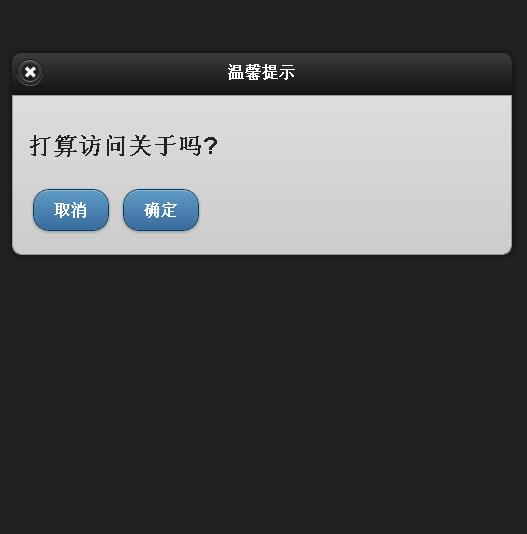
演示效果图:
MVC4中重复使用JQuery Mobile Dialog的做法实践.的更多相关文章
- [转]Jquery Mobile dialog的生命周期
本文转自:http://www.cnblogs.com/jackhuclan/archive/2012/04/05/2432972.html JQuery Mobile对htm5的移动开发绝对是个好用 ...
- 主攻ASP.NET MVC4.0之重生:Jquery Mobile 列表
代码: <!DOCTYPE html> <html> <head> <meta charset="utf-8"> <title ...
- 主攻ASP.NET MVC4.0之重生:Jquery Mobile 表单元素
相关代码: <!DOCTYPE html> <html> <head> <meta charset="utf-8"> <tit ...
- 主攻ASP.NET MVC4.0之重生:Jquery Mobile 按钮+对话框使用
<!DOCTYPE html> <html> <head> <meta charset="utf-8"> <title> ...
- 主攻ASP.NET MVC4.0之重生:Jquery Mobile 面板
左滑动面板效果: 右滑动面板效果: @{ ViewBag.Title = "JQuery Mobile Web Page"; } <!DOCTYPE html> < ...
- jQuery Mobile 中创建按钮
在 jQuery Mobile 中创建按钮 jQuery Mobile 中的按钮可通过三种方法创建: 使用 <button> 元素 使用 <input> 元素 使用 data- ...
- jQuery Mobile Api
jQuery Mobile提供了使用Javascript与框架(html5)通信以及进行内容管理的API.下面介绍具体事件. 文档事件 mobileinit事件会在jQuery Mob ...
- JQuery Mobile - 解决动态更新页面内容,CSS失效问题!
今天编写JQuery Mobile程序,需要对数组数据动态创建,并且每条数据对应一个复选框,于是我很顺利写了一个Demo,当我运行时候发现,和我期望的不一样!复选框确实创建出来了,但是却没有CSS效果 ...
- jquery mobile转场时加载js失效(转)
jquery mobile拦截了所有的http请求,并使用ajax请求取代传统的http.请求发出后,框架会将请求的内容插入到页面中data- role="page"的部分,取代原 ...
随机推荐
- Codeforces Round #196 (Div. 2) B. Routine Problem
screen 尺寸为a:b video 尺寸为 c:d 如果a == c 则 面积比为 cd/ab=ad/cb (ad < cb) 如果b == d 则 面积比为 cd/ab=cb/ad (c ...
- Coder-Strike 2014 - Round 1 C. Pattern
题目的意思是给出n个长度相同的字符串然后找出与他们匹配的字符串 将字符串存入类似二维数组的里面,每一行代表一个字符串,遍历每列,判断每列是否有公共的匹配字符,如果有输出任意一个 如果没有输出'?' # ...
- BZOJ3293: [Cqoi2011]分金币
Description 圆桌上坐着n个人,每人有一定数量的金币,金币总数能被n整除.每个人可以给他左右相邻的人一些金币,最终使得每个人的金币数目相等.你的任务是求出被转手的金币数量的最小值. Inpu ...
- js获取屏幕大小
1.js获取屏幕大小 <html> <script> function a(){ document.write( "屏幕分辨率为:"+screen.widt ...
- 处理海量数据的高级排序之——堆排序(C++)
在面对大数据量的排序时(100W以上量级数据),通常用以下三种的排序方法效率最高O(nlogn):快速排序.归并排序,堆排序.在这个量级上,其他冒泡,选择,插入等简单排序已经无法胜任,效率极低,跟前面 ...
- js正则验证之不能使用相同字符
在我们的前端开发中,为了不让用户输入相同的密码字符以提高其安全性,我们会写一个js方法来实现这个功能.接下来,我就来实现这个方法,有其他好的解决办法,敬请留言,博主必定向其学习. function _ ...
- 特殊集合 Stack Queue Hashtable
//Stack 干草堆集合 栈集合 先进后出 Stack st = new Stack(); //实例化 初始化 st.Push(2); //添加元素 st.Push(6); s ...
- Hadoop.2.x_WebUV示例
一.网站基本指标(即针对于网站用户行为而产生的日志中进行统计分析) 1. PV:网页浏览量(Page View页面浏览次数,只要进入该网页就产生一条记录,不限IP,统计点每天(较多)/每周/每月/.. ...
- Aidl的使用步骤
先说说Aidl传递参数类型 1.基本数据类型(除short类型) 2.String.charSequence 3.List,map 4.parcelable 第1步:定义一个*.aidl文件,ecli ...
- LabVIEW如何将脚本插入Quick Drop
问题:如何将自己设计的LabVIEW脚本做成快捷键的方式,实现效果如下 解决: 第一步:在LabVIEW Data中新建Quick Drop Plugins 第二步 在文件夹下新建一个VI,VI接口的 ...