
Report launcher to run SSRS report subscriptions on demand
Problem
SSRS report subscriptions are a great feature for automatic report delivery on regular schedule. Unfortunately, there is no easy way to run a subscribed report on demand. If you need to run one of these reports on demand, you will need to dig into the Report Server database to find the right subscription. When it is needed to be run on demand more frequently, it becomes annoying and you lose valuable time.
Solution
This tip will show how this can be handled more elegantly by two new SSRS reports. One report will allow us to run individual subscriptions of reports and the second will allow to run all subscriptions handled by a schedule.
Background
The automatic execution of report subscriptions is handled by SQL Server Agent. SSRS creates a separate agent job for each shared schedule and each individual schedule. The jobs are named by the GUIDs of that particular schedules as shown below which are not very useful.
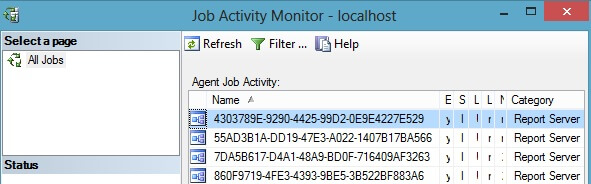
If you take a closer look at the job created by SSRS you will notice that in fact the job does not executes the report itself, but instead it calls the [dbo].[AddEvent] stored procedure from the report server database to add an event into the [dbo].[Event] table. Based on the subscription schedule there are 2 types of events - TimedSubscription or SharedSchedule.
exec [ReportServer].dbo.AddEvent

    @EventType='TimedSubscription',

    @EventData='be13bfa4-9c36-423f-90b8-bd449bfd7eb3'
exec [ReportServer].dbo.AddEvent

    @EventType='SharedSchedule',

    @EventData='3045b1a3-ce3b-430e-a5dd-99953d389d80'
The @EventType parameter of the [dbo].[AddEvent] stored procedure specifies a type of Schedule and the @EventData represents the GUID for the particular shared schedule or GUID of an individual subscription.
SSRS regularly checks the events in the reports server database and if it finds one of the above mentioned events, it automatically starts processing the subscriptions. In the case of a TimedSubscription the single subscription is processed and in the case of a SharedSchedule all subscription sharing that schedule are processed one by one.
Creating SSRS Reports to Launch Reports
We will design the reports so each of the reports will have three datasets. The first dataset will get information about the Subscriptions or Schedules. The second dataset will handle execution of the subscription or schedule and the third dataset will provide information about the launched subscription or schedule and that information will be shown on the report itself.
Our reports will use four different tables from the Report Server database.
- [dbo].[Catalog] - catalog table which contains information about all reports and folders in the SSRS Instance
- [dbo].[Subscriptions] - table containing information about all subscriptions
- [dbo].[Schedule] - containing information about all schedules
- [dbo].[ReportSchedule] - contains links among Schedules, Subscriptions and Reports
SSRS report to launch individual subscription reports
The first report to develop will handle launching individual subscriptions
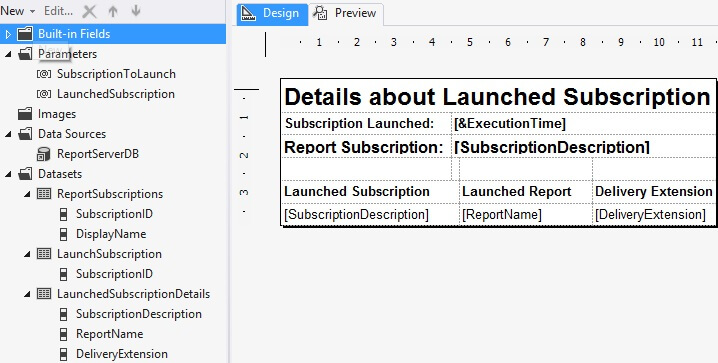
The report contains two parameters SubscriptionToLaunch and LaunchedSubscritption. Available values of the SubscriptionToLaunch is populated by the ReportSubscriptions Dataset and is used to select a particular subscription for execution. The LaunchedSubscription has a default value populated by the LaunchSubscription Dataset, which handles the execution itself and is subsequently used by the LaunchedSubscriptionDetails Dataset, which returns details for the launched subscription and information from this data set are shown on the report itself.
ReportSubscriptions Dataset
As mentioned above, the ReportSubscriptions dataset is used to populate the SubscriptionsToLaunch parameter and the purpose of this parameter is to select a particular subscription for execution. This queries the [dbo].[Subscriptions] and [dbo].[Catalog] tables. From the subscription we will receive the [SubscriptionID] and subscription [Description] and from the [dbo].[Catalog] we retrieve the subscribed report [Name].
SELECT

    S.[SubscriptionID]

    ,C.[Name] + ' (' + S.[Description] + ')' AS [DisplayName]

FROM [dbo].[Subscriptions] S

INNER JOIN [dbo].[Catalog] C ON S.[Report_OID] = C.[ItemID]

ORDER BY [DisplayName]
LaunchSubscription Dataset
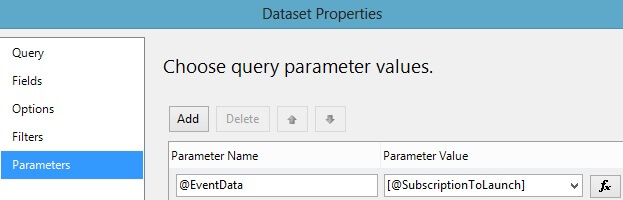
This dataset handles the execution of the subscription by calling the [dbo].[AddEvent] stored procedure in ReportServer database. Because the [dbo].[AddEvent] stored procedure does not return any record set, we have to return some information so the Dataset can be used by reporting services. Because of this, the query contains a SELECT statement, which returns the SubscriptionID. The @EventData variable is mapped to the SubscriptionToLaunch parameter.
exec [dbo].[AddEvent] 'TimedSubscription', @EventData;

SELECT

 @EventData AS [SubscriptionID]
LaunchedSubscriptionDetails DataSet
The third dataset provides information about launched subscriptions. Data from this dataset are used on the report to inform users about subscription and report details.
SELECT

    S.[Description] AS [SubscriptionDescription]

    ,C.[Name] AS [ReportName]

    ,S.[DeliveryExtension]

FROM [dbo].[Subscriptions] S

INNER JOIN [dbo].[Catalog] C ON S.[Report_OID] = C.[ItemID]

WHERE

    S.[SubscriptionID] = @LaunchedSubscription
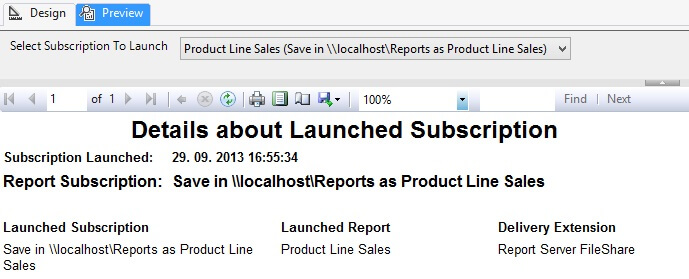
Once you compose everything together, you can use the report for launching subscriptions. The final result will look like below.
SSRS report to launch shared scheduled reports
The second report mentioned is used to execute shared schedules. When a shared schedule is launched, all the subscriptions using that shared schedule will be launched one by one. The structure of the report is the same as the previous report with only slight differences in the queries.
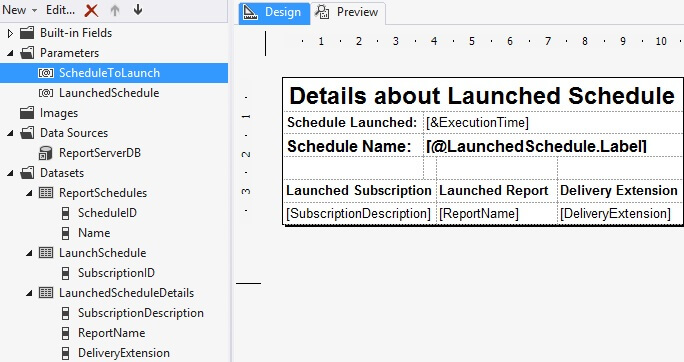
ReportSchedules Dataset
In contrast to the ReportSubscriptions query for the previous report, we will query only the names of the shared schedules. We get this information from the [dbo].[Schedules] table. As this table contains records for both SharedSchedules and also for TimedSubscriptions, we limit the results only to get the shared ones. Also we get only schedules for which a record in [dbo].[ReportSchedule] exists as we do not want to execute shared schedules without a report subscription.
SELECT

    [ScheduleID],

    [Name]

FROM [dbo].[Schedule] S

WHERE

 [EventType] = 'SharedSchedule'

 AND

 [ScheduleID] IN (SELECT [ScheduleID] FROM [dbo].[ReportSchedule])

ORDER BY [Name]
LaunchSchedule Dataset
The LaunchSchedule is similar to the LaunchSubscription query. The only difference is that instead of passing TimedSubscription as @EventType we will pass SharedShedule.
exec [dbo].[AddEvent] 'SharedSchedule', @EventData;

SELECT

 @EventData AS [ScheduleID]
LaunchedScheduleDetails Dataset
Again similar to the LaunchedSubscriptionDetails dataset from the previous report, this will return details about the executed schedule. In contrast to the LaunchedSubscriptionDetails, this query can return multiple rows as one shared schedule can handle multiple report subscriptions.
SELECT

    S.[Description] AS [SubscriptionDescription]

    ,C.[Name] AS [ReportName]

    ,S.[DeliveryExtension]

FROM [dbo].[ReportSchedule] RS

INNER JOIN [dbo].[Subscriptions] S ON RS.[SubscriptionID] = S.[SubscriptionID]

INNER JOIN [dbo].[Catalog] C ON RS.[ReportID] = C.[ItemID]

WHERE

    RS.[ScheduleID] = @LaunchedSchedule
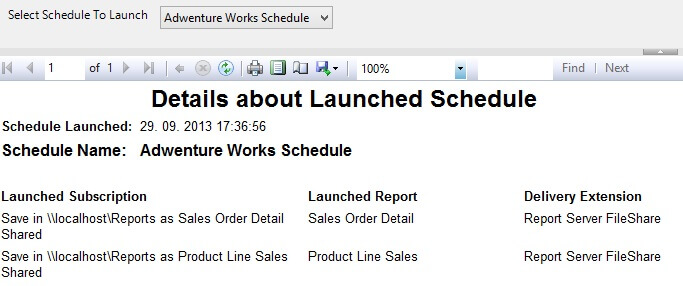
Once the report is composed, we can use it to launch subscriptions handled by shared schedules. The result will look like the image below.
Next Steps
- Reports presented in this tip provide only basic information. You can elaborate on the reporting database and update the reports to provide more information about the subscriptions and reports.
- Reports as they are presented here are suitable for administrators. You can create a set of stored procedures in the reporting database to get the subscriptions and schedules and also create procedures for launching subscriptions and returning necessary information. These procedures can process information about the currently logged in user and limit the execution to subscriptions and schedules created by the user who is running the report. Then you can provide such reports to end users to allow them on demand execution of subscriptions.
- You can create additional overview reports for the Schedules and Subscription which will allow you to group and sort the subscriptions. Then upon a click you can execute these reports providing the right parameters to launch a particular subscription.
- You can download the complete SSRS project with sample reports here.
Report launcher to run SSRS report subscriptions on demand的更多相关文章
- Session for SSRS Report of Microsoft Dynamics AX
Session for SSRS Report of Microsoft Dynamics AX 版权声明:本文为博主原创文章,未经博主允许不得转载. Contract •A data contrac ...
- Dynamics CRM 2015中的SSRS Report集成配置
大家应该都知道.Dynamics CRM能集成SSRS Report,而且我也在之前的博文中讨论过怎样制作一个简单的SSRS Report并部署到Dynamics CRM中.今天我们来看看一些比較有用 ...
- Dynamics AX 2012 R2 从代码中调用SSRS Report
平时,我们制作SSRS Report的方法主要有两种:使用Query或RDP.如果需要为报表传递参数,就要在代码中为报表参数赋值,然后在代码中调用报表.下面我总结下这两种报表在代码中传参和调用的方式: ...
- How to get the underlying SSRS Report Query, reset query , add your own ranges and execute report [AX2012]
Below is the small code snippet to get the underlying query of the SSRS report, reset query, prompt ...
- SSRS Report Knowledge Base
1. 获取Textbox的值,根据Textbox值更改单元格颜色 Textbox值:=ReportItems!Textbox1.Value 当前单元格的值:=Me.Value =IIF(ReportI ...
- 解决:insert Vodafone sim card,open the mms read report,when receive the read report,cann't download..
insert Vodafone sim card,open the mms read report,when receive the read report,cann't download the m ...
- 解决:insert Vodafone sim card,open the mms read report,when receive the read report,cann't download..
insert Vodafone sim card,open the mms read report,when receive the read report,cann't download the m ...
- How to display SSRS report based on customer/Vendor specific language [AX2012]
Common requirement is to show the reports in customer’s language. [example : Quotations, sales confi ...
- How to using expression setup BackgroundColor AX2012 SSRS Report[AX2012]
tile label using [#99ccff] property BackgroundColor - > expression =Iif(Fields!Flag.Value = " ...
随机推荐
- Ubuntu 一键安装pptp
手工配置完开始能用,后来被机房停机之后无法恢复,下面文章介绍的使用脚本简单好用,感谢作者,下面是链接: http://blog.sina.com.cn/s/blog_6e7bae020102v8wm. ...
- http和网页设计
.基本概念: CGI(Common Gate Interface,通用网关接口) HTML均是静态网页,它无法实现一些复杂的功能,而CGI可以为我们实现. get方式提交表单: 当表单被发送到服务器断 ...
- Webapp的display-name问题
临时需要做一个webapp,就按myeclipse缺省的web工程做了,web.xml也没改,本地测试没问题就放到服务器上去了. 测试发现,走 http://服务器ip:8080/appname居然出 ...
- rem适配
//REM适配new function() { var _self = this; _self.width = 640; // 设置默认最大宽度 _self.fontSize = 100; // 默认 ...
- JQuery:通过noConflict()方法同时使用jQuery 和其他框架
jQuery - noConflict()方法 一.如何在页面上同时使用 jQuery 和其他框架?jQuery 和其他 JavaScript 框架正如您已经了解到的,jQuery 使用 $ 符号作为 ...
- svn使用dump和hotcopy进行脚本备份
[root@svn shell]# cat repolist dev-arcdev-bmdev-crmdev-paydev-pmdev-portaldev-riskhrproductqarep-op ...
- Linux和Windows路由配置
Linux和Windows路由配置 一.配置路由 1- 原则上一台主机只能有一条缺省路由.如果一台主机上有多个网段的话,请配置能够上网的那个网段的网关为缺省路由 Linux配置缺省路由: ...
- 30天,APP创业从0到1【7.26苏州站】
活动概况 时间:2015年7月26日13:30-16:30 地点:创客巢(苏州吴中区玉山路646号金枫广告产业园B栋4楼) 主办:APICloud.融云.鱼多多 网址:www.apicloud.com ...
- myeclipse WIN7下设置字体列表中无Courier New
到"C:\Windows\Fonts"下找到对应的字体,单击,选择上面的显示 然后就可以在eclicpse字体设置里面看到Courier New项了: Eclipse字体设置方法: ...
- 随机删除数据库N条记录
delete from table where newsID in(select top 50 newsID from table order by newid())