
HTML&CSS----练习做网页
<!DOCTYPE html PUBLIC "-//W3C//DTD XHTML 1.0 Transitional//EN" "http://www.w3.org/TR/xhtml1/DTD/xhtml1-transitional.dtd">
<html xmlns="http://www.w3.org/1999/xhtml">
<head>
<meta http-equiv="Content-Type" content="text/html; charset=utf-8" />
<title>360导航—新一代安全上网</title>
<link href="Untitled-360外部样式表.css" rel="stylesheet" type="text/css" />
</head> <body>
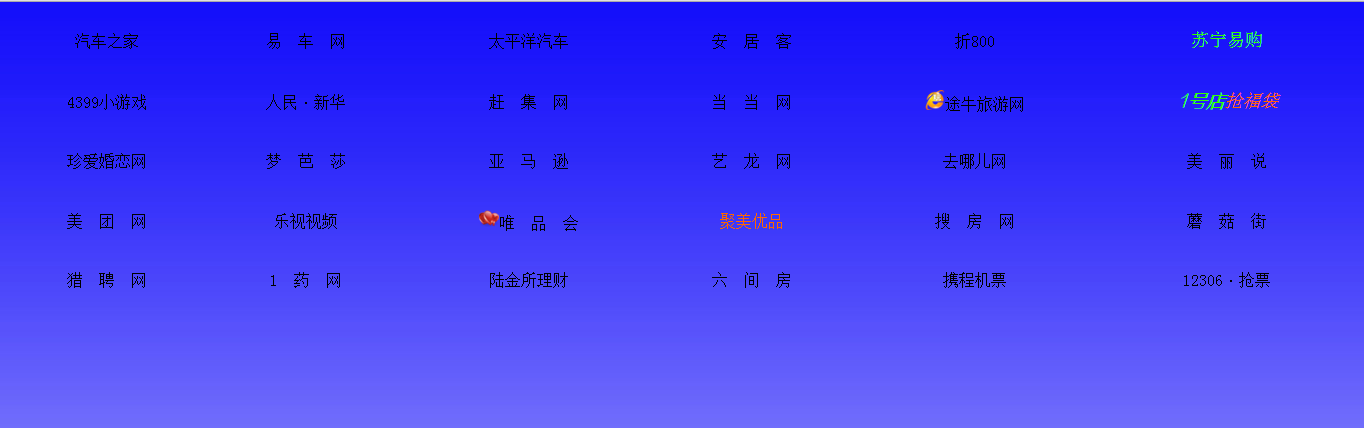
<table width="100%" border="0" height="300" >
<tr align="center">
<td><a href="http://m.autohome.com.cn">汽车之家</a></td>
<td><a href="http://www.yiche.com">易 车 网</a></td>
<td><a href="http://www.pcauto.com.cn/">太平洋汽车</a></td>
<td><a href="http://www.anjuke.com">安 居 客</a></td>
<td><a href="http://www.zhe800.com">折800</a></td>
<td><a href="http://www.suning.com/"><font color="#33FF00" size="+1">苏宁易购</a></font></td>
</tr>
<tr align="center">
<td><a href="http://www.4399.com/">4399小游戏</a></td>
<td><a href="http://www.xinhuanet.com/">人民</a>·<a href="http://www.people.com.cn/">新华</a></td>
<td><a href="http://www.ganji.com">赶 集 网</a></td>
<td><a href="http://www.dangdang.com/">当 当 网</a></td>
<td><a href="http://www.tuniu.com/"><img src="素材/wan.ico" height="20"/>途牛旅游网</a></td>
<td><a href="http://www.yhd.com/"><font color="#33FF00" face="方正兰亭超细黑简体" size="+1"><i><b>1号店</a></b></i></font><a href="http://www.yhd.com/"><font color="#FF6600" size="+1"><i>抢福袋</a></i></font></td>
</tr>
<tr align="center">
<td><a href="http://www.zhenai.com/">珍爱婚恋网</a></td>
<td><a href="http://www.moonbasa.com/">梦 芭 莎</a></td>
<td><a href="http://www.amazon.cn/">亚 马 逊</a></td>
<td><a href="http://www.elong.com/">艺 龙 网</a></td>
<td><a href="http://www.qunar.com/">去哪儿网</a></td>
<td><a href="http://www.meilishuo.com/">美 丽 说</a></td>
</tr>
<tr align="center">
<td><a href="http://www.meituan.com">美 团 网</a></td>
<td><a href="http://www.letv.com/">乐视视频</a></td>
<td><a href="http://www.vip.com/"><img src="素材/bitbug_favicon (33333).ico"" height="20" />唯 品 会</a></td>
<td><a href="http://www.jumei.com"><font color="#FF6600">聚美优品</a></font></td>
<td><a href="http://www.fang.com">搜 房 网</a></td>
<td><a href="http://www.mogujie.com/">蘑 菇 街</a></td>
</tr>
<tr align="center">
<td><a href="http://www.liepin.com/">猎 聘 网</a></td>
<td><a href="http://www.111.com.cn/">1 药 网</a></td>
<td><a href="http://www.user.lu.com">陆金所理财</a></td>
<td><a href="http://www.6.cn/">六 间 房</a></td>
<td><a href="http://www.ctrip.com/">携程机票</a></td>
<td><a href="http://www.12306.cn/">12306</a>·<a href="http://www.12306.cn/">抢票</a></td>
</tr>
</table>
</body>
</html>
@charset "utf-8";/* CSS Document */

<style type="text/css">

*

{

    margin:0px;/*注释*/

    padding:0px;

}

body

{

    background-image:url(777.jpg);

    background-repeat:repeat-x;

    }

a:link

{

    color:#000;

    text-decoration:none;}

a:visited

{

    color:#000;

    text-decoration:none;}

a:hover

{

    color:red;

    text-decoration:underline;}

a:active

{

    color:orange;

    text-decoration:underline;}

</style>
HTML&CSS----练习做网页的更多相关文章
- 【学】CSS3基础实例1 - 用CSS3做网页中的小三角,以及transition的用法
自开了博客园已经有2周了吧,虽然转载了一些觉得比较有用的文章之外还没有开始写自己的一些学习记录,那就从今天开始. 目前看了妙味的不少视频,有css+html,js的基础和中级也都看完了,作业也都做了, ...
- 用做网页开发经历了三个阶段(附长篇讨论) good
用做网页开发经历了三个阶段:第一阶:傻干阶段使用Intraweb,傻瓜型,无需知道javascript,html,css,会pascal就可以了. 第二阶:困惑阶段使用Intraweb,有很多限制,比 ...
- 基于CSS的个人网页
前端时间做的CSS作业:基于CSS的个人网页 基于CSS的个人网页 效果图: 代码: <!DOCTYPE html> <html> <head> <meta ...
- #3使用html+css+js制作网页 番外篇 使用python flask 框架 (II)
#3使用html+css+js制作网页 番外篇 使用python flask 框架 II第二部 0. 本系列教程 1. 登录功能准备 a.python中操控mysql b. 安装数据库 c.安装mys ...
- #3使用html+css+js制作网页 番外篇 使用python flask 框架 (I)
#3使用html+css+js制作网页 番外篇 使用python flask 框架(I 第一部) 0. 本系列教程 1. 准备 a.python b. flask c. flask 环境安装 d. f ...
- #3使用html+css+js制作网页 番外篇 制作接收php
使用html+css+js制作网页 番外篇 制作接收php 本系列链接 基础 php语法 例子 本系列链接 #1使用html+css+js制作网站教程 准备 #2使用html+css+js制作网站教程 ...
- #3使用html+css+js制作网页 制作登录网页
#3使用html+css+js制作网页 制作登录网页 本系列链接 2制作登录网页 2.1 准备 2.1.1 创建文件夹 2.1.2 创建主文件 2.2 html部分 2.2.1 网站信息 2.2.2 ...
- 基于CSS+dIV的网页层,点击后隐藏或显示
一个基于CSS+dIV的网页层,用JavaScript结合Input按钮进行控制,点击后显示或隐藏,网页上常用到的特效之一,实用性较强,相信对大家的前端设计有帮助. <!DOCTYPE html ...
- 通过CSS让html网页中的内容不可选
*{ moz-user-select: -moz-none; -moz-user-select: none; -o-user-select:none; -khtml-user-select:none; ...
- 用XAML做网页!!—边栏与页脚
原文:用XAML做网页!!-边栏与页脚 此次我们来设计边栏和页脚,首先从页脚开始,其代码很简单: <Border x:Name="Footer" BorderBrush=&q ...
随机推荐
- VS2010中“工具>选项中的VC++目录编辑功能已被否决”解决方法
转自:http://blog.csdn.net/chaijunkun/article/details/6658923 这是VS2010的改变,不能够在“工具-选项”中看到“VC++目录”了. 但是呢, ...
- OpenGL在 win8 64bits系统下的配置
1 program files(x86)与program files 在64位系统下,为了更好的兼容32位程序,在安装一些32位程序(注意某些程序他就是32位的),会默认扔到program files ...
- 有时间测试dism
dism /capture-image /imagefile:d\win.win /capturedir:c:\ /name:win81 dism /export-image /winboot /so ...
- ubuntu下简单的驱动编译
转自:http://www.eefocus.com/jefby1990/blog/13-02/291628_c39b8.html 本文是参考了网上多篇帖子而写的算不上什么原创.唯一值得欣慰的只不过在本 ...
- Android种 adb是什么(转)
提到adb.exe,一直关注我们Android系列教程的朋友们应该不会感到陌生,因为无论取得 Root权限或者刷机的时候我们都通过adb直接操作管理Android手机,但是可能大多数对于adb仅仅局限 ...
- 测试服务API的_苏飞开发助手_使用说明
1 工具说明_json对象字符串拼接 2 工具说明_纯字符串拼接
- hdu 4751(dfs染色)
题目链接:http://acm.hdu.edu.cn/showproblem.php?pid=4751 思路:构建新图,对于那些两点连双向边的,忽略,然后其余的都连双向边,于是在新图中,连边的点是能不 ...
- sql复制表、拷贝表、临时表
--insert into pppcopy select * from ppp //从表ppp中获取数据,并将其插入到pppcopy中,只拷贝表的数据,不拷贝表的结构(前提:表pppcopy1存在) ...
- 解决 Agent admitted failure to sign using the key 问题 with ssh
之前如果建立 ssh 连接,只要將公鑰複製到 ~/.ssh/authorized_keys 就可以利用金鑰登入而不需要建立密碼. 現在的 ssh 使用同樣的方法會出現錯誤訊息 Agent admitt ...
- ITEYE中的读书笔记:重构其实就是持续改进
原文地址:http://hawkon.iteye.com/blog/2093338#bc2355877 前段时间同事参加ITEYE的试读有奖, 没想到得了个奖,拿到一本书.由于同事的推荐我也认真读了一 ...