
HTML&CSS----练习做网页
<!DOCTYPE html PUBLIC "-//W3C//DTD XHTML 1.0 Transitional//EN" "http://www.w3.org/TR/xhtml1/DTD/xhtml1-transitional.dtd">
<html xmlns="http://www.w3.org/1999/xhtml">
<head>
<meta http-equiv="Content-Type" content="text/html; charset=utf-8" />
<title>360导航—新一代安全上网</title>
<link href="Untitled-360外部样式表.css" rel="stylesheet" type="text/css" />
</head> <body>
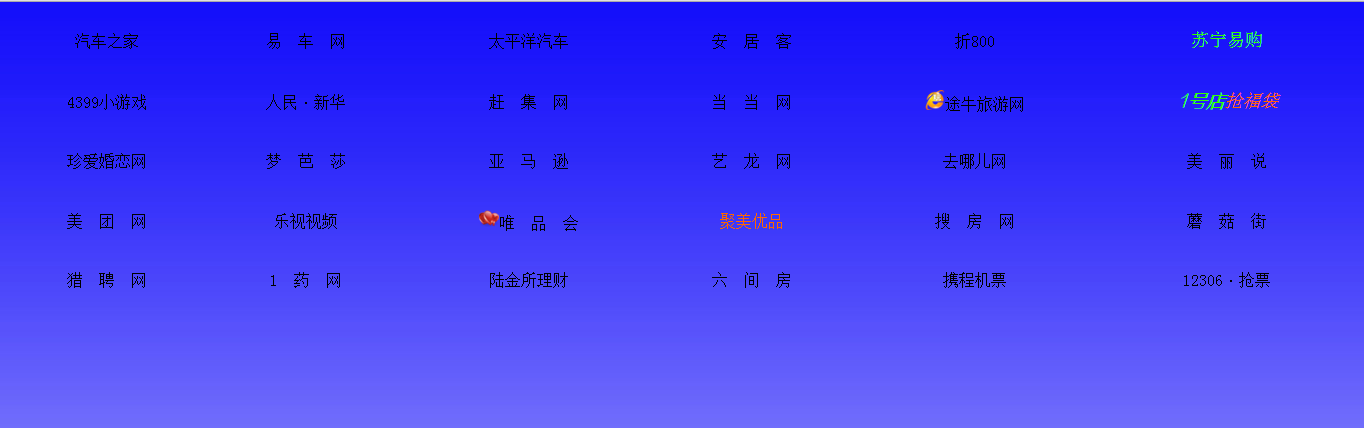
<table width="100%" border="0" height="300" >
<tr align="center">
<td><a href="http://m.autohome.com.cn">汽车之家</a></td>
<td><a href="http://www.yiche.com">易 车 网</a></td>
<td><a href="http://www.pcauto.com.cn/">太平洋汽车</a></td>
<td><a href="http://www.anjuke.com">安 居 客</a></td>
<td><a href="http://www.zhe800.com">折800</a></td>
<td><a href="http://www.suning.com/"><font color="#33FF00" size="+1">苏宁易购</a></font></td>
</tr>
<tr align="center">
<td><a href="http://www.4399.com/">4399小游戏</a></td>
<td><a href="http://www.xinhuanet.com/">人民</a>·<a href="http://www.people.com.cn/">新华</a></td>
<td><a href="http://www.ganji.com">赶 集 网</a></td>
<td><a href="http://www.dangdang.com/">当 当 网</a></td>
<td><a href="http://www.tuniu.com/"><img src="素材/wan.ico" height="20"/>途牛旅游网</a></td>
<td><a href="http://www.yhd.com/"><font color="#33FF00" face="方正兰亭超细黑简体" size="+1"><i><b>1号店</a></b></i></font><a href="http://www.yhd.com/"><font color="#FF6600" size="+1"><i>抢福袋</a></i></font></td>
</tr>
<tr align="center">
<td><a href="http://www.zhenai.com/">珍爱婚恋网</a></td>
<td><a href="http://www.moonbasa.com/">梦 芭 莎</a></td>
<td><a href="http://www.amazon.cn/">亚 马 逊</a></td>
<td><a href="http://www.elong.com/">艺 龙 网</a></td>
<td><a href="http://www.qunar.com/">去哪儿网</a></td>
<td><a href="http://www.meilishuo.com/">美 丽 说</a></td>
</tr>
<tr align="center">
<td><a href="http://www.meituan.com">美 团 网</a></td>
<td><a href="http://www.letv.com/">乐视视频</a></td>
<td><a href="http://www.vip.com/"><img src="素材/bitbug_favicon (33333).ico"" height="20" />唯 品 会</a></td>
<td><a href="http://www.jumei.com"><font color="#FF6600">聚美优品</a></font></td>
<td><a href="http://www.fang.com">搜 房 网</a></td>
<td><a href="http://www.mogujie.com/">蘑 菇 街</a></td>
</tr>
<tr align="center">
<td><a href="http://www.liepin.com/">猎 聘 网</a></td>
<td><a href="http://www.111.com.cn/">1 药 网</a></td>
<td><a href="http://www.user.lu.com">陆金所理财</a></td>
<td><a href="http://www.6.cn/">六 间 房</a></td>
<td><a href="http://www.ctrip.com/">携程机票</a></td>
<td><a href="http://www.12306.cn/">12306</a>·<a href="http://www.12306.cn/">抢票</a></td>
</tr>
</table>
</body>
</html>
@charset "utf-8";/* CSS Document */

<style type="text/css">

*

{

    margin:0px;/*注释*/

    padding:0px;

}

body

{

    background-image:url(777.jpg);

    background-repeat:repeat-x;

    }

a:link

{

    color:#000;

    text-decoration:none;}

a:visited

{

    color:#000;

    text-decoration:none;}

a:hover

{

    color:red;

    text-decoration:underline;}

a:active

{

    color:orange;

    text-decoration:underline;}

</style>
HTML&CSS----练习做网页的更多相关文章
- 【学】CSS3基础实例1 - 用CSS3做网页中的小三角,以及transition的用法
自开了博客园已经有2周了吧,虽然转载了一些觉得比较有用的文章之外还没有开始写自己的一些学习记录,那就从今天开始. 目前看了妙味的不少视频,有css+html,js的基础和中级也都看完了,作业也都做了, ...
- 用做网页开发经历了三个阶段(附长篇讨论) good
用做网页开发经历了三个阶段:第一阶:傻干阶段使用Intraweb,傻瓜型,无需知道javascript,html,css,会pascal就可以了. 第二阶:困惑阶段使用Intraweb,有很多限制,比 ...
- 基于CSS的个人网页
前端时间做的CSS作业:基于CSS的个人网页 基于CSS的个人网页 效果图: 代码: <!DOCTYPE html> <html> <head> <meta ...
- #3使用html+css+js制作网页 番外篇 使用python flask 框架 (II)
#3使用html+css+js制作网页 番外篇 使用python flask 框架 II第二部 0. 本系列教程 1. 登录功能准备 a.python中操控mysql b. 安装数据库 c.安装mys ...
- #3使用html+css+js制作网页 番外篇 使用python flask 框架 (I)
#3使用html+css+js制作网页 番外篇 使用python flask 框架(I 第一部) 0. 本系列教程 1. 准备 a.python b. flask c. flask 环境安装 d. f ...
- #3使用html+css+js制作网页 番外篇 制作接收php
使用html+css+js制作网页 番外篇 制作接收php 本系列链接 基础 php语法 例子 本系列链接 #1使用html+css+js制作网站教程 准备 #2使用html+css+js制作网站教程 ...
- #3使用html+css+js制作网页 制作登录网页
#3使用html+css+js制作网页 制作登录网页 本系列链接 2制作登录网页 2.1 准备 2.1.1 创建文件夹 2.1.2 创建主文件 2.2 html部分 2.2.1 网站信息 2.2.2 ...
- 基于CSS+dIV的网页层,点击后隐藏或显示
一个基于CSS+dIV的网页层,用JavaScript结合Input按钮进行控制,点击后显示或隐藏,网页上常用到的特效之一,实用性较强,相信对大家的前端设计有帮助. <!DOCTYPE html ...
- 通过CSS让html网页中的内容不可选
*{ moz-user-select: -moz-none; -moz-user-select: none; -o-user-select:none; -khtml-user-select:none; ...
- 用XAML做网页!!—边栏与页脚
原文:用XAML做网页!!-边栏与页脚 此次我们来设计边栏和页脚,首先从页脚开始,其代码很简单: <Border x:Name="Footer" BorderBrush=&q ...
随机推荐
- DroidDraw - Android的界面设计工具
ADT中的界面开发工具实在是很烂,通常情况下都需要硬编码,对于程序员来说不但效率比较低下,而且调试起来极其不方便,还好在Google未推出GUI的"所见即所得"的工具之前,我们找到 ...
- iOS PickerView动态加载数据
将新的数据放入临时数组 NSMutableArray *tmp=[[NSMutableArray alloc] init]; [tmp addObject:[[NSString alloc] init ...
- [Android Pro] android 混淆文件project.properties和proguard-project.txt
参考文档:http://blog.csdn.net/xueyepiaoling/article/details/8202359转载自:http://glblong.blog.51cto.com/305 ...
- Linux中编译、安装nginx
Nginx ("engine x") 是一个高性能的HTTP和反向代理服务器,也是一个IMAP/POP3/SMTP 代理服务器. Nginx 是由Igor Sysoev为俄罗斯访问 ...
- free(): invalid next size (fast/normal)问题
本文转自 http://blog.sina.com.cn/s/blog_77f1e27f01019qq9.html ,在此感谢! c++编译常会出现free(): invalid next size ...
- ***mysql中经度纬度字段用什么存储(关于mysql的float和decimal区别)
float,decimal精确度比较 float,double容易产生误差,对精确度要求比较高时,建议使用decimal来存,decimal在mysql内存是以字符串存储的, 用于定义货币要求精确 ...
- Unity3D入门之GUI基础以及常用GUI控件使用(2)
1.GUI基础 (1)GUI部分是每帧擦除重绘的,只应该在OnGUI中绘制GUI,按钮:GUILayout.Button(“Hello”); 只读标签:GUILayout.Label() (2)修改控 ...
- hdu 1756 判断点在多边形内 *
模板题 #include<cstdio> #include<iostream> #include<algorithm> #include<cstring> ...
- onSaveInstanceState(Bundle outState)的调用时机
原文摘自: http://handsomeliuyang.iteye.com/blog/1407044 Activity的方法onSaveInstanceState(Bundle outState), ...
- C++的那些事:数据与类型
一.前言 最近在看C++Primer第5版,先前已经看过第4版,但是发现第5版在整个知识布局与个别知识的讲解上跟第4版差别还是挺大的,尤其是新增了C++11的内容,正如孟岩老师在第5版前言中所讲:“现 ...