
Node.js 的module 系统
相较于原生的JavaScript,不同的JavaScript文件之间很难共享变量。有鉴于此,Node.js在JavaScript的基础上进行了扩充,引入了require,exports,module三个global object。
一、absolute module 和 relative module
Smashing Node.js 的作者将node.js 中的modules 分成了两类,一类是absolute modules,一类是 relative modules。
<1> absolute modules,指的是是node core自带的重要modules,如http,fs等,我们使用这些modules时,只需要 require(‘module_name’)即可;还包括用npm安装的第三方module,这些module 默认安装的位置是./node_modules/ 路径下,使用这些modules时,同样只需要require(‘module_name’)即可。但是,在package.json文件中要添加这些module的name,以便使用npm安装。
<2> relative modules,指的是我们自己写的modules,这些modules一般存在于工程文件夹内部,引用时我们需要以require(‘相对路径/module_name’)的方式引用。相对路径,指的是这些modules相对工程文件夹的存放的位置。
注意:即使自己编写的modules位于package.json相同的位置,也需要使用require('./module_name')来引用,否则会按照第一种方式寻找且出错。
通过这些modules,我们可以将复杂的node.js javascript代码分割在不同的文件中,简化我们的工程的管理与维护。
每个module中的变量,除了用exports或者module.exports 声明的属性,都是局部变量,只用用于本模块内。
二、什么是require?
Modules are cached after the first time they are loaded. This means (among other things) that every call to require('foo') will get exactly the same object returned, if it would resolve to the same file.

Multiple calls to require('foo') may not cause the module code to be executed multiple times. This is an important feature. With it, "partially done" objects can be returned, thus allowing transitive dependencies to be loaded even when they would cause cycles.

If you want to have a module execute code multiple times, then export a function, and call that function.
这里的require,跟我们普通的理解的加载不一样,除了把被加载模块的通过module.exports 导出的object或者function放到执行环境中去,也会在加载的过程中执行这个模块的其他代码,因为js是解释型语言,语意上是一句一句执行的。
node.js 使用require引入模块时,会历经以下四个步骤。由于核心模块已经被编译执行过,所以核心模块只会执行第四步。对于用户编写的非核心模块,以下四步都会执行。所以,如果模块内有需要执行的js语句,会在第一次require的时候执行。
- 路径分析
- 文件定位
- 编译执行
- 加入内存
由于node.js 的缓存机制,每个模块都只会被加载一次,也即执行一次,即使多次require。如要想这个module的代码被多次执行,要将这些代码放到function中去,并通过module.exports 引出。
<1> 简单的require
module_a.js

1 name_a = 'a'; //全局作用域
var a = 'a';  //执行作用域仅限于 module_a.js中

 console.log(name_a);  //第一次require的时候执行。

 //console.log(name_b);//会出错,name_b未定义
module_b.js

1 name_b ='b'

 console.log(name_b);
main.js

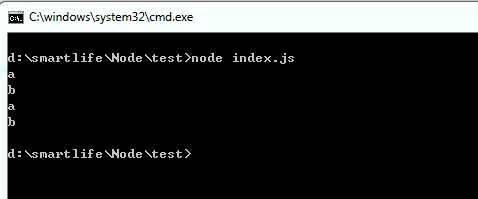
1 require('./module_a'); //relative module,需要给出module的路径, module_a除了被导出的object,未被导出的代码也会被执行。

 require('./module_b');

 //console.log(a); --> 出错,不能访问未被引出来的模块变量。

 console.log(name_a);

 console.log(name_b);
<2> circular require
circular require:顾名思义,循环导入,a.js 要导入b.js, 同理b.js 也要导入a.js。我们先看一下官方给出的例子
 filename: a.js

 console.log('a starting');

 exports.done = false;

 var b = require('./b.js');

 console.log('in a, b.done = %j', b.done);

 exports.done = true;

 console.log('a done');
 filename: b.js

 console.log('b starting');

 exports.done = false;

 var a = require('./a.js');

 console.log('in b, a.done = %j', a.done);

 exports.done = true;

 console.log('b done');
 filename: main.js

 console.log('main starting');

 var a = require('./a.js');

 var b = require('./b.js');

 console.log('in main, a.done=%j, b.done=%j', a.done, b.done);
When main.js loads a.js, then a.js in turn loads b.js. At that point, b.js tries to load a.js. In order to prevent an infinite loop an unfinished copy of the a.js exports object is returned to the b.js module. b.js then finishes loading, and its exports object is provided to the a.js module.
当main.js 加载a.js的时候,a.js 又会加载b.js。b.js加载的过程中又会尝试加载a.js。为了防止陷入无限的循环之中,b.js会直接引用已经加载但是还没有完全加载的a.js(require ('b.js') 之前的代码)。当b.js加载并执行完成后,a.js才会接着加载执行,然后main.js加载执行。
测试结果

$ node main.js

main starting

a starting

b starting

in b, a.done = false

b done

in a, b.done = true

a done

in main, a.done=true, b.done=true
三、module.exports和exports
每一个模块(js文件)都有一个局部变量:module,这个module指向当前的模块。这个module有多个成员field,其中一个就是module.exports。module.exports 是一个javascript object,会被引出,返回给通过require加载的模块。所以我们只需要把要返回的object或者function赋给module.exports,就可以返回任意我们想要返回的object或者function了。
<1> 什么时候该用exports,什么时候该用module.exports
 1 The exports variable that is available within a module starts as a reference to module.exports.
 As with any variable, if you assign a new value to it, it is no longer bound to the previous value.

 2

 3

 4 function require(...) {

 5   // ...

 6   function (module, exports) {

 7     // Your module code here

 8     exports = some_func;        // re-assigns exports, exports is no longer

 9                                 // a shortcut, and nothing is exported.

10     module.exports = some_func; // makes your module export 0

11   } (module, module.exports);

12   return module;

13 }

14

15 As a guideline, if the relationship between exports and module.exports seems like magic to you, ignore exports and only use module.exports.
上面是摘抄自官方的关于exports和module.exports 的解释。 exports就是模块内对module.exports 的一个引用,所以我们给这个引用增加任何的属性(exports.field = value),最后在其他模块require的时候都可以访问到。
但是如果给直接给exports 赋予某个object(exports = object),试图返回一个object的话,是不能通过exports来返回的,因为 exports = object这个过程就会把exports的指向给改变,不再指向module.exports。而我们用require 加载的object是module.exports 指向的object。
<2> 通过exports 返回对象的实例:
默认,每个module通过exports返回一个空的对象实例,我们可以通过给该module的exports增加属性来改变该module返回的对象实例。
 module_a.js

 exports.name = ‘john’;

4 exports.data = ‘this is some data’;

 var privateVariable = 5;

 exports.getPrivate = function () {

 return privateVariable;

 };
 index.js

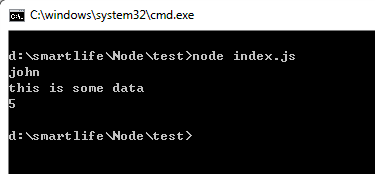
 var a = require(‘./module_a’);  //注意,exports默认返回的是一个已经创建好的对象实例,所以可以直接调用属性,而不需要new。

 console.log(a.name);

 console.log(a.data);

 console.log(a.getPrivate());
<3> 通过module.exports 返回constructor 函数:
虽然通过module.exports可以传递创建好的对象实例,但有时候我们希望在传递时能控制这个对象的创建过程,此时我们需要传递constructor函数:
 module.exports = Person;

 function Person(name){

     this.name = name;

 }

 Person.prototype.talk = function() {

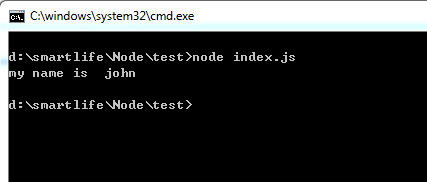
     console.log('my name is ', this.name);

 }
 var Person = require(‘./person’);

 var john = new Person(‘john’); //Person 为constructor函数,必须new之后才能使用

 john.talk();
Node.js 的module 系统的更多相关文章
- Node.Js的Module System 以及一些常用 Module
Node.Js学习就按照这本书的流程来. 在第7章结束与第10章结束时分别自己出一个小项目练练手.Node.Js的入门学习计划是这样. 目录:, QQ:1045642972 欢迎来索书以及讨论Node ...
- Node.js 操作 OSX 系统麦克风、扬声器音量
最近几年 Electron 很火,公司也正好有个项目想做跨平台客户端,大家研究了一下就选择了 Electron,第一次做 js 的项目遇到了不少坑,不过也都一点点解决了. 因为项目中需要对用户录音,H ...
- Node.js的模块系统
编写稍大一点的程序时一般都会将代码模块化.Node.js提供了一个简单的模块系统.模块既可能是一个文件,也可能是包含一个或多个文件的目录. 模块的创建 如果模块是个文件,一般将代码合理拆分到不同的J ...
- 【node.js】模块系统、函数
为了让Node.js的文件可以相互调用,Node.js提供了一个简单的模块系统. 一个 Node.js 文件就是一个模块,这个文件可能是JavaScript 代码.JSON 或者编译过的C/C++ 扩 ...
- Node.js:模块系统、函数
为了让Node.js的文件可以相互调用,Node.js提供了一个简单的模块系统. 模块是Node.js 应用程序的基本组成部分,文件和模块是一一对应的.换言之,一个 Node.js 文件就是一个模块, ...
- Node.js 关于module的一些认知
module是一个对象,在Node环境中运行js脚本,module会自动添加,并且系统会将函数封装到另一个函数中 例如: var module = { id: '.', exports: {} }; ...
- Node.js:模块系统
ylbtech-Node.js:模块系统 1.返回顶部 1. Node.js模块系统 为了让Node.js的文件可以相互调用,Node.js提供了一个简单的模块系统. 模块是Node.js 应用程序的 ...
- node.js安装——Windows7系统下的安装及其环境部署——特别详细
作为一个前端的菜鸟同学,之间也没学过什么框架,目前公司做项目,所用到的webpack+node.js+vue. 首先,关于node的环境部署方面,建议官网安装node.js,最好不要安装非稳定版的版本 ...
- node.js中module模块的理解
node.js中使用CommonJS规范实现模块功能,一个单独的文件就是一个单独的模块.通过require方法实现模块间的依赖管理. 通过require加载模块,是同步操作. 加载流程如下: 1.找到 ...
随机推荐
- paip.元数据驱动的转换-读取文件行到个list理念 uapi java php python总结
paip.元数据驱动的转换-读取文件行到个list理念 uapi java php python总结 #两个思路 1.思路如下:使用file_get_contents()获取txt文件的内容,然后通过 ...
- 单元测试之NSNull 检测
本文主要讲 单元测试之NSNull 检测,在现实开发中,我们最烦的往往就是服务端返回的数据中隐藏着NSNull的数据,一般我们的做法是通过[data isKindOfClass:[NSNull cla ...
- Leetcode 83 Remove Duplicates from Sorted List 链表
就是将链表中的重复元素去除 我的方法很简单就是如果链表的前后元素相同的话,将后一个元素删除 /** * Definition for singly-linked list. * struct List ...
- 如何在servlet取得spring beans (autowired)(转)
在应用中一般普通的JavaPojo都是由Spring来管理的,所以使用autowire注解来进行注入不会产生问题,但是有两个东西是例外的,一个是 Filter,一个是Servlet,这两样东西都是由S ...
- 三、oracle 体系结构
1.oracle内存由SGA+PGA所构成 2.oracle数据库体系结构数据库的体系结构是指数据库的组成.工作过程与原理,以及数据在数据库中的组织与管理机制. oracle工作原理: 1).在数据库 ...
- Android开发的技术层次
任何一种移动开发生态系统其技术人员都是呈现金字塔式分布的.我借此也说说Developer和Programmer的区别: Programmer是真正意义上的程序员,写程序的.灵魂级 Developer是 ...
- 江豚科技|专业移动APP开发与移动互联网解决方案
北京江豚科技(www.eoiiioe.com)是国内领先的移动APP开发解决方案服务商,总部在中国的硅谷--中关村,分别在郑州.深圳设有服务机构. 江豚科技承接各类移动app开发外包和软件定制开发,我 ...
- Apache Storm 与 Spark:对实时处理数据,如何选择【翻译】
原文地址 实时商务智能这一构想早已算不得什么新生事物(早在2006年维基百科中就出现了关于这一概念的页面).然而尽管人们多年来一直在对此类方案进行探讨,我却发现很多企业实际上尚未就此规划出明确发展思路 ...
- Fiddler高级技巧 - 映射路径到本地文件夹
适用场景: 你是前端开发人员,要开发一个小模块,需要用到线上的环境(账号.数据.跨域等),但你又没有权限往线上传文件 你是移动测试人员,需要将一组接口的返回结果替换为另一组,最简单的办法就是使用Fid ...
- Jquery Data Table插件
<%@ page language="java" contentType="text/html; charset=UTF-8" pageEncoding= ...