
在Visual Studio 2015中运行OPENGL
Starting an OpenGL project in VS 2015 is really easy, thanks to the NupenGL.Core nuget package.
Here are really quick steps to start your first OpenGL project using the FreeGlut library to provide a Window toolkit.
Open Visual Studio 2015 Community Edition and create a new Visual Studio C++ Windows Console Application.
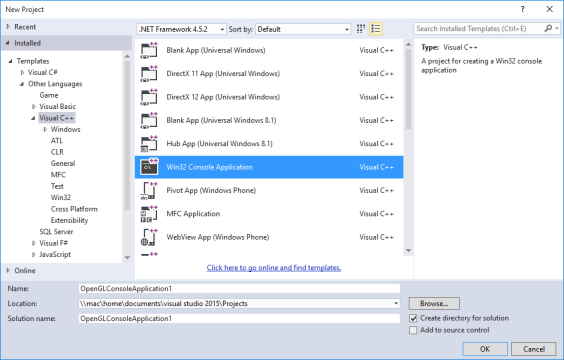
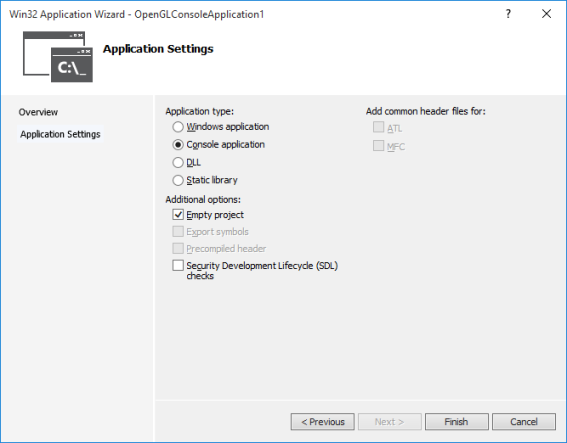
Keep it simple. Choose an empty project template.
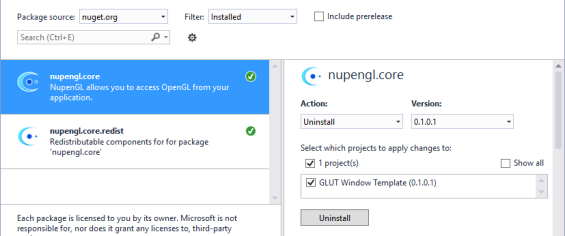
Install the NupenGL.Core nuget package. From Visual Studio, Go to Tools \ NuGet Package Manager \ Manage Nuget Packages for this solution. Search for “NupenGL” and install the package.
测试代码:
// source: http://jingyan.baidu.com/article/d5c4b52bca5005da560dc5d6.html

#include <GL/glut.h>

#include <stdlib.h>

#include <math.h>

#include <stdio.h>

static int year = , spin = , day = ;

static GLint fogMode;

const int n = ;

const GLfloat R = 1.0f;

const GLfloat Pi = 3.1415926536f;

void DrawCircle() {

    int  i;

    glClear(GL_COLOR_BUFFER_BIT);

    glBegin(GL_LINE_LOOP);

    for (i = ; i < n; ++i)

    {

        glColor3f(1.0, 0.0, 0.0);

        glVertex2f(R*cos( * Pi / n*i), R*sin( * Pi / n*i));

    }

    glEnd();

    glFlush();

}

void init(void) {

    GLfloat position[] = { 0.5, 0.5, 3.0, 0.0 };

    glEnable(GL_DEPTH_TEST);                          //防止遮挡

    glLightfv(GL_LIGHT0, GL_POSITION, position);

    glEnable(GL_LIGHTING);

    glEnable(GL_LIGHT0);

    {

        GLfloat mat[] = { 0.1745, 0.01175, 0.01175 };

        glMaterialfv(GL_FRONT, GL_AMBIENT, mat);

        mat[] = 0.61424; mat[] = 0.04136; mat[] = 0.04136;

        glMaterialfv(GL_FRONT, GL_DIFFUSE, mat);

        mat[] = 0.727811; mat[] = 0.626959; mat[] = 0.626959;

        glMaterialfv(GL_FRONT, GL_SPECULAR, mat);

        glMaterialf(GL_FRONT, GL_SHININESS, 0.6*128.0);

    }

    glEnable(GL_FOG);

    {

        GLfloat fogColor[] = { 0.5, 0.5, 0.5, 1.0 };

        fogMode = GL_EXP;

        glFogi(GL_FOG_MODE, fogMode);

        glFogfv(GL_FOG_COLOR, fogColor);

        glFogf(GL_FOG_DENSITY, 0.35);

        glHint(GL_FOG_HINT, GL_DONT_CARE);

        glFogf(GL_FOG_START, 1.0);

        glFogf(GL_FOG_END, 5.0);

    }

    glClearColor(0.5, 0.9, 0.9, 1.0);  /* fog color */

}

void display(void) {

    glClear(GL_COLOR_BUFFER_BIT | GL_DEPTH_BUFFER_BIT);

    glColor3f(0.0, 1.0, 1.0);

    glPushMatrix(); //记住自己的位置

    glutSolidSphere(1.0, , );   /* 画太阳半径、 20经度、16纬度*/

    glRotatef(spin, 0.0, 1.0, 0.0);  //自转,绕着一个向量以给定角度旋转(正的为逆时针)

    glTranslatef(2.0, 1.0, 0.0);

    glRotatef(spin, 1.0, 0.0, 0.0); //公转

    glRectf(0.1, 0.1, 0.5, 0.5);

    glColor3f(0.0, 0.0, 1.0);

    glutWireSphere(0.2, , );    /* 画第一颗小行星 */

    glColor3f(1.0, 0.0, 0.0);

    glTranslatef(2.0, 1.0, 0.0);

    glRotatef( * spin, 0.0, 1.0, 0.0);

    glutSolidSphere(0.5, , );

    glPopMatrix();//回到原来的位置

    glutSwapBuffers();

}

void spinDisplay(void) {

    spin = spin + ;

    if (spin > )

        spin = spin - ;

    glutPostRedisplay();

}

void mouse(int button, int state, int x, int y) {

    switch (button)

    {

    case GLUT_LEFT_BUTTON:

        if (state == GLUT_DOWN)

            glutIdleFunc(spinDisplay);

        break;

    case GLUT_MIDDLE_BUTTON:

        if (state == GLUT_DOWN)

            glutIdleFunc(NULL);

        break;

    default:

        break;

    }

}

void reshape(int w, int h) {

    glViewport(, , (GLsizei)w, (GLsizei)h);

    glMatrixMode(GL_PROJECTION);

    glLoadIdentity();

    gluPerspective(60.0, (GLfloat)w / (GLfloat)h, 0.5, 20.0);

    glMatrixMode(GL_MODELVIEW);

    glLoadIdentity();

    gluLookAt(0.0, 10.0, 10.0, 0.0, 0.0, 0.0, 0.0, 1.0, 0.0);

}

void keyboard(unsigned char key, int x, int y) {

    switch (key) {

    case 'd':

        day = (day + ) % ;

        glutPostRedisplay();

        break;

    case 'D':

        day = (day - ) % ;

        glutPostRedisplay();

        break;

    case 'y':

        year = (year + ) % ;

        glutPostRedisplay();

        break;

    case 'Y':

        year = (year - ) % ;

        glutPostRedisplay();

        break;

    case :

        exit();

        break;

    default:

        break;

    }

}

int main(int argc, char** argv) {

    glutInit(&argc, argv);

    glutInitDisplayMode(GLUT_DOUBLE | GLUT_RGB);

    glutInitWindowSize(, );

    glutInitWindowPosition(, );

    glutCreateWindow("OpengGL 程序设计--这段代码是我抄的");

    init();

    //glutDisplayFunc(DrawCircle);

    glutDisplayFunc(display);

    glutReshapeFunc(reshape);

    //glutKeyboardFunc(keyboard);

    glutMouseFunc(mouse);

    glutMainLoop();

    return ;

}
在Visual Studio 2015中运行OPENGL的更多相关文章
- ASP.NET 5系列教程 (五):在Visual Studio 2015中使用Grunt、Bower开发Web程序
基于Visual Studio 2015,你可以: 方便的管理前端包,如jQuery, Bootstrap, 或Angular. 自动运行任务,如LESS.JavaScript压缩.JSLint.Ja ...
- Grunt和Gulp构建工具在Visual Studio 2015中的高效的应用
Grunt和Gulp构建工具在Visual Studio 2015中的高效的应用 Grunt和Gulp是Javascript世界里的用来做自动压缩.Typescript编译.代码质量lint工具.cs ...
- ASP.NET5之客户端开发:Grunt和Gulp构建工具在Visual Studio 2015中的高效的应用
Grunt和Gulp是Javascript世界里的用来做自动压缩.Typescript编译.代码质量lint工具.css预处理器的构建工具,它帮助开发者处理客户端开发中的一些烦操重复性的工作.Grun ...
- [.net 面向对象程序设计进阶] (27) 团队开发利器(六)分布式版本控制系统Git——在Visual Studio 2015中使用Git
[.net 面向对象程序设计进阶] (26) 团队开发利器(六)分布式版本控制系统Git——在Visual Studio 2015中使用Git 本篇导读: 接上两篇,继续Git之旅 分布式版本控制系统 ...
- GitHub在Visual Studio 2015中获得TFS/VSO同等地位
(此文章同时发表在本人微信公众号"dotNET每日精华文章",欢迎右边二维码来关注.) 在Visual Studio 2015中微软为GitHub提供了扩展插件,从而让GitHub ...
- Visual Studio 2015中的常用调试技巧分享
.NET 技术交流群:337901356 欢迎您的加入! 为什么要学习调试? 调试(Debug)是作为一个程序员必须要学会的东西,学会调试可以极大的提高开发效率,排错时间,很多人不喜欢调试,但我认为这 ...
- 微软移除Visual Studio 2015中的UML
微软已经在Visual Studio 2015中移除了UML(Unified Modeling Language,统一建模语言),原因是该语言使用率过低.因此微软要优化产品结构,把好钢用在刀刃上. V ...
- WebApi-路由机制 Visual Studio 2015中的常用调试技巧分享
WebApi-路由机制 一.WebApi路由机制是什么? 路由机制通俗点来说:其实就是WebApi框架将用户在浏览器中输入的Url地址和路由表中的路由进行匹配,并根据最终匹配的路由去寻找并匹配相应 ...
- 在Visual Studio 2015 中添加SharePoint 2016 开发模板
前言 SharePoint 2016已经发布很久了,然而,默认安装VS2015以后,却没有SharePoint 2016的开发模板.其实问题很简单,和VS2012开发SharePoint 2013一样 ...
随机推荐
- css样式表:样式分类,选择器。样式属性,格式与布局
样式表分类: 1.内联样式表, 和html联合显示,例:<p style="font-size:14px;">内联样式表</p> 2.内嵌样式表 作为一个独 ...
- MUI - Scroll插件的使用
http://dev.dcloud.net.cn/mui/ui/#scroll 神坑1:如果在vuejs中使用,那么需要配合mui.ready(function(){}) 才能找到dom对象,具体de ...
- PHP有两个不同的版本:4.x系列版本和5.x系列版本
在为用户提供动态内容方面,PHP和MySQL是一个强大的组合.这些年来,这两项产品已经跨越了它们最初的应用舞台,现在,一些世界上最繁忙的网站也在应用它们.虽然它们当初都是开源软件,只能在UNIX/Li ...
- ORACLE SEQUENCE用法
引用自: http://www.cnblogs.com/hyzhou/archive/2012/04/12/2444158.html 在oracle中sequence就是序号,每次取的时候它会自动增加 ...
- 【iM_TFTRGB液晶模块】demo例程(版本1.02)发布
============================== 技术论坛:http://www.eeschool.org 博客地址:http://xiaomagee.cnblogs.com 官方网店:h ...
- JAVA架构师要求
JAVA架构师要求专业素质要求:1.理解架构师的职责和架构设计的目标.原则及取舍:2.精通架构模式,Transaction.Security.Persistence等机制及实现,IOC.AOP.SOA ...
- Web 在线文件管理器学习笔记与总结(1)初始文件以及获取首层目录信息
在线文件管理器即使用浏览器管理和操作项目中的目录和文件 文件相关操作包括: 1.创建文件 2.判断文件的权限 3.文件的大小 4.文件的创建时间.修改时间.访问时间 5.查看文件的内容 6.修改文件的 ...
- 用thinkphp进行微信开发的整体设计思考
用thinkphp进行微信开发的整体设计思考 http://www.2cto.com/weixin/201504/388423.html 2015-04-09 0个评论 作者:明 ...
- attr-img-src
https://dev.w3.org/html5/spec-preview/the-img-element.html#attr-img-src The src attribute must be pr ...
- w_click_twice
var w_global_obj; var dat = new Date(); var w_golbal_count_millseconds; function w_click_twice(w_cur ...