
NServiceBus 结合 RabbitMQ 使用
参考官方教程:
新建4个项目:
- A Console Application named
Client - A Console Application named
Server - A Console Application named
Subscriber - A Class Library named
Shared
Framework框架选择4.6及以上,后面有用到。
Client,Server,Subscriber引用Shared。
4个项目都安装NServiceBus包:
Install-Package NServiceBus
3个控制台项目安装NServiceBus.RabbitMQ包:
Install-Package NServiceBus.RabbitMQ
Share代码:
using NServiceBus;
public class PlaceOrder:ICommand
    {
        public Guid Id { get; set; }
        public string Product { get; set; }
    }
public class OrderPlaced:IEvent
    {
        public Guid OrderId { get; set; }
    }
public class PlaceShipping:ICommand
    {
        public Guid Id { get; set; }
        public string Product { get; set; }
    }
Client代码:
namespace Client
{
    class Program
    {
        static void Main(string[] args)
        {
            AsyncMain().GetAwaiter().GetResult();
        }
        static async Task AsyncMain()
        {
            Console.Title = "Sample.StepByStep.Client";
            var endpointConfiguration = new EndpointConfiguration(endpointName: "Sample.StepByStep.Client");
            endpointConfiguration.SendFailedMessagesTo("error");
            var transport = endpointConfiguration.UseTransport<RabbitMQTransport>();
            transport.ConnectionString("host=10.255.20.44;username=guest;password=guest");
            endpointConfiguration.UseSerialization<JsonSerializer>();
            endpointConfiguration.EnableInstallers();
            endpointConfiguration.UsePersistence<InMemoryPersistence>();
            var endpointInstance = await Endpoint.Start(endpointConfiguration).ConfigureAwait(false);
            try
            {
                await SendOrder(endpointInstance);
            }
            catch (Exception)
            {
                await endpointInstance.Stop().ConfigureAwait(false);
            }
        }

        private static async Task SendOrder(IEndpointInstance endpointInstance)
        {
            Console.WriteLine("Press enter to send a message");
            Console.WriteLine("Press any key to exit");
            while(true)
            {
                var key = Console.ReadKey();
                Console.WriteLine();
                if(key.Key!=ConsoleKey.Enter)
                {
                    return;
                }
                var id = Guid.NewGuid();
                var id2 = Guid.NewGuid();
                var placeOrder = new PlaceOrder
                {
                    Product = "New shoes",
                    Id = id
                };
                var placeShipping = new PlaceShipping
                {
                    Product = "A-->B",
                    Id = id2
                };
                await endpointInstance.Send("Samples.StepByStep.Server", placeOrder);
                await endpointInstance.Send("Samples.StepByStep.Server", placeShipping);
                Console.WriteLine($"Sent a PlaceOrder messge with id:{id:N}");
                Console.WriteLine($"Sent a PlaceShipping messge with id:{id2:N}");
            }
        }
    }
}
Server代码:
namespace Server
{
    class Program
    {
        static void Main(string[] args)
        {
            AsyncMain().GetAwaiter().GetResult();
        }
        static async Task AsyncMain()
        {
            Console.Title = "Samples.StepByStep.Server";
            var endpointConfiguration = new EndpointConfiguration("Samples.StepByStep.Server");
            endpointConfiguration.UseSerialization<JsonSerializer>();
            endpointConfiguration.EnableInstallers();
            var transport = endpointConfiguration.UseTransport<RabbitMQTransport>();
            transport.ConnectionString("host=10.255.20.44;username=guest;password=guest");
            endpointConfiguration.UsePersistence<InMemoryPersistence>();
            endpointConfiguration.SendFailedMessagesTo("error");

            var endpointInstance = await Endpoint.Start(endpointConfiguration)
                .ConfigureAwait(false);
            try
            {
                Console.WriteLine("Press any key to exit");
                Console.ReadKey();
            }
            finally
            {
                await endpointInstance.Stop()
                    .ConfigureAwait(false);
            }
        }
    }
}
namespace Server
{
    public class PlaceOrderHandler : IHandleMessages<PlaceOrder>
    {
        static ILog log = LogManager.GetLogger<PlaceOrderHandler>();

        public Task Handle(PlaceOrder message, IMessageHandlerContext context)
        {
            log.Info($"Order for Product:{message.Product} placed with id: {message.Id}");
            log.Info($"Publishing: OrderPlaced for Order Id: {message.Id}");

            var orderPlaced = new OrderPlaced
            {
                OrderId = message.Id
            };
            return context.Publish(orderPlaced);
        }
    }
}
namespace Server
{
    public class PlaceShippingHandler : IHandleMessages<PlaceShipping>
    {
        static ILog log = LogManager.GetLogger<PlaceShippingHandler>();

        public Task Handle(PlaceShipping message, IMessageHandlerContext context)
        {
            log.Info($"Shipping for Product:{message.Product} placed with id: {message.Id}");
            return Task.CompletedTask;
        }
    }
}
为什么要选4.6以上,原因就在Task.CompletedTask需要4.6以上。
SubScribe代码:
namespace Subscriber
{
    class Program
    {
        static void Main(string[] args)
        {
            AsyncMain().GetAwaiter().GetResult();
        }
        static async Task AsyncMain()
        {
            Console.Title = "Samples.StepByStep.Subscriber";
            var endpointConfiguration = new EndpointConfiguration("Samples.StepByStep.Subscriber");
            endpointConfiguration.UseSerialization<JsonSerializer>();
            endpointConfiguration.EnableInstallers();
            var transport = endpointConfiguration.UseTransport<RabbitMQTransport>();
            transport.ConnectionString("host=10.255.20.44;username=guest;password=guest");
            endpointConfiguration.UsePersistence<InMemoryPersistence>();
            endpointConfiguration.SendFailedMessagesTo("error");

            var endpointInstance = await Endpoint.Start(endpointConfiguration)
                .ConfigureAwait(false);
            try
            {
                Console.WriteLine("Press any key to exit");
                Console.ReadKey();
            }
            finally
            {
                await endpointInstance.Stop()
                    .ConfigureAwait(false);
            }
        }
    }
}
namespace Subscriber
{
    public class OrderCreatedHandler : IHandleMessages<OrderPlaced>
    {
        static ILog log = LogManager.GetLogger<OrderCreatedHandler>();

        public Task Handle(OrderPlaced message, IMessageHandlerContext context)
        {
            log.Info($"Handling: OrderPlaced for Order Id: {message.OrderId}");
            return Task.CompletedTask;
        }
    }
}
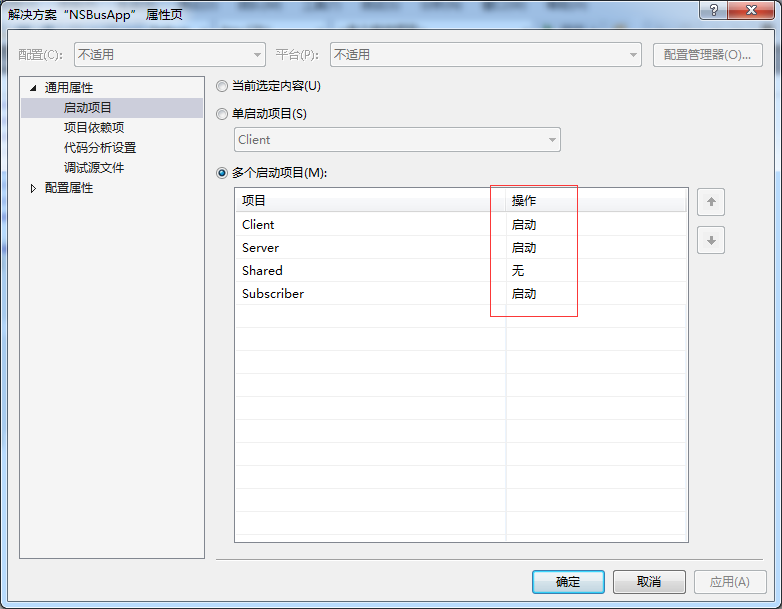
选择多启动项目:
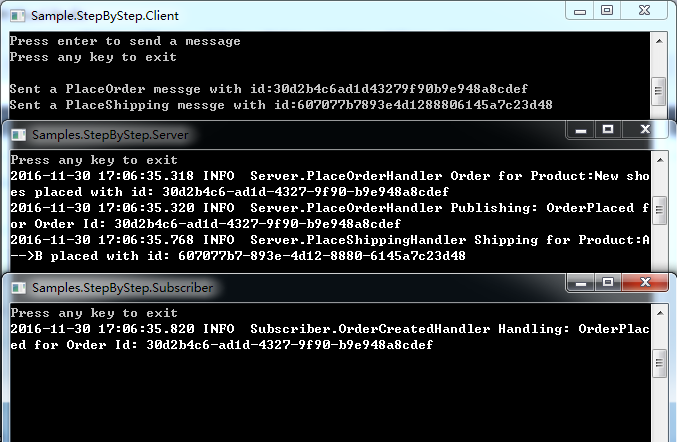
启动项目,在Client端按回车,可以看到Server端和Subscribe端的接收信息:
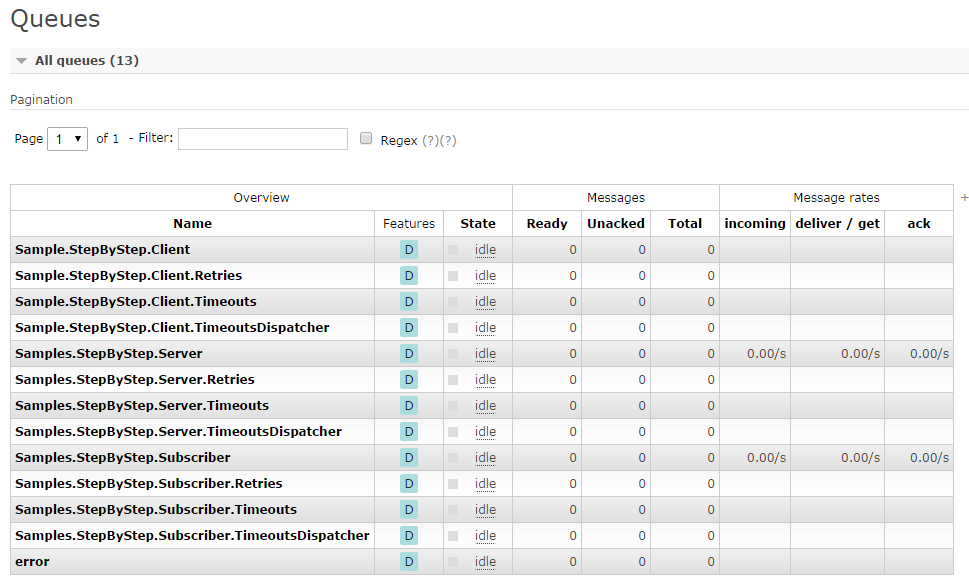
同时查看http://10.255.20.44:15672/#/queues:
NServiceBus 结合 RabbitMQ 使用的更多相关文章
- NServiceBus+RabbitMQ开发分布式应用
前言 NServiceBus提供了8种传输管道组件,分别是Learning.MSMQ.Azure Service Bus.Azure Service Bus (Legacy).Azure S ...
- NServiceBus VS MassTransit 从 stackoverflow.com 翻译而来,希望对这两个技术比较关心的同学有帮助
近段时间在看SOA,在国外网站有很多资料可以查看,本来在中文网站中找到一片关于这两个框架的对比介绍的可惜笔者没有认真翻译,只有花点时间自己翻译了一个版本,希望对技术界的朋友有所帮助. 我正纠结于NSe ...
- NserviceBus+rabbitmq
Ok so I figured this out after looking a bit at the code and the requirements for amqp URI and it sh ...
- 如何优雅的使用RabbitMQ
RabbitMQ无疑是目前最流行的消息队列之一,对各种语言环境的支持也很丰富,作为一个.NET developer有必要学习和了解这一工具.消息队列的使用场景大概有3种: 1.系统集成,分布式系统的设 ...
- 使用NServiceBus开发分布式应用
系列主题:基于消息的软件架构模型演变 NServiceBus 是一个.Net平台下开源的消息服务框架,这类产品有时也被称作ESB(Enterprise Service Bus)--企业服务总线.NSe ...
- 消息队列与RabbitMQ
1 什么是消息队列 消息指进程或应用间通信的数据:队列是保存数据的结构:消息队列是指进程或应用间通信时,保存消息的容器.消息队列独特的机制和结构保证了消息发送者和接收者之间良好的异步通信. 2 为什么 ...
- NServiceBus开发
使用NServiceBus开发分布式应用 系列主题:基于消息的软件架构模型演变 NServiceBus 是一个.Net平台下开源的消息服务框架,这类产品有时也被称作ESB(Enterprise Ser ...
- 如何优雅的使用RabbitMQ(转)
RabbitMQ无疑是目前最流行的消息队列之一,对各种语言环境的支持也很丰富,作为一个.NET developer有必要学习和了解这一工具.消息队列的使用场景大概有3种: 1.系统集成,分布式系统的设 ...
- RabbitMQ入门-理论
目录 RabbitMQ简介 RabbitMQ原理简介 RabbitMQ安装 .NET Core 使用 RabbitMQ Hello World 工作队列 扇型交换机 直连交换机 主题交换机 远程过程调 ...
随机推荐
- uva 725 division(水题)——yhx
aaarticlea/png;base64,iVBORw0KGgoAAAANSUhEUgAABVMAAAOHCAIAAAClwESxAAAgAElEQVR4nOydybGturJFcQEPfgQu4A
- Debian下安装deb格式安装包
dpkg -i 软件包名称 就好啦 下面是相应链接: http://blog.csdn.net/lhf_tiger/article/details/7493400
- ZOJ 3967 Colorful Rainbows --栈的应用
题意:给出n条y=ai*x+bi的直线.对于这些直线,如果存在x使得该直线y大于其他任意一直线,那么这条直线可以被看见,问有多少条直线可以被看见. 做法什么的不讲了,参见:http://blog.cs ...
- 注册其它地区Apple ID
不同地区Apple Id需求 iPhone 最近换上了iPhone,想要下载其它国家地区的游戏,需要登录该国的Apple Id才能在itunes里下载. 下面记录一下我注册日本地区的Apple Id过 ...
- [3d跑酷] Xcode5 打包 发布配置
主题 Unity导出Xcode项目,使用Xocde打包ipa并提交到AppStore xcode发布配置 1.设置发布相关参数,比如 包名,版本,证书,ios设备版本 2.设置体系结构,支持的平台(I ...
- java 15 - 9 集合框架之 栈、队列、数组 和 链表
- 爆炸吧 js dom ---------> boom
dom-> html css 事件 元素 eventlistener HTML 事件的例子: 当用户点击鼠标时 当网页已加载时 当图像已加载时 当鼠标移动到元素上时 当输入字段被改变时 当提交 ...
- 什么是javascript-SourceMap
简单说,Source map就是一个信息文件,里面储存着位置信息.也就是说,转换后的代码的每一个位置,所对应的转换前的位置. 有了它,出错的时候,除错工具将直接显示原始代码,而不是转换后的代码.这无疑 ...
- 14Mybatis_输入映射(传递pojo的包装对象)——很重要
假设我们有这么一个需求:用户信息的综合查询,需要传入的查询条件很复杂(可能包括用户信息,其他的信息,比如商品,订单) 我们的思想是:传入到select中的parameterType是一个包装类,里面可 ...
- svn使用过程forMac
在Windows环境中,我们一般使用TortoiseSVN来搭建svn环境.在Mac环境下,由于Mac自带了svn的服务器端和客户端功能,所以我们可以在不装任何第三方软件的前提下使用svn功能,不过还 ...