
使用WCF对外提供接口
本篇将通过WCF以webservices的方式对外提供接口。同时使用NUnit对webservices中的方法进行单元测试。
开发契约 contract
Contract项目为类库项目,该项目下会包含WCF中的ServiceContract,这是一些被加上Attribute [ServiceContract]的接口。同时接口中的方法也需要加上Attribute [OperationContract]。
另,考虑到下一篇要对接口进行压力测试,所以接口中的方法也加上Attribute [WebGet],可以通过get方式访问方法。
下面就开始定义UserInfo的Contract—IuserInfo接口。
using
System.ServiceModel;
System.ServiceModel.Web;//webGet
using System;

using System.Collections.Generic;

using System.Linq;

using System.Text;

using System.ServiceModel;

using System.ServiceModel.Web;//webGet

namespace Lee.Contract

{

    [ServiceContract]

    public interface IUserInfo

    {

        [OperationContract]

        [WebGet]

        bool AddUserInfo(string name, string description, string state);

        [OperationContract]

        [WebGet]

        bool ExistUserInfo(string name);

        [OperationContract]

        [WebGet]

        bool UpdateUserInfo(string name, string description, string state);

    }

}
开发服务 Services
Services项目也是类库项目,该项目主要是对Contract的具体实现,同时会调用DAL提供的数据访问层方法。
using
添加对Lee.Model项目的引用。
添加对Lee.DAL项目的引用。
添加对Lee. Contract项目的引用。
我们实现的UserInfo的三个方法中都是返回了Bool值,如果方法返回对象,这时就需要添加对Lee.Model项目的引用。
另,如果要在WCF中传递对象,需要为实体类添加Attribute [DataContract]和[Serializable]。属性需要添加Attribute [DataMember]。
下面是Lee.Services中的UserInfo 服务类
using System;

using System.Collections.Generic;

using System.Linq;

using System.Text;

using Lee.DAL;

using Lee.Model;

using Lee.Contract;

namespace Lee.Services

{

    public class UserInfo:IUserInfo

    {

        /**//// <summary>

        /// 添加用户

        /// </summary>

        /// <param name="name">用户名称</param>

        /// <param name="description">用户描述</param>

        /// <param name="state">状态</param>

        /// <returns>True-操作成功|False-操作失败</returns>

        public bool AddUserInfo(string name, string description, string state)

        {

            UserInfoDAL dal =new UserInfoDAL();

            return dal.AddUserInfo(name,description,state);

        }

        /**//// <summary>

        /// 检查用户是否存在

        /// </summary>

        /// <param name="name">用户名称</param>

        /// <returns>True-用户存在|False-用户不存在</returns>

        public bool ExistUserInfo(string name)

        {

            UserInfoDAL dal =new UserInfoDAL();

            return dal.ExistUserInfo(name);

        }

        /**//// <summary>

        /// 更新用户信息

        /// </summary>

        /// <param name="name">用户名称</param>

        /// <param name="description">用户描述</param>

        /// <param name="state">状态</param>

        /// <returns>True-操作成功|False-操作失败</returns>

        public bool UpdateUserInfo(string name, string description, string state)

        {

            UserInfoDAL dal = new UserInfoDAL();

            return dal.UpdateUserInfo(name, description, state);

        }

    }

}
开发宿主 Hosting
Hosting项目为WCF服务应用程序,该项目会自动添加对System.Runtime.Serialization和System.ServiceModel的引用。
using
添加对Lee. Contract项目的引用。
添加对Lee. Services项目的引用。
详细步骤
1)添加 UserInfo.svc;
2)删除文件 UserInfo.svc.cs;
3)双击打开 UserInfo.svc
<%@ ServiceHost Language="C#" Debug="true" Service="Lee.Hosting.UserInfo" CodeBehind="UserInfo.svc.cs" %>
修改为:
<%@ ServiceHost Language="C#" Debug="true" Service="Lee.Services.UserInfo" CodeBehind="Lee.Services.UserInfo.cs" %>
4)修改Web.config;
<?xml version="1.0" encoding="utf-8"?>

<configuration>

  <connectionStrings>

    <add name="SQLConnection" connectionString="Database=XX;User ID=sa;Password=saas;Server=XX;" providerName="System.Data.SqlClient"/>

  </connectionStrings>

  <system.serviceModel>

    <serviceHostingEnvironment aspNetCompatibilityEnabled="false" />

    <services>

      <service behaviorConfiguration="Lee.Hosting.UserInfoBehavior" name="Lee.Services.UserInfo">

        <endpoint address="" binding="basicHttpBinding" contract="Lee.Contract.IUserInfo">

          <identity>

            <dns value="localhost" />

          </identity>

        </endpoint>

        <endpoint address="webhttp" behaviorConfiguration="webHttp" binding="webHttpBinding" contract="Lee.Contract.IUserInfo">

          <identity>

            <dns value="localhost" />

          </identity>

        </endpoint>

      </service>

    </services>

    <behaviors>

      <endpointBehaviors>

        <behavior name="webHttp">

          <webHttp />

        </behavior>

      </endpointBehaviors>

      <serviceBehaviors>

        <behavior name="Lee.Hosting.UserInfoBehavior">

          <serviceMetadata httpGetEnabled="true" />

          <serviceDebug includeExceptionDetailInFaults="true" />

        </behavior>

      </serviceBehaviors>

    </behaviors>

  </system.serviceModel>

  <system.web>

    <compilation debug="true"/>

  </system.web>

</configuration>
5)创建NHibernate配置文件hibernate.cfg.xml并设置为始终复制,添加对NHibernate和NHibernate.ByteCode.Castle的引用。
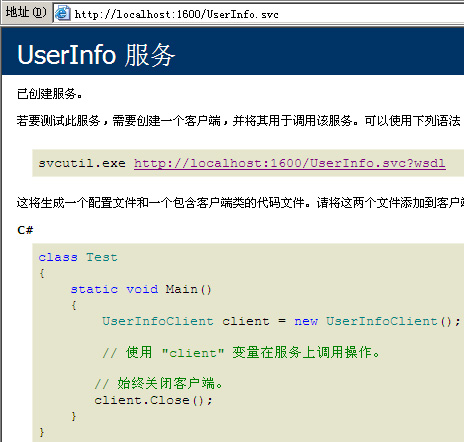
6)效果查看
浏览UserInfo.svc
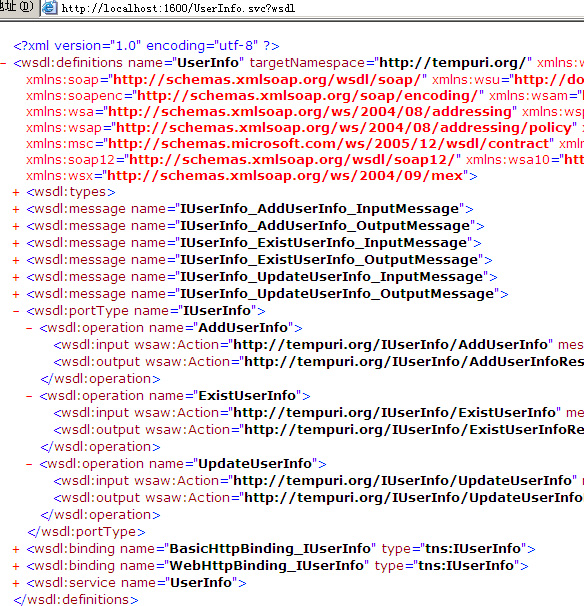
对应的WSDL
查看Schema格式
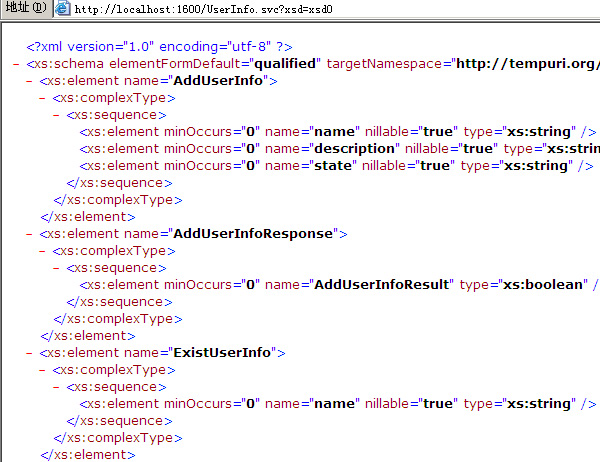
到现在为止,我们已经用WCF成功的对外发布了接口。下面我们对Webservices进行单元测试!
单元测试
单元测试的相关设置在上一篇已经讲过了,这里不再介绍。
测试步骤
1)using
添加对Lee. Contract项目的引用。
2)添加服务引用,直接点“发现“,可以找到该解决方案下的服务。
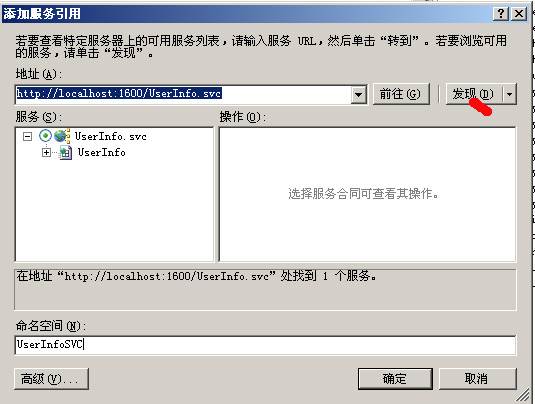
成功添加后,会自动在App.Config中创建client端EndPoint。
3)创建服务测试类TestUserInfoSVC.cs
using System;

using System.Collections.Generic;

using System.Linq;

using System.Text;

using Lee.Model;

using Lee.DAL;

using NUnit.Framework;

namespace Lee.Test

{

    [TestFixture]

    public class TestUserInfoSVC

    {

        [Test]

        public void AddUserInfo()

        {

            UserInfoSVC.UserInfoClient client = new Lee.Test.UserInfoSVC.UserInfoClient();

            bool result = client.AddUserInfo("testname6", "testdesc", "teststate");

            Assert.AreEqual(true, result);

        }

        [Test]

        public void ExistUserInfo()

        {

            UserInfoSVC.UserInfoClient client = new Lee.Test.UserInfoSVC.UserInfoClient();

            bool result = client.ExistUserInfo("testname");

            Assert.AreEqual(true, result);

        }

        [Test]

        public void UpdateUserInfo()

        {

            UserInfoSVC.UserInfoClient client = new Lee.Test.UserInfoSVC.UserInfoClient();

            bool result = client.UpdateUserInfo("testname5", "hello,testname!", "activation");

            Assert.AreEqual(true, result);

        }

    }

}
4)可以在方法中设置断点单步调试。
使用WCF对外提供接口的更多相关文章
- springboot+CXF开发webservice对外提供接口(转)
文章来源:http://www.leftso.com/blog/144.html 1.项目要对外提供接口,用webservcie的方式实现 2.添加的jar包 maven: <dependenc ...
- 开发FTP服务接口,对外提供接口服务
注意:本文只适合小文本文件的上传下载,因为post请求是有大小限制的.默认大小是2m,虽然具体数值可以调节,但不适合做大文件的传输 最近公司有这么个需求:以后所有的项目开发中需要使用ftp服务器的地方 ...
- Frp内网穿透搭建,家庭主机对外提供接口,支持ssh访问
Frp内网穿透搭建,家庭主机对外提供接口,支持ssh访问 1.使用场景: 需求1.家中服务器 ubuntu 主机,跑接口服务,需要对外暴漏, 需求2.同时需要在外网ssh远程 关键词: frp内网 ...
- Java服务器对外提供接口以及Android端向服务器请求数据
转载请注明出处:http://www.cnblogs.com/Joanna-Yan/p/5056780.html 讲解下java服务器是如何对移动终端提供接口的,以什么数据格式提供出去,移动端又是怎么 ...
- WPF内嵌WCF服务对外提供接口
要测试本帖子代码请记得管理员权限运行vs. 我写这个帖子的初衷是在我做surface小车的时候有类似的需求,感觉这个功能还挺有意思的,所以就分享给大家,网上有很多关于wcf的文章 我就不一一列举了.公 ...
- C++中模块(Dll)对外暴露接口的方式
总结下C++中模块(Dll)对外暴露接口的方式: (1)导出API函数的方式这种方式是Windows中调用DLL接口的最基本方式,GDI32.dll, User32.dll都是用这种方式对外暴露系统A ...
- WCF中修改接口或步骤名称而不影响客户端程序
WCF中修改接口或方法名称而不影响客户端程序 本篇接着"从Web Service和Remoting Service引出WCF服务"中有关WCF的部分. 运行宿主应用程序. 运行We ...
- WCF技术剖析之二十九:换种不同的方式调用WCF服务[提供源代码下载]
原文:WCF技术剖析之二十九:换种不同的方式调用WCF服务[提供源代码下载] 我们有两种典型的WCF调用方式:通过SvcUtil.exe(或者添加Web引用)导入发布的服务元数据生成服务代理相关的代码 ...
- grpc-gateway:grpc对外提供http服务的解决方案
我所在公司的项目是采用基于Restful的微服务架构,随着微服务之间的沟通越来越频繁,就希望可以做成用rpc来做内部的通讯,对外依然用Restful.于是就想到了google的grpc. 使用grpc ...
随机推荐
- D3D11中的MSAA
这两年我的工作都转到了D3D11,目前新出硬件几乎全部支持此标准,加上D3D11接口清晰,概念直观,等到windows7普及,想必未来都是D3D11的天下.最近时间较空,我陆续开始写些基础文章,希望对 ...
- Spring.Net.FrameworkV3.0 版本发布了,感谢大家的支持
Spring.Net.FrameworkV3.0 版本发布了,感谢大家的支持. Spring.Net.Framework,基于.NET的快速信息化系统开发.整合框架,为企业或个人在.NET环境下快速开 ...
- Java--解决java compiler level does not match the version of the installed java project facet错误
从网上下载了个项目,导入eclipse时发现如下错误: 检查后发现原来是JDK版本不一致的问题,项目的默认JDK配置是1.5,而自己电脑上是1.7. 需要修改两个地方的配置,如下图所示: 修改一: 修 ...
- [OpenCV] Image Processing - Grayscale Transform
"每个像素的输出值只取决于其输入值" 重难点:Histogram equalization 参考:笑得很甜 http://blog.csdn.net/xiaowei_cqu/art ...
- android和ios,音频互通方案
好久不更新博客上,从年前从公司辞职,这半年以来,一直靠做一些外包app养活自己!也算是达成了自己年前制定的目标!可是也想着总不能一直做外包吧,所以决定做一些自己觉得有意思的app,挂到应用商店上和ap ...
- SQL Server技术问题之自定义函数优缺点
优点: 可以在SQL语句中调用,直接使用返回值,从而可以形成复杂的SQL应用. 缺点: 能在函数中使用的语句有严格限制: 不支持create.ALTER.drop等DDL(Data Definitio ...
- SQL Server技术问题之视图优缺点
优点: 一.简单性.视图不仅可以简化用户对数据的理解,也可以简化他们的操作.那些被经常使用的查询可以被定义为视图,从而使用户不必为以后的操作每次都指定全部的条件. 二.安全性.通过视图用户只能查询和修 ...
- IOS开发UI基础UIView
主要介绍下UIView得基本概念和一些属性的介绍至于属性的用户后面会由详细的介绍 -.UIView基本概念 1.什么是控件? 屏幕上所有的UI元素都叫做控件 (也有很多书中叫做视图 组件) 比如 按钮 ...
- GPUImage滤镜之自然饱和度
自然饱和度”是图像整体的明亮程度,“饱和度”是图像颜色的鲜艳程度. “饱和度”与“色相/饱和度”命令中的“饱和度”选项效果相同,可以增加整个画面的“饱和度”,但如调节到较高数值,图像会产生色彩过饱和从 ...
- C#操作IIS程序池及站点的创建配置
最近在做一个WEB程序的安装包:对一些操作IIS进行一个简单的总结:主要包括对IIS进行站点的新建以及新建站点的NET版本的选择,还有针对IIS7程序池的托管模式以及版本的操作:首先要对Microso ...