
国际化的实现i18n--错误码国际化以及在springboot项目中使用
国际化 ,英文叫 internationalization 单词太长 ,又被简称为 i18n(取头取尾中间有18个字母);
主要涉及3个类: Locale用来设置定制的语言和国家代码
ResourceBundle 用来加载国际化资源文件
MessageFormat 用来格式化占位符
//先看结构:
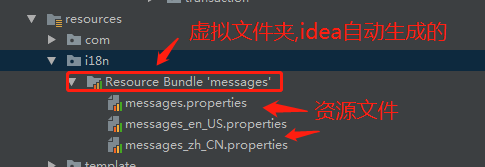
在创建国际化资源文件时,如我在resources文件下建了一个i18n文件夹,下放了3个资源文件,idea自动会生成一个Resource Bundle 'messages'文件夹,这个文件夹不是真实存在的,打开项目所在文件夹后,找不到它的;如图:
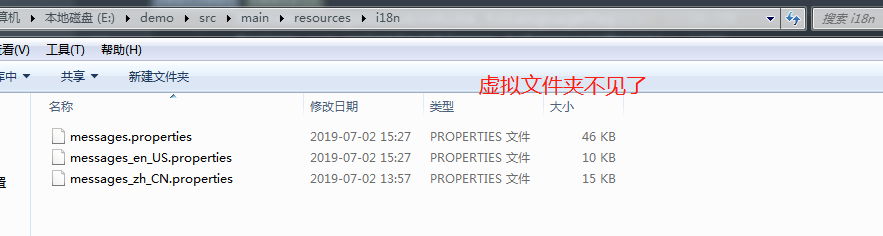
资源文件的命名格式:前缀+"_"+"语言代码"+地区代码+".properites";(
Locale[] locales = Locale.getAvailableLocales();//获取世界可用的语言地区表示
)
如上图所示,我定义了3个资源文件夹,其中一个没有语言代码和地区代码的那个是默认资源,也就是要找的资源文件都不存在时,就会去那里找;
查找顺序,如果你指定Locale locale=new Locale("en_US"),那它就会找到messages_en_US.properties,如果你写错了一个单词Locale locale=new Locale("en_USAA");找不到的话,它就会找本地的语言(
Locale locale2 = Locale.getDefault(); //获取默认语言地区
),如我们在中国就会找本地的中国语言包messages_zh_CN.properties,如果没有本地的语言包messages_zh_CN.properties,就会去messages.properties这里找
资源文件的内容格式为:key=value,其中value值可以含有占位符,格式{数字},例如" 你的订单号{0}的订单,金额{1}元";
key和value值在properties文件中都不用加双引号
注意:
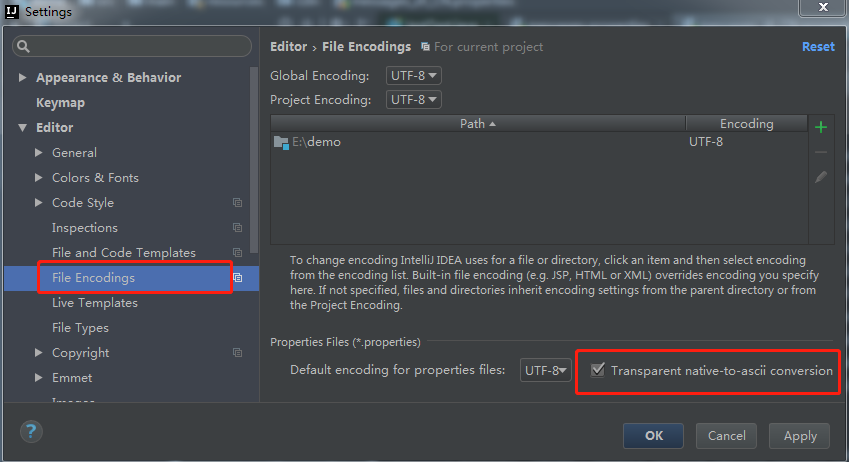
资源文件中的所有字符都必须是 ascll 码 ,不能保存为中文的 ,Java 中提供 了 native2ascll 工具用于将中文转化为 ascll 码 。所以在编写 properties 文件的时候写的是中文 ,一回车就自动被编码了 。

在idea工具中,可以设置显示为中文:
后端做国际化用得比较多的情况是错误码国际化:具体代码如下:
 @Test

    public void test2(){

        Locale locale1 = new Locale("en_US");

        Locale locale2 = Locale.getDefault(); //获取默认语言地区

        System.out.println(locale2.getCountry()); //CN

        System.out.println(locale2.getDisplayCountry()); //中国

        System.out.println(locale2.getDisplayLanguage()); //中文

        System.out.println(locale2.getDisplayName()); //中文(中国)

        System.out.println(locale2.getDisplayLanguage(locale1)); //以某种语言显示语言,这里是Chinese

        System.out.println(locale2.getLanguage()); //zh 语言代表符

        System.out.println(locale2.toLanguageTag()); //语言标签 格式语言-国家 这里是zh-CN

        //Locale自定义了很多语言跟国家常量 如中国 和中文,德国和德文

        Locale china = Locale.CHINA; // zh-Cn

        Locale chinese = Locale.CHINESE; //ZH

        System.out.println(china.toLanguageTag()); //ZH-CN

        System.out.println(chinese.toLanguageTag()); //ZH

        Locale german = Locale.GERMAN; //de

        Locale germany = Locale.GERMANY; //de-DE

        System.out.println(german.toLanguageTag());//de

        System.out.println(germany.toLanguageTag());//de-DE

        Locale[] locales = Locale.getAvailableLocales();//获取世界可用的地区

        for (Locale locale : locales) {

            System.out.println(locale.toLanguageTag());

        }

        ResourceBundle resourceBundle = ResourceBundle.getBundle("i18n/messages",locale2); //这里的baseName也可以表示成i18n.messages形式,messages是虚拟的包名

        String s = resourceBundle.getString("103014"); //我在资源文件存了:103014=订单号为{0}的订单已经支付

        MessageFormat messageFormat = new MessageFormat(s);

        String format = messageFormat.format(new String[]{"100002222"});

        System.out.println(format);//输出值(订单号为{100002222}的订单已经支付)

    }

//稍微封装:

 private String getErrorMessage(String language,String errorCode,String ...params){

        Locale locale=null;

        if(StringUtils.isEmpty(language)){

            locale=new Locale("zh_CN");

        }

        locale=new Locale(language);

        ResourceBundle bundle = ResourceBundle.getBundle("i18n/messages",locale);

        String msg = bundle.getString(errorCode);

        if(StringUtils.isEmpty(msg)){

            return null;

        }

        MessageFormat messageFormat = new MessageFormat(msg);

        String format = messageFormat.format(params);

        return format;

    }

  @Test

    public void testI18n() throws IOException {

      //key=value 103032=Order No.{0} and No.{1} has not been linked

        System.out.println(getErrorMessage("en_US", "103032", "dddd", "vvvvvv"));

    }//输出为Order No.dddd and No.vvvvvv has not been linked

补充:注意下面的区别:下划线和横线用在不同方法,建议使用

Locale locale = new Locale("en_US");

Locale locale2 =Locale.forLanguageTag("en-US"); //推荐使用这种方式
//springboot项目中使用国际化,非常简单:
@RunWith(SpringRunner.class)

@SpringBootTest

public class JestTest {

    @Autowired

    private MessageSource messageSource;

    @Test

    public void testI18n() throws IOException {

        Locale locale2 = Locale.forLanguageTag("en-US");

        Object[] arr = {"dddd", "vvvvvv"};

        //key=value    103032=Order No.{0} and No.{1} has not been linked

        System.out.println(messageSource.getMessage("103032", arr, locale2));

        //输出结果:Order No.dddd and No.vvvvvv has not been linked

    }

}
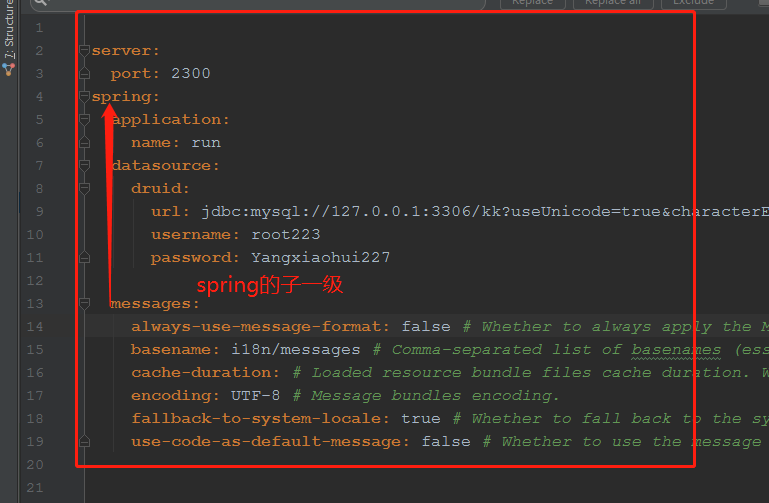
需要在application.yml中配置:
messages:
  always-use-message-format: false # Whether to always apply the MessageFormat rules, parsing even messages without arguments.
  basename: i18n/messages # Comma-separated list of basenames (essentially a fully-qualified classpath location), each following the ResourceBundle convention with relaxed support for slash based locations.
  cache-duration: # Loaded resource bundle files cache duration. When not set, bundles are cached forever. If a duration suffix is not specified, seconds will be used.
  encoding: UTF-8 # Message bundles encoding.
  fallback-to-system-locale: true # Whether to fall back to the system Locale if no files for a specific Locale have been found.
  use-code-as-default-message: false # Whether to use the message code as the default message instead of throwing a "NoSuchMessageException". Recommended during development only.
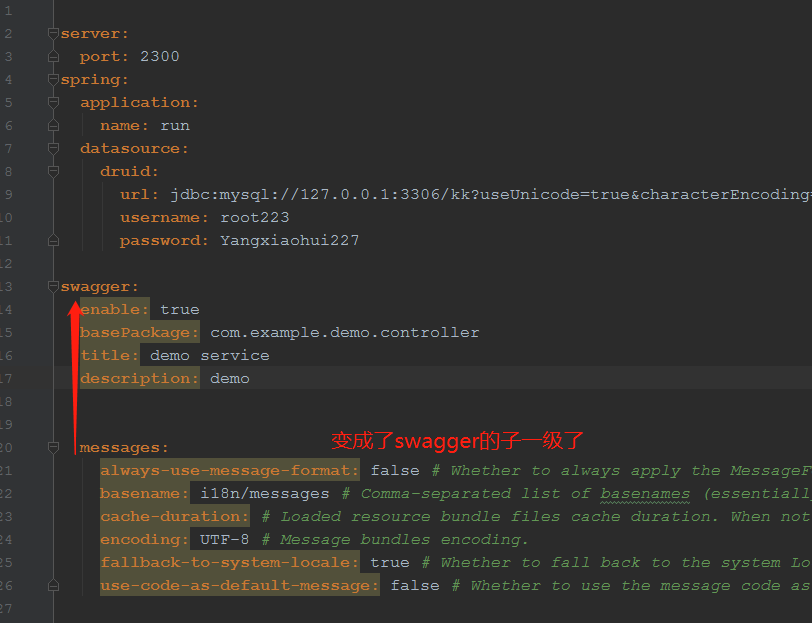
如果报这个:org.springframework.context.NoSuchMessageException: No message found under code '103032' for locale 'en_us'
非常有可能是上面的messages在application.yml的位置没配置对,messages要配置在spring的下一级,如图所示:
错误配置如下:
国际化的实现i18n--错误码国际化以及在springboot项目中使用的更多相关文章
- Springboot项目中Pom.xml报错
摘要:使用idea,两次在maven上浪费时间,第一次不知道怎么就解决了,第二次记录一下解决办法 参考博客地址: https://blog.csdn.net/u013129944/article/de ...
- springboot项目中使用spring-data-Redis对map序列化时报错
错误信息: java.lang.ClassCastException: java.lang.Integer cannot be cast to java.lang.String at org.spri ...
- springboot项目中常遇到的问题-初学者最容易犯的错
1.在spring中有两个main方法 2.在idea中少提代码类了,或者某类中代码依赖关系没解决掉
- 安装APK的错误码(PackageManager.java)
安装APK的错误码,定义在android源码中的这个文件中:frameworks\base\core\java\android\content\pm\PackageManager.java /** * ...
- jQuery国际化插件 jQuery.i18n.properties 【轻量级】
jQuery.i18n.properties是一款轻量级的jQuery国际化插件,能实现Web前端的国际化. 国际化英文单词为:Internationalization,又称i18n,“i”为单词的第 ...
- Web前端国际化之jQuery.i18n.properties
Web前端国际化之jQuery.i18n.properties jQuery.i18n.properties介绍 国际化是如今Web应用程序开发过程中的重要一环,jQuery.i18n.propert ...
- php gettext方式实现UTF-8国际化多语言(i18n)
php gettext方式实现UTF-8国际化多语言(i18n) 一.总结 一句话总结: 二.php gettext方式实现UTF-8国际化多语言(i18n) 近 来随着i18n(国际化)的逐渐标准化 ...
- jquery.i18n.properties前端国际化方案
如果新项目要做系统国际化, 时下热门的任何一种技术选型都有成熟的方案,比如: vue + vue-i18n angular + angular-translate react + react-intl ...
- 【转】i18n实现前端国际化(实例)
源地址:https://www.jianshu.com/p/ea93efef5155 i18n实现前端国际化(实例) 0.1442018.08.27 16:25:10字数 246阅读 10563 在今 ...
随机推荐
- 10、Entity Framework Core 3.1入门教程-执行原生SQL
本文章是根据 微软MVP solenovex(杨旭)老师的视频教程编写而来,再加上自己的一些理解. 视频教程地址:https://www.bilibili.com/video/BV1xa4y1v7rR ...
- 医疗seo常用的图标工具
http://www.wocaoseo.com/thread-304-1-1.html 下面是一些医疗seo常用的一些图表工具,这些都是些最简单的工具,主要放置这里以防止以后有作用. 1,医疗的常用搜 ...
- Framework项目持续集成(jenkins)及集合SonarQube
目录 Framework项目持续集成及集合SonarQube - 前言 CI/CD是什么 -- jenkins 什么是sonarqube?什么是CodeReview? 什么是sonarqube? 什么 ...
- AD18 PCB中添加中文字符串显示乱码问题解决
该问题是由于字符串的自体类型设置问题,AD默认是[stroke],我们点击[TrueType]即可正常显示.PS:AD18搞啥呢,默认显示输入内容不行吗,找半天!!!
- js动画和css3动画的区别
JS动画(逐帧动画) 首先,在js动画是逐帧动画,是在时间帧上逐帧绘制帧内容,由于是一帧一帧的话,所以他的可操作性很高,几乎可以完成任何你想要的动画形式.但是由于逐帧动画的帧序列内容不一样,会增加制作 ...
- HTTPS的简介
一.什么是HTTPS HTTPS是在HTTP上建立SSL加密层,并对传输数据进行加密,是HTTP协议的安全版.现在它被广泛用于万维网上安全敏感的通讯,例如交易支付方面. HTTPS主要作用是: (1) ...
- Unity游戏Mono内存管理及泄漏
UWA工具 https://yq.aliyun.com/articles/435553 Unity游戏Mono内存管理及泄漏 https://wetest.qq.com/lab/view/135.ht ...
- 01_Python基础知识梳理
1.计算机知识基础 1.计算机组成 计算机底层: 点子电路,计算机只能识别两个数 0 1 硬件: 处理器(CPU), 运行内存(RAM), 主板(总线设备), 外部存储设备(硬盘U盘等 ...
- agumaster 分页方案
本文例程下载:https://files.cnblogs.com/files/xiandedanteng/agumaster20200430-1.zip 之前的分页方案有点小瑕疵,这回修正了一下. 控 ...
- docker 停止、启动、删除镜像指令
容器 docker ps // 查看所有正在运行容器 docker stop containerId // containerId 是容器的ID docker ps -a // 查看所有容器 dock ...