
微信小程序swiper实现 句子控app首页滑动卡片
微信小程序swiper实现 句子控app首页滑动卡片
引言:最近看到句子控APP首页的效果很清新,可是发现他的微信小程序端没有实现这个功能,我看了一下难度不大,于是尝试着去实现。
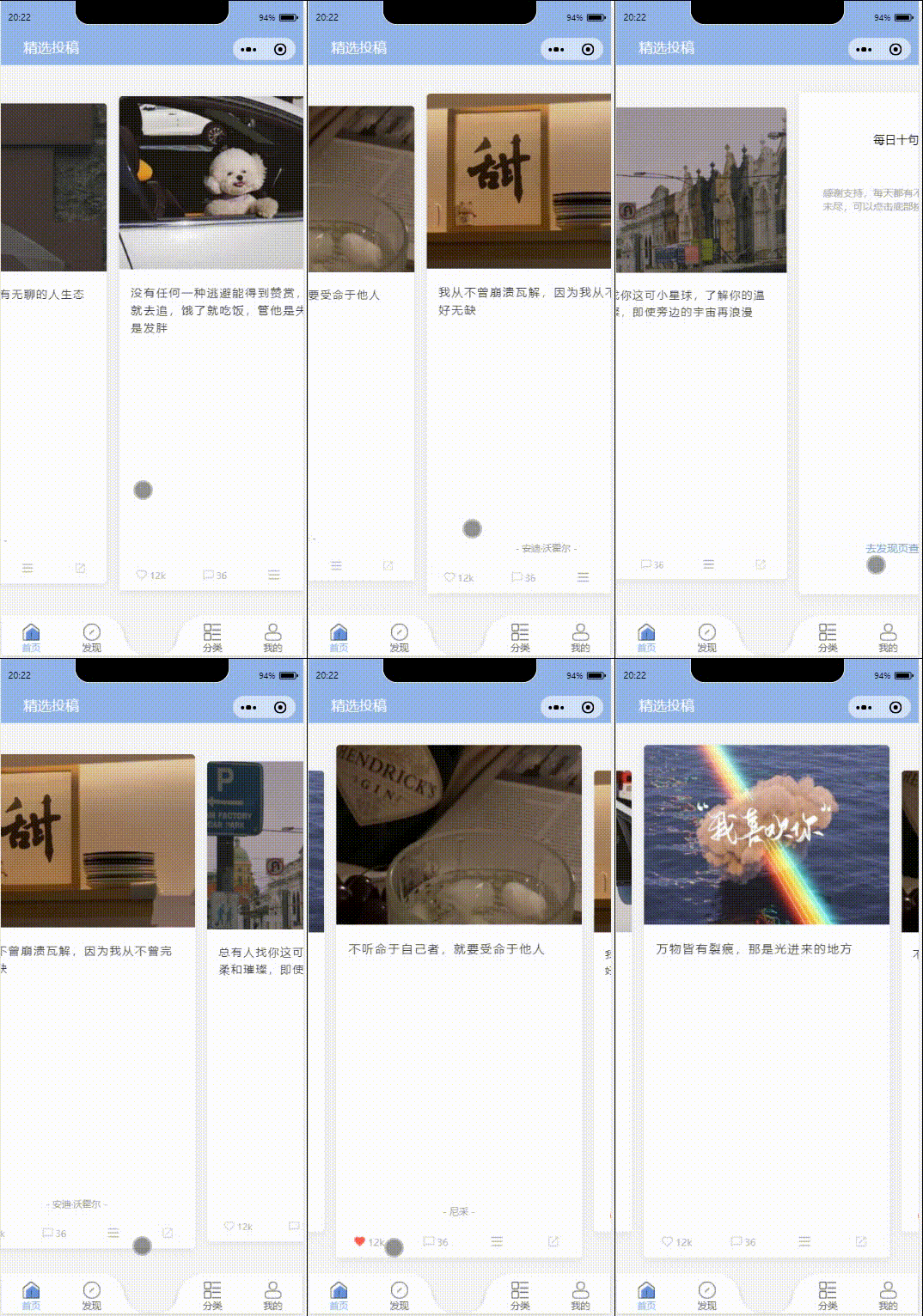
实现效果如下:
1、定义一个yiyancard自定义组件,在根目录下新建一个components文件夹并在其内部新建一个yiyancard文件夹。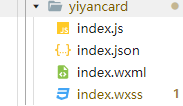
2、在pages文件夹下新建一个home页面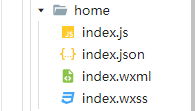
3、在home页面的json引入yiyancard组件,并在wxml中使用
index.json
{

  "usingComponents": {

    "s-yiyancard": "../../components/yiyancard/index"

  }

}
index.wxml
<view class="container">

  <s-yiyancard style="width:100vw"> </s-yiyancard>

</view>
4、编写yiyancard相关代码
index.js
Page({

  data: {

    cardCur: 0,

    swiperList: [{

      id: 0,

      type: 'image',

      url: 'https://7368-shuyuabn-9gke6t6k962d48ca-1304045188.tcb.qcloud.la/image/6.JPG?sign=39d14c3902ca802c5bbdca9487c4dfc8&t=1612537023',

      yiyan: '没有无聊的人生,只有无聊的人生态度',

      form: '刘瑜',

      iflike: "false"

    }, {

      id: 1,

      type: 'image',

      url: 'https://7368-shuyuabn-9gke6t6k962d48ca-1304045188.tcb.qcloud.la/image/1.JPG?sign=6a578b89d06a74141a01b35b26684e04&t=1612536951',

      yiyan: '没有任何一种逃避能得到赞赏,喜欢就去追,饿了就吃饭,管他是失败或是发胖',

      form: '',

      iflike: "false"

    }, {

      id: 2,

      type: 'image',

      url: 'https://7368-shuyuabn-9gke6t6k962d48ca-1304045188.tcb.qcloud.la/image/2.JPG?sign=42c68e97e5fcd277e42bdc476a94cdb4&t=1612536964',

      yiyan: '万物皆有裂痕,那是光进来的地方',

      iflike: "false"

    }, {

      id: 3,

      type: 'image',

      url: 'https://7368-shuyuabn-9gke6t6k962d48ca-1304045188.tcb.qcloud.la/image/3.JPG?sign=d607ee45937f227f8ae5fba4e9f846f4&t=1612536974',

      yiyan: '不听命于自己者,就要受命于他人',

      form: '尼采',

      iflike: "false"

    }, {

      id: 4,

      type: 'image',

      url: 'https://7368-shuyuabn-9gke6t6k962d48ca-1304045188.tcb.qcloud.la/image/4.JPG?sign=4c986f27559352bb5d9b42a96851ab22&t=1612536983',

      yiyan: '我从不曾崩溃瓦解,因为我从不曾完好无缺',

      form: '安迪·沃霍尔',

      iflike: "false"

    }, {

      id: 5,

      type: 'image',

      url: 'https://7368-shuyuabn-9gke6t6k962d48ca-1304045188.tcb.qcloud.la/image/5.JPG?sign=22d43fff1c66594770c1c2b10cd8403c&t=1612537004',

      yiyan: '总有人找你这可小星球,了解你的温柔和璀璨,即使旁边的宇宙再浪漫',

      form: '',

      iflike: "false"

    }, {

      ifend: true

    }],

  },

  onLoad() {

    this.towerSwiper('swiperList');

    // 初始化towerSwiper 传已有的数组名即可

  },

  DotStyle(e) {

    this.setData({

      DotStyle: e.detail.value

    })

  },

  // cardSwiper

  cardSwiper(e) {

    this.setData({

      cardCur: e.detail.current

    })

  },

  // towerSwiper

  // 初始化towerSwiper

  towerSwiper(name) {

    let list = this.data[name];

    for (let i = 0; i < list.length; i++) {

      list[i].zIndex = parseInt(list.length / 2) + 1 - Math.abs(i - parseInt(list.length / 2))

      list[i].mLeft = i - parseInt(list.length / 2)

    }

    this.setData({

      swiperList: list

    })

  },

  // towerSwiper触摸开始

  towerStart(e) {

    this.setData({

      towerStart: e.touches[0].pageX

    })

  },

  // towerSwiper计算方向

  towerMove(e) {

    this.setData({

      direction: e.touches[0].pageX - this.data.towerStart > 0 ? 'right' : 'left'

    })

  },

  // towerSwiper计算滚动

  towerEnd(e) {

    let direction = this.data.direction;

    let list = this.data.swiperList;

    if (direction == 'right') {

      let mLeft = list[0].mLeft;

      let zIndex = list[0].zIndex;

      for (let i = 1; i < list.length; i++) {

        list[i - 1].mLeft = list[i].mLeft

        list[i - 1].zIndex = list[i].zIndex

      }

      list[list.length - 1].mLeft = mLeft;

      list[list.length - 1].zIndex = zIndex;

      this.setData({

        swiperList: list

      })

    } else {

      let mLeft = list[list.length - 1].mLeft;

      let zIndex = list[list.length - 1].zIndex;

      for (let i = list.length - 1; i > 0; i--) {

        list[i].mLeft = list[i - 1].mLeft

        list[i].zIndex = list[i - 1].zIndex

      }

      list[0].mLeft = mLeft;

      list[0].zIndex = zIndex;

      this.setData({

        swiperList: list

      })

    }

  },
 // 喜欢图标点击改变

  like: function (event) {

    const that = this

    let likeid = event.currentTarget.dataset.likeid

    var a = `swiperList[${likeid}].iflike`

    var b =`that.data.swiperList[${likeid}].iflike`

    console.log(a)

    console.log(b)

    if (that.data.swiperList[likeid].iflike=== "false") {

      that.setData({

      [a] : "true",

      })

    } else if (that.data.swiperList[likeid].iflike=== "true") {

      that.setData({

        [a]: "false",

      })

    }

    console.log(that.data.swiperList[likeid].iflike)

  }

})
index.json
{

  "component": true,

  "usingComponents": {}

}
<swiper class="card-swiper " duration="500" bindchange="cardSwiper">

  <swiper-item wx:for="{{swiperList}}" wx:key class="{{cardCur==index?'cur':''}}">

    <block wx:if="{{!item.ifend}}" >

      <view class="swiper-item other ">

      <image src="{{item.url}}" mode="aspectFill" class="swiper-img"></image>

      <view class="yiyan-body">{{item.yiyan}}</view>

      <view wx:if="{{item.form}}" class="yiyan-form">- {{item.form}} -</view>

      <view wx:if="{{!item.form}}" class="zhanwei"></view>

      <view class="bottom-box">

        <view class="like juzhong" bindtap="like" data-likeid="{{item.id}}">

          <block wx:if="{{item.iflike =='false'}}">

            <image class="icon-img" src="../../images/icon/xihuan.png"></image>

          </block>

          <block wx:if="{{item.iflike =='true'}}">

            <image class="icon-img" src="../../images/icon/xihuan2.png"></image>

          </block>

          <view class="num">12k</view>

        </view>

        <view class="liuyan">

          <image class="icon-img2" src="../../images/icon/liuyan.png"></image>

          <view class="num">36</view>

        </view>

        <view class="biaoqian">

          <image class="icon-img" src="../../images/icon/biaoqian.png"></image>

        </view>

        <view class="zhuanfa">

          <image class="icon-img" src="../../images/icon/zhuanfa.png"></image>

        </view>

      </view>

    </view>

    </block>

    <block wx:if="{{item.ifend}}">

      <view class="swiper-item other juzhong">

        <view class="end-title">每日十句精选投稿</view>

        <view class="end-body">

          感谢支持,每天都有不同的收获。如果意犹未尽,可以点击底部按钮查看更多推荐

        </view>

        <view class="end-bottom"> 去发现页查看更多推荐</view>

      </view>

    </block>

  </swiper-item>

</swiper>
index.css
/* ==================

         轮播

 ==================== */

.swiper-img {

    height: 35% !important;

}

.swiper-item image,

.swiper-item video {

    width: 100%;

    display: block;

    height: 100%;

    margin: 0;

    pointer-events: none;

}

.card-swiper {

    height: 85vh !important;

}

.card-swiper swiper-item {

    width: 610rpx !important;

    left: 70rpx;

    box-sizing: border-box;

    padding: 40rpx 0rpx 70rpx;

    overflow: initial;

}

.card-swiper swiper-item .swiper-item {

    width: 100%;

    display: block;

    height: 100%;

    border-radius: 10rpx;

    transform: scale(0.9);

    transition: all 0.2s ease-in 0s;

    overflow: hidden;

}

.card-swiper swiper-item.cur .swiper-item {

    transform: none;

    transition: all 0.2s ease-in 0s;

}

swiper {

    margin-top: 15rpx !important;

}

.other {

    position: relative;

    background-color: #ffffff;

    display: flex;

    /*flex布局方法*/

    flex-direction: column;

    /*垂直布局*/

    align-items: center;

    /*水平方向居中*/

    box-shadow: 0 6rpx 24rpx rgba(0, 0, 0, 0.08);

    position: relative;

}

/* 内容 */

.yiyan-body {

    line-height: 46rpx;

    letter-spacing: 5rpx;

    margin-top: 38rpx;

    font-size: 30rpx;

    width: 90%;

    height: 35%;

    margin-left: 5%;

    color: #3e3e3e;

}

.yiyan-form {

    position: absolute;

    bottom: 55px;

    display: flex;

    flex-direction: column;

    align-items: center;

    font-size: 25rpx;

    color: #999999;

    width: 50%;

    margin-top: 20%;

    margin-left: 25%;

}

/* 底部 */

.bottom-box {

    position: absolute;

    bottom: 0px;

    width: 100%;

    height: 80rpx;

    display: flex;

    flex-direction: row;

}

.juzhong {

    display: flex;

    justify-content: center;

    align-items: center;

}

.icon-img {

    width: 30rpx !important;

    height: 30rpx !important;

}

.icon-img2 {

    width: 30rpx !important;

    height: 30rpx !important;

    /* margin-top: 5rpx !important; */

}

.like {

    display: flex;

    justify-content: center;

    align-items: center;

    width: 27%;

}

.num {

    font-size: smaller;

    margin-top: 3rpx;

    margin-left: 6rpx;

    color: #b4b4b4;

}

.liuyan {

    width: 27%;

    display: flex;

    justify-content: center;

    align-items: center;

}

.biaoqian {

    width: 23%;

    display: flex;

    justify-content: center;

    align-items: center;

}

.zhuanfa {

    width: 23%;

    display: flex;

    justify-content: center;

    align-items: center;

}

/* 最后一页 */

.end-title{

    width: 60%;

    margin-left: 20%;

    font-size: 30rpx;

    display: flex;

    justify-content: center;

    align-items: center;

    margin-top: 100rpx;

    margin-bottom: 100rpx;

}

.end-body{

    width: 80%;

    margin-left: 10%;

    font-size: 27rpx;

    color: #a7a7a7;

    display: flex;

    justify-content: center;

    align-items: center;

    margin-bottom: 40rpx;

}

.end-bottom{

    position: absolute;

    width: 70%;

    left: 15%;

    bottom: 60rpx;

    display: flex;

    justify-content: center;

    align-items: center;

    margin-bottom: 40rpx;

    color: #7b9fcb;

    font-size: 28rpx;

}
编写完以上代码,相关功能就实现了。
注意:为了方便以上data中的数据是直接在js中自定义好的。
微信小程序swiper实现 句子控app首页滑动卡片的更多相关文章
- 微信小程序实质是什么? Hybrid App
微信小程序是一种不需要下载安装即可使用的应用,用户扫一扫或者搜一下即可打开应用.微信小程序实质是Hybrid技术的应用.Hybrid App(混合模式移动应用). 小程序能够更多的可以更多的调用手机本 ...
- 微信小程序基础之试图控件View、ScrollView、Swiper
今天写一篇关于微信小程序视图控件的文章,主要是介绍界面的搭建和部分操作js交互功能的介绍,转载请注明出处,谢谢~ 首先显示首页结构.创建三个navigator,用来跳转页面: <!--index ...
- 绑定bindchange事件的微信小程序swiper闪烁,抖动问题解决,(将微信小程序切换到后台一段时间,再打开微信小程序,会出现疯狂循环轮播,造成抖动现象)
微信小程序开发文档-组件-swiper后面追加的新闻如上图所示: 如果在bindchange事件给swiper的current属性对应的值{{current}}赋值,就会造成抖动现象. bindcha ...
- 我的微信小程序第三篇(app.json)
前言 端午节回家了,所以好多天没有更新,只想说还是待在家里舒服呀,妈妈各种做好吃的,小侄子侄女各种粘着我在室外玩,导致我三天下来不仅胖了一圈,还黑了一圈,上班第一天有同事就说我晒黑了,哭~~~,为了防 ...
- 微信小程序swiper制作内容高度不定的tab选项卡
微信小程序利用swiper制作内容高度不定的tab选项卡,不使用absolute定位,不定高度,由内容自由撑开主要思路是获取内容区的高度来给swiper动态设置值 .wxml <view cla ...
- 如何自定义微信小程序swiper轮播图面板指示点的样式
https://www.cnblogs.com/myboogle/p/6278163.html 微信小程序的swiper组件是滑块视图容器,也就是说平常我们看到的轮播图就可以用它来做,不过这个组件有很 ...
- 微信小程序swiper bindChange重复执行
swiper是微信小程序的一个滑动组件,非常重要.如果只是做简单的轮播图而不进行复杂的逻辑,直接可以使用,甚至不需要知道组件的方法.今天在做一个如下的页面时,快速滑动swiper出现了问题: 控制台打 ...
- 自定义微信小程序swiper轮播图面板指示点的样式
微信小程序的swiper组件是滑块视图容器,也就是说平常我们看到的轮播图就可以用它来做,不过这个组件有很多样式是固定的,但是,有时候我们的设计稿的面板指示点是需要个性化的,那么如何去修改swiper组 ...
- 微信小程序实现连接蓝牙设备跑步APP
背景 微信小程序兴起,有变成超级APP的趋势,通过微信提供的小程序api,可以通过微信调用到手机原生的支持. 目标 通过微信小程序实现来实现跑步类App的功能. 需求分析 跑步类App需要的两个核心的 ...
随机推荐
- drop table 命令不回收以前的相关访问权限
drop table 命令不回收以前的相关访问权限,也就是说假如我现在把表删除了,然后再创建一个同名的表时,会自动赋予权限的.
- 【Oracle】从删除的recyclebin中查看并恢复数据
如果数据库中用了drop删除表,后面没有加上purge的话,会出现在oracle的回收机制中 dba_recyclebin可以查看当前删除的都是哪些 这个只是部分截图,可以看到删除的对象是什么,删除的 ...
- Linux TCP漏洞 CVE-2019-11477 CentOS7 修复方法
CVE-2019-11477漏洞简单介绍 https://cert.360.cn/warning/detail?id=27d0c6b825c75d8486c446556b9c9b68 RedHat用户 ...
- 给dtcms增加模板自动生成功能
作为dtcms的使用者你是不是像我一样,也在不停的修改模板之后要点击生成模板浪费了很多开发模板的时间? 那就跟我一起给dtcms增加一个开发者模式,当模板修改完成之后,直接刷新页面就能看到效果,而不再 ...
- Spring Cloud Alibaba学习笔记
引自B站楠哥:https://space.bilibili.com/434617924 一.创建父工程 创建父工程hello-spring-cloud-alibaba Spring Cloud Ali ...
- Django Signals
信号 Django中提供了"信号调度",用于在框架执行操作时解耦.通俗来讲,就是一些动作发生的时候,信号允许特定的发送者去提醒一些接受者. Django内置的信号 Model si ...
- FLask之视图
视图 1 FBV def index(): return render_template('index.html') app.add_url_rule('/index', 'index', index ...
- Android N wifi auto connect流程分析
定义 当有两个或者两个以上的已经保存的无线网络可以连接时,系统通过选择算法来选择一个最优网络. 在Android L,wifi的自动重连机制是由WifiAutoJoinController 类来实现, ...
- Optimistic concurrency control 死锁 悲观锁 乐观锁 自旋锁
Optimistic concurrency control https://en.wikipedia.org/wiki/Optimistic_concurrency_control Optimist ...
- vuex有哪几种属性
有五种,分别是 State. Getter.Mutation .Action. Modulestate => 基本数据(数据源存放地)getters => 从基本数据派生出来的数据muta ...