
springboot(五)使用FastJson返回Json视图
FastJson简介:
本文目标:
一、项目搭建
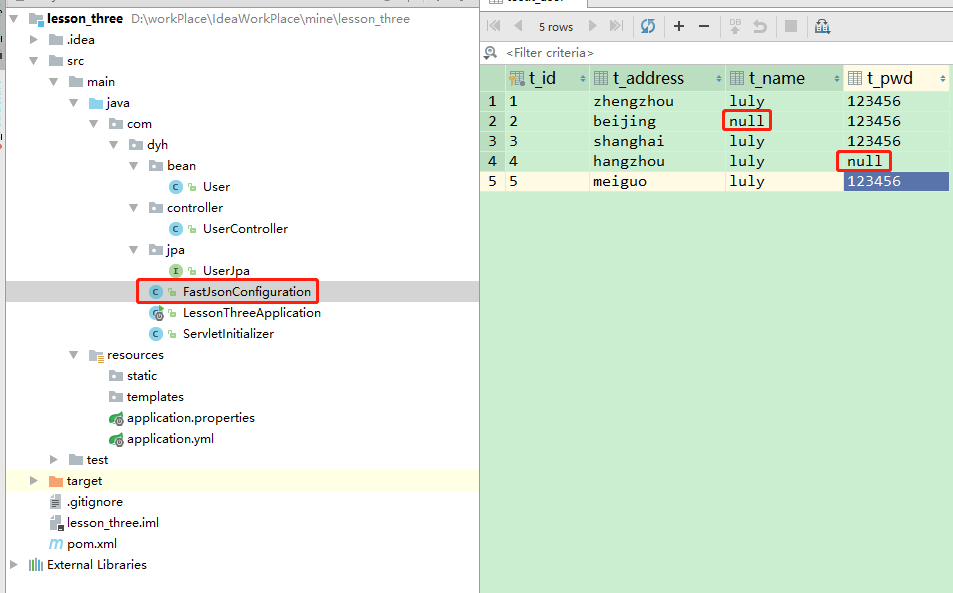
项目搭建目录及数据库
二、添加依赖(FastJson依赖)
spring-boot-stater-tomcat依赖的scope属性一定要注释掉,我们才能在IntelliJ IDEA工具使用SpringBootApplication的形式运行项目!
依赖地址:mvnrepository.com/artifact/com.alibaba/fastjson/1.2.31
<?xml version="1.0" encoding="UTF-8"?>

<project xmlns="http://maven.apache.org/POM/4.0.0" xmlns:xsi="http://www.w3.org/2001/XMLSchema-instance"

    xsi:schemaLocation="http://maven.apache.org/POM/4.0.0 http://maven.apache.org/xsd/maven-4.0.0.xsd">

    <modelVersion>4.0.0</modelVersion>

    <parent>

        <groupId>org.springframework.boot</groupId>

        <artifactId>spring-boot-starter-parent</artifactId>

        <version>2.1.2.RELEASE</version>

        <relativePath/> <!-- lookup parent from repository -->

    </parent>

    <groupId>com.dyh</groupId>

    <artifactId>lesson_three</artifactId>

    <version>0.0.1-SNAPSHOT</version>

    <packaging>war</packaging>

    <name>lesson_three</name>

    <description>Demo project for Spring Boot</description>

    <properties>

        <java.version>1.8</java.version>

    </properties>

    <dependencies>

        <dependency>

            <groupId>org.springframework.boot</groupId>

            <artifactId>spring-boot-starter-data-jpa</artifactId>

        </dependency>

        <dependency>

            <groupId>org.springframework.boot</groupId>

            <artifactId>spring-boot-starter-web</artifactId>

        </dependency>

        <dependency>

            <groupId>mysql</groupId>

            <artifactId>mysql-connector-java</artifactId>

            <scope>runtime</scope>

        </dependency>

        <dependency>

            <groupId>org.springframework.boot</groupId>

            <artifactId>spring-boot-starter-tomcat</artifactId>

            <!--<scope>provided</scope>-->

        </dependency>

        <dependency>

            <!--fastJson-->

            <groupId>com.alibaba</groupId>

            <artifactId>fastjson</artifactId>

            <version>1.2.51</version>

        </dependency>

        <dependency>

            <groupId>org.springframework.boot</groupId>

            <artifactId>spring-boot-starter-test</artifactId>

            <scope>test</scope>

        </dependency>

    </dependencies>

    <build>

        <plugins>

            <plugin>

                <groupId>org.springframework.boot</groupId>

                <artifactId>spring-boot-maven-plugin</artifactId>

            </plugin>

        </plugins>

    </build>

</project>
三、配置文件(该项目用Spring Data JPA架构)
spring:

  datasource:

    url: jdbc:mysql://localhost:3306/test?useUnicode=true&characterEncoding=utf8&serverTimezone=GMT

    driverClassName: com.mysql.cj.jdbc.Driver

    username: root

    password: root

  jpa:

    database: MySQL

    show-sql: true

    hibernate:

#      naming_strategy: org.hibernate.cfg.ImprovedNamingStrategy

#      ddl-auto: create
四、创建一个FastJsonConfiguration配置信息类。
添加@Configuration注解让SpringBoot自动加载类内的配置,有一点要注意我们继承了WebMvcConfigurerAdapter这个类,这个类是SpringBoot内部提供专门处理用户自行添加的配置,里面不仅仅包含了修改视图的过滤还有其他很多的方法,包括我们后面章节要讲到的拦截器,过滤器,Cors配置等。
@Configuration

public class FastJsonConfiguration extends WebMvcConfigurerAdapter

{

    /**

     * 修改自定义消息转换器

     * @param converters 消息转换器列表

     */

    @Override

    public void configureMessageConverters(List<HttpMessageConverter<?>> converters) {

        //调用父类的配置

        super.configureMessageConverters(converters);

        //创建fastJson消息转换器

        FastJsonHttpMessageConverter fastConverter = new FastJsonHttpMessageConverter();

        //创建配置类

        FastJsonConfig fastJsonConfig = new FastJsonConfig();

        //修改配置返回内容的过滤

        fastJsonConfig.setSerializerFeatures(

                SerializerFeature.DisableCircularReferenceDetect,

                SerializerFeature.WriteMapNullValue,

                SerializerFeature.WriteNullStringAsEmpty

        );

        fastConverter.setFastJsonConfig(fastJsonConfig);

        //将fastjson添加到视图消息转换器列表内

        converters.add(fastConverter);

    }

}
FastJson SerializerFeatures
WriteNullListAsEmpty :List字段如果为null,输出为[],而非null
五、测试,并比较用了FastJson与没有用之间的比较
使用前:

使用后:

name的值从NULL变成了"",那么证明我们的fastJson消息的转换配置完美生效了
springboot(五)使用FastJson返回Json视图的更多相关文章
- SpringBoot 03_利用FastJson返回Json数据
自上一节:SpringBoot 02_返回json数据,可以返回json数据之后,由于有些人习惯于不同的Json框架,比如fastjson,这里介绍一下如何在SpringBoot中集成fastjson ...
- 小记SpringMVC与SpringBoot 的controller的返回json数据的不同
近期由于项目的改动变更,在使用springmvc和springboot测试的时候发现一个有趣的现象 1.springmvc的controller使用@ResponseBody返回的仅仅是json格式的 ...
- fastjson 返回json字符串,JSON.parse 报错
这是由于转义字符引起的如 : \ , fastjson 处理后是双反斜杠:\\ ,而 JSON.parse 解析时需要4个反斜杠 ,即 js解析json 反斜杠时,需要 4个 解成 1 个 解决方法: ...
- SpringBoot项目中处理返回json的null值
在后端数据接口项目开发中,经常遇到返回的数据中有null值,导致前端需要进行判断处理,否则容易出现undefined的情况,如何便捷的将null值转换为空字符串? 以SpringBoot项目为例,SS ...
- 如何搭建一个WEB服务器项目(五)—— Controller返回JSON字符串
从服务器获取所需数据(JSON格式) 观前提示:本系列文章有关服务器以及后端程序这些概念,我写的全是自己的理解,并不一定正确,希望不要误人子弟.欢迎各位大佬来评论区提出问题或者是指出错误,分享宝贵经验 ...
- SpringBoot 02_返回json数据
在SpringBoot 01_HelloWorld的基础上来返回json的数据,现在前后端分离的情况下多数都是通过Json来进行交互,下面就来利用SpringBoot返回Json格式的数据. 1:新建 ...
- nutz的json视图
2.3. json视图 返回json视图有两种方法: @Ok("json") 与@Ok(“raw:json”) 2.3.1. @Ok("json") (1) ...
- 2.SpringBoot之返回json数据
一.创建一个springBoot个项目 操作详情参考:1.SpringBoo之Helloword 快速搭建一个web项目 二.编写实体类 /** * Created by CR7 on 2017-8- ...
- springboot使用fastJson作为json解析框架
springboot使用fastJson作为json解析框架 springboot默认自带json解析框架,默认使用jackson,如果使用fastjson,可以按照下列方式配置使用 〇.搭建spri ...
随机推荐
- activiti学习笔记二
上一篇文章大概讲了下什么是流程引擎,为什么我们要用流程引擎,他的基本原理是啥,以及怎么进行基本的使用,这篇文章我们再讲下其他的一些使用. 删除流程部署 package activiti02; impo ...
- Win8.1卸载64位Oracle Database 11g的详细图文步骤记录
Oracle Database 11g在Win8 上的卸载过程记录. Step1停用oracle服务:进入计算机管理/任务管理器,在服务中,找到oracle开头的所有服务,右击选择停止: Step2 ...
- 【转载】张一鸣:为什么 BAT 挖不走我们的人才?
很多企业失败的时候,总说是政策的变化.市场的变化.消费者需求的变化.技术发展的变化等等,导致了失败,其实这都是瞎说,归根结底还是人的原因,都是因为你招的人不行.可见,人才对于一个企业的重要性. 互联网 ...
- SpringBoot--数据库管理与迁移(LiquiBase)
随着开发时间积累,一个项目会越来越大,同时表结构也越来越多,管理起来比较复杂,特别是当想要把一个答的项目拆分成多个小项目时,表结构拆分会耗很大的精力:如果使用LiquiBase对数据库进行管理,那么就 ...
- 使用随机函数random来实现课堂点名
如何使用函数random来实现课堂随机点名 1.最初的样子如下 2.点击开始点名,上面一行的文字变成名字,名字在不停的变化,开始点名变成停止点名,如下 3.点击停止点名,上面名字不动,停止点名变成开始 ...
- 调用微信内置的方法及wx.config的配置问题
首先请看网址: https://www.w3cschool.cn/weixinkaifawendang/h8ap1qe5.html 重点说下怎么配置wx.config(为了安全,所有的参数都在服务端获 ...
- MySQL 字符串索引优化方案
字符串建立索引的优化 1. 建立前缀索引 假设建立一个支持邮箱登录的用户表,对于邮件字段来说,可以有以下几种建立索引的方式: 直接对整个字符串建立索引 alter table SUser add in ...
- js省市二级联动实例
//动态创建省市二级联动<!DOCTYPE html><html lang="en"><head> <meta charset=" ...
- 猿灯塔:关于Java面试,你应该准备这些知识点
自天子以至于庶人,壹是皆以修身为本 <礼记·大学> 马老师说过,员工的离职原因很多,只有两点最真实: 钱,没给到位 心,受委屈了 当然,我是想换个平台,换个方向,想清楚为什么要跳槽,如果真 ...
- CF796C Bank Hacking 题解
洛谷链接 题目 Although Inzane successfully found his beloved bone, Zane, his owner, has yet to return. To ...