
Node.js _dirname & path All In One
Node.js _dirname & path All In One
file path
相对路径
绝对路径
_dirname
https://nodejs.org/docs/latest/api/globals.html#globals_dirname
https://nodejs.org/docs/latest/api/modules.html#modules_dirname
const log = console.log;

// log(`__dirname`, __dirname);
This is the same as the path.dirname() of the __filename.
Example: running node example.js from /Users/mjr
console.log(__dirname);

// Prints: /Users/mjr

console.log(path.dirname(__filename));

// Prints: /Users/mjr
__filename
Running node example.js from /Users/mjr
console.log(__filename);

// Prints: /Users/mjr/example.js

console.log(__dirname);

// Prints: /Users/mjr
path
https://nodejs.org/api/path.html
https://github.com/nodejs/node/blob/v15.2.0/lib/path.js
const log = console.log;

const path = require('path');

// path.dirname(file_path);

let directories = path.dirname('/Users/xgqfrms/app.js');

log(directories);

// /Users/xgqfrms
- Express.js / Koa.js
- React SSR
- Vue SSR
- Electron app
"use strict";

/**

 *

 * @author xgqfrms

 * @license MIT

 * @copyright xgqfrms

 * @created 2020-11-01

 * @modified

 *

 * @description

 * @difficulty Easy Medium Hard

 * @complexity O(n)

 * @augments

 * @example

 * @link

 * @solutions

 *

 * @best_solutions

 *

 */

const log = console.log;

const path = require('path');

// path.dirname(file_path);

// log(`__dirname`, __dirname);

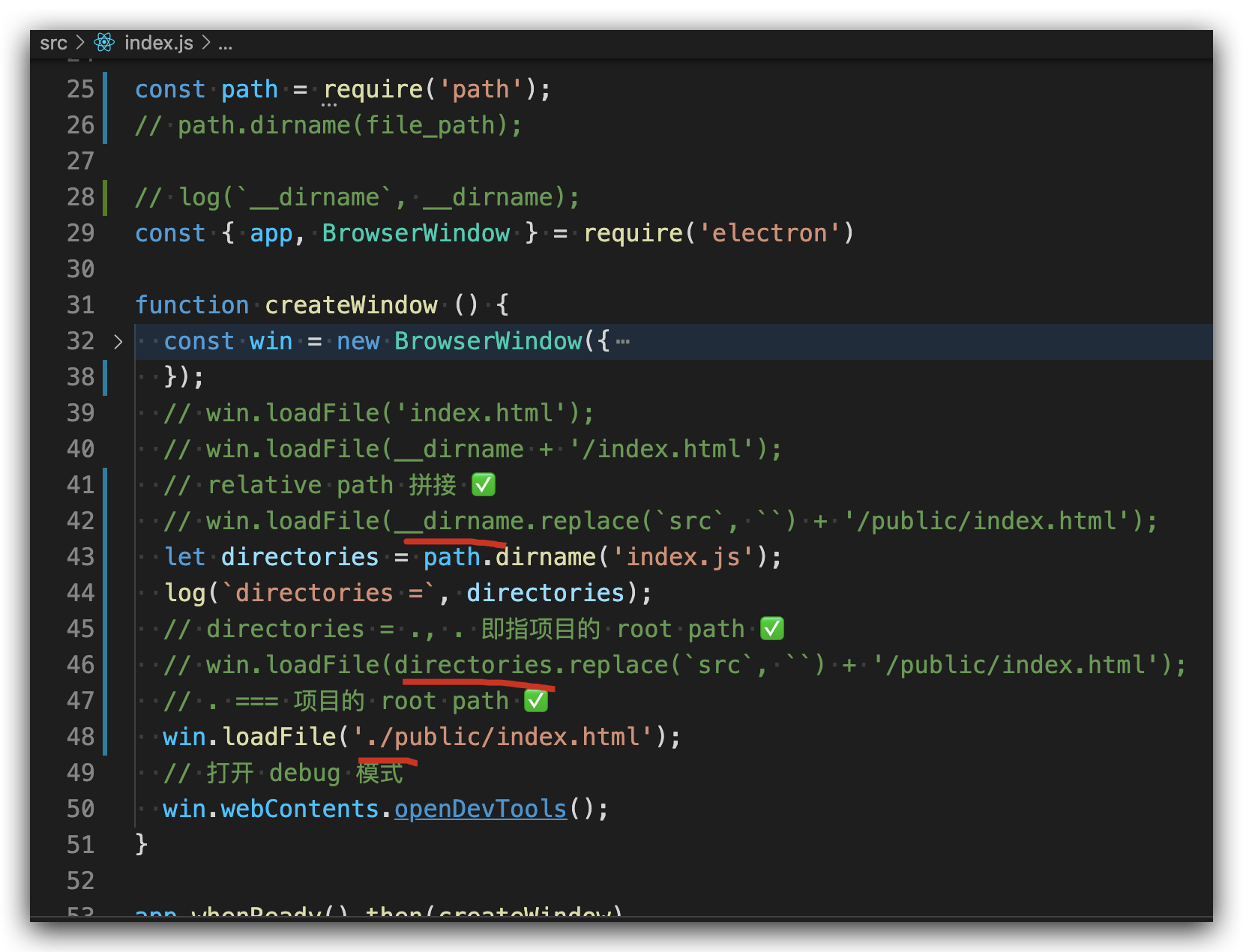
const { app, BrowserWindow } = require('electron')

function createWindow () {

  const win = new BrowserWindow({

    width: 1000,

    height: 700,

    webPreferences: {

      nodeIntegration: true

    }

  })

  // win.loadFile('index.html');

  // win.loadFile(__dirname + '/index.html');

  // relative path 拼接

  // win.loadFile(__dirname.replace(`src`, ``) + '/public/index.html');

  let directories = path.dirname('index.js');

  log(`directories =`, directories);

  // directories = ., . 即指项目的 root path

  // win.loadFile(directories.replace(`src`, ``) + '/public/index.html');

  win.loadFile('./public/index.html');

  // 打开 debug 模式

  win.webContents.openDevTools();

}

app.whenReady().then(createWindow)

app.on('window-all-closed', () => {

  if (process.platform !== 'darwin') {

    app.quit()

  }

})

app.on('activate', () => {

  if (BrowserWindow.getAllWindows().length === 0) {

    createWindow()

  }

})
refs
https://stackoverflow.com/questions/8131344/what-is-the-difference-between-dirname-and-in-node-js

difference between
__dirnameand./in Node.js
https://www.geeksforgeeks.org/difference-between-__dirname-and-in-node-js/
https://www.w3schools.com/nodejs/met_path_dirname.asp
process.cwd()
https://coderrocketfuel.com/article/get-the-path-of-the-current-working-directory-in-node-js
xgqfrms 2012-2020
www.cnblogs.com 发布文章使用:只允许注册用户才可以访问!
Node.js _dirname & path All In One的更多相关文章
- node.js之path
说到node.js,可能实际中用到node进行后台开发的公司不多,大部分人都没有开发后台的经验.但是也要了解node相关模块的用法,因为现在前端自动化脚本的构建,模块的打包越来越离不开node.特别是 ...
- node.js中path路径模块的使用
path模块是node.js中处理路径的核心模块.可以很方便的处理关于文件路径的问题. join() 将多个参数值合并成一个路径 const path = require('path'); conso ...
- Node.js:path、url、querystring模块
Path模块 该模块提供了对文件或目录路径处理的方法,使用require('path')引用. 1.获取文件路径最后部分basename 使用basename(path[,ext])方法来获取路径的最 ...
- node.js(四)path优化(路径优化)
1.normalize函数的基本用法 normalize函数将不符合规范的路径经过格式化转换为标准路径,解析路径中的.与..外,还能去掉多余的斜杠. 如下示例: var path = require( ...
- node.js的path模块
path模块的各种API path.join([...paths]) 参数:paths <string> ,paths参数是字符串,这些字符串按路径片段顺序排列,(A sequence o ...
- 极简 Node.js 入门 - 2.1 Path
极简 Node.js 入门系列教程:https://www.yuque.com/sunluyong/node 本文更佳阅读体验:https://www.yuque.com/sunluyong/node ...
- Node.js 自学之旅
学习基础,JQuery 原生JS有一定基础,有自己一定技术认知(ps:原型链依然迷糊中.闭包6不起来!哎!) 当然最好有语言基础,C#,java,PHP等等.. 最初学习这个东西的原因很简单,在园子里 ...
- [Node.js] Serve Static Files with Express
In this lesson we will find out how to serve static assets (images, css, stylesheets, etc.) with Exp ...
- Node.js 自学之旅(初稿篇)
学习基础,JQuery 原生JS有一定基础,有自己一定技术认知(ps:原型链依然迷糊中.闭包6不起来!哎!) 当然最好有语言基础,C#,java,PHP等等.. 最初学习这个东西的原因很简单,在园子里 ...
随机推荐
- JavaScript中函数的this指向!
JavaScript的this的指向问题! 这是我自己敲的, 报错! <button>点击查看绑定事件的this指向!</button> <script> // 函 ...
- Enabling Session Persistence 粘性会话
NGINX Docs | HTTP Load Balancing https://docs.nginx.com/nginx/admin-guide/load-balancer/http-load-ba ...
- 用Jenkins构建Django持续集成环境
用Jenkins构建Django持续集成环境 - V2EX https://www.v2ex.com/t/32054
- pycharm创建文件夹以及查看源文件存放位置(FOR MAC)
1.首先我们打开pycharm软件,一般首次打开界面如下 2.我们点击creat new project,点击后效果如下,此时创建相应的文件夹 3.创建完成后如下,并可以查看存放文件夹的位置 4.完成 ...
- LOJ10068 秘密的牛奶运输
LOJ10068秘密的牛奶运输 题目描述 Farmer John 要把他的牛奶运输到各个销售点.运输过程中,可以先把牛奶运输到一些销售点,再由这些销售点分别运输到其他销售点. 运输的总距离越小,运输的 ...
- 数据库MySQL——SQL语句(命令)
SQL语句分类 DCL (Data Control Language):数据控制语言:用来管理用户及权限 DDL(Data Definition Language):数据定义语言:用来定义数据库对象: ...
- 关闭Linux - centos7的防火墙
关闭Centos7的防火墙 在每台虚拟机上分别执行以下指令: systemctl stop firewalld.service #停止firewall systemctl disable firewa ...
- 动态代理+静态代理+cglib代理 详解
代理定义:代理(Proxy):是一种设计模式,提供了对目标对象另外的访问方式;即通过代理对象访问目标对象.好处是:可以在目标对象实现的基础上,增强额外的功能操作,即扩展目标对象的功能. 动态代理+静态 ...
- 搭建tdh平台
1.卸载tdh平台(见tdh集群卸载文件夹) 在manager节点执行chmod +x uninstall.sh (非root用户执行sudo chmod +x uninstall.sh)开始卸载TD ...
- F - Cheapest Palindrome
有一个长度为m的字符串,由n种小写字母组成.对应的n种字母在这个字符串加上或者减去都有相应的费用,现在要将这个字符串变成回文串,问最低消费是多少? Keeping track of all the c ...