
使用create-react-app 搭建react + ts + antd框架
一、创建项目
使用npx create-react-app (项目名) --template typescript 创建项目
①如果App.tsx文件有如下报错: (没有报错的请忽略)
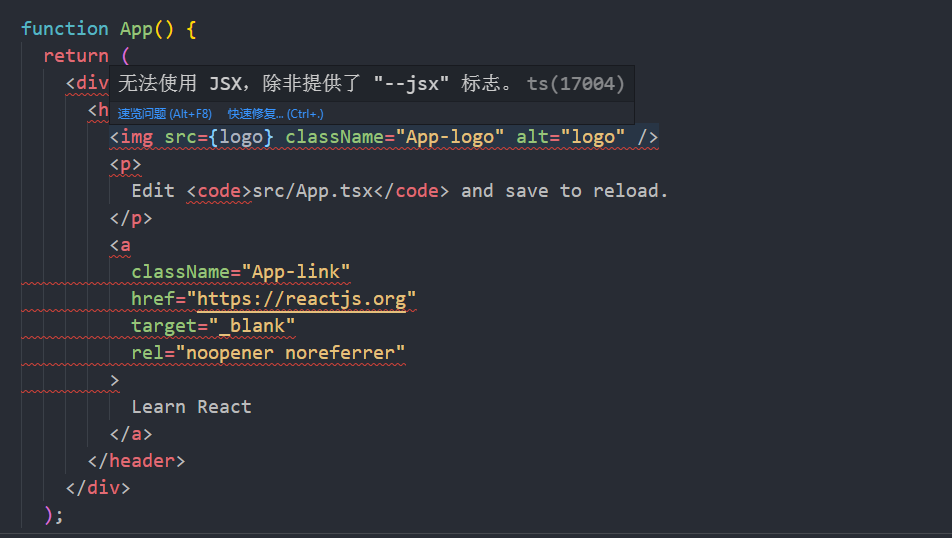
需要将tsconfig.json文件里的 "jsx": "react-jsx" 配置改为 "jsx": "react" 即可。
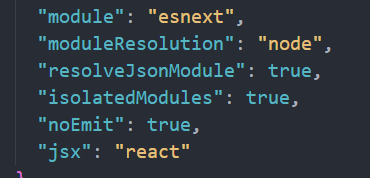
② 此时运行yarn start会报错
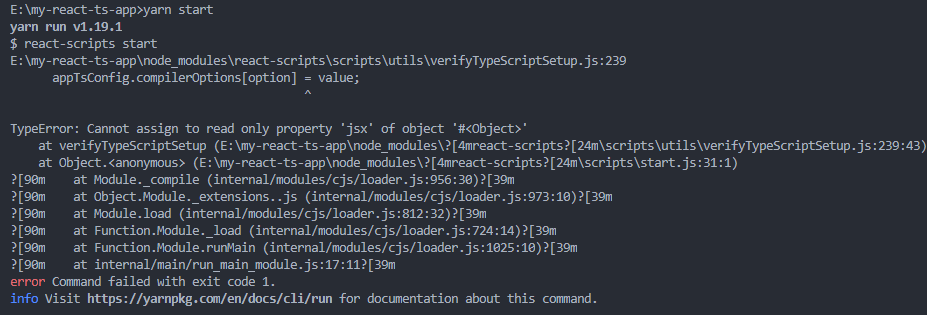
此时需要将react-scripts版本4.0.0降级为3.4.4 (参考: https://stackoverflow.com/questions/64593336/typeerror-cannot-assign-to-read-only-property-paths-of-object-for-compileropt)
③ 如遇到报错 : TypeScript 引入第三方包,报无法找到模块错误 (参考: https://www.cnblogs.com/xym4869/p/13323483.html)
二、安装ant-design 并配置自定义主题、按需加载(参考antd官网)、绝对路径的引用
yarn add antd @craco/craco craco-less
yarn add @babel/plugin-proposal-decorators babel-plugin-import --dev
①修改 package.json 里的 scripts 属性:
"scripts": {

    "start": "set PORT=3000 && craco start",

    "build": "set GENERATE_SOURCEMAP=false && craco build",

    "test": "craco test"

  },
② 在项目根目录创建一个 craco.config.js 用于修改默认配置 (参考: https://blog.csdn.net/qq_39223195/article/details/106287522)
const CracoLessPlugin = require('craco-less');

const path = require('path')

const pathResolve = pathUrl => path.join(__dirname, pathUrl)

module.exports = {

    webpack: {

        alias: {

            '@@': pathResolve('.'),

            '@': pathResolve('src'),

            '@common': pathResolve('src/common'),

            '@config': pathResolve('src/config'),

            '@components': pathResolve('src/components'),

        }

    },

    babel: {

        plugins: [

            ['import', { libraryName: 'antd', style: true }],

            ['@babel/plugin-proposal-decorators', { legacy: true }]

        ]

    },

    plugins: [

        {

            plugin: CracoLessPlugin,

            options: {

                lessLoaderOptions: {

                    lessOptions: {

                        modifyVars: { '@primary-color': 'red' },

                        javascriptEnabled: true,

                    },

                },

            },

        },

    ],

};
③在根目录创建 paths.json 文件
{

    "compilerOptions": {

        "baseUrl": "./",

        "paths": {

          "@@/*": ["./*"],

          "@/*": ["src/*"],

          "@common/*": ["src/common/*"],

          "@config/*": ["src/config/*"],

          "@components/*": ["src/components/*"]

        }

    }

  }
④修改tsconfig.json配置,添加上以下内容。将paths.json文件引入。直接在tsconfig.json文件里写会报错。 这样配置完之后引入文件的时候可以@/xxx/xxx并且会有提示。
"extends": "./paths.json",
⑤ 将App.css和index.css改为App.less和index.less
⑥ demo
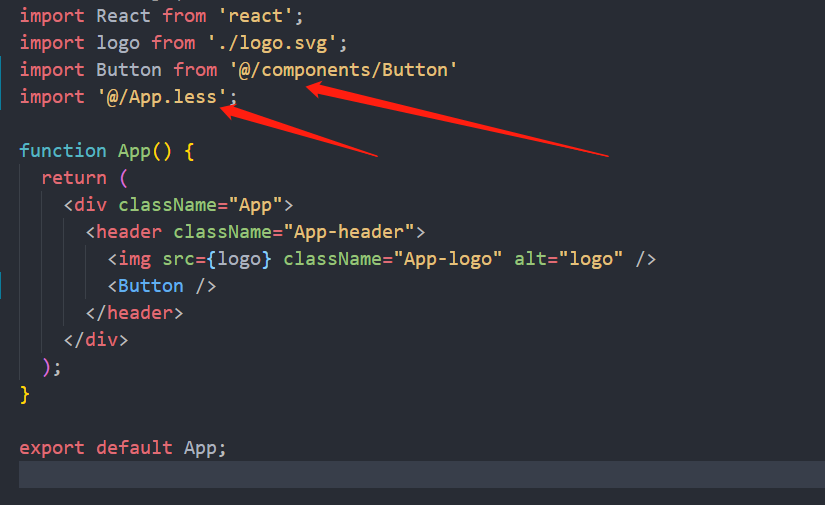
三、代码规范(eslint)的配置 (参考: https://www.npmjs.com/package/eslint)
./node_modules/.bin/eslint --init
如果是windows系统需要将‘/’换成 ‘\’, 然后按照自己的需求来选择配置即可。
使用create-react-app 搭建react + ts + antd框架的更多相关文章
- 从零搭建react+ts组件库(封装antd)
为什么会有这样一篇文章?因为网上的教程/示例只说了怎么做,没有系统详细的介绍引入这些依赖.为什么要这样配置,甚至有些文章还是错的!迫于技术洁癖,我希望更多的开发小伙伴能够真正的理解一个项目搭建各个方面 ...
- 【每天学一点-04】使用脚手架搭建 React+TypeScript+umi.js+Antd 项目
一.使用脚手架搭建项目框架 1.首先使用脚手架搭建React项目(React+TypeScript+Umi.js) 在控制台输入命令:yarn create @umijs/umi-app 2.引入An ...
- Create React App
Facebook开源了React前端框架(MIT Licence),也同时提供了React脚手架 - create-react-app. create-react-app遵循约定优于配置(Coc)的原 ...
- 深入 Create React App 核心概念
本文差点难产而死.因为总结的过程中,多次怀疑本文是对官方文档的直接翻译和简单诺列:同时官方文档很全面,全范围的介绍无疑加深了写作的心智负担.但在最终的梳理中,发现走出了一条与众不同的路,于是坚持分享出 ...
- tap news:week5 0.0 create react app
参考https://blog.csdn.net/qtfying/article/details/78665664 先创建文件夹 安装create react app 这个脚手架(facebook官方提 ...
- 使用create react app教程
This project was bootstrapped with Create React App. Below you will find some information on how to ...
- 如何扩展 Create React App 的 Webpack 配置
如何扩展 Create React App 的 Webpack 配置 原文地址https://zhaozhiming.github.io/blog/2018/01/08/create-react-a ...
- 在 .NET Core 5 中集成 Create React app
翻译自 Camilo Reyes 2021年2月22日的文章 <Integrate Create React app with .NET Core 5> [1] Camilo Reyes ...
- SAAS云平台搭建札记: (四) AntD For React使用react-router-dom路由接收不同参数页面不刷新的问题
在.net开发员眼里,如果使用MVC,根据路由匹配原则,可以通过各种方式接收参数,比如 /Post/List/1, /Post/List/2,或者 /Post/List?id=1,/Post/List ...
随机推荐
- C# 微支付退款查询接口 V3.3.6
#region 微支付退款查询 string Nonce = CreateRandomCode(15).ToLower(); //生成15个随机字符string sign1 = "appid ...
- Windows和Mac两种操作系统下CSS不兼容问题的解决
这两天碰到一个问题,就是一个小图标的大小和定位的位置在不同的操作系统下是不一样的. 查了下资料,自己解决出来了,整理如下: html: <i :class="['cursor-poin ...
- PHP实现Bitmap的探索 - GMP扩展使用
原文地址:https://blog.fanscore.cn/p/22/ 一.背景 公司当前有一个用户群的系统,核心功能是根据不同的条件组去不同的业务线中get符合条件的uid列表,然后存到redis中 ...
- frida框架hook获取方法输出参数(常用于简单的so输出参数获取,快速开发)
一.模板 function douyinencode(data) { var result = {}; Java.perform(function () { try { var Test = Java ...
- ssm整合所用全部依赖pom.xml(idea版)
<?xml version="1.0" encoding="UTF-8"?><project xmlns="http://maven ...
- css自定义字体----使用外部字体文件
css外部自定义字体 给大家分享一个使用的css小技巧!记得收藏呀!相信大家在浏览各种网站会见到各种奇形怪状花里胡哨的文字,还有就是一些浏览器兼容性问题,不会支持一些特殊的字体!给大家分享一个极其简单 ...
- Git之同一台电脑连接多个远程仓库
问题描述 有时候我们需要在同一台电脑上连接多个远程仓库,比如连接两个GitHub账号,那么需要两个条件. 1.生成两对 私钥/公钥,并且密钥文件命名不能重复. 2.push 到remote时区分两个账 ...
- SpringBoot连接多数据源(HBASE,KUDU,ORACLE集成和开发库)
前提:1.连接hadoop需要本地安装 winutils.exe 并在程序指定,不然程序会报错 IOException: HADOOP_HOME or hadoop.home.dir are not ...
- Docker composer搭建Spring Cloud Alibaba 运行环境(二)
" Spring Cloud Alibaba要用到的组件很多,注册中心nacos, 限流sentinel, 数据库,网关等等.由于用到的组件相对较多,部署会很繁琐,最关键的是没有资源服务器, ...
- DOM4J API
1.DOM4J简介 DOM4J是 dom4j.org 出品的一个开源 XML 解析包.DOM4J应用于 Java 平台,采用了 Java 集合框架并完全支持 DOM,SAX 和 JAXP. DOM4J ...