
Elasticsearch第三篇:查询详解
从第一篇开始,我用的ES版本就是7.8.0的,与低版本略有不同,不同点可以参考官方介绍,最大的不同就是抛弃 type 这一概念,为了方便测试,首先建立一个学生成绩的索引库(在建立的同时,规定字段类型,并指定IK中文分词)
PUT http://localhost:9200/db_student
{

    "mappings": {

            "properties": {

                "class": {

                    "type": "integer",

                    "store": true,

                    "index":true

                },

                "chinese": {

                    "type": "integer",

                    "store": true,

                    "index":true

                },

                "english": {

                    "type": "integer",

                    "store": true,

                    "index":true

                },

                "math": {

                    "type": "integer",

                    "store": true,

                    "index":true

                },

                "name": {

                    "type": "text",

                    "store": true,

                    "index":true

                },

                "school": {

                    "type": "text",

                    "store": true,

                    "index":true,

                    "analyzer":"ik_max_word"

                }

            }

    }

}
为了方便测试,需要先插入测试数据,如下,一共插入8条记录
PUT http://localhost:/db_student/_doc/

{

"chinese":,

"class":,

"english":,

"math":,

"name":"Vincent",

"school":"华南理工大学"

}

PUT http://localhost:/db_student/_doc/

{

"chinese":,

"class":,

"english":,

"math":,

"name":"Kitty",

"school":"华南理工大学"

}

PUT http://localhost:/db_student/_doc/

{

"chinese":,

"class":,

"english":,

"math":,

"name":"Thomas",

"school":"华南师范大学"

}

PUT http://localhost:/db_student/_doc/

{

"chinese":,

"class":,

"english":,

"math":,

"name":"Lucy",

"school":"华南师范大学"

}

PUT http://localhost:/db_student/_doc/

{

"chinese":,

"class":,

"english":,

"math":,

"name":"Lily",

"school":"华南农业大学"

}

PUT http://localhost:/db_student/_doc/

{

"chinese":,

"class":,

"english":,

"math":,

"name":"Coco",

"school":"华南农业大学"

}

PUT http://localhost:/db_student/_doc/

{

"chinese":,

"class":,

"english":,

"math":,

"name":"Allen",

"school":"中山大学"

}

PUT http://localhost:/db_student/_doc/

{"chinese":,

"class":,

"english":,

"math":,

"name":"Zack",

"school":"中山大学"

}
打开 Kibana 可以看到已经插入的数据,如下
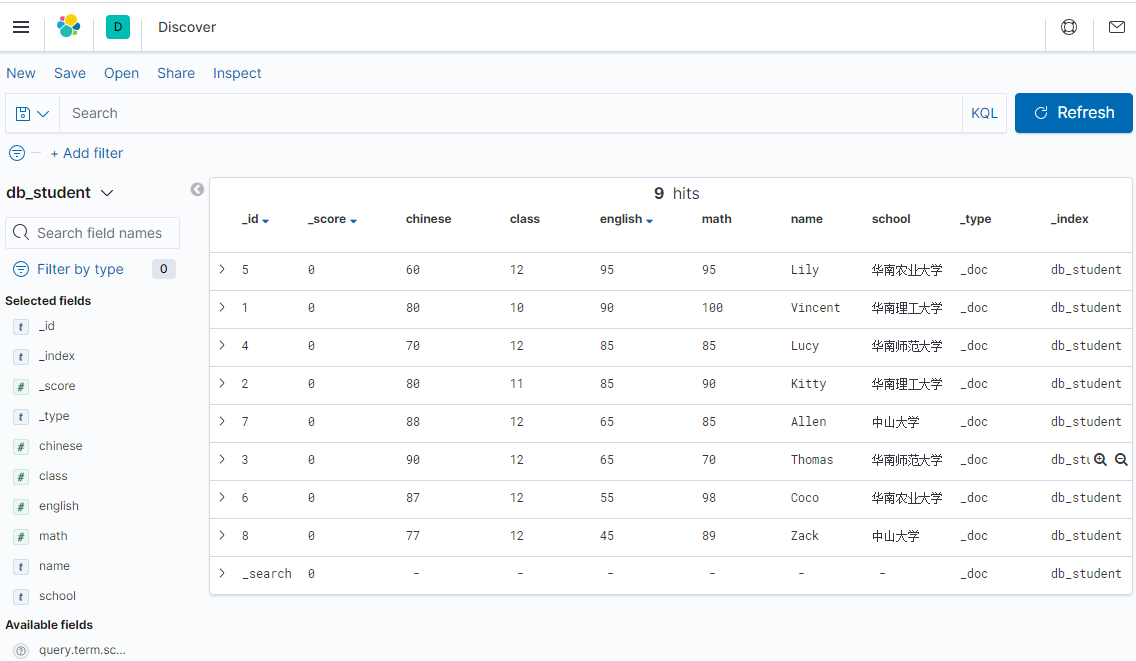
数据已经插入,现在可以来实现基本的查询了。
1、查询所有索引库、所有文档
POST  http://localhost:9200/_search

{

   "query": {

       "match_all": {}

   }
}
2、查询索引库 db_student 所有文档
POST  http://localhost:9200/db_student/_search
或者是 http://localhost:9200/db_student/_doc/_search
{

   "query": {

       "match_all": {}

   }

}
3、根据文档编号 id=1 来获取文档
GET http://localhost:/db_student/_doc/
4、查询 class=10 的学生
注意:term 在这里相当于 = 的逻辑,但是如果是字符串,还可以是包含的逻辑。
POST  http://localhost:/db_student/_search

{

   "query": {

       "bool":{

             "must":[

                   {"term":{"class":}}

             ]

       }

   }

}
5、And 逻辑查询,如查询 class=10 并且 name=vincent 的文档
POST  http://localhost:/db_student/_search

{

  "query": {

     "bool":{

         "must":[

             {"term":{"name":"vincent"}},

             {"term":{"class":}}

         ]

     }

  }

}
6、模糊查询,例如,查询 school 包含 “华南” 的文档
POST  http://localhost:/db_student/_search

{

   "query": {

       "bool":{

             "must":[

                   {"match":{"school":"华南"}}

             ]

       }

   }

}
也可以是term
POST  http://localhost:/db_student/_search

{

   "query": {

       "bool":{

             "must":[

                   {"term":{"school":"华南"}}

             ]

       }

   }

}
7、范围查询,查询 english 大于等于90,小于等于100的文档
注意:from、to 都是闭包的,包含等于
POST   http://localhost:/db_student/_search

{

   "query": {

       "bool":{

             "must":[

                   {"range":{"english":{"from":,"to":}}}

             ]

       }

   }

}
还可以查大于、小于的逻辑,例如查询 english 大于90的文档
注意:gt 表示大于, lt 表示小于 ,这两者都不包含等于
POST http://localhost:/db_student/_search

{

   "query": {

       "bool":{

             "must":[

                   {"range":{"english":{"gt":}}}

             ]

       }

   }

}
8、高亮显示,例如 name 高亮
POST  http://localhost:/db_student/_search

{

   "query": {

      "term":{"name":"vincent"}

   },

   "highlight":{

          "pre_tags" : "<a class='red'>",

          "post_tags" : "</a>",

          "fields" : {

             "name" : {}

        }

   }

}
查询结果是:
{

    "took": ,

    "timed_out": false,

    "_shards": {

        "total": ,

        "successful": ,

        "skipped": ,

        "failed":

    },

    "hits": {

        "total": {

            "value": ,

            "relation": "eq"

        },

        "max_score": .,

        "hits": [

            {

                "_index": "db_student",

                "_type": "_doc",

                "_id": "",

                "_score": .,

                "_source": {

                    "chinese": ,

                    "class": ,

                    "english": ,

                    "math": ,

                    "name": "Vincent",

                    "school": "华南理工大学"

                },

                "highlight": {

                    "name": [

                        "<a class='red'>Vincent</a>"

                    ]

                }

            }

        ]

    }

}
9、分页和排序,先按照 english 倒序,再按 math 升序,每页3条记录,取第一页
POST  http://localhost:/db_student/_search

{

    "query": {

        "match_all":{}

    },

    "from": ,

    "size": ,

    "sort":{

        "english" : {"order" : "desc"},

        "math": {"order" : "asc"}

    }

}
查询结果是
{

    "took": ,

    "timed_out": false,

    "_shards": {

        "total": ,

        "successful": ,

        "skipped": ,

        "failed":

    },

    "hits": {

        "total": {

            "value": ,

            "relation": "eq"

        },

        "max_score": null,

        "hits": [

            {

                "_index": "db_student",

                "_type": "_doc",

                "_id": "",

                "_score": null,

                "_source": {

                    "chinese": ,

                    "class": ,

                    "english": ,

                    "math": ,

                    "name": "Lily",

                    "school": "华南农业大学"

                },

                "sort": [

                    ,

                ]

            },

            {

                "_index": "db_student",

                "_type": "_doc",

                "_id": "",

                "_score": null,

                "_source": {

                    "chinese": ,

                    "class": ,

                    "english": ,

                    "math": ,

                    "name": "Vincent",

                    "school": "华南理工大学"

                },

                "sort": [

                    ,

                ]

            },

            {

                "_index": "db_student",

                "_type": "_doc",

                "_id": "",

                "_score": null,

                "_source": {

                    "chinese": ,

                    "class": ,

                    "english": ,

                    "math": ,

                    "name": "Lucy",

                    "school": "华南师范大学"

                },

                "sort": [

                    ,

                ]

            }

        ]

    }

}
聚合查询、统计查询等等, 稍后补上
Elasticsearch第三篇:查询详解的更多相关文章
- ElasticSearch第四步-查询详解
ElasticSearch系列学习 ElasticSearch第一步-环境配置 ElasticSearch第二步-CRUD之Sense ElasticSearch第三步-中文分词 ElasticSea ...
- 学会Git玩转GitHub(第三篇) 入门详解 - 精简归纳
学会Git玩转GitHub(第三篇) 入门详解 - 精简归纳 JERRY_Z. ~ 2020 / 10 / 25 转载请注明出处!️ 目录 学会Git玩转GitHub(第三篇) 入门详解 - 精简归纳 ...
- elasticsearch系列三:索引详解(分词器、文档管理、路由详解(集群))
一.分词器 1. 认识分词器 1.1 Analyzer 分析器 在ES中一个Analyzer 由下面三种组件组合而成: character filter :字符过滤器,对文本进行字符过滤处理,如 ...
- Mysql高手系列 - 第9篇:详解分组查询,mysql分组有大坑!
这是Mysql系列第9篇. 环境:mysql5.7.25,cmd命令中进行演示. 本篇内容 分组查询语法 聚合函数 单字段分组 多字段分组 分组前筛选数据 分组后筛选数据 where和having的区 ...
- Mysql高手系列 - 第12篇:子查询详解
这是Mysql系列第12篇. 环境:mysql5.7.25,cmd命令中进行演示. 本章节非常重要. 子查询 出现在select语句中的select语句,称为子查询或内查询. 外部的select查询语 ...
- 《手把手教你》系列技巧篇(三十一)-java+ selenium自动化测试- Actions的相关操作-番外篇(详解教程)
1.简介 上一篇中,宏哥说的宏哥在最后提到网站的反爬虫机制,那么宏哥在自己本地做一个网页,没有那个反爬虫的机制,谷歌浏览器是不是就可以验证成功了,宏哥就想验证一下自己想法,于是写了这一篇文章,另外也是 ...
- 《手把手教你》系列技巧篇(三十六)-java+ selenium自动化测试-单选和多选按钮操作-番外篇(详解教程)
1.简介 前边几篇文章是宏哥自己在本地弄了一个单选和多选的demo,然后又找了网上相关联的例子给小伙伴或童鞋们演示了一下如何自动化测试,这一篇宏哥在网上找了一个问卷调查,给小伙伴或童鞋们来演示一下.上 ...
- ThinkPHP视图查询详解
ThinkPHP视图查询详解 参考http://www.jb51.net/article/51674.htm 这篇文章主要介绍了ThinkPHP视图查询,需要的朋友可以参考下 ThinkP ...
- elasticsearch系列二:索引详解(快速入门、索引管理、映射详解、索引别名)
一.快速入门 1. 查看集群的健康状况 http://localhost:9200/_cat http://localhost:9200/_cat/health?v 说明:v是用来要求在结果中返回表头 ...
- (转)Mysql 多表查询详解
MySQL 多表查询详解 一.前言 二.示例 三.注意事项 一.前言 上篇讲到mysql中关键字执行的顺序,只涉及了一张表:实际应用大部分情况下,查询语句都会涉及到多张表格 : 1.1 多表连接有 ...
随机推荐
- python也能玩视频剪辑!moviepy操作记录总结
前几篇文章咱们介绍了一下图片的处理方式,今天咱们说说视频的处理.python能够支持视频的处理么?当然是肯定的,人生苦读,我用python.万物皆可python. moviepy库安装 今天咱们需要使 ...
- Cyber Security - Palo Alto Firewall Objects Addresses, Services, and Groups(3)
LDAP Authentication and Remote Users and Groups Create Remote User Objects and LDAP Integration: sam ...
- Crystal Reports --报表设计
完整的报表解决方案 数据访问—>报表设计—>报表管理—>与应用系统集成 一.规划报表 设计报表的准备工作 谁看报表? 报表的数据是什么?(页眉页脚的内容?是否需要分组?是否需要汇总? ...
- 带你上手阿里开源的 Java 诊断利器:Arthas
本文适合有 Java 基础知识的人群. 本文作者:HelloGitHub-秦人 HelloGitHub 推出的<讲解开源项目>系列,今天给大家带来一款阿里开源的 Java 诊断利器 Art ...
- NPOI Excel设置样式
在表格导出时,会碰到样式修改的问题,作如下简单归纳: //创建行样式ICellStyle style = workbook.CreateCellStyle();//前景色 ...
- PyQt5模型视图委托
Model-View-Delegate 模型视图委托(MVD)是PyQt中特有的设计模式,类似MVC设计模式,将MVC设计模式中的Controller当做MVD中的Delegate,两者的概念基本相同 ...
- Spark入门(第1讲)
一.Spark是什么 引用官方文档的一句话 Apache Spark is a unified analytics engine for large-scale data processing. Ap ...
- 遍历map的6种方式
1,平时开发中对map的使用很多,然后发现了很多map可能存在的各种问题:如HashMap 需要放置 1024 个元素,由于没有设置容量初始大小,随着元素不断增加,容量 7 次被迫扩大,resize ...
- 解决android studio Gradle无法同步问题
打开根目录build.gradle buildscript { repositories { // 添加阿里云 maven 地址 maven { url 'http://maven.aliyun.co ...
- .NET Core 发布到 IIS
①右键项目->属性 将生成配置为Release ②右键项目->重新生成 ③提示生成成功后,右键项目->发布 点击新建,-> 这一步可以选择文件系统, 也可以选择IIS FT 以 ...