
OpenCV 之 图象几何变换
二维平面中,图像的几何变换有等距、相似、仿射、投影等,如下所示:

1 图象几何变换
1.1 等距变换
等距变换 (Isometric Transformation),是一种二维的刚体变换,可理解为旋转和平移的组合
$\quad \begin{bmatrix} x' \\ y' \\ 1 \end{bmatrix} = \begin{bmatrix} \cos \theta & -\sin \theta & t_x \\ \sin \theta & \cos \theta & t_y \\ 0&0&1 \end{bmatrix} \begin{bmatrix} x \\ y \\ 1\end{bmatrix} =\begin{bmatrix} R_{2 \times 2} & T_{2 \times 1} \\ 0_{1 \times 2} & 1_{1 \times 1} \end{bmatrix} \begin{bmatrix} x \\ y \\1 \end{bmatrix}$
其中, $R=\begin{bmatrix} \cos \theta &-\sin\theta \\ \sin \theta & \cos \theta \end{bmatrix}$ 为旋转矩阵, $T=\begin{bmatrix}t_x \\ t_y \end{bmatrix}$ 为平移矩阵
想象一个无限大的光滑平面上,放一张极薄的图像照片,让它只能在平面内做旋转和平移运动,则这样的运动就是等距变换
-- 配图
1.2 相似变换
相似变换 (Similarity Transformation),是一个等距变换和各向均匀缩放的组合
$\quad \begin{bmatrix} x' \\ y' \\ 1 \end{bmatrix} = \begin{bmatrix} s \cos \theta & -s\sin \theta & t_x \\ s \sin \theta & s \cos \theta & t_y \\ 0&0&1 \end{bmatrix} \begin{bmatrix} x \\ y \\ 1\end{bmatrix} = \begin{bmatrix} sR_{2 \times 2} & T_{2 \times 1} \\ 0_{1 \times 2} & 1_{1 \times 1} \end{bmatrix} \begin{bmatrix} x \\ y \\1 \end{bmatrix}$,其中 $s$ 为缩放系数
想象无限大光滑平面内的一张图片,在旋转和平移的过程中,其大小也会均匀缩放,则这样的变换就是相似变换
-- 配图
1.3 仿射变换
1.3.1 定义
仿射变换(Affine Transformation),是一个非奇异线性变变换 (矩阵乘法) 和 平移变换 (向量加法) 的组合
矩阵表达式为 $\quad \begin{bmatrix} x' \\ y' \\ 1 \end{bmatrix} = \begin{bmatrix} a_{11} & a_{12} & t_x \\ a_{21} & a_{22} & t_y \\ 0 & 0 & 1 \end{bmatrix} \begin{bmatrix} x \\ y \\ 1 \end{bmatrix} =\begin{bmatrix} A_{2 \times 2} & T_{2 \times 1} \\ 0_{1 \times 2} & 1_{1 \times 1} \end{bmatrix} \begin{bmatrix} x \\ y \\1 \end{bmatrix}$
其中,当 $A = \begin{bmatrix} a_{11} & a_{12} \\ a_{21} & a_{22} \end{bmatrix}$ 是非奇异的,则称 $A$ 为仿射矩阵
1.3.2 分解
仿射矩阵 $A$ 可分解为:旋转和各向 (正交) 非均匀缩放
$\quad A = R(\theta) R(-\phi) D R(\phi)$,其中 $D = \begin{bmatrix} \lambda_1 & 0 \\ 0 & \lambda_2 \end{bmatrix}$是一个对角矩阵
首先,旋转角度 $\phi$;然后在 $x$ 和 $y$ 方向上 (其中 $x\perp y$) 分别缩放 $\lambda_1$ 和 $\lambda_2$;再旋转角度 $-\phi$,也即回转 $\phi$;最后旋转角度 $\theta$


2 OpenCV 函数
2.1 仿射变换的矩阵
仿射变换有 6 个未知数 ($\phi, \theta, \lambda_1, \lambda_2, t_x, t_y$),需列 6 组方程,而一组对应特征点 $(x,y)$ -> $(x′,y′)$ 可构造 2 个方程,因此,求解 6 个未知数,需要 3 组对应特征点
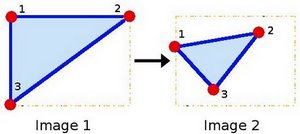
OpenCV 中 getAffineTransform() 可求解 2x3 矩阵 $\begin{bmatrix} a_{11} & a_{12} & t_{x} \\ a_{21} & a_{22} & t_y \end{bmatrix}$
  Mat getAffineTransform (

      const Point2f    src[],  // 源图像的三角形顶点坐标

      const Point2f    dst[]   // 目标图像的三角形顶点坐标

  )
其代码实现比较简单,先构建方程组,再利用 solve() 求解 $Ax=b$
Mat getAffineTransform(const Point2f src[], const Point2f dst[])

{

    Mat M(2, 3, CV_64F), X(6, 1, CV_64F, M.ptr());

    double a[6 * 6], b[6];

    Mat A(6, 6, CV_64F, a), B(6, 1, CV_64F, b);

    for (int i = 0; i < 3; i++)

    {

        int j = i * 12;

        int k = i * 12 + 6;

        a[j] = a[k + 3] = src[i].x;

        a[j + 1] = a[k + 4] = src[i].y;

        a[j + 2] = a[k + 5] = 1;

        a[j + 3] = a[j + 4] = a[j + 5] = 0;

        a[k] = a[k + 1] = a[k + 2] = 0;

        b[i * 2] = dst[i].x;

        b[i * 2 + 1] = dst[i].y;

    }

    solve(A, B, X);

    return M;

}
2.2 相似变换的矩阵
对于相似变换,有 4 个未知数 ($s, \theta, t_x, t_y$),对应 OpenCV 中的 getRotationMatrix2D() 函数
  Mat getRotationMatrix2D (

      Point2f     center,  // 原图像中的旋转中心点

      double      angle,   // 旋转角度(正值代表逆时针旋转)

      double      scale    // 均匀缩放系数

  )
该函数可得到如下矩阵:
$\begin{bmatrix} \alpha & \beta & (1- \alpha ) \cdot \texttt{center.x} - \beta \cdot \texttt{center.y} \\ - \beta & \alpha & \beta \cdot \texttt{center.x} + (1- \alpha ) \cdot \texttt{center.y} \end{bmatrix}$
其中 $\alpha=scale \cdot \cos angle$,$\beta=scale \cdot \sin angle$
2.3 仿射变换的图象
已知仿射变换的 $A_{2 \times 2}$ 和 $T_{2 \times 1}$ ,将原图像带入 warpAffine() ,便可得到仿射变换后的目标图像
void warpAffine(

    InputArray      src,    // 输入图象

    OutputArray     dst,    // 输出图像(大小为 dsize,类型同 src)

    InputArray       M,     // 2x3 矩阵

    Size            dsize,  // 输出图像的大小

    int  flags = INTER_LINEAR,

    int  borderMode = BORDER_CONSTANT,

    const Scalar& borderValue = Scalar()

)
3 代码示例
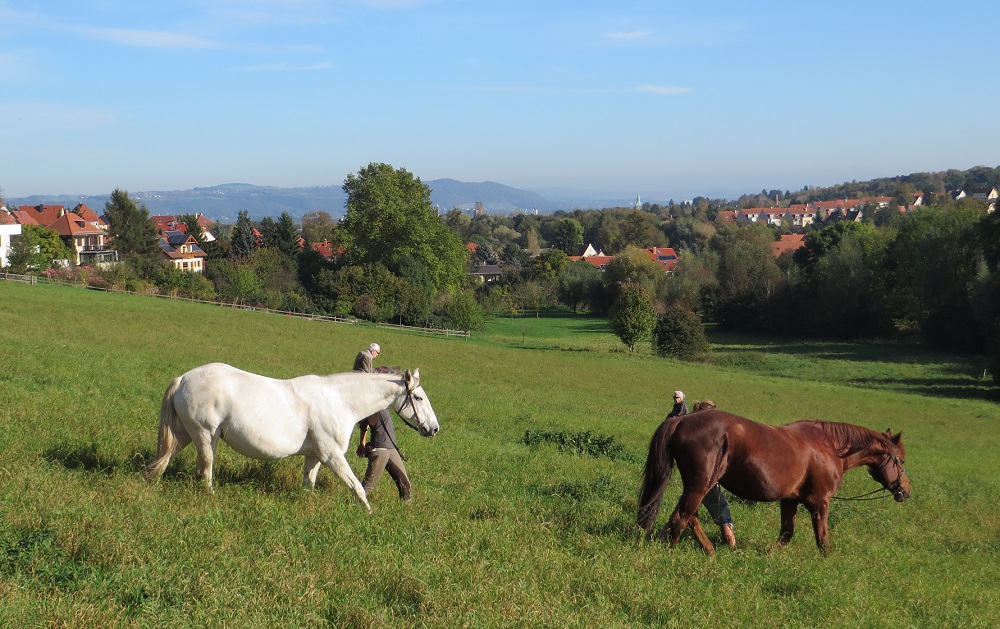
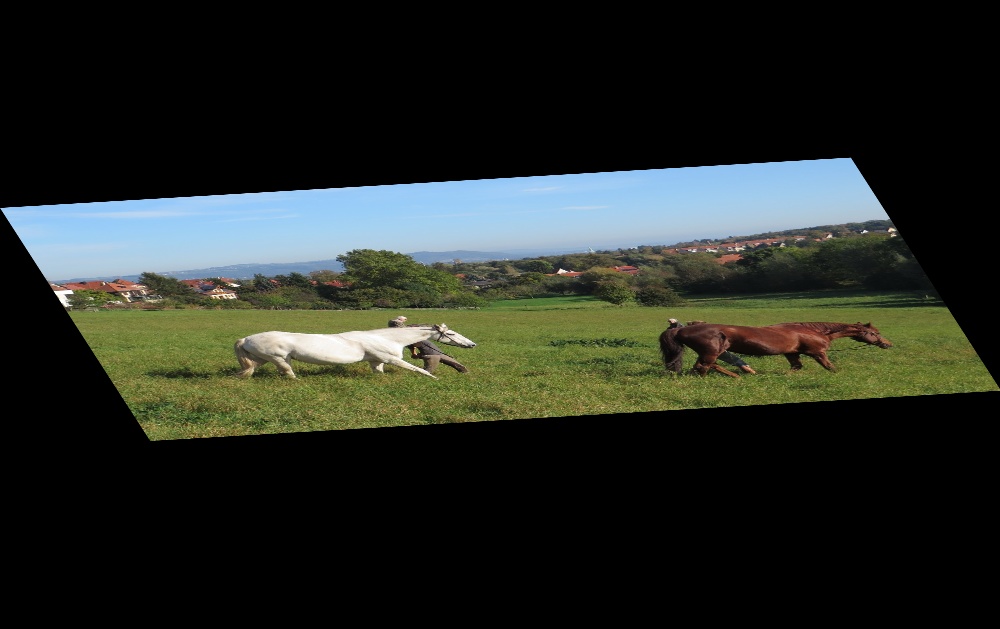
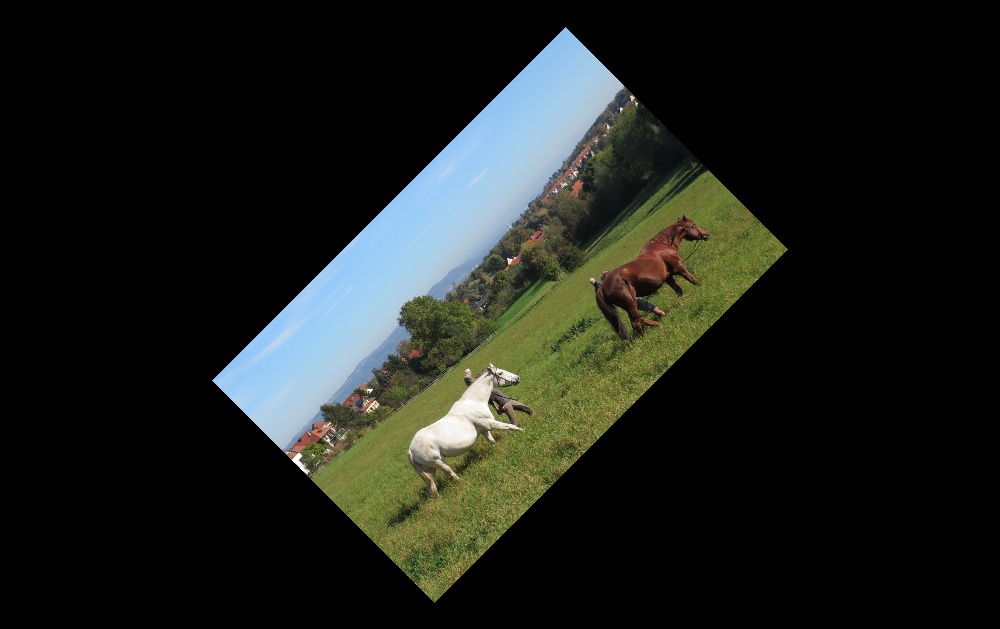
下面代码分别用 getRotationMatrix2D() 求解相似变换的矩阵,getAffineTransform() 仿射变换,并将变换后的目标图像进行比较
#include "opencv2/core.hpp"

#include "opencv2/imgproc.hpp"

#include "opencv2/imgcodecs.hpp"

#include "opencv2/highgui.hpp"

using namespace cv;

int main()

{

    // 1) read image

    Mat src = imread("horse.jpg");

    // 2) triangle vertices

    Point2f srcTri[3];

    srcTri[0] = Point2f(0.f, 0.f);

    srcTri[1] = Point2f(src.cols - 1.f, 0.f);

    srcTri[2] = Point2f(0.f, src.rows - 1.f);

    Point2f dstTri[3];

    dstTri[0] = Point2f(0.f, src.rows * 0.33f);

    dstTri[1] = Point2f(src.cols * 0.85f, src.rows * 0.25f);

    dstTri[2] = Point2f(src.cols * 0.15f, src.rows * 0.7f);

    // 3.1) getAffineTransform

    Mat warp_mat1 = getAffineTransform(srcTri, dstTri);// 3.2) getRotationMatrix2D

    Mat warp_mat2 = getRotationMatrix2D(Point2f(0.5*src.cols, 0.5*src.rows), 45, 0.5);

    // 4) warpAffine image

    Mat dst1,dst2;

    warpAffine(src, dst1, warp_mat1, Size(src.cols, src.rows));

    warpAffine(src, dst2, warp_mat2, Size(src.cols, src.rows));

    // 5) show image

    imshow("image", src);

    imshow("warp affine 1", dst1);

    imshow("warp affine 2", dst2);

    waitKey(0);

}
检测结果对比如下:
参考资料
《Computer Vision: Algorithms and Applications》 Chapter 2 Image Formation
《Multiple View Geometry in Computer Vision》 2.4 A hierarchy of transformations
OpenCV Tutorials / Image Processing (imgproc module) / Affine Transformations
OpenCV-Python Tutorials / Image Processing in OpenCV / Geometric Transformations of Images
OpenCV 之 图象几何变换的更多相关文章
- OpenCV实现图象翻转、滤波、锐化
OpenCV实现图象翻转.滤波.锐化 注:以下代码,使用opencv库函数实现了对图片的翻转.灰度图转换.各种滤波.各种锐化. 库函数相关参数及说明参阅:OpenCV中文站=>opencv教程( ...
- Numpy和OpenCV中的图像几何变换
介绍 上面的图像使它不言而喻什么是几何变换.它是一种应用广泛的图像处理技术.例如,在计算机图形学中有一个简单的用例,用于在较小或较大的屏幕上显示图形内容时简单地重新缩放图形内容. 它也可以应用于扭曲一 ...
- openCV 扩图
1.扩图 import cv2 import numpy as np img=cv2.imread('Test2.jpg',1) width=img.shape[0] height=img.shape ...
- OpenCV——积分图计算
#include <opencv2/opencv.hpp> #include <iostream> #include "math.h" using name ...
- opencv::积分图计算
利用积分图像,可以计算在某象素的上-右方的或者旋转的矩形区域中进行求和.求均值以及标准方差的计算,并且保证运算的复杂度为O(). #include <opencv2/opencv.hpp> ...
- OpenCV学习笔记(6)——几何变换
对图像进行各种变换,如移动,旋转,仿射变换等 变换 opencv提供了两个变换函数cv2.warpAffine cv2.warpPerspective使用这两个函数你可以实现所有类型的变换.前者接收的 ...
- openCV—Python(5)—— 图像几何变换
一.函数简单介绍 1.warpAffine-图像放射变换(平移.旋转.缩放) 函数原型:warpAffine(src, M, dsize, dst=None, flags=None, borderMo ...
- 《opencv学习》 之 几何变换
图像平移: 1.不改变图像大小 2.改变图像大小 编程按照目标图像的角度去编写 不改变大小的平移 1 void imageTranslation1(Mat& src, Mat& dst ...
- Opencv识别图中人脸
#!/usr/bin/python #coding=utf-8 # 识别图片中的人脸 import face_recognition jobs_image = face_recognition.loa ...
随机推荐
- Laravel Homestead 安装 使用教程详解!
1 Laravel Homestead 1 安装: 1 下载: http://www.vagrantup.com/downloads.html 1 配置: 1 1 测试: 1 1 ********** ...
- Web 安全漏洞 All In One
Web 安全漏洞 All In One Web 安全 & 漏洞 输入输出验证不充分 SQL 注入 XSS self-XSS CSRF 目录穿越 文件上传 代码注入 命令注入 信息漏洞 暴力破解 ...
- Online analog video interview
Online analog video interview 在线模拟视频面试 English 口语 https://www.pramp.com/#/ https://www.pramp.com/faq ...
- vuex bug & vue computed setter
vuex bug & vue computed setter https://vuejs.org/v2/guide/computed.html#Computed-Setter [Vue war ...
- macOS & wifi & ip
macOS & wifi & ip mac show wifi ip # wireless ipconfig getifaddr en1 # ethernet ipconfig get ...
- git include只包含某些文件
.gitignore: * # include !.gitignore !a.txt !dir2
- 「NGK每日快讯」2021.2.7日NGK公链第96期官方快讯!
- 交易所频频跑路?Baccarat去中心化交易平台助力资金安全
过去,黑客攻击可能是交易所跑路的最常见原因.自OKEx事件以来,这些交易所暂停提币或跑路还多了一个原因,就是因创始人正在协助调查. 据不完全统计,自OKEx于10月16日宣布暂停提币后不到两个月,已经 ...
- A study on ILC for linear discrete systems with single delay
论文题目就是随笔的题目,以后的随笔的命名都是如此,特此说明. 论文的主要内容是偏理论研究的,引入了离散矩阵延迟指数函数,来处理具有单时滞线性离散系统.对于离散延迟矩阵指数函数其定义为: \[e_{m} ...
- Cannot resolve MVC View
在搭建springboot项目时报错:Cannot resolve MVC View "index" 那是因为在pom中缺少依赖 <dependency> <gr ...