
C# 串口连接的读取与发送
一、串口连接的打开与关闭
串口,即COM口,在.NET中使用 SerialPort 类进行操作。串口开启与关闭,是涉及慢速硬件的IO操作,频繁打开或关闭会影响整体处理速度,甚至导致打开或关闭串口失败。非特殊情况,串口一次性打开后,在退出程序时关闭串口即可。在打开串口前,可以设置一些常用的参数。常用的参数如下:
(1)串口的接受/发送超时时间:ReadTimeout/WriteTimeout。
(2) 串口的接受/发送缓存区大小:ReadBufferSize/WriteBufferSize。
具体代码如下:
 1             // Open Com

 2             _serialPort = new SerialPort(com, baud);

 3             if (_serialPort.IsOpen) _serialPort.Close();

 4

 5             // Set the read / write timeouts

 6             _serialPort.ReadTimeout = 500;

 7             _serialPort.WriteTimeout = 500;

 8

 9             // Set read / write buffer Size,the default of value is 1MB

10             _serialPort.ReadBufferSize = 1024 * 1024;

11             _serialPort.WriteBufferSize = 1024 * 1024;

12

13             _serialPort.Open();

14

15             // Discard Buffer

16             _serialPort.DiscardInBuffer();

17             _serialPort.DiscardOutBuffer();
需要注意的是超出缓冲区的部分会被直接丢弃。因此,如果需要使用串口传送大文件,那接收方和发送方都需要将各自的缓冲区域设置的足够大,以便能够一次性存储下大文件的二进制数组。若条件限制,缓冲区域不能设置过大,那就需要在发送大文件的时候按照发送缓冲区大小分包去发送,接收方按顺序把该数组组合起来形成接受文件的二进制数组。
二、串口发送
串口发送支持二进制发送与文本发送,需要注意的是文本发送时,需要知道转换的规则,一般常用的是ASCII、UTF7、UTF-8、UNICODE、UTF32。具体代码如下:
 1         #region Send

 2         /// <summary>

 3         /// 发送消息(byte数组)

 4         /// </summary>

 5         /// <param name="buffer"></param>

 6         /// <param name="offset"></param>

 7         /// <param name="count"></param>

 8         public void Send(byte[] buffer, int offset, int count)

 9         {

10             lock (_mux)

11             {

12                 _serialPort.Write(buffer, offset, count);

13                 _sendCount += (count - offset);

14             }

15         }

16

17         /// <summary>

18         /// 发送消息(字符串)

19         /// </summary>

20         /// <param name="encoding">字符串编码方式,具体方式见<see cref="Encoding"/></param>

21         /// <param name="message"></param>

22         public void Send(Encoding encoding , string message)

23         {

24             lock (_mux)

25             {

26                 var buffer = encoding.GetBytes(message);

27                 _serialPort.Write(buffer, 0, buffer.Length);

28                 _sendCount += buffer.Length;

29             }

30         }

31         #endregion
三、串口接受
串口接受需要注意,消息接受与消息处理要代码分离。不能把流程处理的代码放入信息接受处,因为消息处理或多或少会有耗时,这会造成当发送方发送过快时,接受方的接受缓冲区会缓存多条消息。我们可以把接受到的消息放入队列中,然后在外部线程中,尝试去拿出该条消息进行消费。采用 “生产-消费”模式。具体代码如下:
 1      #region Receive

 2         private void PushMessage()

 3         {

 4             _serialPort.DataReceived += (sender, e) =>

 5             {

 6                 lock (_mux)

 7                 {

 8                     if (_serialPort.IsOpen == false) return;

 9                     int length = _serialPort.BytesToRead;

10                     byte[] buffer = new byte[length];

11                     _serialPort.Read(buffer, 0, length);

12                     _receiveCount += length;

13                     _messageQueue.Enqueue(buffer);

14                     _messageWaitHandle.Set();

15                 }

16             };

17         }

18

19         /// <summary>

20         /// 获取串口接受到的内容

21         /// </summary>

22         /// <param name="millisecondsToTimeout">取消息的超时时间</param>

23         /// <returns>返回byte数组</returns>

24         public byte[] TryMessage(int millisecondsToTimeout = -1)

25         {

26             if (_messageQueue.TryDequeue(out var message))

27             {

28                 return message;

29             }

30

31             if (_messageWaitHandle.WaitOne(millisecondsToTimeout))

32             {

33                 if (_messageQueue.TryDequeue(out message))

34                 {

35                     return message;

36                 }

37             }

38             return default;

39         }

40         #endregion
四、完整代码与测试结果
串口工具类的完整代码如下:


  1 using System;

  2 using System.Collections.Concurrent;

  3 using System.Collections.Generic;

  4 using System.IO.Ports;

  5 using System.Linq;

  6 using System.Runtime.Serialization;

  7 using System.Text;

  8 using System.Threading;

  9 using System.Threading.Tasks;

 10

 11 namespace SerialportDemo

 12 {

 13     public class SSerialPort

 14     {

 15         private SerialPort _serialPort;

 16         private readonly ConcurrentQueue<byte[]> _messageQueue;

 17         private readonly EventWaitHandle _messageWaitHandle;

 18         private int _receiveCount, _sendCount;

 19         private readonly object _mux;

 20         public int ReceiveCount

 21         {

 22             get => _receiveCount;

 23         }

 24         public   int SendCount

 25         {

 26             get => _sendCount;

 27         }

 28         public SSerialPort(string com, int baud )

 29         {

 30             // initialized

 31             _mux=new object();

 32             _receiveCount = 0;

 33             _sendCount = 0;

 34             _messageQueue = new ConcurrentQueue<byte[]>();

 35             _messageWaitHandle = new EventWaitHandle(false, EventResetMode.AutoReset);

 36

 37             // Open Com

 38             OpenCom(com.ToUpper(),baud);

 39

 40             // Receive byte

 41             PushMessage();

 42         }

 43

 44         private void OpenCom(string com, int baud)

 45         {

 46             // Open Com

 47             _serialPort = new SerialPort(com, baud);

 48             if (_serialPort.IsOpen) _serialPort.Close();

 49

 50             // Set the read / write timeouts

 51             _serialPort.ReadTimeout = 500;

 52             _serialPort.WriteTimeout = 500;

 53

 54             // Set read / write buffer Size,the default of value is 1MB

 55             _serialPort.ReadBufferSize = 1024 * 1024;

 56             _serialPort.WriteBufferSize = 1024 * 1024;

 57

 58             _serialPort.Open();

 59

 60             // Discard Buffer

 61             _serialPort.DiscardInBuffer();

 62             _serialPort.DiscardOutBuffer();

 63         }

 64

 65

 66         #region Static

 67         /// <summary>

 68         /// 获取当前计算机的串行端口名的数组

 69         /// </summary>

 70         /// <returns></returns>

 71         public static string[] GetPortNames()

 72         {

 73             return SerialPort.GetPortNames();

 74         }

 75         #endregion

 76

 77         #region Receive

 78         private void PushMessage()

 79         {

 80             _serialPort.DataReceived += (sender, e) =>

 81             {

 82                 lock (_mux)

 83                 {

 84                     if (_serialPort.IsOpen == false) return;

 85                     int length = _serialPort.BytesToRead;

 86                     byte[] buffer = new byte[length];

 87                     _serialPort.Read(buffer, 0, length);

 88                     _receiveCount += length;

 89                     _messageQueue.Enqueue(buffer);

 90                     _messageWaitHandle.Set();

 91                 }

 92             };

 93         }

 94

 95         /// <summary>

 96         /// 获取串口接受到的内容

 97         /// </summary>

 98         /// <param name="millisecondsToTimeout">取消息的超时时间</param>

 99         /// <returns>返回byte数组</returns>

100         public byte[] TryMessage(int millisecondsToTimeout = -1)

101         {

102             if (_messageQueue.TryDequeue(out var message))

103             {

104                 return message;

105             }

106

107             if (_messageWaitHandle.WaitOne(millisecondsToTimeout))

108             {

109                 if (_messageQueue.TryDequeue(out message))

110                 {

111                     return message;

112                 }

113             }

114             return default;

115         }

116         #endregion

117

118

119         #region Send

120         /// <summary>

121         /// 发送消息(byte数组)

122         /// </summary>

123         /// <param name="buffer"></param>

124         /// <param name="offset"></param>

125         /// <param name="count"></param>

126         public void Send(byte[] buffer, int offset, int count)

127         {

128             lock (_mux)

129             {

130                 _serialPort.Write(buffer, offset, count);

131                 _sendCount += (count - offset);

132             }

133         }

134

135         /// <summary>

136         /// 发送消息(字符串)

137         /// </summary>

138         /// <param name="encoding">字符串编码方式,具体方式见<see cref="Encoding"/></param>

139         /// <param name="message"></param>

140         public void Send(Encoding encoding , string message)

141         {

142             lock (_mux)

143             {

144                 var buffer = encoding.GetBytes(message);

145                 _serialPort.Write(buffer, 0, buffer.Length);

146                 _sendCount += buffer.Length;

147             }

148         }

149         #endregion

150

151         /// <summary>

152         /// 清空接受/发送总数统计

153         /// </summary>

154         public  void ClearCount()

155         {

156             lock (_mux)

157             {

158                 _sendCount = 0;

159                 _receiveCount = 0;

160             }

161         }

162

163         /// <summary>

164         /// 关闭串口

165         /// </summary>

166         public void Close()

167         {

168             _serialPort.Close();

169         }

170     }

171 }
测试代码如下:
 1  class Program

 2     {

 3         static void Main(string[] args)

 4         {

 5             Console.WriteLine($"该计算机可使用的串口列表:{string.Join(",", SSerialPort.GetPortNames())}");

 6

 7             Console.Write("请输入需要打开的串口:");

 8             string port = Console.ReadLine();

 9             SSerialPort com = new SSerialPort(port, 57600);

10             Console.WriteLine($"串口 {port} 打开成功...");

11

12             Console.Write("请输入需要打开的串口发送的消息:");

13             string text = Console.ReadLine();

14

15             while (true)

16             {

17                 com.Send(Encoding.Default, text);

18                 Console.WriteLine($"总共发送 {com.SendCount}");

19                 var message = com.TryMessage();

20                 if (message != null)

21                 {

22                     Console.WriteLine($"{DateTime.Now.ToString("HH:mm:ss fff")} {Encoding.Default.GetString(message)}");

23

24                     //// TEST:从添加延时可以测试到,接受消息和处理消息必须分不同线程处理。因为对于消息的处理或多或少都需要耗时,这样容易造成消息处理不及时。而添加到队列后,我们可以随时取出处理

25                     //System.Threading.Thread.Sleep(100*1);

26                 }

27                 Console.WriteLine($"总共接受 {com.ReceiveCount}");

28             }

29

30

31             Console.ReadKey();

32         }

33     }
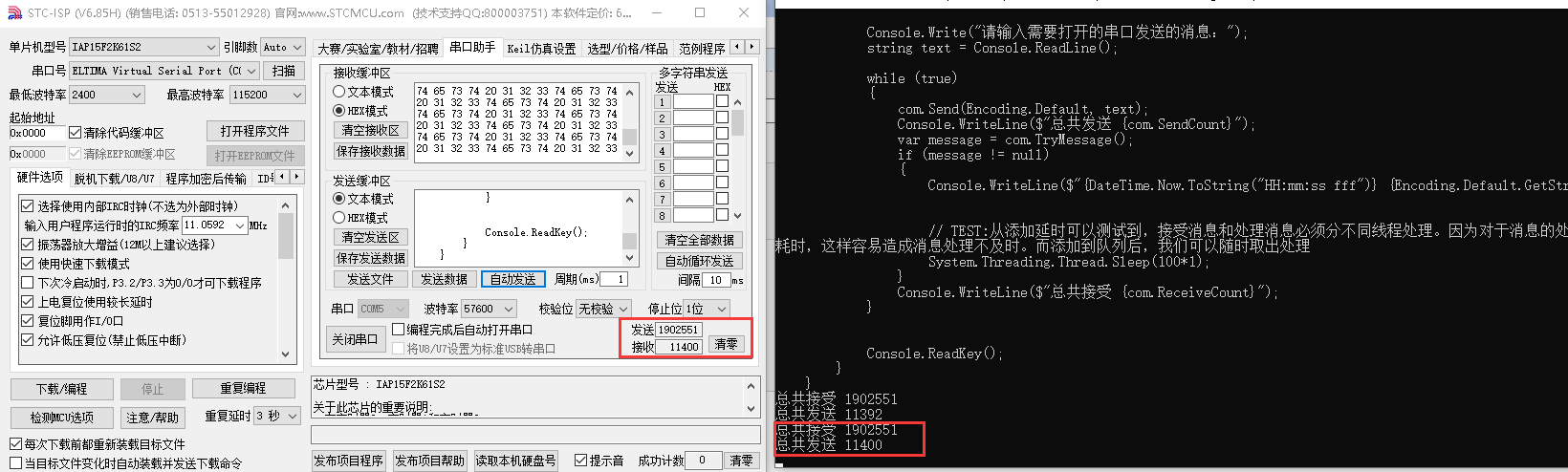
使用串口工具测试如下,对于串口的接受如丝般顺滑。当我们在消息中增加测试延时后,就会发现当串口工具继续快速发送一段时间后关闭发送,发现使用队列后,依然没有丢失一条来自发送方的消息。
C# 串口连接的读取与发送的更多相关文章
- Qt 串口连接
Qt 串口连接 使用 Qt 开发上位机程序时,经常需要用到串口,在 Qt 中访问串口比较简单,因为 Qt 已经提供了 QSerialPort 和 QSerialPortInfo 这两个类用于访问串口. ...
- [转载]使用HttpWebRequest进行请求时发生错误:基础连接已关闭,发送时发生错误处理
转载,原文来自 http://blog.csdn.net/hawksoft/article/details/21776009 最近调试原来的微信模拟登陆时发生了“基础连接已关闭,发送时发生错误”的错误 ...
- (微信API接口开发) 使用HttpWebRequest进行请求时发生错误:基础连接已关闭,发送时发生错误处理
最近调试原来的微信模拟登陆时发生了“基础连接已关闭,发送时发生错误”的错误提示,原来都是好好的,只是很久没用了. 出错代码如下: HttpWebRequest req = (HttpWebReques ...
- 使用HttpWebRequest进行请求时发生错误:基础连接已关闭,发送时发生错误处理
原文地址:http://blog.csdn.net/hawksoft/article/details/21776009 最近调试原来的微信模拟登陆时发生了“基础连接已关闭,发送时发生错误”的错误提示, ...
- 【嵌入式开发】嵌入式 开发环境 (远程登录 | 文件共享 | NFS TFTP 服务器 | 串口连接 | Win8.1 + RedHat Enterprise 6.3 + Vmware11)
作者 : 万境绝尘 博客地址 : http://blog.csdn.net/shulianghan/article/details/42254237 一. 相关工具下载 嵌入式开发工具包 : -- 下 ...
- 【记录】恢复win7与ARM开发板TQ2440的串口连接
1.给板子上电. 2.接好物理上的串口连接,板子那端就是普通的RS232串口,电脑这端是USB转串口的线的USB这头,连到电脑上,然后在Win7系统下,先去看看,当前连接的USB虚拟出来的串口是哪个口 ...
- 基于STM32之UART串口通信协议(二)发送
一.前言 1.简介 在上一篇UART详解中,已经有了关于UART的详细介绍了,也有关于如何使用STM32CubeMX来配置UART的操作了,而在该篇博客,主要会讲解一下如何实现UART串口的发送功能. ...
- c# winform读取及发送串口信号
请参考C#的API文档:https://docs.microsoft.com/zh-cn/dotnet/api/system.io.ports.serialport?redirectedfrom=MS ...
- Android蓝牙连接以及数据接收发送
1.加入权限 <uses-feature android:name="android.hardware.bluetooth_le" android:required=&quo ...
随机推荐
- Python学习随笔:使用xlwings设置和操作excel多行多列数据以及设置数据字体颜色填充色对齐方式的方法
☞ ░ 前往老猿Python博文目录 ░ 在前面老猿的文章中,<Python学习随笔:使用xlwings读取和操作Excel文件>.<Python学习随笔:使用xlwings读取和操 ...
- 第十一章、Designer中主窗口QMainWindow类
老猿Python博文目录 专栏:使用PyQt开发图形界面Python应用 老猿Python博客地址 一.概述 主窗口对象是在新建窗口对象时,选择main window类型的模板时创建的窗口对象,如图: ...
- 小程序setData 修改数组附带索引解决办法
this.setData({'judge[current]':true}); 以此句进行修改值,会报错 Error: Only digits (0-9) can be put inside [] in ...
- 2020中国.NET开发者峰会主题内容发布
2020年12月09日,组委会正式发布了China .NET Conf 2020中国 .NET 开发者峰会的主题内容. 今年的大会主题收到超预期的主题,无论是数量还是质量上都比2019年有所进步,这也 ...
- 题解-CmdOI2019 口头禅
题面 CmdOI2019 口头禅 给 \(n\) 个 \(01\) 串 \(s_i\),\(m\) 个询问问 \(s_{l\sim r}\) 的最长公共子串长度. 数据范围:\(1\le n\le 2 ...
- 博流BL602&BL604开发板介绍
在2020松山湖论坛上,博流智能科技(南京)有限公司销售副总裁刘占领介绍了基于RISC-V核的低功耗.高可靠Wi-Fi+BLE二合一SoC芯片BL602.主要应用领域包括人工智能与工业互联网,特别是电 ...
- 【UV统计】海量数据统计的前世今生
转载请注明出处 背景 在互联网公司中,每个项目都需要数据统计.分析,便于项目组利用详细数据研究项目的整体情况,进行下一步的调整.在数据统计中,UV统计是最常见的,也是最普遍的.有的场景要求实时性很高, ...
- 实验楼表关系建立 (课程模块·5张表)
实验楼表关系图 from utils.MyBaseModel import Base from django.db import models # # Create your models here. ...
- tp5使用PHPExcel(下载引入/composer与模板/生成方式搭配使用)
PHPExcel使用 一:引入 tp5.0,tp5.1: 1:composer方式 a:根目录下执行:composer require phpoffice/phpexcel b:引入(可new \PH ...
- python 利用cvxopt线性规划
from cvxopt import matrix, solvers ################################################################# ...