
LVS-DR:搭建HTTP和HTTPS负载均衡集群
LVS-DR实战:搭建HTTP和HTTPS负载均衡集群
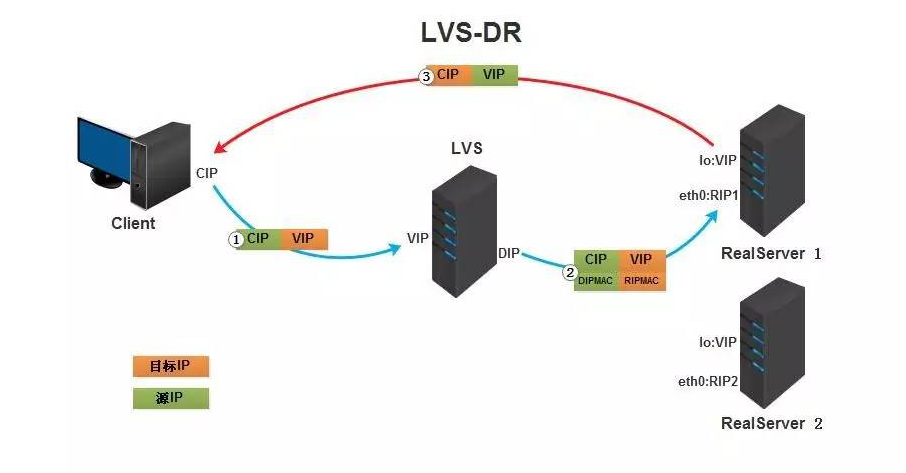
DR模式是通过director将报文源和目标MAC地址修改,发送给RS,RS将响应报文直接发送给client。
环境说明:
| LVS服务器(DR) | DIP:192.168.32.125 | VIP:192.168.32.250 |
|---|---|---|
| apache服务器(RS) | IP:192.168.32.130 | VIP:192.168.32.250 |
| apache服务器(RS) | IP:192.168.32.135 | VIP:192.168.32.250 |
三台机器分别配置了对应的本地静态地址DIP和RIP,VIP之后配置
1. 搭建lvs-dr模式的http负载集群
LVS服务器配置要点
LVS是被编译进内核中,主要分为两部分ipvs和ipvsadm,ipvs是LVS软件核心,是运行在LB上的,这是个基于ip层的负载均衡;ipvsadm是用户空间的集群管理工具。
要想起到负载均衡效果,那么所有请求报文必须发往LVS服务器(DS),然后DS根据指定算法分发到后端服务器上,因此DS必须配置VIP地址,VIP是与公网client通信地址,这样DS才能接受到请求报文进行分发。
一定要先设置好内核参数在配置VIP,如果先配置VIP,VIP配置好后会立即通告给所有人,而修改内核参数就是为了不通告
LVS-DR模式的注意情况:
VS 的VIP 和 RS 必须在同一个网段,不然广播后所有的包都会丢掉: 提前确认LVS/硬件LB 是什么模式,是否需要在同一个网段 所有的RS都必须绑定VIP的IP地址,否则RS收到package后发现dst 不是自己的IP,所有包都会丢掉。 RS处理完包后直接把package 通过dst IP 发送给 client ,不通过LVS/迎接IP 了这样的LVS /VIP 效率会更高一点。【通过把realserver的ip暴漏给外界,不是很安全】
1.1 LVS上配置IP
[root@DR ~]# ip addr add 192.168.32.250/32 dev eth0

[root@DR ~]# ip a

1: lo: <LOOPBACK,UP,LOWER_UP> mtu 65536 qdisc noqueue state UNKNOWN group default qlen 1000

    link/loopback 00:00:00:00:00:00 brd 00:00:00:00:00:00

    inet 127.0.0.1/8 scope host lo

       valid_lft forever preferred_lft forever

    inet6 ::1/128 scope host

       valid_lft forever preferred_lft forever

2: eth0: <BROADCAST,MULTICAST,UP,LOWER_UP> mtu 1500 qdisc pfifo_fast state UP group default qlen 1000

    link/ether 00:0c:29:39:18:a9 brd ff:ff:ff:ff:ff:ff

    inet 192.168.32.125/24 brd 192.168.32.255 scope global noprefixroute eth0

       valid_lft forever preferred_lft forever

    inet 192.168.32.250/32 scope global eth0

       valid_lft forever preferred_lft forever

    inet6 fe80::20c:29ff:fe39:18a9/64 scope link

       valid_lft forever preferred_lft forever
1.2 RS上配置arp内核参数
[root@RS-1 ~]# vim /etc/sysctl.conf

#添加以下两行

net.ipv4.conf.all.arp_ignore = 1

# 将对应网卡设置为只回应目标IP为自身接口地址的ARP请求

net.ipv4.conf.all.arp_announce = 2

# 将ARP请求的源IP设置为eth0上的IP,也就是RIP

[root@RS-1 ~]# sysctl -p

net.ipv4.conf.all.arp_ignore = 1

net.ipv4.conf.all.arp_announce = 2

##两台RS都要进行以上操作

[root@RS-2 ~]# echo 'net.ipv4.conf.all.arp_ignore = 1' >> /etc/sysctl.conf

[root@RS-2 ~]# echo 'net.ipv4.conf.all.arp_announce = 2' >> /etc/sysctl.conf

[root@RS-2 ~]# sysctl -p

net.ipv4.conf.all.arp_ignore = 1

net.ipv4.conf.all.arp_announce = 2
1.3 RS上配置VIP
一定要先设置好内核参数在配置VIP,如果先配置VIP,VIP配置好后会立即通告给所有人,而修改内核参数就是为了不通告
LVS服务器的eth0网卡的IP:192.168.32.250作为VIP
两台RS上都要做
[root@RS-1 ~] ip addr add 192.168.32.250/32 dev lo

[root@RS-2 ~] ip addr add 192.168.32.250/32 dev lo

#永久生效在配置文件中加IP
所有RS上都要做
[root@RS-1 ~]# route add -host 192.168.32.250/32 dev lo

#永久配置

		echo '192.168.32.250/32 via dev lo' > /etc/sysconfig/network-scripts/route-lo

[root@RS-2 ~]# route add -host 192.168.135.131/32 dev lo
1.4 DR上配置lvs-dr转发规则
#LVS依赖于ipvsadm来进行配置,所以我们首先先安装ipvsadm

[root@DR ~]# yum -y install ipvsadm

[root@DR ~]# ipvsadm -A -t 192.168.32.250:80 -s rr

[root@DR ~]# ipvsadm -a -t 192.168.32.250:80 -r 192.168.32.130:80 -g

[root@DR ~]# ipvsadm -a -t 192.168.32.250:80 -r 192.168.32.135:80 -g

[root@DR ~]# ipvsadm -Sn

-A -t 192.168.32.250:80 -s rr

-a -t 192.168.32.250:80 -r 192.168.32.130:80 -m -w 1

-a -t 192.168.32.250:80 -r 192.168.32.135:80 -m -w 1

[root@DR ~]# ipvsadm -Sn > /etc/sysconfig/ipvsadm
1.5 RS上配置http并启动
[root@RS-1 ~]# yum -y install httpd

[root@RS-1 ~]# echo 'rs1' > /var/www/html/index.html

[root@RS-1 ~]# systemctl start httpd

[root@RS-2 ~]# yum -y install httpd

[root@RS-2 ~]# echo 'rs1' > /var/www/html/index.html

[root@RS-2 ~]# systemctl start httpd
1.6 客户端访问测试
[root@localhost ~]# for i in $(seq 10);do curl 192.168.32.250:80;done

rs2

rs1

rs2

rs1

rs2

rs1

rs2

rs1

rs2

rs1
搭建https的负载集群
在以上配置基础下搭建https
1. LVS服务器搭建CA服务端
1.生成密钥对
[root@DR ~]# cd /etc/pki/CA/

[root@DR CA]# (ls)

certs  crl  newcerts  private

[root@DR CA]# (umask 077;openssl genrsa -out private/cakey.pem 2048)

Generating RSA private key, 2048 bit long modulus

.................................+++

.........................................................................................+++

e is 65537 (0x10001)

[root@DR CA]# openssl rsa -in private/cakey.pem -pubout

writing RSA key

-----BEGIN PUBLIC KEY-----

MIIBIjANBgkqhkiG9w0BAQEFAAOCAQ8AMIIBCgKCAQEAxBHetLa8VvcmikZNDbG/

tXsbrxvCBsMnsMcwqCKLupcZiRhlUgjY+AAYPrBM5sE8jlJAW/mEGZc1fHG30ruU

5Lnbh2NeHrHJZUuZS6WYCslDKzd0KRDW2GR43CtfqLmFc8g+3DWIqEdeXrH29o5L

cm4AsfeqjBQaNIoNXKcnl/7Yc0mJK+yp3AHO4EFadXTQF+nx6A0mfVRw254h4lgP

6YdL3izUlG2JZ5kqZfytMzG1lKz+O651alNo+Lq14mSKxJArLAT5mWvJ/JJXH/7q

qIHk1RPHQ2XkZyk7QONhjLfZN9aY1h3EawAoBH8etbasbUoPWaUeV+wxzDqPF4pY

qQIDAQAB

-----END PUBLIC KEY-----
2.生成自签署证书
[root@DR CA]#  openssl req -new -x509 -key private/cakey.pem -out cacert.pem -days 1024

You are about to be asked to enter information that will be incorporated

into your certificate request.

What you are about to enter is what is called a Distinguished Name or a DN.

There are quite a few fields but you can leave some blank

For some fields there will be a default value,

If you enter '.', the field will be left blank.

-----

Country Name (2 letter code) [XX]:CN

State or Province Name (full name) []:HB

Locality Name (eg, city) [Default City]:WH

Organization Name (eg, company) [Default Company Ltd]:runtime

Organizational Unit Name (eg, section) []:runtime

Common Name (eg, your name or your server's hostname) []:runtime

Email Address []:

[root@DR CA]#

[root@DR CA]# touch index.txt && echo 01 > serial
3.RS生成证书签署请求,并发送给CA
#RS-1(httpd服务器)生成密钥

[root@RS-1 ssl]# (umask 077;openssl genrsa -out httpd.key 2048)

Generating RSA private key, 2048 bit long modulus

...................................................................................................................................................................................................................................................+++

................+++

e is 65537 (0x10001)

#RS-1(httpd服务器)生成证书签署请求

[root@RS-1 ~]# mkdir /etc/httpd/ssl

[root@RS-1 ~]# cd /etc/httpd/ssl

[root@RS-1 ssl]# openssl req -new -key httpd.key -days 1024 -out httpd.csr

You are about to be asked to enter information that will be incorporated

into your certificate request.

What you are about to enter is what is called a Distinguished Name or a DN.

There are quite a few fields but you can leave some blank

For some fields there will be a default value,

If you enter '.', the field will be left blank.

-----

Country Name (2 letter code) [XX]:CN

State or Province Name (full name) []:HB

Locality Name (eg, city) [Default City]:WH

Organization Name (eg, company) [Default Company Ltd]:runtime

Organizational Unit Name (eg, section) []:runtime

Common Name (eg, your name or your server's hostname) []:runtime

Email Address []:

Please enter the following 'extra' attributes

to be sent with your certificate request

A challenge password []:

An optional company name []:

[root@RS-1 ssl]#

[root@RS-1 ssl]# ls

httpd.csr  httpd.key

#把证书签署请求文件发送给CA

[root@RS-1 ssl]# scp httpd.csr root@192.168.32.125:/root
4.CA签署证书并发给客户端
[root@DR ~]# ls

anaconda-ks.cfg  httpd.csr

[root@DR ~]# openssl ca -in /root/httpd.csr -out httpd.crt -days 1024

Using configuration from /etc/pki/tls/openssl.cnf

Check that the request matches the signature

Signature ok

Certificate Details:

        Serial Number: 1 (0x1)

        Validity

            Not Before: Jul 24 15:27:28 2020 GMT

            Not After : May 14 15:27:28 2023 GMT

        Subject:

            countryName               = CN

            stateOrProvinceName       = HB

            organizationName          = runtime

            organizationalUnitName    = runtime

            commonName                = runtime

        X509v3 extensions:

            X509v3 Basic Constraints:

                CA:FALSE

            Netscape Comment:

                OpenSSL Generated Certificate

            X509v3 Subject Key Identifier:

                51:C2:11:E1:0D:86:FB:40:79:0B:F3:DD:5E:49:71:C6:D3:88:41:B1

            X509v3 Authority Key Identifier:

                keyid:31:D2:0A:8F:D2:DD:B9:3E:EE:05:B5:1B:58:C4:AF:8C:45:3B:C8:A0

Certificate is to be certified until May 14 15:27:28 2023 GMT (1024 days)

Sign the certificate? [y/n]:y

1 out of 1 certificate requests certified, commit? [y/n]y

Write out database with 1 new entries

Data Base Updated

[root@DR ~]# ls

anaconda-ks.cfg  httpd.crt  httpd.csr

#CA把签署好的证书httpd.crt和服务端的证书cacert.pem发给客户端

[root@DR ~]# scp httpd.crt root@192.168.32.130:/etc/httpd/ssl

[root@DR ~]# scp cacert.pem root@192.168.32.130:/etc/httpd/ssl
2.配置https
1.将RS-1的证书和密钥发给RS-2
[root@RS-2 ~]# yum -y install mod_ssl

[root@RS-2 ~]# mkdir /etc/httpd/ssl

[root@RS-1 ~]# yum -y install mod_ssl

[root@RS-1 ssl]# ls

cacert.pem  httpd.crt  httpd.csr  httpd.key

[root@RS-1 ssl]# scp cacert.pem httpd.crt httpd.key root@192.168.32.135:/etc/httpd/ssl

root@192.168.32.135's password:

cacert.pem                                                       100% 1294     1.4MB/s   00:00

httpd.crt                                                        100% 4416     5.4MB/s   00:00

httpd.key

#RS-2上查看

[root@RS-2 ~]# ls /etc/httpd/ssl/

cacert.pem  httpd.crt  httpd.key
2.修改https配置文件
[root@RS-1 ~]# vim /etc/httpd/conf.d/ssl.conf

//修改后如下所示

#   Server Certificate:

# Point SSLCertificateFile at a PEM encoded certificate.  If

# the certificate is encrypted, then you will be prompted for a

# pass phrase.  Note that a kill -HUP will prompt again.  A new

# certificate can be generated using the genkey(1) command.

SSLCertificateFile /etc/httpd/ssl/httpd.crt

#   Server Private Key:

#   If the key is not combined with the certificate, use this

#   directive to point at the key file.  Keep in mind that if

#   you've both a RSA and a DSA private key you can configure

#   both in parallel (to also allow the use of DSA ciphers, etc.)

SSLCertificateKeyFile /etc/httpd/ssl/httpd.key

#   Server Certificate Chain:

#   Point SSLCertificateChainFile at a file containing the

#   concatenation of PEM encoded CA certificates which form the

#   certificate chain for the server certificate. Alternatively

#   the referenced file can be the same as SSLCertificateFile

#   when the CA certificates are directly appended to the server

#   certificate for convinience.

#SSLCertificateChainFile /etc/pki/tls/certs/server-chain.crt

#   Certificate Authority (CA):

#   Set the CA certificate verification path where to find CA

#   certificates for client authentication or alternatively one

#   huge file containing all of them (file must be PEM encoded)

SSLCACertificateFile /etc/httpd/ssl/cacert.pem

#重启服务

[root@RS-1 ~]# systemctl restart httpd

[root@RS-1 ~]# ss -tanl

State       Recv-Q Send-Q    Local Address:Port                   Peer Address:Port

LISTEN      0      100           127.0.0.1:25                                *:*

LISTEN      0      128                   *:22                                *:*

LISTEN      0      100               [::1]:25                             [::]:*

LISTEN      0      128                [::]:443                            [::]:*

LISTEN      0      128                [::]:80                             [::]:*

LISTEN      0      128                [::]:22                             [::]:*
RS-2上也要做如上配置
3. LVS上配置规则
[root@DR ~]# ipvsadm -Ln

IP Virtual Server version 1.2.1 (size=4096)

Prot LocalAddress:Port Scheduler Flags

  -> RemoteAddress:Port           Forward Weight ActiveConn InActConn

TCP  192.168.32.250:80 rr

  -> 192.168.32.130:80            Masq    1      0          0

  -> 192.168.32.135:80            Masq    1      0          0

[root@DR ~]#

[root@DR ~]#

[root@DR ~]#

[root@DR ~]#

[root@DR ~]#

[root@DR ~]# ipvsadm -A -t 192.168.32.250:443 -s rr

[root@DR ~]# ipvsadm -a -t 192.168.32.250:443 -r 192.168.32.130 -m

[root@DR ~]# ipvsadm -a -t 192.168.32.250:443 -r 192.168.32.135 -m

[root@DR ~]#

[root@DR ~]#

[root@DR ~]#

[root@DR ~]#

[root@DR ~]# ipvsadm -Ln

IP Virtual Server version 1.2.1 (size=4096)

Prot LocalAddress:Port Scheduler Flags

  -> RemoteAddress:Port           Forward Weight ActiveConn InActConn

TCP  192.168.32.250:80 rr

  -> 192.168.32.130:80            Masq    1      0          0

  -> 192.168.32.135:80            Masq    1      0          0

TCP  192.168.32.250:443 rr

  -> 192.168.32.130:443           Masq    1      0          0

  -> 192.168.32.135:443           Masq    1      0          0
4. 客户端访问测试
curl 可以使用-k参数不验证证书的合法性
[root@localhost ~]#  for i in $(seq 10);do curl http://192.168.32.250;done

rs2

rs1

rs2

rs1

rs2

rs1

rs2

rs1

rs2

rs1

[root@localhost ~]#  for i in $(seq 10);do curl -k https://192.168.32.250;done

rs2

rs1

rs2

rs1

rs2

rs1

rs2

rs1

rs2

rs1
LVS-DR:搭建HTTP和HTTPS负载均衡集群的更多相关文章
- LVS-NAT:搭建HTTP及HTTPS负载均衡集群
目录 LVS-NAT:搭建HTTP及HTTPS负载均衡集群 环境说明: 搭建NAT模式的HTTP负载集群 1. 配置好IP地址信息 2. DR上开启IP转发 3.DR上配置lvs-nat的转发机制 4 ...
- LVS+Keepalived搭建MyCAT高可用负载均衡集群
LVS+Keepalived 介绍 LVS LVS是Linux Virtual Server的简写,意即Linux虚拟服务器,是一个虚拟的服务器集群系统.本项目在1998年5月由章文嵩博士成立,是中国 ...
- 通过LVS+Keepalived搭建高可用的负载均衡集群系统
1. 安装LVS软件 (1)安装前准备操作系统:统一采用Centos6.5版本,地址规划如下: 服务器名 IP地址 网关 虚拟设备名 虚拟ip Director Server 192.168 ...
- Haproxy+Keepalived搭建Weblogic高可用负载均衡集群
配置环境说明: KVM虚拟机配置 用途 数量 IP地址 机器名 虚拟IP地址 硬件 内存3G 系统盘20G cpu 4核 Haproxy keepalived 2台 192.168.1.10 192 ...
- LVS+Keepalived+Nginx+Tomcat高可用负载均衡集群配置(DR模式,一个VIP,多个端口)
一.概述 LVS作用:实现负载均衡 Keepalived作用:监控集群系统中各个服务节点的状态,HA cluster. 配置LVS有两种方式: 1. 通过ipvsadm命令行方式配置 2. 通过Red ...
- LVS+keepalived DR模式配置高可用负载均衡集群
实验环境 LVS-Master 10.0.100.201 VIP:10.0.100.203 LVS-Slave 10.0.100.204 WEB1-Tomcat 10.0.2.29 gat ...
- 搭建MySQL高可用负载均衡集群
1.简介 使用MySQL时随着时间的增长,用户量以及数据量的逐渐增加,访问量更是剧增,最终将会使MySQL达到某个瓶颈,那么MySQL的性能将会大大降低.这一结果也不利于软件的推广. 那么如何跨过这个 ...
- 搭建MySQL高可用负载均衡集群(转)
阅读目录 1.简介 2.基本环境 3.配置MySQL主主复制 4.中间件简述 4.1.Haproxy介绍 4.2.keepalived介绍 5.中间件的安装与配置(haproxy.keepalived ...
- [转]搭建MySQL高可用负载均衡集群
转自:http://www.cnblogs.com/phpstudy2015-6/p/6706465.html 阅读目录 1.简介 2.基本环境 3.配置MySQL主主复制 4.中间件简述 4.1.H ...
随机推荐
- 不懂SpringApplication生命周期事件?那就等于不会Spring Boot嘛
学习方法之少废话:吹牛.装逼.叫大哥. 作者:A哥(YourBatman) 公众号:BAT的乌托邦(ID:BAT-utopia) 文末是否有彩蛋:有 目录 前言 正文 生命周期事件流程图 版本说明: ...
- CentOS7.7 安装并配置JDK 1.8
本文介绍如何在CentOS中安装oracleJDK1.8并配置环境变量 1.下载并安装jdk1.8 进入下载页:https://www.oracle.com/technetwork/java/java ...
- jmeter设置HTTP代理,录制APP脚本
1.打开jmeter,“工作台”右键——“添加”——“非测试元件”——“HTTP代理服务器” 2.设置端口号,手机需与这里的端口号一致 3.新建线程组,“测试计划”右键——“添加”——“Threads ...
- 【题解】uva1104 chips challenge
原题传送门 题目分析 给定一张n*n的芯片. '.'表示该格子可以放一个零件. 'C'表示该格子已经放了一个零件(不能拆下). '/'表示该格子不能放零件. 要求在芯片的现有基础上,放置尽可能多的零件 ...
- CVE-2020-5902 简单复现
这几天通报了f5的一个漏洞,想着先弄个环境保存着,说不定后面就用到了.. 1.漏洞描述 近日,F5官方发布公告,修复了流量管理用户界面(TMUI)中存在的一个远程代码执行漏洞(CVE-2020-5 ...
- Python并发编程——多线程与协程
Pythpn并发编程--多线程与协程 目录 Pythpn并发编程--多线程与协程 1. 进程与线程 1.1 概念上 1.2 多进程与多线程--同时执行多个任务 2. 并发和并行 3. Python多线 ...
- 5 个 IDEA 必备插件,让效率成为习惯
IDEA 是最好的 IDE,谁赞成,谁反对? IDEA 是 Java 开发人员中最受欢迎和用户友好的 IDE 之一,它具有许多便利的功能,例如智能代码完成,自动执行繁琐的重复开发任务,因此它已成为 J ...
- 用matplotlib画简单折线图示例
例1 import numpy as np import matplotlib.pyplot as plt from scipy import stats rx1 = np.array([54.52, ...
- ICP备案业务中取消接入和注销网站是什么
ICP备案业务中取消接入和注销网站是什么 之前给大家介绍了ICP备案业务中的<什么是ICP备案>.<ICP备案类型>.<ICP备案信息基本标准>.<已备案域名 ...
- IDEA JRebel热部署( IDEA版本是2020.1.2)
1.安装JRebel插件 在IDEA->Settings->plugins先安装JRebel插件: 2.下载工具 安装好JRebel后,找到lanyus大神文章中写的git地址:http: ...