
spring boot:用swagger3生成接口文档,支持全局通用参数(swagger 3.0.0 / spring boot 2.3.2)
一,什么是swagger?
1, Swagger 是一个规范和完整的文档框架,
用于生成、描述、调用和可视化 RESTful 风格的 Web 服务文档
官方网站:
https://swagger.io/
2,使用swagger要注意的地方:
在生产环境中必须关闭swagger,
它本身只用于前后端工程师之间的沟通,
可以专门使用一台内部服务器来展示ui供访问,
即使在这上面要做好安全措施
3, 因为swagger3.0.0已发布,本文使用了最新版
如果有还在用2.x版本的请参考时注意区分
说明:刘宏缔的架构森林是一个专注架构的博客,地址:https://www.cnblogs.com/architectforest
对应的源码可以访问这里获取: https://github.com/liuhongdi/
说明:作者:刘宏缔 邮箱: 371125307@qq.com
二,演示项目的相关信息
1,项目地址
https://github.com/liuhongdi/swagger3
2,项目功能说明
演示了使用swagger3.0.0生成接口站的文档,
包括:通用的全局参数,
响应时各种状态的返回
响应的封装后的result格式数据
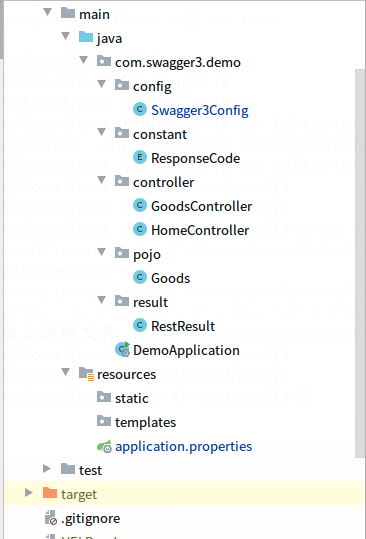
3,项目结构:如图:
三,配置文件说明
1,pom.xml
        <dependency>

            <groupId>io.springfox</groupId>

            <artifactId>springfox-boot-starter</artifactId>

            <version>3.0.0</version>

        </dependency>
说明:用springfox-boot-starter来引入swagger
2,application.properties
springfox.documentation.swagger-ui.enabled=true
说明:在生产环境中要设置swagger-ui的enabled值为false,
用来关闭文档的显示
四,java文件说明:
1,Swagger3Config.java
@EnableOpenApi

@Configuration

public class Swagger3Config implements WebMvcConfigurer {

    @Bean

    public Docket createRestApi() {

        //返回文档摘要信息

        return new Docket(DocumentationType.OAS_30)

                .apiInfo(apiInfo())

                .select()

                //.apis(RequestHandlerSelectors.withMethodAnnotation(ApiOperation.class))

                .apis(RequestHandlerSelectors.withMethodAnnotation(Operation.class))

                .paths(PathSelectors.any())

                .build()

                .globalRequestParameters(getGlobalRequestParameters())

                .globalResponses(HttpMethod.GET, getGlobalResonseMessage())

                .globalResponses(HttpMethod.POST, getGlobalResonseMessage());

    }

    //生成接口信息,包括标题、联系人等

    private ApiInfo apiInfo() {

        return new ApiInfoBuilder()

                .title("Swagger3接口文档")

                .description("如有疑问,请联系开发工程师老刘。")

                .contact(new Contact("刘宏缔", "https://www.cnblogs.com/architectforest/", "371125307@qq.com"))

                .version("1.0")

                .build();

    }

    //生成全局通用参数

    private List<RequestParameter> getGlobalRequestParameters() {

        List<RequestParameter> parameters = new ArrayList<>();

        parameters.add(new RequestParameterBuilder()

                .name("appid")

                .description("平台id")

                .required(true)

                .in(ParameterType.QUERY)

                .query(q -> q.model(m -> m.scalarModel(ScalarType.STRING)))

                .required(false)

                .build());

        parameters.add(new RequestParameterBuilder()

                .name("udid")

                .description("设备的唯一id")

                .required(true)

                .in(ParameterType.QUERY)

                .query(q -> q.model(m -> m.scalarModel(ScalarType.STRING)))

                .required(false)

                .build());

        parameters.add(new RequestParameterBuilder()

                .name("version")

                .description("客户端的版本号")

                .required(true)

                .in(ParameterType.QUERY)

                .query(q -> q.model(m -> m.scalarModel(ScalarType.STRING)))

                .required(false)

                .build());

         return parameters;

    }

    //生成通用响应信息

    private List<Response> getGlobalResonseMessage() {

        List<Response> responseList = new ArrayList<>();

        responseList.add(new ResponseBuilder().code("404").description("找不到资源").build());

         return responseList;

    }

}
说明:生成了全局的参数和通用的响应信息
2,RestResult.java
@ApiModel("api通用返回数据")

public class RestResult<T> {

    //uuid,用作唯一标识符,供序列化和反序列化时检测是否一致

    private static final long serialVersionUID = 7498483649536881777L;

    //标识代码,0表示成功,非0表示出错

    @ApiModelProperty("标识代码,0表示成功,非0表示出错")

    private Integer code;

    //提示信息,通常供报错时使用

    @ApiModelProperty("提示信息,供报错时使用")

    private String msg;

    //正常返回时返回的数据

    @ApiModelProperty("返回的数据")

    private T data;

    //constructor

    public RestResult() {

    }

    //constructor

    public RestResult(Integer status, String msg, T data) {

        this.code = status;

        this.msg = msg;

        this.data = data;

    }

    //返回成功数据

    public RestResult success(T data) {

        return new RestResult(ResponseCode.SUCCESS.getCode(), ResponseCode.SUCCESS.getMsg(), data);

    }

    public static RestResult success(Integer code,String msg) {

        return new RestResult(code, msg, null);

    }

    //返回出错数据

    public static RestResult error(ResponseCode code) {

        return new RestResult(code.getCode(), code.getMsg(), null);

    }

    public Integer getCode() {

        return code;

    }

    public void setCode(Integer code) {

        this.code = code;

    }

    public String getMsg() {

        return msg;

    }

    public void setMsg(String msg) {

        this.msg = msg;

    }

    public T getData() {

        return data;

    }

    public void setData(T data) {

        this.data = data;

    }
说明:这里要注意使用泛型T,如果只用Object,则swagger不能识别我们所返回的数据的类型说明:
其中:ApiModel用于类上面说明功能,
ApiModelProperty用于字段上说明功能
尤其是getData方法的返回数据类型,要用T,使用工具生成的data类容易出现这种错误,
3,Goods.java
@ApiModel("商品模型")

public class Goods {

    //商品id

    @ApiModelProperty("商品id")

    Long goodsId;

    public Long getGoodsId() {

        return this.goodsId;

    }

    public void setGoodsId(Long goodsId) {

        this.goodsId = goodsId;

    }

    //商品名称

    @ApiModelProperty("商品名称")

    private String goodsName;

    public String getGoodsName() {

        return this.goodsName;

    }

    public void setGoodsName(String goodsName) {

        this.goodsName = goodsName;

    }

    //商品标题

    @ApiModelProperty("商品标题")

    private String subject;

    public String getSubject() {

        return this.subject;

    }

    public void setSubject(String subject) {

        this.subject = subject;

    }

    //商品价格

    @ApiModelProperty("商品价格")

    private BigDecimal price;

    public BigDecimal getPrice() {

        return this.price;

    }

    public void setPrice(BigDecimal price) {

        this.price = price;

    }

    //库存

    @ApiModelProperty("商品库存")

    int stock;

    public int getStock() {

        return this.stock;

    }

    public void setStock(int stock) {

        this.stock = stock;

    }

    public String toString(){

        return " Goods:goodsId=" + goodsId +" goodsName=" + goodsName+" subject=" + subject+" price=" + price+" stock=" + stock;

    }

}
4,GoodsController.java
@Api(tags = "商品信息管理接口")

@RestController

@RequestMapping("/goods")

public class GoodsController {

    @Operation(summary = "商品详情,针对得到单个商品的信息")

    @GetMapping("/one")

    public RestResult<Goods> one(@Parameter(description = "商品id,正整数") @RequestParam(value="goodsid",required = false,defaultValue = "0") Integer goodsid) {

        Goods goodsone = new Goods();

        goodsone.setGoodsId(3L);

        goodsone.setGoodsName("电子书");

        goodsone.setSubject("学python,学ai");

        goodsone.setPrice(new BigDecimal(60));

        goodsone.setStock(10);

        RestResult res = new RestResult();

        return res.success(goodsone);

    }

    @Operation(summary = "提交订单")

    @PostMapping("/order")

    @ApiImplicitParams({

            @ApiImplicitParam(name="userid",value="用户id",dataTypeClass = Long.class, paramType = "query",example="12345"),

            @ApiImplicitParam(name="goodsid",value="商品id",dataTypeClass = Integer.class, paramType = "query",example="12345"),

            @ApiImplicitParam(name="mobile",value="手机号",dataTypeClass = String.class, paramType = "query",example="13866668888"),

            @ApiImplicitParam(name="comment",value="发货备注",dataTypeClass = String.class, paramType = "query",example="请在情人节当天送到")

    })

    public RestResult<String> order(@ApiIgnore @RequestParam Map<String,String> params) {

        System.out.println(params);

        RestResult res = new RestResult();

        return res.success("success");

    }

}
说明:Api用来指定一个controller中的各个接口的通用说明
Operation:用来说明一个方法
@ApiImplicitParams:用来包含多个包含多个 @ApiImplicitParam,
@ApiImplicitParam:用来说明一个请求参数
如果使用@Parameter来做说明,可以直接加到@RequestParam参数之前
@ApiIgnore:用来忽略不必要显示的参数
五,效果测试
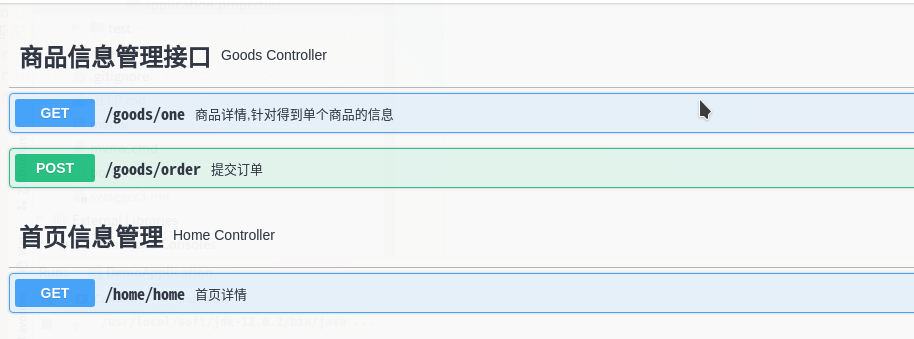
1,访问文档:访问:
http://127.0.0.1:8080/swagger-ui/index.html
可以看到已有的接口:
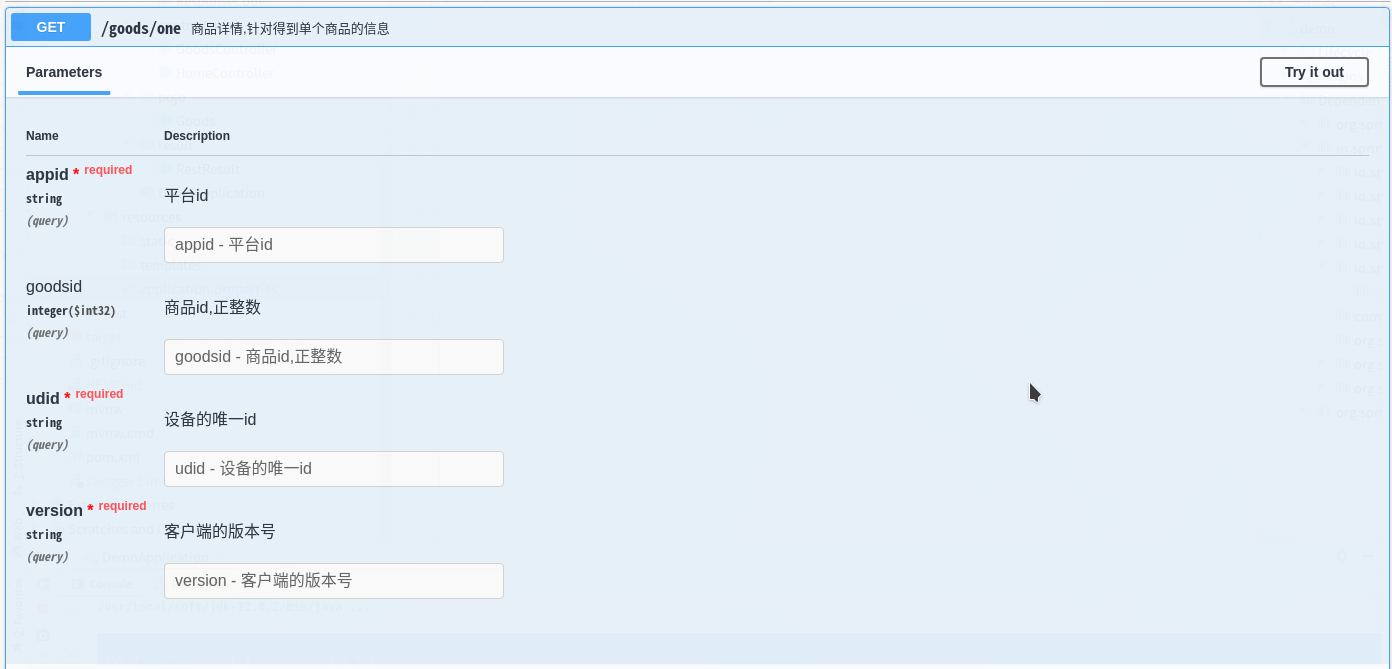
2,查看接口的详情:
参数:可以看到我们添加的全局通用参数
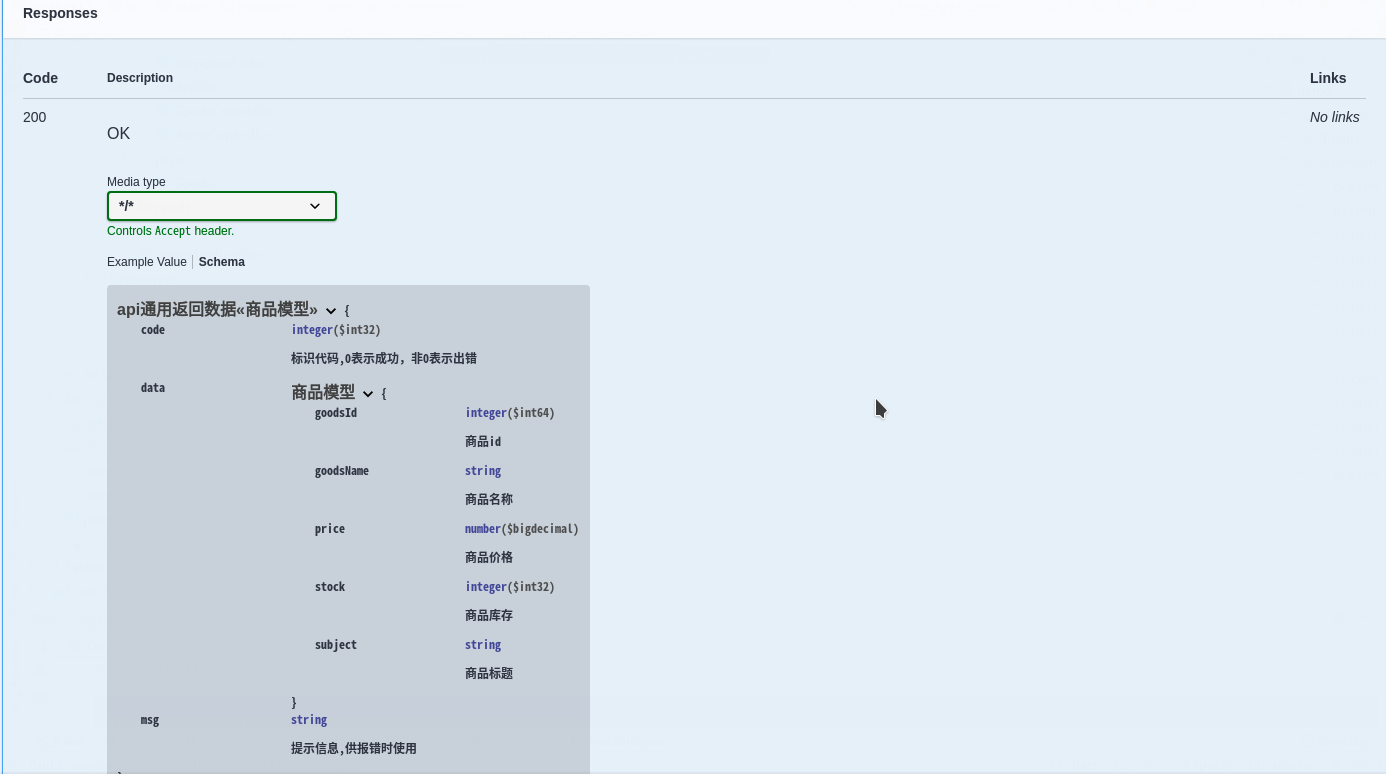
响应:
六,查看spring boot的版本
  .   ____          _            __ _ _

 /\\ / ___'_ __ _ _(_)_ __  __ _ \ \ \ \

( ( )\___ | '_ | '_| | '_ \/ _` | \ \ \ \

 \\/  ___)| |_)| | | | | || (_| |  ) ) ) )

  '  |____| .__|_| |_|_| |_\__, | / / / /

 =========|_|==============|___/=/_/_/_/

 :: Spring Boot ::        (v2.3.2.RELEASE)
spring boot:用swagger3生成接口文档,支持全局通用参数(swagger 3.0.0 / spring boot 2.3.2)的更多相关文章
- Spring Boot Swagger2自动生成接口文档
一.简介 在当下这个前后端分离的技术趋势下,前端工程师过度依赖后端工程师的接口和数据,给开发带来了两大问题: 1.问题一.后端接口查看难:要怎么调用?参数怎么传递?有几个参数?参数都代表什么含义? 2 ...
- SpringBoot整合Swagger3生成接口文档
前后端分离的项目,接口文档的存在十分重要.与手动编写接口文档不同,swagger是一个自动生成接口文档的工具,在需求不断变更的环境下,手动编写文档的效率实在太低.与swagger2相比新版的swagg ...
- 接口文档管理工具-Postman、Swagger、RAP(转载)
接口文档管理工具-Postman.Swagger.RAP 转自:http://www.51testing.com/html/10/n-3715910.html 在项目开发测试中,接口文档是贯穿始终的. ...
- Spring Boot(九)Swagger2自动生成接口文档和Mock模拟数据
一.简介 在当下这个前后端分离的技术趋势下,前端工程师过度依赖后端工程师的接口和数据,给开发带来了两大问题: 问题一.后端接口查看难:要怎么调用?参数怎么传递?有几个参数?参数都代表什么含义? 问题二 ...
- Spring boot 添加日志 和 生成接口文档
<dependency> <groupId>org.springframework.boot</groupId> <artifactId>spring- ...
- Java | Spring Boot Swagger2 集成REST ful API 生成接口文档
Spring Boot Swagger2 集成REST ful API 生成接口文档 原文 简介 由于Spring Boot 的特性,用来开发 REST ful 变得非常容易,并且结合 Swagg ...
- Springboot集成swagger2生成接口文档
[转载请注明]: 原文出处:https://www.cnblogs.com/jstarseven/p/11509884.html 作者:jstarseven 码字挺辛苦的..... 一 ...
- spring-boot-route(六)整合JApiDocs生成接口文档
上一篇文章中介绍了使用Swagger生成接口文档,非常方便,功能也十分强大.如果非要说Swaager有什么缺点,想必就是注解写起来比较麻烦.如果我说有一款不用写注解,就可以生成文档的工具,你心动了吗? ...
- SpringBoot接口 - 如何生成接口文档之非侵入方式(通过注释生成)Smart-Doc?
通过Swagger系列可以快速生成API文档,但是这种API文档生成是需要在接口上添加注解等,这表明这是一种侵入式方式: 那么有没有非侵入式方式呢, 比如通过注释生成文档? 本文主要介绍非侵入式的方式 ...
随机推荐
- HTML标签语言一览表
<html> ● 文件声明 让浏览器知道这是 html 文件 <head> ● 开头 提供文件整体资讯 <title> ● 标题 定义文件标题,将显示于浏览顶端 & ...
- 数字,字符串,逻辑比较在IF语句中的判断应用
Shell 语言中的if条件 一.if的基本语法: if [ command ];then 符合该条件执行的语句 elif [ command ];then 符合该条件执行的语句 else 符合该条 ...
- css常用属性:居中展示、内边距、外边距
1.横向居中.纵向居中 2.纵向展示3个块级(div标签即可纵向展示) 3.横向展示3个块级 4.在横向块级上加上边框的两种方法 法一:在父级div上加上和样式一样高的height 法二:在父级div ...
- 系统服务监控指标--load、CPU利用率、磁盘剩余空间、磁盘I/O、内存使用情况等
介绍 大型互联网企业的背后,依靠的是成千上万台服务器日夜不停的运转,以支撑其业务的运转.宕机对于互联网企业来说,代价是沉重的,轻则影响用户体验,重则直接影响交易,导致交易下跌,并且给企业声誉造成不可挽 ...
- 关于java基础_方法的学习
方法: 方法就是把一堆需要反复执行的代码封装起来,如果项目需要调用这段代码时,直接调用方法名即可 方法相当于榨汁机, 材料:水果 产出物:果汁 参数(材料):进入方法的数据 返回值(产出物):就是方法 ...
- k8s架构分析(二)
master节点 k8s的集群由master和node组成,节点上运行着若干k8s服务. master节点之上运行着的后台服务有kube-apiserver .kube-scheduler.kube- ...
- robots检测插件编写
首先先把url分割 url = 'https://www.baidu.com/s?wd=123&rsv_spt=1&rsv_iqid=0x8d22781d000014ad&is ...
- springmvc与mybatis整合时 java.lang.IllegalArgumentException: Property 'sqlSessionFactory' or 'sqlSessionTemplate' are required 异常
今天在整合springmvc与mybatis时,启动服务器遇到这样一个问题, by: java.lang.IllegalArgumentException: Property 'sqlSessionF ...
- Spring 配置文件AOP
1 <!-- 配置切面bean --> 2 <bean id="permAspect" class="com.tx.spring.aspect.Perm ...
- 基于Excel参数化你的Selenium2测试-xlrd
本篇文章转载至苦叶子: 前言 今天我们就如何使用xlrd模块来进行python selenium2 + excel自动化测试过程中的参数化进行演示说明,以解决大家在自动化测试实践过程中参数化的疑问 ...