
(六)springMvc 和 mybatis 整合
目录
文章目录
文章目录
#整合思路
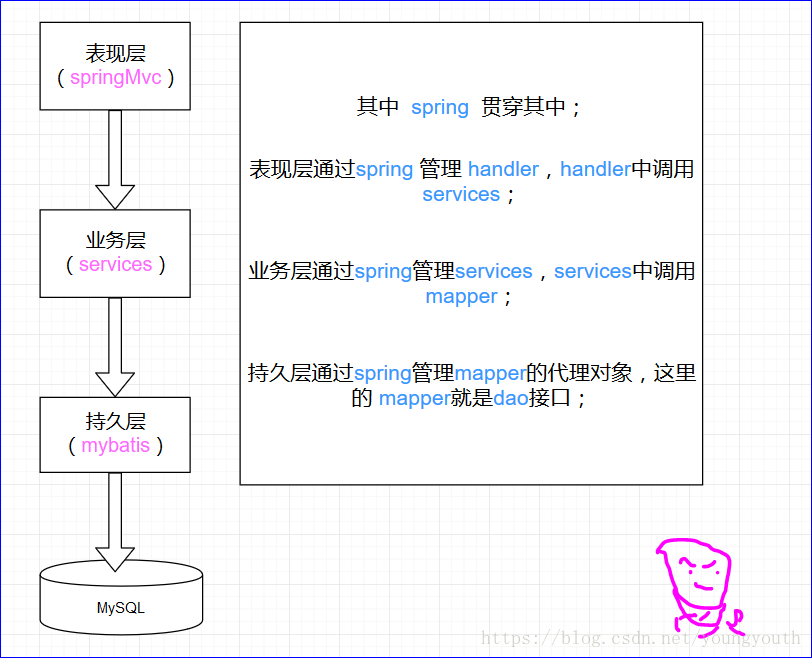
整合是将spring 看做是一个大的容器,将其他东西整合进来,是以 spring 为大环境的;
整合
springMvcspringMvc是spring的一个子模块,二者之间不需要整合包进行整合,只需要加载一些文件 ;整合
services层在
spring配置文件中,配置services接口 ,将services对象注册到spring中;事务操作,一般都在业务层 ;
整合
dao层在
spring配置文件中,配置mapper接口 ,将mapper代理对象对象注册到spring中;
整合 dao 层
也就是整合 mybatis 整合 spring ;
导入spring 包、mybatis 包、mybatis-spring 整合包,以及它们的依赖包 log4j 的包, 还有 数据源 包 ;
创建
log4j.properties配置文件#### 开发用debug 生产用 info
log4j.rootLogger=DEBUG, stdout
log4j.appender.stdout=org.apache.log4j.ConsoleAppender
log4j.appender.stdout.layout=org.apache.log4j.PatternLayout
log4j.appender.stdout.layout.ConversionPattern=[service] %d - %c -%-4r [%t] %-5p %c %x - %m%n
# mybatis 的打印输出
log4j.logger.java.sql.Statement = debug
log4j.logger.java.sql.PreparedStatement = debug
log4j.logger.java.sql.ResultSet =debug
创建
mybatis的配置文件在里面进行
mybatis的基本配置全局参数、别名设定;<?xml version="1.0" encoding="UTF-8" ?>
<!DOCTYPE configuration
PUBLIC "-//mybatis.org//DTD Config 3.0//EN"
"http://mybatis.org/dtd/mybatis-3-config.dtd">
<configuration>
<!--全局参数设置,看情况设定-->
<!--<settings>-->
<!--<setting name="" value=""/>-->
<!--</settings>--> <!--别名设定-->
<typeAliases>
<!--批量别名,po-->
<package name="xin.ijava.ssm.po"/>
</typeAliases> <!--本来还需要批量扫描 mapper 的,但是现在跟 spring整合,这一步由 spring 完成--> </configuration>
编写
ApplicationContext-dao.xml里面进行
mybatis和spring整合的配置 ;<?xml version="1.0" encoding="UTF-8"?>
<beans xmlns="http://www.springframework.org/schema/beans"
xmlns:xsi="http://www.w3.org/2001/XMLSchema-instance"
xmlns:mvc="http://www.springframework.org/schema/mvc"
xmlns:context="http://www.springframework.org/schema/context"
xmlns:aop="http://www.springframework.org/schema/aop"
xmlns:tx="http://www.springframework.org/schema/tx"
xsi:schemaLocation="
http://www.springframework.org/schema/beans http://www.springframework.org/schema/beans/spring-beans.xsd
http://www.springframework.org/schema/mvc http://www.springframework.org/schema/mvc/spring-mvc.xsd
http://www.springframework.org/schema/context http://www.springframework.org/schema/context/spring-context.xsd
http://www.springframework.org/schema/tx http://www.springframework.org/schema/tx/spring-tx.xsd
http://www.springframework.org/schema/aop http://www.springframework.org/schema/aop/spring-aop.xsd
"> <!--加载数据库配置文件-->
<context:property-placeholder location="classpath:xin/ijava/ssm/config/spring/db.properties"/> <!--配置数据源-->
<bean id="dataSource" class="org.apache.commons.dbcp2.BasicDataSource">
<property name="driver" value="${jdbc.driver}"/>
<property name="url" value="${jdbc.url}"/>
<property name="username" value="${jdbc.username}"/>
<property name="password" value="${jdbc.password}"/>
<property name="maxOpenPreparedStatements" value="30"/>
<property name="maxIdle" value="5"/>
</bean> <!--配置 sqlSessionFactory -->
<bean id="sqlSessionFactory" class="org.mybatis.spring.SqlSessionFactoryBean">
<property name="dataSource" ref="dataSource" />
<property name="configLocation" value="xin/ijava/ssm/config/mybatis/SqlMapperConfig.xml"/>
</bean> <!--批量扫描 mapper,自动生成代理对象 -->
<bean class="org.mybatis.spring.mapper.MapperScannerConfigurer">
<property name="sqlSessionFactoryBeanName" value="sqlSessionFactory"/>
<property name="basePackage" value="xin.ijava.ssm.mapper"/>
</bean> </beans>
逆向工程生成单表的
po 、mapper如何逆向工程生成,自己百度去,简单的很!
自定义编写复杂查询的
mappermybatis逆向工程生成的单表之间的关系,复杂的,还需要我们手写 ;这里自定义一个
mapper,查询 购买商品关联用户 ;创建
po增强对象当进行复杂查询的时候,需要对我们的
po类,进行增强,来满足我们的需求,但是我们不会直接在逆向工程生成的po里面进行增加新的属性,这样后期如果表的增加字段,逆向工程重新生成po,会覆盖掉我们之前修改的po;选择新建一个po,继承要增强的po!创建
Vo包装对象包装类,是为了扩展,方便我们进行后面复杂查询(多表查询)的时候,比如我们的条件,往往会重名,不使用复杂查询,参数绑定会有问题;
比如查询购买某些书的用户,书和用户,都有user属性,我们要是不使用包装类的话,就会为pojo对象很难赋值;
因此,我们写包装类;
至于包装类中既含有增强类,又含有原始类,是有的时候,我们可能只需要用到原始类 ;
构建复杂的查询条件?
编写自定义
mapper的映射关系为了可扩展性,使用动态sql;
sql返回的对象是增强对象,传入的对象是包装对象;<?xml version="1.0" encoding="UTF-8" ?>
<!DOCTYPE mapper PUBLIC "-//mybatis.org//DTD Mapper 3.0//EN" "http://mybatis.org/dtd/mybatis-3-mapper.dtd" >
<mapper> <sql id="query_items_where">
<if test="itemCustomer !=null">
<if test="itemCustomer.name !=null and itemCustomer.name != ''">
`name` LIKE '%${itemCustomer.name}%'
</if>
</if>
</sql>
<select id="queryItemsCustomer" parameterType="itemQueryVo" resultType="itemsCustomer">
SELECT* FROM items
<where>
<include refid="query_items_where"/>
</where>
</select>
</mapper>
自定义
mapper接口也就是
dao接口public interface ItemCustomerMapper { public List<ItemCustomer> queryItemsCustomer(ItemQueryVo itemQueryVo) throws Exception ;
}
#整合 services 层
编写
services接口public interface ItemsServices { public List<ItemCustomer> queryItemsCustomer(ItemQueryVo itemQueryVo) throws Exception ;
}编写
services实现类public class ItemsServicesImpl implements ItemsServices { /**
* 将自动生成的 mapper 代理对象,注入
*/
@Autowired
private ItemCustomerMapper itemCustomerMapper ; @Override
public List<ItemCustomer> queryItemsCustomer(ItemQueryVo itemQueryVo) throws Exception {
List<ItemCustomer> itemCustomers = itemCustomerMapper.queryItemsCustomer(itemQueryVo) ;
return itemCustomers;
}
}
创建
AppLicationContext-services.xml配置文件在这里进行
services的管理,将它们注册到spring中 ;<?xml version="1.0" encoding="UTF-8"?>
<beans xmlns="http://www.springframework.org/schema/beans"
xmlns:xsi="http://www.w3.org/2001/XMLSchema-instance"
xmlns:mvc="http://www.springframework.org/schema/mvc"
xmlns:context="http://www.springframework.org/schema/context"
xmlns:aop="http://www.springframework.org/schema/aop"
xmlns:tx="http://www.springframework.org/schema/tx"
xsi:schemaLocation="
http://www.springframework.org/schema/beans http://www.springframework.org/schema/beans/spring-beans.xsd
http://www.springframework.org/schema/mvc http://www.springframework.org/schema/mvc/spring-mvc.xsd
http://www.springframework.org/schema/context http://www.springframework.org/schema/context/spring-context.xsd
http://www.springframework.org/schema/tx http://www.springframework.org/schema/tx/spring-tx.xsd
http://www.springframework.org/schema/aop http://www.springframework.org/schema/aop/spring-aop.xsd
"> <!--将 ItemServicesImpl 注册到 `spring` 中,-->
<bean class="xin.ijava.ssm.services.impl.ItemsServicesImpl" id="itemsServices"/> </beans>
```创建
AppLicationContext-transaction.xml配置文件在里面进行
事务的管理 ;(注意,spring事务,也是基于aop,而使用aop,需要导入AspectJ的包)<?xml version="1.0" encoding="UTF-8"?>
<beans xmlns="http://www.springframework.org/schema/beans"
xmlns:xsi="http://www.w3.org/2001/XMLSchema-instance"
xmlns:mvc="http://www.springframework.org/schema/mvc"
xmlns:context="http://www.springframework.org/schema/context"
xmlns:aop="http://www.springframework.org/schema/aop"
xmlns:tx="http://www.springframework.org/schema/tx"
xsi:schemaLocation="
http://www.springframework.org/schema/beans http://www.springframework.org/schema/beans/spring-beans.xsd
http://www.springframework.org/schema/mvc http://www.springframework.org/schema/mvc/spring-mvc.xsd
http://www.springframework.org/schema/context http://www.springframework.org/schema/context/spring-context.xsd
http://www.springframework.org/schema/tx http://www.springframework.org/schema/tx/spring-tx.xsd
http://www.springframework.org/schema/aop http://www.springframework.org/schema/aop/spring-aop.xsd
"> <!--开启事务管理,告诉spring,对什么数据源进行 事务 管理-->
<bean id="transactionManager" class="org.springframework.jdbc.datasource.DataSourceTransactionManager">
<!-- dataSource 定义在 ApplicationContext-dao.xml 中,这里需要告诉它 fix 所有的spring配置文件-->
<property name="dataSource" ref="dataSource"/>
</bean> <!--配置增强的方法,也就是对什么方法使用 事务-->
<tx:advice id="transactionInterceptor">
<tx:attributes>
<!--对于 增删改 方法需要开启事务-->
<tx:method name="save*" propagation="REQUIRED"/>
<tx:method name="insert*" propagation="REQUIRED"/>
<tx:method name="update*" propagation="REQUIRED"/>
<tx:method name="delete*" propagation="REQUIRED"/>
<!--对于 查 ,级别设为 SUPPORTS ,支持事务 -->
<tx:method name="find*" propagation="SUPPORTS" read-only="true"/>
<tx:method name="get*" propagation="SUPPORTS" read-only="true"/>
</tx:attributes>
</tx:advice> <!--配置切入点,也就是配置,在什么地方使用事务-->
<aop:config>
<aop:advisor advice-ref="transactionInterceptor" pointcut="execution(* xin.ijava.ssm.services.impl.*.*(..))"/>
</aop:config>
<!--加上这句话,不然 services的层,创建会报错,报 actually of type 'com.sun.proxy.$Proxy12'-->
<!--报 这样的 类型错误-->
<aop:aspectj-autoproxy proxy-target-class="true"/>
</beans>
整合 springMvc
配置
springMvc.xml文件配置其他组件,诸如:注解映射器、注解适配器、视图解析器; 并其开启批量扫描
处理器;<?xml version="1.0" encoding="UTF-8"?>
<beans xmlns="http://www.springframework.org/schema/beans"
xmlns:xsi="http://www.w3.org/2001/XMLSchema-instance"
xmlns:mvc="http://www.springframework.org/schema/mvc"
xmlns:context="http://www.springframework.org/schema/context"
xmlns:aop="http://www.springframework.org/schema/aop"
xmlns:tx="http://www.springframework.org/schema/tx"
xsi:schemaLocation="
http://www.springframework.org/schema/beans http://www.springframework.org/schema/beans/spring-beans.xsd
http://www.springframework.org/schema/mvc http://www.springframework.org/schema/mvc/spring-mvc.xsd
http://www.springframework.org/schema/context http://www.springframework.org/schema/context/spring-context.xsd
http://www.springframework.org/schema/tx http://www.springframework.org/schema/tx/spring-tx.xsd
http://www.springframework.org/schema/aop http://www.springframework.org/schema/aop/spring-aop.xsd "
> <!--配置视图解析器-->
<!-- JSP 的视图解析器-->
<bean class="org.springframework.web.servlet.view.InternalResourceViewResolver">
<!--配置前后缀-->
<property name="prefix" value="/WEB-INF/jsp/"/>
<property name="suffix" value=".jsp"/>
</bean> <!--使用注解的映射器、适配器-->
<mvc:annotation-driven/> <!--批量扫描处理器-->
<context:component-scan base-package="xin.ijava.ssm.controller"/> </beans>
在
web.xml中配置前端控制器<?xml version="1.0" encoding="UTF-8"?>
<web-app xmlns="http://xmlns.jcp.org/xml/ns/javaee"
xmlns:xsi="http://www.w3.org/2001/XMLSchema-instance"
xsi:schemaLocation="http://xmlns.jcp.org/xml/ns/javaee http://xmlns.jcp.org/xml/ns/javaee/web-app_3_1.xsd"
version="3.1"> <!-- **************************** 配置springMvc前端控制器(DispatcherServlet)************************* --> <!--前端控制器是个servlet,因此,这里就像配置servlet一样-->
<servlet>
<servlet-name>springMvc</servlet-name>
<servlet-class>org.springframework.web.servlet.DispatcherServlet</servlet-class>
<!--初始化读取配置文件,我们指定配置文件在哪;
否则默认加载 /WEB-INF/servlet-name-servlet.xml
我们这里的 servlet-name 是 springMvc ,那么就是去加载 springMvc-servlet.xml
-->
<init-param>
<param-name>contextConfigLocation</param-name>
<param-value>classpath:xin/ijava/ssm/config/spring/springMvc.xml</param-value>
</init-param>
</servlet>
<servlet-mapping>
<servlet-name>springMvc</servlet-name>
<!--
1、 *.action 拦截 .action 结尾的url
2、/ 拦截所有url,即使是访问 静态资源也会被拦截,全部走前端控制器,可以实现 resultFul 风格的url
3、/* 这样配置不对,当转发到jsp页面时,还是会交给前端控制器,去找处理器
-->
<url-pattern>*.action</url-pattern>
</servlet-mapping> </web-app>
编写
Handler使用 注解 开发 ;
@Controller

public class ItemsController3  {

    @Autowired

    private ItemsServicesImpl itemsServices ;

    /**

     * 使用注解进行映射

     * 注解内容写上后缀 .action 或者不写都行,但是最后访问的时候,都要带上 .action  后缀

     * @return

     * @throws Exception

     */

    @RequestMapping("/queryItems3")

    public ModelAndView queryItems() throws Exception {

//        调用services层,进行查询,参数传进去 null ,我们在映射关系中,进行了 判读;

        List<ItemCustomer> items = itemsServices.queryItemsCustomer(null) ;

//        创建 ModelAndView

        ModelAndView modelAndView = new ModelAndView() ;

//        添加model,也就是数据。(键值对)

//        在页面中取数据,就是根据键名

        modelAndView.addObject("items",items) ;

        Map map = modelAndView.getModel();

//        添加视图,也就是界面

        modelAndView.setViewName("Item/ItemController");

        return modelAndView;

    }

}
写一个
jsp测试下 ;随便写个页面,记性了,数据显示出来就OK!
加载
spring容器之前,我们将
mapper、controller、services都注册到spring容器中了 ;但是
spring这个大容器,我们还没有加载的,现在加载一下 ;具体操作:就是将
spring相关的配置文件,都加载进来,上面我们创建了多个spring得配置文件,注入Application-dao.xml、Application-services.xml、Application-transaction.xml等 ;<!--配置监听器-->
<listener>
<listener-class>org.springframework.web.context.ContextLoaderListener</listener-class>
</listener>
<!--加载spring配置文件-->
<context-param>
<param-name>contextConfigLocation</param-name>
<!--使用通配符-->
<param-value>classpath:spring/ApplicationContext-*.xml</param-value>
</context-param>
#创建资源文件夹
我们把配置文件所在文件夹,设为资源文件,这样,在访问的时候,可以使用**classpath:** ApplicationContext.xml ,来直接寻找文件;
#后记
终于找到了 bug 所在,孜孜不倦的 debug 一天,玄不救非, 2处错误,都是名字写错了 ;
(六)springMvc 和 mybatis 整合的更多相关文章
- SpringMVC与MyBatis整合之日期格式转换
在上一篇博客<SpringMVC与MyBatis整合(一)——查询人员列表>中遗留了日期格式转换的问题,在这篇记录解决过程. 对于controller形参中pojo对象,如果属性中有日期类 ...
- 3.springMVC+spring+Mybatis整合Demo(单表的增删该查,这里主要是贴代码,不多解释了)
前面给大家讲了整合的思路和整合的过程,在这里就不在提了,直接把springMVC+spring+Mybatis整合的实例代码(单表的增删改查)贴给大家: 首先是目录结构: 仔细看看这个目录结构:我不详 ...
- SpringMVC与mybatis整合
一.逆向工程生成基础信息 <?xml version="1.0" encoding="UTF-8"?> <!DOCTYPE generator ...
- SpringMVC+Spring+Mybatis整合
SpringMVC+Spring+Mybatis整合 导包 配置jdbc.properties.log4j.properties jdbc.driver=com.mysql.jdbc.Driver j ...
- Springmvc+Spring+Mybatis整合开发(架构搭建)
Springmvc+Spring+Mybatis整合开发(架构搭建) 0.项目结构 Springmvc:web层 Spring:对象的容器 Mybatis:数据库持久化操作 1.导入所有需要的jar包 ...
- SpringMVC学习记录三——8 springmvc和mybatis整合
8 springmvc和mybatis整合 8.1 需求 使用springmvc和mybatis完成商品列表查询. 8.2 整合思路 springmvc+mybaits的 ...
- SpringMvc基础知识(二) springmvc和mybatis整合
1 springmvc和mybatis整合 1.1 需求 使用springmvc和mybatis完成商品列表查询. 1.2 整合思路 springmvc+mybaits的系统架构: 第一步:整合dao ...
- SpringMVC与MyBatis整合(一)——查询人员列表
从今天开始,一点点的记录做毕设和学习的过程. 寒假才开始接触SpringMVC和MyBatis,之前对框架的概念理解并不到位,也没学过Spring.目前学习起来思路并不很清晰,有些东西我还不能理解,只 ...
- 淘淘商城之springmvc和mybatis整合
一.需求 使用springmvc和mybatis完成商品列表查询 二.整合思路 springmvc+mybaits的系统架构: 第一步:整合dao层 mybatis和spring整合,通过spring ...
随机推荐
- 【概率论】2-2:独立事件(Independent Events)
title: [概率论]2-2:独立事件(Independent Events) categories: Mathematic Probability keywords: Independent Ev ...
- vue 重置data中表单form的值 重置变量
export default { data() { return { form:{ name:"张三", age:13, sex:1, address:"" } ...
- leveldb源码分析之Slice
转自:http://luodw.cc/2015/10/15/leveldb-02/ leveldb和redis这样的优秀开源框架都没有使用C++自带的字符串string,redis自己写了个sds,l ...
- JIRA恢复备份后无法上传附件
1.在恢复JIRA 备份数据和附件后,上传附件失败,这一般是恢复附件时没有修改附件的拥有者和组 创建JIRA平台,会自动创建一个服务器的账户,如果是服务器第一次部署JIRA那么账户肯定是jira,如果 ...
- poj 1458 Common Subsequence ——(LCS)
虽然以前可能接触过最长公共子序列,但是正规的写应该还是第一次吧. 直接贴代码就好了吧: #include <stdio.h> #include <algorithm> #inc ...
- Java并发指南7:JUC的核心类AQS详解
一行一行源码分析清楚AbstractQueuedSynchronizer 转自https://www.javadoop.com/post/AbstractQueuedSynchronizer#toc4 ...
- 20190710记录:去掉中转图,直接以1280*1024进行反坐标计算,填补pbFinal。
1.记录:去掉中转图,直接以1280*1024进行反坐标计算.pbFinal=1280*1024. // Imagejoint.cpp : 定义控制台应用程序的入口点. // #include &qu ...
- flask_security学习笔记
[Flask Security]当不能通过认证的时候制定跳转 Flask Security这个插件能对用户权限进行很好的控制.通过三个model实现:User,存放用户数据Role,存放角色数据U ...
- 断句:Store all parameters but the first passed to this function as an array
// Store all parameters but the first passed to this function as an array //除了第一个参数,把调用publish函数时的所有 ...
- linux 查看网络流量命令
转: linux 查看网络流量命令 2019年01月31日 14:22:00 weixin_33894992 阅读数 893 sar命令参数很多,有时间man一下. -n参数很有用,他有6个不同的 ...