
ElasticSearch——Curator索引管理
简介
curator 是一个官方的,可以管理elasticsearch索引的工具,可以实现创建,删除,段合并等等操作。详见官方文档
功能
curator允许对索引和快照执行许多不同的操作,包括:
- 从别名添加或删除索引(或两者!)
- 更改分片路由分配
- 关闭索引
- 创建索引
- 删除索引
- 删除快照
- 打开被关闭的索引
- 对索引执行forcemerge段合并操作
- reindex索引,包括来自远程集群的索引
- 更改索引的每个分片的副本数
- rollover索引
- 生成索引的快照(备份)
- 还原快照
版本
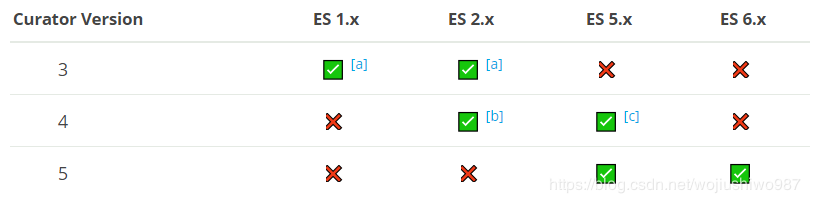
安装
有多种安装方法,本人采用yun安装,官网下载安装包:https://www.elastic.co/guide/en/elasticsearch/client/curator/current/yum-repository.html
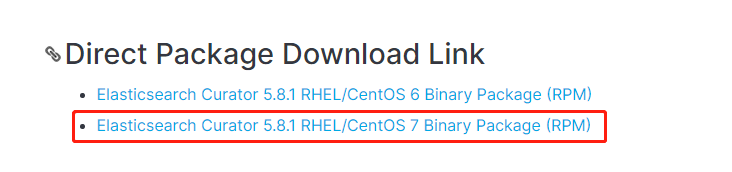
执行以下命令进行安装:
rpm -ivh elasticsearch-curator-5.8.-.x86_64.rpm

默认安装路径为:/opt/elasticsearch-curator,且不能移动到其它位置,命令会识别不了。
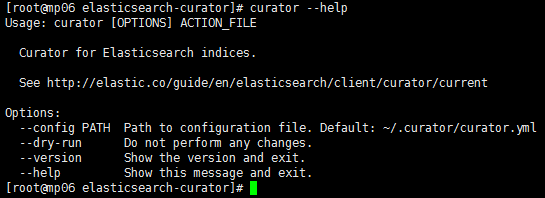
执行以下命令验证是否安装成功:
curator --help
创建配置文件
curator运行需两个配置文件config.yml(用于连接ES集群配置)、action.yml(用于配置要执行的操作),文件名称可以随意命名。
config.yml样例如下: 配置说明参考官网说明:config.yml
# Rmember, leave a key empty if there is no value.  None will be a string,

# not a Python "NoneType"

client:

  hosts: ["10.0.101.100", "10.0.101.101", "10.0.101.102"]    # es集群地址

  port: 9200                               # es端口

  url_prefix:

  use_ssl: False

  certificate:

  client_cert:

  client_key:

  ssl_no_validate: False

  http_auth:

  timeout:

  master_only: False

logging:

  loglevel: INFO

  logfile: /opt/elasticsearch-curator/logs/run.log        # 日志路径

  logformat: default

  blacklist: ['elasticsearch', 'urllib3']
action.yml样例如下: 配置说明参考官网说明:action.yml
# Remember, leave a key empty if there is no value.  None will be a string,

# not a Python "NoneType"

#

# Also remember that all examples have 'disable_action' set to True.  If you

# want to use this action as a template, be sure to set this to False after

# copying it.

actions:

  :

    action: delete_indices        # 这里执行操作类型为删除索引

    description: >-

      Delete metric indices older than  days (based on index name), for zou_data---

      prefixed indices. Ignore the error if the filter does not result in an

      actionable list of indices (ignore_empty_list) and exit cleanly.

    options:

      ignore_empty_list: True

    filters:

    - filtertype: pattern

      kind: prefix

      value: business-logs-        # 这里是指匹配前缀为 “order_” 的索引,还可以支持正则匹配等,详见官方文档

    - filtertype: age            # 这里匹配时间

      source: name              # 这里根据索引name来匹配,还可以根据字段等,详见官方文档

      direction: older

      timestring: '%Y-%m-%d'        # 用于匹配和提取索引或快照名称中的时间戳

      unit: days               # 这里定义的是days,还有weeks,months等,总时间为unit * unit_count

      unit_count: 3
以上命令删除了3天前,以business-logs-*开头的索引。
执行多个任务
注意:actions: 后面的,依次类推:
:执行操作

:执行操作

:执行操作

N:执行操作
运行curator
单次运行:
curator --config config.yml action.yml
实际生成环境中我们添加一个linux的cron定时任务:
crontab -e
加上如下命令(每天0时运行一次):
0 0 */1 * * curator --config /opt/elasticsearch-curator/config.yml /opt/elasticsearch-curator/action.yml

运行curator_cli
用法举例:curator_cli 关闭全部一天前创建的索引名称为logs_*开头的索引。
curator_cli --host 192.168.1.2 --port close --filter_list '[{"filtertype":"age","source":"creation_date","direction":"older","unit":"days","unit_count":1},{"filtertype":"pattern","kind":"prefix","value":"logs_"}]'
总结
curator适用于基于时间或者template其他方式创建的索引,不适合单一索引存储N久历史数据的操作的场景。
例如以下场景:
elasticsearch要想实现只保留固定时间的数据,这里以7天为例,要想每个索引的数据都只保留最近7天的数据,大于7天的则删除,有两种方法:
1. 看你的索引是怎么样的,如果你的索引名称中有时间,比如logstash-2019-01-02 这样,就是每天都会生成一个新的索引,这样的话可以使用官方的Curator 工具
2. 如果你的索引中不带时间,比如,如果是根据应用或者服务名来命名的,那么注意,Curator是无法实现删除索中的某一段数据的!! 这里需要特别注意,网上很多说可以实现的,那是因为他们的索引如上面1 所说,是根据时间日期来生成的。
但实际上,很多索引都不是这样的,按正常的思维,更容易用服务名或应用名作为索引,以此来区分日志所属应用,方便日志的分析对应指定的应用。这种时候需要使用elasticsearch的api:delete_by_query来进行删除指定数据。
具体实现请参考:https://blog.csdn.net/weixin_41004350/article/details/85620572
https://juejin.im/post/58e5de06ac502e006c254145
参考:
https://blog.csdn.net/laoyang360/article/details/85882832
ElasticSearch——Curator索引管理的更多相关文章
- 使用curator 来管理elasticsearch的index
这里我们参考官网安装curator https://www.cookiesinn.org/elasticsearch_curator_delete_indices/ https://www.elast ...
- ElasticSearch 命令行管理工具Curator
一.背景 elastic官网现在已经大面积升级到了5.x版本,然而针对elasticsearch的命令行管理工具curator现在仍然是4.0版本. 刚开始找到此工具,深深的怕因为版本更迭无法使用,还 ...
- ElasticSearch权威指南学习(索引管理)
创建索引 当我们需要确保索引被创建在适当数量的分片上,在索引数据之前设置好分析器和类型映射. 手动创建索引,在请求中加入所有设置和类型映射,如下所示: PUT /my_index { "se ...
- elasticsearch系列二:索引详解(快速入门、索引管理、映射详解、索引别名)
一.快速入门 1. 查看集群的健康状况 http://localhost:9200/_cat http://localhost:9200/_cat/health?v 说明:v是用来要求在结果中返回表头 ...
- elasticsearch最全详细使用教程:入门、索引管理、映射详解、索引别名、分词器、文档管理、路由、搜索详解
一.快速入门1. 查看集群的健康状况http://localhost:9200/_cat http://localhost:9200/_cat/health?v 说明:v是用来要求在结果中返回表头 状 ...
- 一文带您了解 Elasticsearch 中,如何进行索引管理(图文教程)
欢迎关注笔者的公众号: 小哈学Java, 每日推送 Java 领域干货文章,关注即免费无套路附送 100G 海量学习.面试资源哟!! 个人网站: https://www.exception.site/ ...
- Elasticsearch系列---生产集群的索引管理
概要 索引是我们使用Elasticsearch里最频繁的部分日常的操作都与索引有关,本篇从运维人员的视角,来玩一玩Elasticsearch的索引操作. 基本操作 在运维童鞋的视角里,索引的日常操作除 ...
- ElasticSearch+Kibana 索引操作
ElasticSearch+Kibana 索引操作 一 前言 ElasticiSearch 简介 ElasticSearch是一个基于Lucene的搜索服务器.它提供了一个分布式多用户能力的全文搜索引 ...
- MySQL索引管理
一.索引介绍 1.什么是索引 1.索引好比一本书的目录,它能让你更快的找到自己想要的内容. 2.让获取的数据更有目的性,从而提高数据库索引数据的性能. 2.索引类型介绍 1.BTREE:B+树索引 2 ...
随机推荐
- master-worker常驻型程序代码修改哪些需要重启master或者worker
之前在yii的项目里用redis作为消息队列,现在很多任务需要延迟需求,于是把之前redis的消息队列替换成了rabbitmq 于是使用yii的yii2-queue这个组件 但是由于提供的yii qu ...
- PL/SQL 使用控制流程
一.条件分支语句 1.if判断 IF <布尔表达式> THEN PL/SQL 和 SQL语句 END IF; 2.if else判断 IF <布尔表达式> THEN PL/SQ ...
- 28-SQLServer带见证服务器的镜像搭建
一.注意点 1.数据库的模式要是完整模式. 2.要对数据库完整备份和事务日志备份,分别还原到镜像库上,使用NORECOVERY模式. 3.镜像数据库是不允许删除和操作,即便查看属性也不行. 4.先删除 ...
- 简介WEB应用服务器TONCAT
1.HTTP与Tomcat简介1.1 什么是Http协议HTTP,超文本传输协议(HyperText Transfer Protocol)是互联网上应用最为广泛的 一种网络协议.所有的WWW文件都必须 ...
- python 虚拟环境相关命令
1.总是记不住一些关于创建虚拟环境得命令,特在自己得博客里记录一下自己常用得命令: virtualenv -p C:\Python36\python D:\virtual\Envs\AssetScan ...
- from module_name import var
######## a.py ######## aa = "Hello World" ####### b.py ######## from a import aa print aa ...
- E:first-of-type
E:first-of-type 语法: E:first-of-type { sRules } 说明: 匹配同类型中的第一个同级兄弟元素E.大理石平台[1200mm*1000mm*150mm] 要使该属 ...
- Flume实时监控目录sink到hdfs,再用sparkStreaming监控hdfs的这个目录,对数据进行计算
目标:Flume实时监控目录sink到hdfs,再用sparkStreaming监控hdfs的这个目录,对数据进行计算 1.flume的配置,配置spoolDirSource_hdfsSink.pro ...
- learning scala sealed class
package com.aura.scala.day01 object sealedClassed { def findPlaceToSit(piece: Furniture) = piece mat ...
- bzoj 3629
给出数 $n$记 $f(x)$ 表示 $x$ 的因子和求出所有 $x$ 使得 $f(x) = n$考虑 $x = p_1 ^{a_1} * p_2 ^ {a_2} * \cdots * p_k ^ { ...