
根据返回数据, 迭代数组, 构造HTML结构
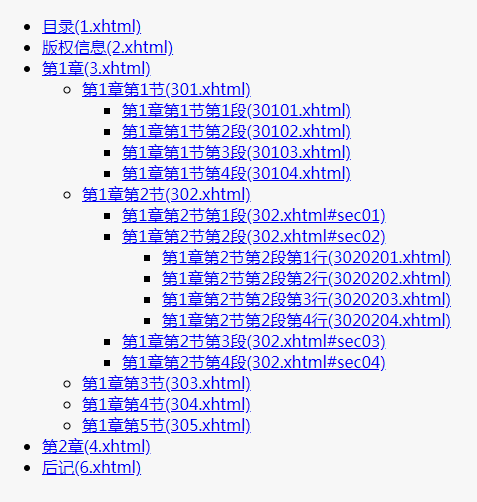
首先需要引入jQuery哈!
1. 要求用下面的格式制作目录, 结构如下:

<ul>

  <li>xxxx</li>

  <li>xxxx</li>

  <ul>

     <li>xxxx</li>

     <li>xxxx</li>

     <ul>

        <li>xxxx</li>

        <li>xxxx</li>

     </ul>

  </ul>

</ul>

2. 要求带锚点的, 要使用父节点ID+锚点做为链接
1. 后台返回的数据:
const newDirList = [

  {

    "catalogId": 1,

    "catalogFid": 0,

    "catalogName": "目录",

    "child": [],

    "anchor": ""

  },

  {

    "catalogId": 2,

    "catalogFid": 0,

    "catalogName": "版权信息",

    "child": [],

    "anchor": ""

  },

  {

    "catalogId": 3,

    "catalogFid": 0,

    "catalogName": "第1章",

    "child": [

      {

        "catalogId": 301,

        "catalogFid": 3,

        "catalogName": "第1章第1节",

        "child": [

            {"catalogId": 30101, "catalogFid": 301, "catalogName": "第1章第1节第1段", "child": [], "anchor": ""},

            {"catalogId": 30102, "catalogFid": 301, "catalogName": "第1章第1节第2段", "child": [], "anchor": ""},

            {"catalogId": 30103, "catalogFid": 301, "catalogName": "第1章第1节第3段", "child": [], "anchor": ""},

            {"catalogId": 30104, "catalogFid": 301, "catalogName": "第1章第1节第4段", "child": [], "anchor": ""}

        ],

        "anchor": ""

      },

      {

        "catalogId": 302,

        "catalogFid": 3,

        "catalogName": "第1章第2节",

        "child": [

            {"catalogId": 30201, "catalogFid": 302, "catalogName": "第1章第2节第1段", "child": [], "anchor": "sec01"},

            {"catalogId": 30202, "catalogFid": 302, "catalogName": "第1章第2节第2段", "child": [], "anchor": "sec02"},

            {"catalogId": 30203, "catalogFid": 302, "catalogName": "第1章第2节第3段", "child": [], "anchor": "sec03"},

            {"catalogId": 30204, "catalogFid": 302, "catalogName": "第1章第2节第4段", "child": [], "anchor": "sec04"}

        ],

        "anchor": ""

      },

      {

        "catalogId": 303,

        "catalogFid": 3,

        "catalogName": "第1章第3节",

        "child": [],

        "anchor": ""

      },

      {

        "catalogId": 304,

        "catalogFid": 3,

        "catalogName": "第1章第4节",

        "child": [],

        "anchor": ""

      },

      {

        "catalogId": 305,

        "catalogFid": 3,

        "catalogName": "第1章第5节",

        "child": [],

        "anchor": ""

      }

    ],

    "anchor": ""

  },

  {

    "catalogId": 4,

    "catalogFid": 0,

    "catalogName": "第2章",

    "child": [],

    "anchor": ""

  },

  {

    "catalogId": 6,

    "catalogFid": 0,

    "catalogName": "后记",

    "child": [],

    "anchor": ""

  }

]
2. javaScrip:
 function genLi(name, catalogId, anchor, catalogFid) {

   return `

     <li>

     <a href="${anchor?catalogFid:catalogId}.xhtml${anchor?'#'+anchor:''}">${name}(${anchor?catalogFid:catalogId}.xhtml${anchor?'#'+anchor:''})</a>

     </li>

   `.trim();

 }

 function loopArray (arr) {

   let $ul = $('<ul>');

   arr.forEach(function(v){

     let $li = $(genLi(v.catalogName, v.catalogId, v.anchor, v.catalogFid));

     $ul.append($li);

     if (v.child && v.child.length) {

       $ul.append(loopArray(v.child));

     }

   });

   return $ul.get(0).outerHTML;

 }

 loopArray(newDirList);
3. 生成出的HTML代码:
<ul>

  <li>

    <a href="1.xhtml">目录(1.xhtml)</a>

  </li>

  <li>

    <a href="2.xhtml">版权信息(2.xhtml)</a>

  </li>

  <li>

    <a href="3.xhtml">第1章(3.xhtml)</a>

  </li>

  <ul>

    <li>

      <a href="301.xhtml">第1章第1节(301.xhtml)</a>

    </li>

    <ul>

      <li>

        <a href="30101.xhtml">第1章第1节第1段(30101.xhtml)</a>

      </li>

      <li>

        <a href="30102.xhtml">第1章第1节第2段(30102.xhtml)</a>

      </li>

      <li>

        <a href="30103.xhtml">第1章第1节第3段(30103.xhtml)</a>

      </li>

      <li>

        <a href="30104.xhtml">第1章第1节第4段(30104.xhtml)</a>

      </li>

    </ul>

    <li>

      <a href="302.xhtml">第1章第2节(302.xhtml)</a>

    </li>

    <ul>

      <li>

        <a href="302.xhtml#sec01">第1章第2节第1段(302.xhtml#sec01)</a>

      </li>

      <li>

        <a href="302.xhtml#sec02">第1章第2节第2段(302.xhtml#sec02)</a>

      </li>

      <ul>

        <li>

          <a href="3020201.xhtml">第1章第2节第2段第1行(3020201.xhtml)</a>

        </li>

        <li>

          <a href="3020202.xhtml">第1章第2节第2段第2行(3020202.xhtml)</a>

        </li>

        <li>

          <a href="3020203.xhtml">第1章第2节第2段第3行(3020203.xhtml)</a>

        </li>

        <li>

          <a href="3020204.xhtml">第1章第2节第2段第4行(3020204.xhtml)</a>

        </li>

      </ul>

      <li>

        <a href="302.xhtml#sec03">第1章第2节第3段(302.xhtml#sec03)</a>

      </li>

      <li>

        <a href="302.xhtml#sec04">第1章第2节第4段(302.xhtml#sec04)</a>

      </li>

    </ul>

    <li>

      <a href="303.xhtml">第1章第3节(303.xhtml)</a>

    </li>

    <li>

      <a href="304.xhtml">第1章第4节(304.xhtml)</a>

    </li>

    <li>

      <a href="305.xhtml">第1章第5节(305.xhtml)</a>

    </li>

  </ul>

  <li>

    <a href="4.xhtml">第2章(4.xhtml)</a>

  </li>

  <li>

    <a href="6.xhtml">后记(6.xhtml)</a>

  </li>

</ul>
根据返回数据, 迭代数组, 构造HTML结构的更多相关文章
- matlab学习笔记12_2创建结构体数组,访问标量结构体,访问非标量结构体数组的属性,访问嵌套结构体中的数据,访问非标量结构体数组中多个元素的字段
一起来学matlab-matlab学习笔记12 12_2 结构体 创建结构体数组,访问标量结构体,访问非标量结构体数组的属性,访问嵌套结构体中的数据,访问非标量结构体数组中多个元素的字段 觉得有用的话 ...
- C语言实现使用动态数组来构造栈结构
我在面前一篇博客<C语言实现使用静态数组来构造栈结构>中使用了静态数组来模拟栈的操作.静态数组的大小是在代码中写死的.是存储在用户栈上面的,使用起来不灵活.在这篇博客中我会使用动态数组来构 ...
- 013.CI4框架CodeIgniter数据库操作之:查询数据库,并让数据以数组的方式返回查询结果
01. 我们在CI4框架中的Model文件夹新建一个User_model.php的文件,使用的是getResultArray,表示并让数据以数组的方式返回查询结果,代码如下: <?php nam ...
- carry-检查数据接口返回数据合法性
问题背景: 在测试&部署监控过程中,我们常常会遇到外部接口返回数据不靠谱的时候.最常见的场合是从某个http获取如json和xml等结构化的结果,进行解析并处理,在这时候出现以下这几种常见类型 ...
- ListFiles():返回Files类型数组,可以用getName()来访问到文件名。
List():显示文件的名(相对路径) ListFiles():返回Files类型数组,可以用getName()来访问到文件名. 使用isDirectory()和isFile()来判断究竟是文件还是目 ...
- NumPy来自现有数据的数组
NumPy - 来自现有数据的数组 这一章中,我们会讨论如何从现有数据创建数组. numpy.asarray 此函数类似于numpy.array,除了它有较少的参数. 这个例程对于将 Python 序 ...
- JavaScript 构造树形结构的一种高效算法
引言 我们经常会碰到树形数据结构,比如组织层级.省市县或者动植物分类等等数据.下面是一个树形结构的例子: 在实际应用中,比较常见的做法是将这些信息存储为下面的结构,特别是当存在1对多的父/子节点关系时 ...
- NumPy 基于已有数据创建数组
原文:Python Numpy 教程 章节 Numpy 介绍 Numpy 安装 NumPy ndarray NumPy 数据类型 NumPy 数组创建 NumPy 基于已有数据创建数组 NumPy 基 ...
- pandas:数据迭代、函数应用
1.数据迭代 1.1 迭代行 (1)df.iterrows() for index, row in df[0:5].iterrows(): #需要两个变量承接数据 print(row) print(& ...
随机推荐
- LC 900. RLE Iterator
Write an iterator that iterates through a run-length encoded sequence. The iterator is initialized b ...
- selector状态选择器
Selector selector就是状态选择器(StateList),它分为两种,一种Color-Selector 和Drawable-Selector. Color-Selector color- ...
- Jmeter接口上传文件
一.使用抓包软件抓取该接口,查看参数(图例使用的是charles) 可以看到上传文件的参数名是file1 二.把抓取到的普通参数都放在参数这一栏里,如图所示,不要在意马赛克 三.参数名称写在如图所示的 ...
- 操作 SQL语句之数据操作语言(DML)详解
一.插入数据(INSERT) MariaDB [(none)]> help insertName: 'INSERT'Description:Syntax:INSERT [LOW_PRIORITY ...
- 【Java】生成随机的手机号码并输出到文件
import java.io.File; import java.io.FileOutputStream; import java.io.IOException; import java.util.R ...
- spark 1.6.0 安装与配置(spark1.6.0、Ubuntu14.04、hadoop2.6.0、scala2.10.6、jdk1.7)
前几天刚着实研究spark,spark安装与配置是入门的关键,本人也是根据网上各位大神的教程,尝试配置,发现版本对应最为关键.现将自己的安装与配置过程介绍如下,如有兴趣的同学可以尝试安装.所谓工欲善其 ...
- redis的单线程模型
redis的单线程模型 redis使用文本事件处理器file event handler ,整个文件事件处理器是单线程的, 所以才叫做单线程模型,他采用IO多路复用机制同时监听多个socket,根据s ...
- python-第五章习题
5.2 def isOdd(x): if(x%2==0): return False return True x=eval(input("")) print(isOdd(x)) 5 ...
- React生命周期使用
组件的生命周期可分成三个状态: Mounting:已插入真实 DOM Updating:正在被重新渲染 Unmounting:已移出真实 DOM 生命周期的方法有: componentWillMoun ...
- [转帖]socks5 协议简介
socks5 协议简介 http://zhihan.me/network/2017/09/24/socks5-protocol/ 什么是socks5 或许你没听说过socks5,但你一定听说过Shad ...