
java调用ffmpeg获取视频文件信息的一些参数
一、下载ffmpeg
http://www.ffmpeg.org/download.html
主要需要bin目录下的ffmpeg可执行文件
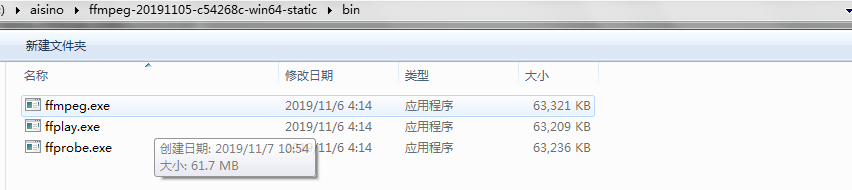
二、java代码实现
package com.aw.utils;

import org.apache.commons.lang3.StringUtils;

import org.apache.oro.text.regex.*;

import org.slf4j.Logger;

import org.slf4j.LoggerFactory;

import java.io.BufferedReader;

import java.io.InputStreamReader;

import java.util.HashMap;

import java.util.List;

import java.util.Map;

/**

 * @author hy

 * @date 2019/11/7 14:05

 */

public class FileParseUtil {

    public static final Logger LOGGER = LoggerFactory.getLogger(FileParseUtil.class);

    /**

     * 提取音频、视频编码等信息

     *

     * @param filePath

     * @return

     */

    public static Map<String, String> getEncodingFormat(String filePath) {

        String processFLVResult = processFLV(filePath);

        Map retMap = new HashMap();

        if (StringUtils.isNotBlank(processFLVResult)) {

            PatternCompiler compiler = new Perl5Compiler();

            try {

                String regexDuration = "Duration: (.*?), start: (.*?), bitrate: (\\d*) kb\\/s";

                String regexVideo = "Video: (.*?), (.*?), (.*?)[,\\s]";

                String regexAudio = "Audio: (\\w*), (\\d*) Hz";

                Pattern patternDuration = compiler.compile(regexDuration, Perl5Compiler.CASE_INSENSITIVE_MASK);

                PatternMatcher matcherDuration = new Perl5Matcher();

                if (matcherDuration.contains(processFLVResult, patternDuration)) {

                    MatchResult re = matcherDuration.getMatch();

                    retMap.put("提取出播放时间", re.group(1));

                    retMap.put("开始时间", re.group(2));

                    retMap.put("bitrate 码率 单位 kb", re.group(3));

                    System.out.println("提取出播放时间  ===" + re.group(1));

                    System.out.println("开始时间        =====" + re.group(2));

                    System.out.println("bitrate 码率 单位 kb==" + re.group(3));

                }

                Pattern patternVideo = compiler.compile(regexVideo, Perl5Compiler.CASE_INSENSITIVE_MASK);

                PatternMatcher matcherVideo = new Perl5Matcher();

                if (matcherVideo.contains(processFLVResult, patternVideo)) {

                    MatchResult re = matcherVideo.getMatch();

                    retMap.put("编码格式", re.group(1));

                    retMap.put("视频格式", re.group(2));

                    retMap.put("分辨率", re.group(3));

                    System.out.println("编码格式  ===" + re.group(1));

                    System.out.println("视频格式 ===" + re.group(2));

                    System.out.println(" 分辨率  == =" + re.group(3));

                }

                Pattern patternAudio = compiler.compile(regexAudio, Perl5Compiler.CASE_INSENSITIVE_MASK);

                PatternMatcher matcherAudio = new Perl5Matcher();

                if (matcherAudio.contains(processFLVResult, patternAudio)) {

                    MatchResult re = matcherAudio.getMatch();

                    retMap.put("音频编码", re.group(1));

                    retMap.put("音频采样频率", re.group(2));

                    System.out.println("音频编码   ===" + re.group(1));

                    System.out.println("音频采样频率  ===" + re.group(2));

                }

            } catch (MalformedPatternException e) {

                e.printStackTrace();

            }

        }

        return retMap;

    }

    //  ffmpeg能解析的格式:(asx,asf,mpg,wmv,3gp,mp4,mov,avi,flv等)

    private static String processFLV(String inputPath) {

        List<String> commend = new java.util.ArrayList<String>();

        commend.add("D:\\aisino\\ffmpeg-20191105-c54268c-win64-static\\bin\\ffmpeg");//可以设置环境变量从而省去这行

        commend.add("ffmpeg");

        commend.add("-i");

        commend.add(inputPath);

        try {

            ProcessBuilder builder = new ProcessBuilder();

            builder.command(commend);

            builder.redirectErrorStream(true);

            Process p = builder.start();

            //1. start

            BufferedReader buf = null; // 保存ffmpeg的输出结果流

            String line = null;

            //read the standard output

            buf = new BufferedReader(new InputStreamReader(p.getInputStream()));

            StringBuffer sb = new StringBuffer();

            while ((line = buf.readLine()) != null) {

                System.out.println(line);

                sb.append(line);

                continue;

            }

            int ret = p.waitFor();//这里线程阻塞,将等待外部转换进程运行成功运行结束后,才往下执行

            //1. end

            return sb.toString();

        } catch (Exception e) {

            LOGGER.error("-- processFLV error, message is {}", e);

            return null;

        }

    }

}
原文:https://www.iteye.com/blog/gaozzsoft-1483576
java调用ffmpeg获取视频文件信息的一些参数的更多相关文章
- Java使用FFmpeg处理视频文件指南
Java使用FFmpeg处理视频文件指南 本文主要讲述如何使用Java + FFmpeg实现对视频文件的信息提取.码率压缩.分辨率转换等功能: 之前在网上浏览了一大圈Java使用FFmpeg处理音视频 ...
- Java使用FFmpeg处理视频文件的方法教程
这篇文章主要给大家介绍了关于Java使用FFmpeg处理视频文件的相关资料,文中通过示例代码介绍的非常详细,对大家的学习或者工作具有一定的参考学习价值,需要的朋友们下面来一起学习学习吧 前言 本文主要 ...
- Java调用FFmpeg进行视频处理及Builder设计模式的应用
1.FFmpeg是什么 FFmpeg(https://www.ffmpeg.org)是一套可以用来记录.转换数字音频.视频,并能将其转化为流的开源计算机程序.它用来干吗呢?视频采集.视频格式转化.视频 ...
- JAVA通过URL链接获取视频文件信息(无需下载文件)
最近项目碰到一个大坑:APP上需要在获取视频列表时就获取视频的时长,但早期上传的时候数据库都没有保存这个数据,所以前段时间添加一个时长字段,在上传时手动输入视频时长,但是之前库中有上万条数据没这个信息 ...
- centos8平台用ffprobe获取视频文件信息(ffmpeg4.2.2)
一,ffprobe的作用 ffprobe是强大的视频分析工具, 用于从多媒体流中获取相关信息或查看文件格式信息, 并以可读的方式打印 说明:刘宏缔的架构森林是一个专注架构的博客,地址:https:// ...
- java 实现视频转换通用工具类:获取视频元数据信息(一)
java 做视频转换主要用到开源的ffmpeg或者mencoder,还要有MP4Box. 注:由于平时都没有时间写博客,所以思路我就不写了,有问题问我,不一定马上回复. 详细介绍: ffmpeg:ht ...
- JAVA调用FFMpeg进行转码等操作
直接上代码: public abstract class FFmpegUtils { FFmpegUtils ffmpegUtils; ; String timeLength = "&quo ...
- android 中获取视频文件的缩略图(非原创)
在android中获取视频文件的缩略图有三种方法: 1.从媒体库中查询 2. android 2.2以后使用ThumbnailUtils类获取 3.调用jni文件,实现MediaMetadataRet ...
- Java调用ffmepg+mencoder视频格式转换(*)
PS: 建议大家在官网下载最新的资源 其他格式转FLV格式,可以用Java调用ffmpeg和memcoder实现 ffmepg: D:\ffmpeg\bin\ffmpeg.exe -i E:\1.mp ...
随机推荐
- Myeclipse 启动tomcat项目报Out of memory: java heap space
问题: 在Myeclipse中启动tomcat,程序启动过程中报内存不足,java.lang.OutOfMemoryError: Java heap space 从错误可以看出是堆内存太小,需要配置j ...
- Java中非静态成员变量、静态成员变量的初始化时机
转: Java中非静态成员变量.静态成员变量的初始化时机. 2018年05月22日 11:48:11 SilenceCarrot 阅读数 421 版权声明:技术就要分享才有意思,欢迎大家分享(注明 ...
- JavaWeb—Nginx介绍(转载)
Nginx的产生 没有听过Nginx?那么一定听过它的"同行"Apache吧!Nginx同Apache一样都是一种WEB服务器.基于REST架构风格,以统一资源描述符(Unifor ...
- 数据库文件结构、sqlserver ON [PRIMARY]
在sqlserver创建表的语句中,最后总来一句on[primary],这到底是什么意思? .联机丛书中CREATE TABLE的语法下似乎没有找到.最后终于发现,具体如下: 在CREATE TABL ...
- 20190603 - CentOS 7 提示 Failed to load SELinux policy. Freezing 导致卡住不启动的解决办法
现象 最近 Windows 和两台 Mac 混用,将 Windows VirtualBox 中安装的 CentOS 7 拷贝到 Mac 上. 启动 CentOS 7 时,图形界面进度卡在最后,按 Es ...
- mariadb第一章
1.什么是数据库? 简单的说,数据库就是一个存放数据的仓库,这个仓库是按照一定的数据结构(数据结构是指数据的组织形式或数据之间的联系)来组织,存储的,我们可以通过数据库提供的多种方法来管理数据库里的数 ...
- C++学习笔记-异常处理
程序设计的要求之一就是程序的健壮性.希望程序在运行时能够不出或者少出问题.但是,在程序的实际运行时,总会有一些因素会导致程序不能正常运行.异常处理(Exception Handling)就是要提出或者 ...
- Swagger2异常:Illegal DefaultValue null for parameter type integer java
一.异常分析: Illegal DefaultValue null for parameter type integer`和`NumberFormatException: For input stri ...
- 语言I博客作业04
问题 答案 这个作业属于哪个课程 C语言程序设计II 这个作业的要求在哪里 https://edu.cnblogs.com/campus/zswxy/CST2019-3/homework/9771 我 ...
- PYTHON 100days学习笔记008-1:数据结构补充
目录 Day008_01:数据结构补充 1.列表list 1.1 将列表当作堆栈使用 1.2 将列表当作队列使用 1.3 列表推导式 1.4 嵌套列表解析 1.5 del语句 2.元组和序列 3.集合 ...