
koa 项目实战(四)注册接口和调试工具(postman)
1.安装模块
npm install koa-bodyparser --save

npm install bcryptjs --save
2.引入模块
根目录/app.js
const bodyParser = require('koa-bodyparser');

// 实例化koa

const app = new Koa();

app.use(bodyParser());
3.注册接口
根目录/routes/api/users.js
const Router = require('koa-router');

const router = new Router();

const bcrypt = require('bcryptjs');

// 引入User

const User = require('../../models/User');

/**

 * @route GET api/users/test

 * @desc 测试接口地址

 * @access 接口是公开的

 */

router.get('/test', async ctx => {

  ctx.status = 200;

  ctx.body = { msg: 'users works...' };

});

/**

 * @route POST api/users/register

 * @desc 注册接口地址

 * @access 接口是公开的

 */

router.post('/register', async ctx => {

  // console.log(ctx.request.body);

  // 通过邮箱判读是否注册过

  const findResult = await User.find({ email: ctx.request.body.email });

  // console.log(findResult);

  if (findResult.length > 0) {

    ctx.status = 500;

    ctx.body = { email: '邮箱已被占用 ' };

  } else {

    // 没查到

    const newUser = new User({

      name: ctx.request.body.name,

      email: ctx.request.body.email,

      password: ctx.request.body.password

    });

    await bcrypt.genSalt(10, (err, salt) => {

      bcrypt.hash(newUser.password, salt, (err, hash) => {

        // console.log(hash);

        if (err) throw err;

        newUser.password = hash;

      })

    })

    // console.log(newUser);

    // 存储到数据库

    await newUser.save().then(user => {

      ctx.body = user;

    }).catch(err => {

      console.log(err);

    });

    // 返回json数据

    ctx.body = newUser;

  }

});

module.exports = router.routes();
4.测试
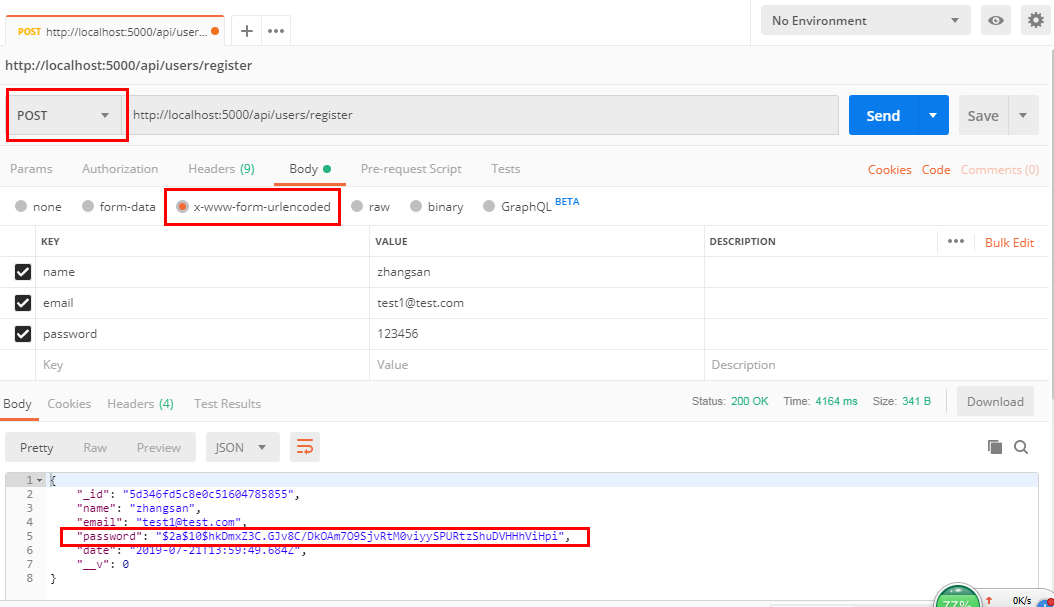
.
koa 项目实战(四)注册接口和调试工具(postman)的更多相关文章
- miniFTP项目实战四
项目简介: 在Linux环境下用C语言开发的Vsftpd的简化版本,拥有部分Vsftpd功能和相同的FTP协议,系统的主要架构采用多进程模型,每当有一个新的客户连接到达,主进程就会派生出一个ftp服务 ...
- koa 项目实战(十一)验证登录和注册的 input
1.验证注册参数 根目录/validation/register.js const Validator = require('validator'); const isEmpty = require( ...
- koa 项目实战(七)登录接口
1.登录接口 /** * @route POST api/users/login * @desc 登录接口地址 * @access 接口是公开的 */ router.post('/login', as ...
- koa 项目实战(九)passport验证token
1.安装模块 npm install koa-passport -D npm install passport-jwt -D 2.解析token 根目录/config/passport.js cons ...
- koa 项目实战(八)生成token
1.安装模块 npm install jsonwebtoken --save 2.引用 const jwt = require('jsonwebtoken'); ... // 返回token cons ...
- koa 项目实战(六)注册接口加密
1.创建工具类 根目录/config/tools.js const bcrypt = require('bcryptjs'); const tools = { enbcrypt(password) { ...
- koa 项目实战(三)创建测试接口和用户模型
1.创建测试接口,并引入用户模型 根目录/routes/api/users.js const Router = require('koa-router'); const router = new Ro ...
- Android项目实战登录&注册
由于项目中大部分界面都有一个后退键和一个标题栏,为避免代码冗杂以及便于利用,我们可以将后推荐和标题栏单独抽取出来定义一个标题栏布局,在 res/layout 目录下新建一个 Layout resour ...
- Android项目实战登录&注册
由于项目中大部分界面都有一个后退键和一个标题栏,为避免代码冗杂以及便于利用,我们可以将后推荐和标题栏单独抽取出来定义一个标题栏布局,在 res/layout 目录下新建一个 Layout resour ...
随机推荐
- Python3简易接口自动化测试框架设计与实现(上)
目录 1.开发环境 2.用到的模块 3.框架设计 3.1.流程 3.2.项目结构 5.日志打印 6.接口请求类封装 接口开发请参考:使用Django开发简单接口:文章增删改查 1.开发环境 操作系统: ...
- kubernetes资源清单之pod
什么是pod? Pod是一组一个或多个容器(例如Docker容器),具有共享的存储/网络,以及有关如何运行这些容器的规范. Pod的内容始终位于同一地点,并在同一时间安排,并在共享上下文中运行. Po ...
- 逆向破解 H.Koenig 遥控器 Part 1
逆向破解 H.Koenig 遥控器(Part 1) 最近我正在尝试一研究些自动吸尘器机器人.iRobot公司的Roomba貌似是该领域的领导者,但是作为实验来讲的话这些东西真是太昂贵了,我也找不到 ...
- three.js之元素周期表
<html><head> <title>three.js css3d - periodic table</title> <meta charset ...
- 在STM32上如果不使用外部晶振,OSC_IN和OSC_OUT的接法
如果使用内部RC振荡器而不使用外部晶振,请按照下面方法处理: 1)对于100脚或144脚的产品,OSC_IN应接地,OSC_OUT应悬空.2)对于少于100脚的产品,有2种接法: 2.1)OSC_I ...
- PAT乙级1018
题目链接 https://pintia.cn/problem-sets/994805260223102976/problems/994805304020025344 题解 刚开始做很懵逼,可能并不难吧 ...
- 安装WIN10+Ubuntu18.04安装教程(实测有效)
转载原文链接:https://www.cnblogs.com/masbay/articles/10745170.html 安装过程中尤其注意分区时候的挂载点一定要选对!!!选择Ubuntu的EFI所在 ...
- 《Python基础教程》第六章:抽象(一)
用def定义函数 __doc__是函数属性.属性名中的双下划线表示它是个特殊属性
- 小程序wx.showToast()方法实现文字换行
小程序wx.showToast()方法实现文字换行 在文字中间加上 '\r\n' 真机中生效 wx.showToast({ title: `换行前内容\r\n换行后内容`, icon: 'none' ...
- 简易MySQL存储过程
自从那天灵感突现,搜了下MySQL存储过程的实现,我就再也不会为造测试数据这种事情烦恼了,存储过程用起来简直太方便了. DROP PROCEDURE IF EXISTS insert2pay; DEL ...