
Latex使用记事(1)
意义用途
用于出版物的排版,样式控制,使得编排标准美观。
整体框架
一个最简环境
\documentclass{article}

\begin{document}

	content...

\end{document}
特殊符号
特殊符号的表示需要使用转义方式,但是\\表示的是换行而不是\。需要则使用$\backslash$表示。
\documentclass{article}
\begin{document}
   \# \$ \% \^{} \& \_ \{ \} \~ \\
   $\backslash$
\end{document}
省略号
省略号使用特殊的表示,区别于传统的直接使用多个点,间距不同的。
\documentclass{article}

\begin{document}

	\ldots when Einstein introduced his formula\\

	...

\end{document}
公式表示
使用另外的子环境设置
\documentclass{article}

\begin{document}

	\begin{equation} e =  m \cdot c^2 \end{equation}

	which is at the same time the most widely known and the least well understood physical formula.

\end{document}
一些求和,下标表示示例
\documentclass{article}

\begin{document}

	\begin{equation} \sum_{k=1}^{n} I_k = 0  \end{equation}

	Kirchhoff’s voltage law can be derive \ldots

\end{document}
日期表示
如下
\documentclass{article}

\begin{document}

	\today

\end{document}
引号表示
使用两个’表示,或者左边使用`,右边使用’表示。
\documentclass{article}

\begin{document}

	‘‘Please press the ‘x’ key.’’ \\

	\\

	``asdf'''

\end{document}
破折号或横线
使用多个-表示
\documentclass{article}

\begin{document}

	--------------------------

	\LaTeX

\end{document}
上波浪线和中波浪线
如下,分别为上波浪线和中波浪线
\documentclass{article}

\begin{document}

	http://www.rich.edu/\~{}bush \\

	http://www.clever.edu/$\sim$demo\\

\end{document}
另一些特殊符号
,如℃
\documentclass{article}

\begin{document}

	It’s $-30\,^{\circ}\mathrm{C}$.
     sm\o rrebr\o d, !‘Se\~norita!,\\

\end{document}
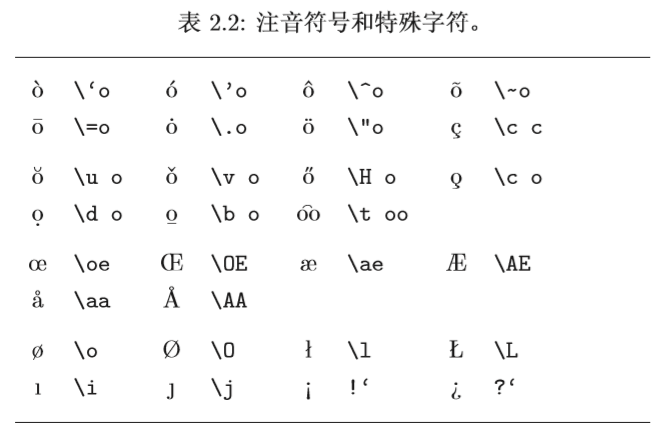
导入包并使用欧元符号
观察不同即可
\documentclass{article}

\usepackage{textcomp}

\begin{document}

	\texteuro

\end{document}
字符ff等自动连接的拆分
如下示例
\documentclass{article}

\begin{document}

	Not shelfful\\

	but shelf\mbox{}ful\\

\end{document}
分节表示
如下简例
\documentclass{article}

\begin{document}

	\section{Some Interesting Words}

\end{document}
页脚注释方案
\documentclass{article}

\begin{document}

	Footnotes\footnote{This is a footnote.}

\end{document}
强调方式
一般使用斜体,但是整体是斜体则用正体,总之是不同的样式,表示强调
\documentclass{article}

\begin{document}

	\textit{You can also \emph{emphasize} text if it is set in italics,}\\

	\emph{emphasize}

\end{document}
分条方式
如下示例
\documentclass{article}

\begin{document}

	\begin{enumerate}

		\item You can mix the list environments to your taste:

		\begin{itemize} \item But it might start to look silly. \item[-] With a dash. \end{itemize}

		\item Therefore remember:

		\begin{description}

			\item[Stupid] things will not become smart because they are in a list.

			\item[Smart] things, though, can be presented beautifully in a list.

		\end{description}

	\end{enumerate}

\end{document}
对齐方式
示例右对齐、居中
\documentclass{article}

\begin{document}

	\begin{flushright} This text is right-\\aligned. \LaTeX{} is not trying to make each line the same length.

	\end{flushright}
     \begin{center} At the centre\\of the earth \end{center}

\end{document}
摘要方式
摘要部分:
\documentclass{article}

\begin{document}

	\begin{abstract} The abstract abstract. \end{abstract}

\end{document}
原始方式显示
示例:
\documentclass{article}

\begin{document}

\begin{verbatim}

   10 PRINT "HELLO WORLD ";

      20 GOTO 10 \end{verbatim}

\end{document}
文字加框
与上下横线,如下示例:宽度固定4.7cm
\documentclass{article}

\begin{document}

\begin{tabular}{|p{4.7cm}|} \hline Welcome to Boxy’s paragraph. We sincerely hope you’ll all enjoy the show.\\ \hline

\end{tabular}\\

\\\\

\\

\begin{tabular}{l} \hline leading space left and right\\ \hline \end{tabular}

\end{document}
指数上标
示例:
\documentclass{article}

\begin{document}

	1\\

	[122pt] 100~m$^{3}$ of water\\

\end{document}
两个数学符号
示例:tal 和 属于
\documentclass{article}

\begin{document}

 \(\tau  \epsilon  \)\\

\end{document}
其它数学表示
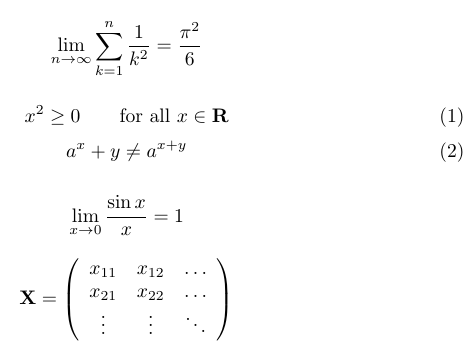
如下和效果:
\documentclass{article}

\begin{document}

\begin{displaymath} \lim_{n \to \infty} \sum_{k=1}^n \frac{1}{k^2} = \frac{\pi^2}{6} \end{displaymath}

\begin{equation} x^{2} \geq 0\qquad \textrm{for all }x\in\mathbf{R} \end{equation}

\begin{equation} a^x+y \neq a^{x+y} \end{equation}

\[\lim_{x \rightarrow 0} \frac{\sin x}{x}=1\]

\begin{displaymath} \mathbf{X} = \left( \begin{array}{ccc} x_{11} & x_{12} & \ldots \\ x_{21} & x_{22} & \ldots \\ \vdots & \vdots & \ddots \end{array} \right) \end{displaymath}

\end{document}
Latex使用记事(1)的更多相关文章
- Linux 中优秀的文本化编辑思想大碰撞(Markdown、LaTeX、MathJax)
这样一个标题可能不太准确,因为确实无法准确地解释什么叫"文本化编辑思想".其实我这篇随笔主要是想探讨 Markdown.LaTeX.MathJax,有兴趣的朋友可以继续往下看,同时 ...
- 再来说说 LaTeX
在我的上一篇随笔中,我提到了 Markdown.LaTeX 和 MathJax.这几个东西对目前的网络技术文章的写作.展示都有深远的影响.在上一篇中,我还给出了一份 LaTeX 语法的学习资料.在这一 ...
- LATEX数学公式基本语法
TEX 是Donald E. Knuth 编写的一个以排版文章及数学公式为目标的计算机程序.TEX的版本号不断趋近于π,现在为3.141592.由Pascal 语言写成,特点: 免费.输出质量高.擅长 ...
- 为WLW开发Latex公式插件
WLW是写博客的利器,支持离线.格式排版等,而且拥有众多的插件.博客园推荐了代码插入插件,但是没有提供WLW的公式编译插件.目前我的一般做法是:先在Word下使用MathType编辑好公式,然后将公式 ...
- MarkDown+LaTex 数学内容编辑样例收集
$\color{green}{MarkDown+LaTex 数学内容编辑样例收集}$ 1.大小标题的居中,大小,颜色 [例1] $\color{Blue}{一元二次方程根的分布}$ $\color{R ...
- Windows下LATEX排版论文攻略—CTeX、JabRef使用介绍
Windows下LATEX排版论文攻略—CTeX.JabRef使用介绍 一.工具介绍 TeX是一个很好排版工具,在学术界十分流行,特别是数学.物理学和计算机科学界. CTeX是TeX中的一个版本,指的 ...
- TeXstudio 编写Latex论文的若干问题
TeXstudio 编写Latex论文的若干问题解决方案总结 问题1: 如何安装TeXstudio 以及 Texstudio当中的中文字体使用问题. 一.如何安装TeXstudio 很 ...
- SCI英文论文写作- Latex 进阶
SCI英文论文写作- Latex 进阶 1.设置行间距的方法: %\setlength{\baselineskip}{15pt} \renewcommand{\baselinestretch}{1 ...
- 如何在latex 中插入EPS格式图片
如何在latex 中插入EPS格式图片 第一步:生成.eps格式的图片 1.利用visio画图,另存为pdf格式的图片 利用Adobe Acrobat裁边,使图片大小合适 另存为.eps格式,如下图所 ...
随机推荐
- HTML5 烟花系统
需求:在一个虚拟烟花球中,在不同的部位填充不同颜色.质地的烟花火药:观看试放效果.最好能结合点物理学定律(以便展现火药粉被爆炸扩散到一定程度再爆炸的效果) 这是这学期的一个作业,感觉挺无聊的,纯粹是老 ...
- Linux字符编码默认为UTF-8,如出现乱码可设置为GBK
Linux字符编码默认为UTF-8,如出现乱码可设置为GBK1.手动更改profile文件的命令: vi /etc/profile 也可以修改 /etc/sysconfig/i18n 文件,如 LAN ...
- LC 900. RLE Iterator
Write an iterator that iterates through a run-length encoded sequence. The iterator is initialized b ...
- [Navicat]把1个库的数据迁移到另1个库--数据库备份
需求: 将autotest库中所包含的所有表,从连接centOS7复制1份至localhost.autotest 操作步骤: 1.将centOS7.autotest库中表结构及表数据转为sql语句:c ...
- IE下 CSS hover iframe失效
预期:某个div下存在iframe子元素,当鼠标移动到该div下,该iframe出现,移出则iframe消失,移入iframe不会引起iframe消失. 问题:在火狐下结果满足预期,在IE下,鼠标移入 ...
- Laplacian eigenmap 拉普拉斯特征映射
下面是实验室大牛师兄自己写的一段总结,主要内容是Laplacian Eigenmap中的核心推导过程. 有空还是多点向这位师兄请教,每次都会捡到不少金子. Reference : <Laplac ...
- Apache 流框架Flink简介
1.Flink架构及特性分析 Flink是个相当早的项目,开始于2008年,但只在最近才得到注意.Flink是原生的流处理系统,提供high level的API.Flink也提供 API来像Spark ...
- 安装cni网络插件-非必须
安装cni网络插件 安装cni # 安装 cni # 百度云链接:https://pan.baidu.com/s/1-PputObLs5jouXLnuBCI6Q 密码:tzqm cd /server/ ...
- babylon 初试
出于对web端3D技术的对比,以及WebGL的发展现状和WebGPU的发展前景,我觉得有必要涉猎一下babylon.js了. 可以参考一下下列文章: 1⃣️下一代web端图形接口现状与前景:https ...
- kubeadm安装集群系列-1.基础服务安装
基础服务 本文基于centos7.5部署 规划 10.8.28.200 master-VIP 10.8.31.84 k8s-test-master-1 10.8.152.149 k8s-test-ma ...