
Android_(自动化)自动获取手机电池的剩余电量
自动获取手机电池的剩余电量
通过使用BroadcastReceiver的特性来获取手机电池的电量,注册BroadcastReceiver时设置的IntentFilter来获取系统发出的Intent.ACTION_BATTERY_CHANGED,然后以此来获取电池的电量。
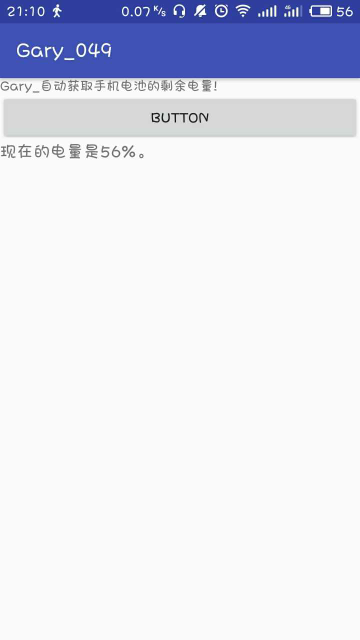
运行截图:
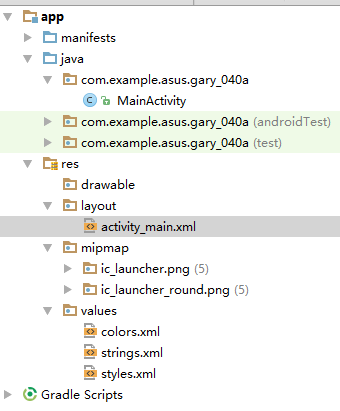
程序结构
package com.example.asus.gary_040a;

import android.app.Dialog;

import android.content.BroadcastReceiver;

import android.content.Context;

import android.content.DialogInterface;

import android.content.Intent;

import android.content.IntentFilter;

import android.support.v7.app.AlertDialog;

import android.support.v7.app.AppCompatActivity;

import android.os.Bundle;

import android.view.View;

import android.view.Window;

import android.view.WindowManager;

import android.widget.Button;

import android.widget.TextView;

import org.w3c.dom.Text;

public class MainActivity extends AppCompatActivity {

    private int intLevel;

    private int intScale;

    private Button mButton01;

    private TextView tv;

    //创建BroadcastReceiver

    private BroadcastReceiver mBatInfoReveiver = new BroadcastReceiver() {

        @Override

        public void onReceive(Context context, Intent intent) {

            String action = intent.getAction();

            //如果捕捉到的Action是ACTION_BATTERY_CHANGED则运行onBatteryInforECEIVER()

            if(intent.ACTION_BATTERY_CHANGED.equals(action))

            {

                //获得当前电量

                intLevel = intent.getIntExtra("level",0);

                //获得手机总电量

                intScale = intent.getIntExtra("scale",100);

                 // 在下面会定义这个函数,显示手机当前电量

                onBatteryInfoReceiver(intLevel, intScale);

            }

        }

    };

    @Override

    protected void onCreate(Bundle savedInstanceState) {

        super.onCreate(savedInstanceState);

        setContentView(R.layout.activity_main);

        mButton01 = (Button) findViewById(R.id.myButton1);

        mButton01.setOnClickListener(new Button.OnClickListener() {

            @Override

            public void onClick(View v) {

                // 注册一个BroadcastReceiver,作为访问电池计量之用

                registerReceiver(mBatInfoReveiver, new IntentFilter(

                        Intent.ACTION_BATTERY_CHANGED));

            }

        });

    }

    // 拦截到ACTION_BATTRY_CHANGED后要执行的动作

    private void onBatteryInfoReceiver(int intLevel, int intScale) {

        // TODO Auto-generated method stub

         int percent = intLevel*100/ intScale;

        //得到的person就是百分比电量

        //不乘100得到的percent为0

        tv=(TextView) findViewById(R.id.myTextView02);

        tv.setText("现在的电量是"+percent+"%。");

    };

}
MainActivity
<?xml version="1.0" encoding="utf-8"?>

<LinearLayout xmlns:android="http://schemas.android.com/apk/res/android"

    xmlns:app="http://schemas.android.com/apk/res-auto"

    xmlns:tools="http://schemas.android.com/tools"

    android:layout_width="match_parent"

    android:layout_height="match_parent"

    android:orientation="vertical"

    tools:context="com.example.asus.gary_040a.MainActivity">

    <TextView

        android:layout_width="wrap_content"

        android:layout_height="wrap_content"

        android:text="Gary_自动获取手机电池的剩余电量!"

        android:textSize="40px"

        app:layout_constraintBottom_toBottomOf="parent"

        app:layout_constraintLeft_toLeftOf="parent"

        app:layout_constraintRight_toRightOf="parent"

        app:layout_constraintTop_toTopOf="parent" />

    <Button

        android:id="@+id/myButton1"

        android:layout_width="match_parent"

        android:layout_height="wrap_content"

        android:text="Button" />

    <TextView

        android:id="@+id/myTextView02"

        android:layout_width="match_parent"

        android:layout_height="wrap_content"

        android:textSize="50px" />

</LinearLayout>
acvivity_main
一、界面布局
一个Button按钮,一个TextView文本框
点击Button时会在TextView上显示(手机电量)提示
二、实现程序功能
1、如果捕捉的Action是ACTION_BATTERY_CHANGED则运行onBatteryInfoReceiver()显示当前手机电量
 private BroadcastReceiver mBatInfoReveiver = new BroadcastReceiver() {

        @Override

        public void onReceive(Context context, Intent intent) {

            String action = intent.getAction();

            //如果捕捉到的Action是ACTION_BATTERY_CHANGED则运行onBatteryInforECEIVER()

            if(intent.ACTION_BATTERY_CHANGED.equals(action))

            {

                //获得当前电量

                intLevel = intent.getIntExtra("level",0);

                //获得手机总电量

                intScale = intent.getIntExtra("scale",100);

                 // 在下面会定义这个函数,显示手机当前电量

                onBatteryInfoReceiver(intLevel, intScale);

            }

        }

    };
2、对Button按钮添加单击后的事件响应动作,注册系统BroadcastReceiver广播事件来访问电池电量
protected void onCreate(Bundle savedInstanceState) {

        super.onCreate(savedInstanceState);

        setContentView(R.layout.activity_main);

        mButton01 = (Button) findViewById(R.id.myButton1);

        mButton01.setOnClickListener(new Button.OnClickListener() {

            @Override

            public void onClick(View v) {

                // 注册一个BroadcastReceiver,作为访问电池计量之用

                registerReceiver(mBatInfoReveiver, new IntentFilter(

                        Intent.ACTION_BATTERY_CHANGED));

            }

        });

    }
3、定义方法onBatteryInfoReceiver(),通过这个方法能在TextView文本框上显示手机剩余电量
 // 拦截到ACTION_BATTRY_CHANGED后要执行的动作

    private void onBatteryInfoReceiver(int intLevel, int intScale) {

        // TODO Auto-generated method stub

         int percent = intLevel*100/ intScale;

        //得到的person就是百分比电量

        //不乘100得到的percent为0

        tv=(TextView) findViewById(R.id.myTextView02);

        tv.setText("现在的电量是"+percent+"%。");

    };
Android_(自动化)自动获取手机电池的剩余电量的更多相关文章
- Android_设备隐私获取,忽略6.0权限管理
1.前言 (1).由于MIUI等部分国产定制系统也有权限管理,没有相关api,故无法判断用户是否允许获取联系人等隐私.在Android 6.0之后,新增权限管理可以通过官方api判断用户的运行状态: ...
- 使用Empire自动获取域管理员
使用Empire自动获取域管理员 译:backlion 前言 自从Empire和BloodHound被应用来,对AD渗透已经可以获取到内网环境95%的信息量.作者发现自己一遍又一遍地在做同样重复的事 ...
- expect脚本自动获取root权限
Linux脚本中有很多场景是进行远程操作的,例如远程登录ssh.远程复制scp.文件传输sftp等.这些命令中都会涉及到安全密码的输入,正常使用命令时是需要人工手动输入密码并接受安全验证的.为了实现自 ...
- <自动化测试>之<自动获取手机短信验证码>
第一次写博,最近解决了做自动化测试短信验证码自动获取填入的方法减少了脚本的人工干预,并非拦截短信,所以不存在安全警报提醒,拿出来分享给大家,有感兴趣的大家可以加Q1856100 目前在职测试开发,,写 ...
- 使用 shell 脚本自动获取发版指标数据
问题背景 大一点的公司都会建立一套规章流程来避免低级错误,例如合入代码前必需经过同行评审:上线前必需提测且通过 QA 验证:全量前必需经过 1%.5%.10%.20%.50% 的灰度过程.尤其是最后一 ...
- 转载-centos网络配置(手动设置,自动获取)的2种方法
转载地址:http://blog.51yip.com/linux/1120.html 重新启动网络配置 # service network restart 或 # /etc/init.d/networ ...
- 分享一个快速设置背景的js 自动获取背景图的长宽
我来分享一个快速设置背景的js (需要jq支持!) 快速切图铺页面用---就是不需要手动输入背景图的长宽 自动获取背景图的长宽 : <div class="wrap"> ...
- paip.enhes efis 自动获取文件的中文编码
paip.enhes efis 自动获取文件的中文编码 ##为什么需要自动获取文件的中文编码 提高开发效率,自动获取文件的中文编码 .不需要手动设置编码...轻松的.. ##cpdetector 可 ...
- 关于启明星系统移除apppath配置,让系统自动获取路径来设置cookie的解决方法
启明星系统底层使用统一接口,特别是用户,用户登录后,都会建立一个 userinfo 的cookie.请看下面2个网址: http://120.24.86.232/book http://120.24. ...
随机推荐
- QByteArray详解
QByteArray在串口通讯中经常被使用,有一定必要较为全面详细的对QByteArray进行阐述.本文通过以下几个部分加以介绍: 1. 初始化 2. 访问与赋值 3. 添加.删除.插入与替换操作 4 ...
- Where is __dso_handle defined?
Where is __dso_handle defined? 来源 https://stackoverflow.com/questions/34308720/where-is-dso-handle- ...
- JS基础_自增自减练习
<!DOCTYPE html> <html> <head> <meta charset="UTF-8"> <title> ...
- SIP笔记
消息代号: 1)1XX:临时响应,表示请求消息正在被处理. 2)2XX:成功响应,表示请求已被成功接收,完全理解并被接受. 3)3XX:重定向响应,表示需采取进一步以完成该请求. 4)4XX:客户机错 ...
- 帝国cms 加载更多的实现(父栏目以及子栏目都可以实现)
1. <div class="pagelist"> <span id="loadmore" class="btn" sty ...
- vue入门:(组件)
模板:(template)模板声明了数据和最终展现给用户的DOM之间的映射关系. 初始数据:(data)一个组件的初始数据状态.对于可复用的组件来说,通常是私有的状态. 接收外部参数:(props)组 ...
- 测试使用Timer定时调用http接口
转自:https://blog.csdn.net/qq_36004521/article/details/80101881
- Oracle的FIXED
今天发现一个有意思的问题,我们知道,在Oracle数据库中正常执行 select sysdate from dual 都可以返回当前主机的系统时间.正常修改系统时间,对应的查询结果也会变成修改后的系统 ...
- 如何使windows7的默认共享可以被访问[转载]
因为UAC的存在, 如果使用windows 7 的默认共享,比如 \abcc$ ,会被提示 无权限错误. 为了方便在局域网共享文件,找到了这个方法. Open the registry edi ...
- 【2017-05-19】WebForm复合控件、用DropDownList实现时间日期选择。
自动提交的属性: AutoPostBack="True" 1.RadioButtonList 单选集合 -属性:RepeatDirection:Vertical (垂直排布 ...