
ivew数控件Tree自定义节点内容示例分析
ivew数控件Tree自定义节点内容示例分析
demo地址:https://run.iviewui.com/plcWlM4H
<template>

    <Tree :data="data5" :render="renderContent"></Tree>

</template>

<script>

    export default {

        data () {

            return {

                data5: [

                    {

                        title: 'parent 1',

                        expand: true,

                        children: [

                            {

                                title: 'child 1-1',

                                expand: true,

                                children: [

                                    {

                                        title: 'leaf 1-1-1',

                                        expand: true

                                    },

                                    {

                                        title: 'leaf 1-1-2',

                                        expand: true

                                    }

                                ]

                            },

                            {

                                title: 'child 1-2',

                                expand: true,

                                children: [

                                    {

                                        title: 'leaf 1-2-1',

                                        expand: true

                                    },

                                    {

                                        title: 'leaf 1-2-1',

                                        expand: true

                                    }

                                ]

                            }

                        ]

                    }

                ],

                buttonProps: {

                    type: 'default',

                    size: 'small',

                }

            }

        },

      //<Icon type="ios-create-outline" />

        methods: {

            renderContent (h, { root, node, data }) {

                //console.log(root, '树的根节点', node, '当前节点', data, '当前节点数据');

                /*

                @root <Array>  把整个树 扁平化 后的  数组

                @node <Object> 当前节点

                @date <Object> 当前节点数据

                nodeKey 每个节点 的唯一标识

                parent 父级的 nodeKey

                */

                return h('span', {

                    class: 'span1',

                    style: {

                        display: 'inline-block',

                        width: '100%'

                    },

                }, [

                    h('span', [

                        h('Icon', {

                            props: {

                                type: 'ios-paper-outline'

                            },

                            class: 'wenjiantubiao',

                            style: {

                                marginRight: '8px'

                            }

                        }),

                        h('span', data.title)  // 节点标题

                    ]),

                    h('span', {  //右侧操作 包裹

                        class: 'youcecaozuo',

                        style: {

                            display: 'inline-block',

                            float: 'right',

                            marginRight: '32px'

                        }

                    }, [

                        h('Button', { //添加按钮

                            props: Object.assign({}, this.buttonProps, {

                                icon: 'ios-add'

                            }),

                            style: {

                                marginRight: '8px'

                            },

                            on: {

                                click: () => { this.append(data) }

                            }

                        }),

                        h('Button', {  //删除按钮

                            props: Object.assign({}, this.buttonProps, {

                                icon: 'ios-remove'

                            }),

                            on: {

                                click: () => { this.remove(root, node, data) }

                            }

                        })

                    ])

                ]);

            },

            append (data) {

                const children = data.children || [];

                children.push({

                    title: 'appended node',

                    expand: true

                });

                this.$set(data, 'children', children);

            },

            remove (root, node, data) {

                //console.log(root, node, data, '三个东西');

                console.log(node, '确定的node节点');

                /*

                因为 参数node 是从 root 上引用 处理的 所以 find 时 可以 判断 el对象 和 node 对象是否相等,

                详见:https://www.cnblogs.com/taohuaya/p/11535432.html

                */

                const parentKey = root.find(el => {

                  console.log(el, 'root每项');

                  return el === node;

                }).parent;  //找到删除项的 父级标识

                const parent = root.find(el => el.nodeKey === parentKey).node;  //通过 删除的 父级标识 找到 父级元素

                const index = parent.children.indexOf(data);   //在父级的children数组 中 找到当前删除元素 的索引 index

                parent.children.splice(index, 1);  //在父级children中 删除掉 要删除的元素

            }

        }

    }

  /*

         render: (h, { root, node, data }) => {

                            return h('span', {

                                style: {

                                    display: 'inline-block',

                                    width: '100%'

                                }

                            }, [

                                h('span', [

                                    h('Icon', {

                                        props: {

                                            type: 'ios-folder-outline'

                                        },

                                        style: {

                                            marginRight: '8px'

                                        }

                                    }),

                                    h('span', data.title)

                                ]),

                                h('span', {

                                    style: {

                                        display: 'inline-block',

                                        float: 'right',

                                        marginRight: '32px'

                                    }

                                }, [

                                    h('Button', {

                                        props: Object.assign({}, this.buttonProps, {

                                            icon: 'ios-add',

                                            type: 'primary'

                                        }),

                                        style: {

                                            width: '64px'

                                        },

                                        on: {

                                            click: () => { this.append(data) }

                                        }

                                    })

                                ])

                            ]);

                        },

        */

</script>
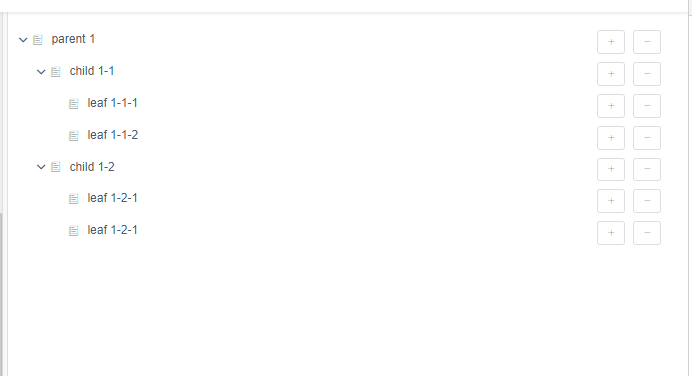
视图:
ivew数控件Tree自定义节点内容示例分析的更多相关文章
- vue中element-ui树形控件自定义节点,注意一下
在项目中用到菜单项编辑删除,在 element-ui自定义节点内容时, 有说明:使用render-content指定渲染函数, 得环境支持 JSX 语法,只要正确地配置了相关依赖,就可以正常运行. 一 ...
- 验证实现element-ui树形控件的自定义图标及右键菜单
许久不用,element-ui已经更新至2.4.1版本.直接进入今天的正题,前提是node.js的环境还有vue及elment-ui都已经安装.由于element-ui的官方文档中介绍比较粗略,试了许 ...
- Element ui tree树形控件获取当前节点id和父节点id
低版本Element ui tree树形控件获取当前节点id和父节点id的方法:点击查看 最新版本Element ui tree树形控件获取当前节点id和父节点id教程: 1.找到node_modul ...
- element-ui tree控件获取当前节点和父节点
今天使用element-ui 遇到两个问题,第一个问题是获取tree控件的当前节点和父节点, 一开始使用tree控件的getCurrentNode()函数,结果发现返回的是当前节点的data属性,和u ...
- 实用的树形菜单控件tree
jQuery plugin: Treeview 这个插件能够把无序列表转换成可展开与收缩的Tree. jQuery plugin: Treeview jQuery jstree jsTree ...
- VS2010/MFC编程入门之三十一(常用控件:树形控件Tree Control 下)
前面一节讲了树形控件Tree Control的简介.通知消息以及相关数据结构,本节继续讲下半部分,包括树形控件的创建.CTreeCtrl类的主要成员函数和应用实例. 树形控件的创建 MFC为树形控件提 ...
- Merkle 树——空间换时间,分而治之的hash表,通过根节点是由它的两个子节点内容的哈希值组成来校验数据完整性,定位篡改的数据位置
Merkle 树 图 1.5.6.1 - Merkle 树示例 默克尔树(又叫哈希树)是一种二叉树,由一个根节点.一组中间节点和一组叶节点组成.最下面的叶节点包含存储数据或其哈希值,每个中间节点是它的 ...
- VS2010-MFC(常用控件:树形控件Tree Control 下)
转自:http://www.jizhuomi.com/software/203.html 前面一节讲了树形控件Tree Control的简介.通知消息以及相关数据结构,本节继续讲下半部分,包括树形控件 ...
- WebConfig 自定义节点configSections配置信息
WebConfig 自定义节点configSections配置信息 示例: <configuration> <configSections> <!-- For ...
随机推荐
- [Eclipse]已经写好的代码怎样切换为unix下的换行符?
问题:使用eclise提交文件到github,每行文件后面都有^M字符 切换换行符的显示格式, 但是这样只能对新文件起作用,修改旧文件:
- 小D课堂 - 零基础入门SpringBoot2.X到实战_第9节 SpringBoot2.x整合Redis实战_37、分布式缓存Redis介绍
笔记 1.分布式缓存Redis介绍 简介:讲解为什么要用缓存和介绍什么是Redis,新手练习工具 1.redis官网 https://redis.io/download ...
- matplotlib常用操作2
关于matplotlib学习还是强烈建议常去官方http://matplotlib.org/contents.html里查一查各种用法和toturial等. 下面是jupyter notebook代码 ...
- Sword cjson库函数使用
/* cjson库的使用 */ #include <stdio.h> #include <stdlib.h> #include <string.h> #includ ...
- pls_integer类型
转: pls_integer类型 2011-08-22 16:49:06 heqiyu34 阅读数 13413更多 分类专栏: Oracle 今天在看一个触发器代码的时候碰到了一个pls_inte ...
- NodeVisitor
/* -*-c++-*- OpenSceneGraph - Copyright (C) 1998-2006 Robert Osfield * * This library is open source ...
- 123457123456#0#-----com.ppGame.huaHua65--前拼后广--儿童填色-pp
com.ppGame.huaHua65--前拼后广--儿童填色-pp
- 【Leetcode_easy】867. Transpose Matrix
problem 867. Transpose Matrix solution: class Solution { public: vector<vector<int>> tra ...
- docker 下mysql 和postgresql 数据库的搭建以及数据文件的迁移和备份
service docker start - docker 启动 service docker stop - docker 关闭 1.docker 镜像创建—使用的默认镜像有数据卷 docker pu ...
- linux maven环境变量配置
export MAVEN_HOME=/opt/hjyang/soft/maven export MAVEN_HOME export PATH=$PATH:$MAVEN_HOME/bin