
ivew数控件Tree自定义节点内容示例分析
ivew数控件Tree自定义节点内容示例分析
demo地址:https://run.iviewui.com/plcWlM4H
<template>

    <Tree :data="data5" :render="renderContent"></Tree>

</template>

<script>

    export default {

        data () {

            return {

                data5: [

                    {

                        title: 'parent 1',

                        expand: true,

                        children: [

                            {

                                title: 'child 1-1',

                                expand: true,

                                children: [

                                    {

                                        title: 'leaf 1-1-1',

                                        expand: true

                                    },

                                    {

                                        title: 'leaf 1-1-2',

                                        expand: true

                                    }

                                ]

                            },

                            {

                                title: 'child 1-2',

                                expand: true,

                                children: [

                                    {

                                        title: 'leaf 1-2-1',

                                        expand: true

                                    },

                                    {

                                        title: 'leaf 1-2-1',

                                        expand: true

                                    }

                                ]

                            }

                        ]

                    }

                ],

                buttonProps: {

                    type: 'default',

                    size: 'small',

                }

            }

        },

      //<Icon type="ios-create-outline" />

        methods: {

            renderContent (h, { root, node, data }) {

                //console.log(root, '树的根节点', node, '当前节点', data, '当前节点数据');

                /*

                @root <Array>  把整个树 扁平化 后的  数组

                @node <Object> 当前节点

                @date <Object> 当前节点数据

                nodeKey 每个节点 的唯一标识

                parent 父级的 nodeKey

                */

                return h('span', {

                    class: 'span1',

                    style: {

                        display: 'inline-block',

                        width: '100%'

                    },

                }, [

                    h('span', [

                        h('Icon', {

                            props: {

                                type: 'ios-paper-outline'

                            },

                            class: 'wenjiantubiao',

                            style: {

                                marginRight: '8px'

                            }

                        }),

                        h('span', data.title)  // 节点标题

                    ]),

                    h('span', {  //右侧操作 包裹

                        class: 'youcecaozuo',

                        style: {

                            display: 'inline-block',

                            float: 'right',

                            marginRight: '32px'

                        }

                    }, [

                        h('Button', { //添加按钮

                            props: Object.assign({}, this.buttonProps, {

                                icon: 'ios-add'

                            }),

                            style: {

                                marginRight: '8px'

                            },

                            on: {

                                click: () => { this.append(data) }

                            }

                        }),

                        h('Button', {  //删除按钮

                            props: Object.assign({}, this.buttonProps, {

                                icon: 'ios-remove'

                            }),

                            on: {

                                click: () => { this.remove(root, node, data) }

                            }

                        })

                    ])

                ]);

            },

            append (data) {

                const children = data.children || [];

                children.push({

                    title: 'appended node',

                    expand: true

                });

                this.$set(data, 'children', children);

            },

            remove (root, node, data) {

                //console.log(root, node, data, '三个东西');

                console.log(node, '确定的node节点');

                /*

                因为 参数node 是从 root 上引用 处理的 所以 find 时 可以 判断 el对象 和 node 对象是否相等,

                详见:https://www.cnblogs.com/taohuaya/p/11535432.html

                */

                const parentKey = root.find(el => {

                  console.log(el, 'root每项');

                  return el === node;

                }).parent;  //找到删除项的 父级标识

                const parent = root.find(el => el.nodeKey === parentKey).node;  //通过 删除的 父级标识 找到 父级元素

                const index = parent.children.indexOf(data);   //在父级的children数组 中 找到当前删除元素 的索引 index

                parent.children.splice(index, 1);  //在父级children中 删除掉 要删除的元素

            }

        }

    }

  /*

         render: (h, { root, node, data }) => {

                            return h('span', {

                                style: {

                                    display: 'inline-block',

                                    width: '100%'

                                }

                            }, [

                                h('span', [

                                    h('Icon', {

                                        props: {

                                            type: 'ios-folder-outline'

                                        },

                                        style: {

                                            marginRight: '8px'

                                        }

                                    }),

                                    h('span', data.title)

                                ]),

                                h('span', {

                                    style: {

                                        display: 'inline-block',

                                        float: 'right',

                                        marginRight: '32px'

                                    }

                                }, [

                                    h('Button', {

                                        props: Object.assign({}, this.buttonProps, {

                                            icon: 'ios-add',

                                            type: 'primary'

                                        }),

                                        style: {

                                            width: '64px'

                                        },

                                        on: {

                                            click: () => { this.append(data) }

                                        }

                                    })

                                ])

                            ]);

                        },

        */

</script>
视图:
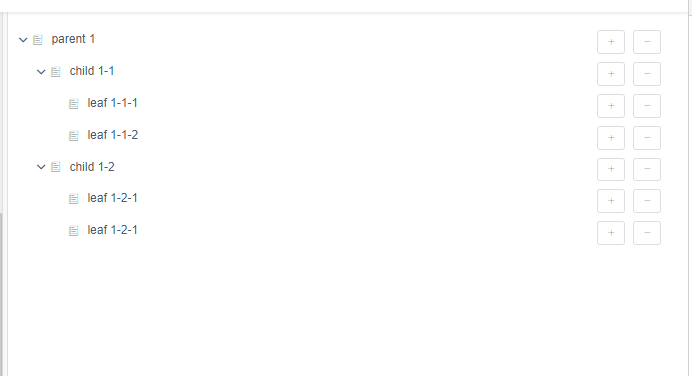
ivew数控件Tree自定义节点内容示例分析的更多相关文章
- vue中element-ui树形控件自定义节点,注意一下
在项目中用到菜单项编辑删除,在 element-ui自定义节点内容时, 有说明:使用render-content指定渲染函数, 得环境支持 JSX 语法,只要正确地配置了相关依赖,就可以正常运行. 一 ...
- 验证实现element-ui树形控件的自定义图标及右键菜单
许久不用,element-ui已经更新至2.4.1版本.直接进入今天的正题,前提是node.js的环境还有vue及elment-ui都已经安装.由于element-ui的官方文档中介绍比较粗略,试了许 ...
- Element ui tree树形控件获取当前节点id和父节点id
低版本Element ui tree树形控件获取当前节点id和父节点id的方法:点击查看 最新版本Element ui tree树形控件获取当前节点id和父节点id教程: 1.找到node_modul ...
- element-ui tree控件获取当前节点和父节点
今天使用element-ui 遇到两个问题,第一个问题是获取tree控件的当前节点和父节点, 一开始使用tree控件的getCurrentNode()函数,结果发现返回的是当前节点的data属性,和u ...
- 实用的树形菜单控件tree
jQuery plugin: Treeview 这个插件能够把无序列表转换成可展开与收缩的Tree. jQuery plugin: Treeview jQuery jstree jsTree ...
- VS2010/MFC编程入门之三十一(常用控件:树形控件Tree Control 下)
前面一节讲了树形控件Tree Control的简介.通知消息以及相关数据结构,本节继续讲下半部分,包括树形控件的创建.CTreeCtrl类的主要成员函数和应用实例. 树形控件的创建 MFC为树形控件提 ...
- Merkle 树——空间换时间,分而治之的hash表,通过根节点是由它的两个子节点内容的哈希值组成来校验数据完整性,定位篡改的数据位置
Merkle 树 图 1.5.6.1 - Merkle 树示例 默克尔树(又叫哈希树)是一种二叉树,由一个根节点.一组中间节点和一组叶节点组成.最下面的叶节点包含存储数据或其哈希值,每个中间节点是它的 ...
- VS2010-MFC(常用控件:树形控件Tree Control 下)
转自:http://www.jizhuomi.com/software/203.html 前面一节讲了树形控件Tree Control的简介.通知消息以及相关数据结构,本节继续讲下半部分,包括树形控件 ...
- WebConfig 自定义节点configSections配置信息
WebConfig 自定义节点configSections配置信息 示例: <configuration> <configSections> <!-- For ...
随机推荐
- 如何贡献补丁到uboot社区?
答: 首次贡献分为两步: 1. 首先需要订阅一下,地址在此https://lists.denx.de/listinfo/u-boot,使邮箱地址对应有一个成员名称,才能向uboot社区发送补丁,否则会 ...
- iptables nat表配置
- typeScript中的函数
// 函数的定义 //es5定义函数的方法 /* //函数声明法 function run(){ return 'run'; } //匿名函数 var run2=function(){ return ...
- 泡泡一分钟:Aided Inertial Navigation: Unified Feature Representations and Observability Analysis
http://udel.edu/~yuyang/downloads/tr_observabilityII.pdf Aided Inertial Navigation: Unified Feature R ...
- MD5Encrypt加密
package utils; import java.security.MessageDigest; public class MD5Encrypt { public MD5Encrypt() { } ...
- django项目mysite
项目建立 建立项目mysite 各文件和目录解释: 外层的mysite/目录与Django无关,只是你项目的容器,可以任意重命名. manage.py:一个命令行工具,用于与Django进行不同方式的 ...
- mybatis 存储过程与游标的使用
MyBatis还能对存储过程进行完全支持,这节开始学习存储过程.在讲解之前,我们需要对存储过程有一个基本的认识,首先存储过程是数据库的一个概念,它是数据库预先编译好,放在数据库内存中的一个程序片段,所 ...
- delphi 多线程定时执行程序如何写
unit Unit1; interface uses Windows, Messages, SysUtils, Variants, Classes, Graphics, Controls, Forms ...
- MySQL插入大批量数据时报错“The total number of locks exceeds the lock table size”的解决办法
事情的原因是:我执行了一个load into语句的SQL将一个很大的文件导入到我的MySQL数据库中,执行了一段时间后报错"The total number of locks exceeds ...
- linux系统实现多个进程监听同一个端口
通过 fork 创建子进程的方式可以实现父子进程监听相同的端口. 方法:在绑定端口号(bind函数)之后,监听端口号之前(listen函数),用fork()函数生成子进程,这样子进程就可以克隆父进程, ...