
mybatis获取刚刚插入到数据库的数据的id(转载)
原文地址:https://blog.csdn.net/hehuihh/article/details/82800739
我用的是第一种写法,直接把代码copy到insert标签里(id要是自增id)
写法如下:
第一种写法:
第二种写法:
第一种写法详解:
keyProperty属性表示要查询的主键的名字,就是主键字段对应实体类的属性。
order属性有两个值,即after,before;after表示在insert之后执行SELECT LAST_INSERT_ID(),一般用于主键自增时,得到的就是自增长生成的id,而before表示在insert之前执行SELECT LAST_INSERT_ID(),一般用于非自增主键,得到的是传入的对象中主键的值,一般是用户生成的uuid。
resultType属性表示主键的类型,一般要么是Integer,要么是String
将该selectKey标签的内容放入insert标签语句中就ok了,例如:
<insert id="insertSelective" parameterType="com.rkxch.studypaper.po.StoryComments">

        <selectKey keyProperty="id" order="AFTER" resultType="java.lang.Integer">

          SELECT LAST_INSERT_ID()

        </selectKey>

        insert into story_comments

        <trim prefix="(" suffix=")" suffixOverrides=",">

          <if test="storyId != null">

            story_id,

          </if>

          <if test="userId != null">

            user_id,

          </if>

          <if test="isDisplayName != null">

            is_display_name,

          </if>

          <if test="isSupport != null">

            is_support,

          </if>

          <if test="likeCount != null">

            like_count,

          </if>

          <if test="auditUserId != null">

            audit_user_id,

          </if>

          <if test="auditStatus != null">

            audit_status,

          </if>

          <if test="auditTime != null">

            audit_time,

          </if>

          <if test="dislikeCount != null">

            dislike_count,

          </if>

          <if test="createTime != null">

            create_time,

          </if>

          <if test="updateTime != null">

            update_time,

          </if>

          <if test="commentsContent != null">

            comments_content,

          </if>

        </trim>

        <trim prefix="values (" suffix=")" suffixOverrides=",">

          <if test="storyId != null">

            #{storyId,jdbcType=INTEGER},

          </if>

          <if test="userId != null">

            #{userId,jdbcType=INTEGER},

          </if>

          <if test="isDisplayName != null">

            #{isDisplayName,jdbcType=INTEGER},

          </if>

          <if test="isSupport != null">

            #{isSupport,jdbcType=INTEGER},

          </if>

          <if test="likeCount != null">

            #{likeCount,jdbcType=INTEGER},

          </if>

          <if test="auditUserId != null">

            #{auditUserId,jdbcType=INTEGER},

          </if>

          <if test="auditStatus != null">

            #{auditStatus,jdbcType=INTEGER},

          </if>

          <if test="auditTime != null">

            #{auditTime,jdbcType=TIMESTAMP},

          </if>

          <if test="dislikeCount != null">

            #{dislikeCount,jdbcType=INTEGER},

          </if>

          <if test="createTime != null">

            #{createTime,jdbcType=TIMESTAMP},

          </if>

          <if test="updateTime != null">

            #{updateTime,jdbcType=TIMESTAMP},

          </if>

          <if test="commentsContent != null">

            #{commentsContent,jdbcType=LONGVARCHAR},

          </if>

        </trim>

      </insert>
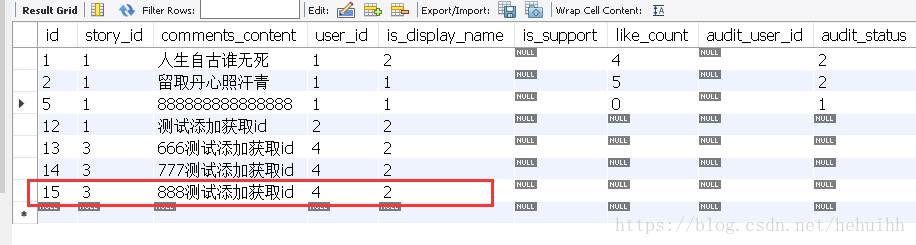
运行效果:


笔者的这个项目,数据库的表结构主键都是自增长,所以selectKey标签中order属性必须是AFTER,而且是大写。
如果,将order属性改成BEFORE会怎样呢?
运行效果如下:

这里查询的主键id是对象的id的值,而不是自增长生成的id的值,对象的属性未赋值,自动初始化的值是0,所以此处主键的值为0,改成BEFORE取的就是对象主键的值。
笔者习惯在写insert语句时将selectKey标签带上,方便使用。
另外:再强调一下,AFTER BEFORE必须大写
否则,运行如下:
第二种写法详解:
在insert标签中加入useGeneratedKeys和keyProperty属性即可,即:useGeneratedKeys="true" keyProperty="id"
例如:
    <insert id="insertSelective" parameterType="com.rkxch.studypaper.po.StoryComments" useGeneratedKeys="true" keyProperty="id">

        insert into story_comments

        <trim prefix="(" suffix=")" suffixOverrides=",">

          <if test="storyId != null">

            story_id,

          </if>

          <if test="userId != null">

            user_id,

          </if>

          <if test="isDisplayName != null">

            is_display_name,

          </if>

          <if test="isSupport != null">

            is_support,

          </if>

          <if test="likeCount != null">

            like_count,

          </if>

          <if test="auditUserId != null">

            audit_user_id,

          </if>

          <if test="auditStatus != null">

            audit_status,

          </if>

          <if test="auditTime != null">

            audit_time,

          </if>

          <if test="dislikeCount != null">

            dislike_count,

          </if>

          <if test="createTime != null">

            create_time,

          </if>

          <if test="updateTime != null">

            update_time,

          </if>

          <if test="commentsContent != null">

            comments_content,

          </if>

        </trim>

        <trim prefix="values (" suffix=")" suffixOverrides=",">

          <if test="storyId != null">

            #{storyId,jdbcType=INTEGER},

          </if>

          <if test="userId != null">

            #{userId,jdbcType=INTEGER},

          </if>

          <if test="isDisplayName != null">

            #{isDisplayName,jdbcType=INTEGER},

          </if>

          <if test="isSupport != null">

            #{isSupport,jdbcType=INTEGER},

          </if>

          <if test="likeCount != null">

            #{likeCount,jdbcType=INTEGER},

          </if>

          <if test="auditUserId != null">

            #{auditUserId,jdbcType=INTEGER},

          </if>

          <if test="auditStatus != null">

            #{auditStatus,jdbcType=INTEGER},

          </if>

          <if test="auditTime != null">

            #{auditTime,jdbcType=TIMESTAMP},

          </if>

          <if test="dislikeCount != null">

            #{dislikeCount,jdbcType=INTEGER},

          </if>

          <if test="createTime != null">

            #{createTime,jdbcType=TIMESTAMP},

          </if>

          <if test="updateTime != null">

            #{updateTime,jdbcType=TIMESTAMP},

          </if>

          <if test="commentsContent != null">

            #{commentsContent,jdbcType=LONGVARCHAR},

          </if>

        </trim>

      </insert>

mybatis获取刚刚插入到数据库的数据的id(转载)的更多相关文章
- mybatis获取批量插入的主键自增id
一.写一个实体类 public class UserInfo { private long userId; private String userAccount; private String use ...
- myBatis获取批量插入数据的主键id
在myBatis中获取刚刚插入的数据的主键id是比较容易的 , 一般来说下面的一句话就可以搞定了 , 网上也有很多相关资料去查. @Options(useGeneratedKeys = true, k ...
- 获取刚刚插入表格的这条信息的自增ID
获取刚刚插入表格的这条信息的自增ID var conn=getConnection(); var msql="INSERT INTO " + table +" (&quo ...
- Mybatis中文模糊查询,数据库中有数据,但无结果匹配
1.Mybatis中文模糊查询,数据库中有数据,但无结果匹配 1.1 问题描述: Mybatis采用中文关键字进行模糊查询,sql语句配置无误,数据库有该数据,且无任何报错信息,但无查询结果 1.2 ...
- 数据库存入数据后id保持不变,或者直接报错
数据库存入数据后id保持不变,且添加的数据一直在进行覆盖 或者直接报错 数据库存入数据后id保持不变,且添加的数据一直在进行覆盖 原因是: 之前注释掉了loadimage();在该函数中含有建立新的记 ...
- mybatis获取insert插入之后的id
一.为什么要获取insert的id 写了测试类测试插入,插入之后用select查询出来进行Assert 插入成功后,不管Select对比的结果成功还是失败,都希望删除掉测试插入的结果 二.运行环境 m ...
- mybatis获得刚刚插入的自增的值
转自这里 在http://blog.csdn.net/zhangwenan2010/article/details/7579191 介绍了MyBatis 3 的配置过程, 其中,Product 类 ...
- mysql获取刚插入(添加)记录的自动编号id
我们在写数据库程序的时候,经常会需要获取某个表中的最大序号数, 一般情况下获取刚插入的数据的id,使用select max(id) from table 是可以的.但在多线程情况下,就不行了. 下面介 ...
- postgresql 获取刚刚插入的数据主键id
postgresql不支持last_insert_id()方法,恶心到啦: 不过还好它有其他的解决方案: 创建一个测试数据表: CREATE TABLE test.test18 ( id serial ...
随机推荐
- java动态加载jar文件
public static void main(String[] args) throws IllegalAccessException, IllegalArgumentException, Invo ...
- SonarQube Detection of Injection Flaws in Java, C#, PHP
Code Quality Tools Review: Sonar, PMD, Findbugs and Checkstyle Sonar CheckStyle, FindBugs and PMD - ...
- Java 13 特性解读
Java 13 特性解读 转 https://blog.csdn.net/bjweimengshu/article/details/100978383 2017年8月,JCP执行委员会提出将 ...
- [转载] Ubuntu上Firefox字体太小--高分屏背锅
版权声明:本文为CSDN博主「mythinker2」的原创文章,遵循 CC 4.0 BY-SA 版权协议,转载请附上原文出处链接及本声明.原文链接:https://blog.csdn.net/myth ...
- python中的修饰符@的作用
1.一层修饰符 1)简单版,编译即实现 在一个函数上面添加修饰符 @另一个函数名 的作用是将这个修饰符下面的函数作为该修饰符函数的参数传入,作用可以有比如你想要在函数前面添加记录时间的代码,这样每个函 ...
- Python3入门(十三)——常用内置模块之URL模块urlib
见名知意,一系列用于URL的操作 当然了,主要是用于web爬虫等处理(发送Get/Post请求,处理响应等),暂不展开, 参考:https://www.liaoxuefeng.com/wiki/101 ...
- pyenv、virtualenv、virtualenvwrapper三种python多版本介绍
今天有把此前接触过的三种python实现多版本环境用到的软件pyenv.virtualenv.virtualenvwrapper,了解了一番,现做如下总结: 一.pyenv: 是针对python多版本 ...
- spring 装配bean的混合使用
在现实中,使用XML或者注解各有道理,建议在自己的工程中所开发的类尽量使用注解方式,因为使用它并不困难,甚至可以说更为简单,而对于引入第三方包或者服务的类,尽量使用XML方式,这样的好处是可以尽量对三 ...
- LeetCode_290. Word Pattern
290. Word Pattern Easy Given a pattern and a string str, find if str follows the same pattern. Here ...
- 【JQuery插件】元素根据滚动条位置自定义吸顶效果
;(function($){ $.fn.extend({ /* 元素根据滚动条位置自定义吸顶插件 @defaultTop 初始化top位置 @startTop 开始滚动和回复原样的位置 @demo v ...