
从FBV到CBV二(认证器)
span::selection, .CodeMirror-line > span > span::selection { background: #d7d4f0; }.CodeMirror-line::-moz-selection, .CodeMirror-line > span::-moz-selection, .CodeMirror-line > span > span::-moz-selection { background: #d7d4f0; }.cm-searching {background: #ffa; background: rgba(255, 255, 0, .4);}.cm-force-border { padding-right: .1px; }@media print { .CodeMirror div.CodeMirror-cursors {visibility: hidden;}}.cm-tab-wrap-hack:after { content: ""; }span.CodeMirror-selectedtext { background: none; }.CodeMirror-activeline-background, .CodeMirror-selected {transition: visibility 0ms 100ms;}.CodeMirror-blur .CodeMirror-activeline-background, .CodeMirror-blur .CodeMirror-selected {visibility:hidden;}.CodeMirror-blur .CodeMirror-matchingbracket {color:inherit !important;outline:none !important;text-decoration:none !important;}.CodeMirror-sizer {min-height:auto !important;}
-->
li {list-style-type:decimal;}.wiz-editor-body ol.wiz-list-level2 > li {list-style-type:lower-latin;}.wiz-editor-body ol.wiz-list-level3 > li {list-style-type:lower-roman;}.wiz-editor-body li.wiz-list-align-style {list-style-position: inside; margin-left: -1em;}.wiz-editor-body blockquote {padding: 0 12px;}.wiz-editor-body blockquote > :first-child {margin-top:0;}.wiz-editor-body blockquote > :last-child {margin-bottom:0;}.wiz-editor-body img {border:0;max-width:100%;height:auto !important;margin:2px 0;}.wiz-editor-body table {border-collapse:collapse;border:1px solid #bbbbbb;}.wiz-editor-body td,.wiz-editor-body th {padding:4px 8px;border-collapse:collapse;border:1px solid #bbbbbb;min-height:28px;word-break:break-word;box-sizing: border-box;}.wiz-editor-body td > div:first-child {margin-top:0;}.wiz-editor-body td > div:last-child {margin-bottom:0;}.wiz-editor-body img.wiz-svg-image {box-shadow:1px 1px 4px #E8E8E8;}.wiz-hide {display:none !important;}
-->
- 认证


'DEFAULT_AUTHENTICATION_CLASSES': (
'rest_framework_jwt.authentication.JSONWebTokenAuthentication',
'rest_framework.authentication.SessionAuthentication',
'rest_framework.authentication.BasicAuthentication',
)
}<wiz_code_mirror>
REST_FRAMEWORK = {
'DEFAULT_AUTHENTICATION_CLASSES': (
'rest_framework_jwt.authentication.JSONWebTokenAuthentication',
'rest_framework.authentication.SessionAuthentication',
'rest_framework.authentication.BasicAuthentication',
)
}


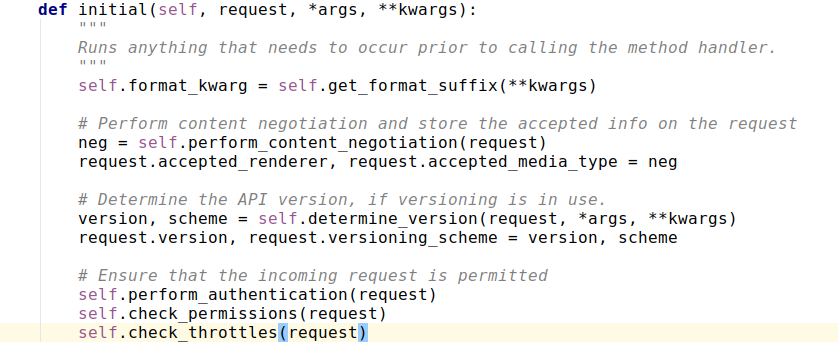
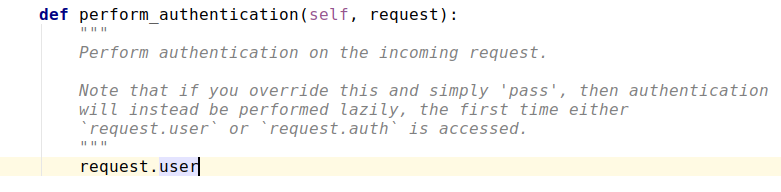


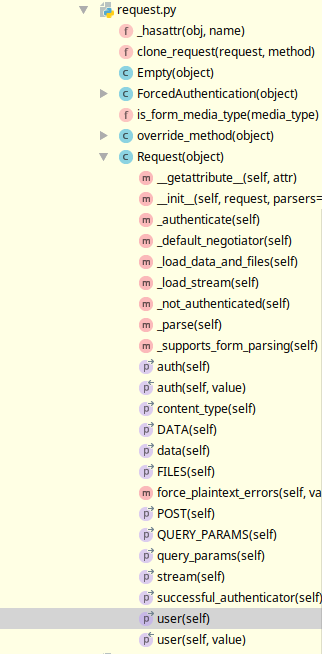


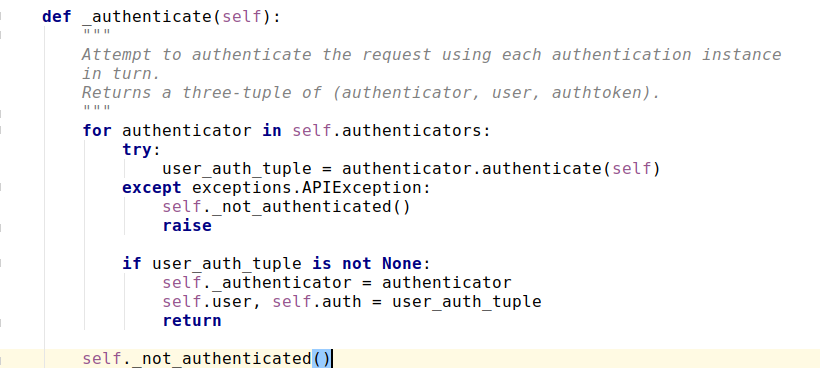

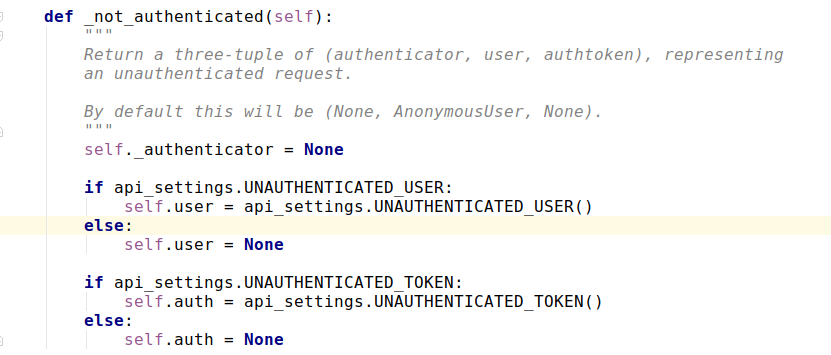
- for authenticator in self.authenticators:
通过遍历找到我们的认证器 - user_auth_tuple = authenticator.authenticate(self)
- except exceptions.APIException: self._not_authenticated() raise
- if user_auth_tuple is not None:
self._authenticator = authenticator
self.user, self.auth = user_auth_tuple
return
- self._not_authenticated()

class MyAuthentication(object):
# authenticate authenticate_header 两个方法是必须有的,authenticate用来写我们自己的认证方式,authenticate_header直接写pass就行,不写会抛错,缺少authenticate_header方法
def authenticate(self, request):
self.token = request._request.GET.get('token')
if not self.token:
raise AuthenticationFailed('用户认证失败') # 如果认证失败,就抛出一个AuthenticationFailed异常
return ('wbj', self.token) # 如果认证通过,就行返回一个元组,第一个元素是用户身份(user),第二个是auth
def authenticate_header(self, request):
pass
from rest_framework.exceptions import AuthenticationFailed
class MyAuthentication(object):
# authenticate authenticate_header 两个方法是必须有的,authenticate用来写我们自己的认证方式,authenticate_header直接写pass就行,不写会抛错,缺少authenticate_header方法
def authenticate(self, request):
self.token = request._request.GET.get('token')
if not self.token:
raise AuthenticationFailed('用户认证失败') # 如果认证失败,就抛出一个AuthenticationFailed异常
return ('wbj', self.token) # 如果认证通过,就行返回一个元组,第一个元素是用户身份(user),第二个是auth
def authenticate_header(self, request): # 如果不想写这个方法,可以让MyAuthentication继承于rest_framework.authentication.BaseAuthentication
pass
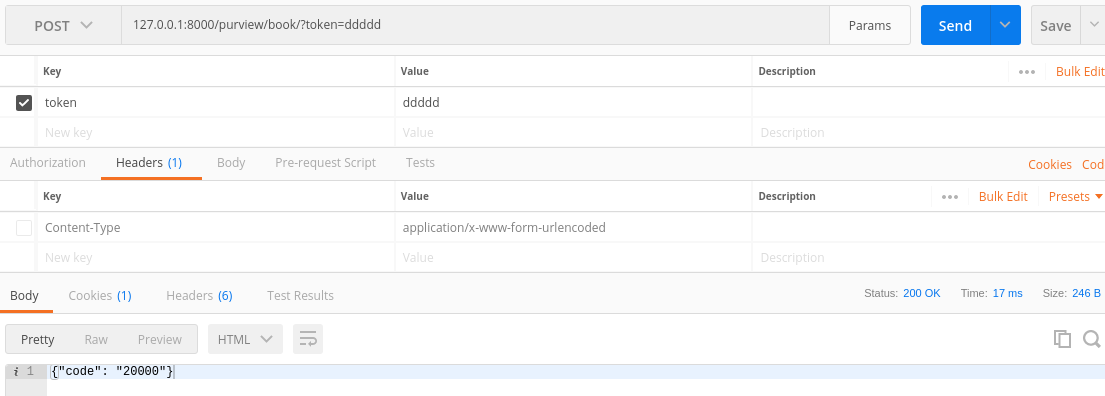
authentication_classes = [MyAuthentication, ]
def dispatch(self, request, *args, **kwargs):
return super().dispatch(request, *args, **kwargs)
def get(self, request):
# get a book
return HttpResponse(json.dumps({'code': '20000'}))
def post(self, request):
return HttpResponse(json.dumps({'code': '20000'}))
def put(self, request):
# update a book
return HttpResponse(json.dumps({'code': '20000'}))
def delete(self, request):
# delete a book
return HttpResponse(json.dumps({'code': '20000'}))
class Book(APIView):
authentication_classes = [MyAuthentication, ]
def dispatch(self, request, *args, **kwargs):
return super().dispatch(request, *args, **kwargs)
def get(self, request):
# get a book
return HttpResponse(json.dumps({'code': '20000'}))
def post(self, request):
return HttpResponse(json.dumps({'code': '20000'}))
def put(self, request):
# update a book
return HttpResponse(json.dumps({'code': '20000'}))
def delete(self, request):
# delete a book
return HttpResponse(json.dumps({'code': '20000'}))



从FBV到CBV二(认证器)的更多相关文章
- django的FBV和CBV的装饰器例子
备忘 def auth(func): def inner(request,*args,**kwargs): u = request.COOKIES.get('username111') if not ...
- 一、虚拟环境.二、路由配置主页与404.三、2.x路由分发.四、伪静态.五、request对象.六、FBV与CBV.七、文件上传.
一.虚拟环境 ''' 解决版本共存 1. 用pycharm选择File点击NewProject然后选择virtualenv创建一个纯净环境 2. 打开下载的目录将venv文件夹下的所有文件(纯净的环境 ...
- django基础 -- 4. 模板语言 过滤器 模板继承 FBV 和CBV 装饰器 组件
一.语法 两种特殊符号(语法): {{ }}和 {% %} 变量相关的用{{}},逻辑相关的用{%%}. 二.变量 1. 可直接用 {{ 变量名 }} (可调用字符串, 数字 ,列表,字典,对象等) ...
- diango中的MTV——FBV/CBV以及装饰器的复用问题解决
MVC M: model 模型 与数据库交互 V: view 视图 HTML C:controller 控制器 流程 和 业务逻辑 MTV M:model ORM T:template 模板 HTML ...
- epic游戏平台如何启用认证器应用程序/二次验证码/谷歌身份验证器?
1.登陆epic游戏平台,找到二次验证绑定界面 登陆https://www.epicgames.com/store/zh-CN/, 点右上角用户头像-[账户]. 之后点-[密码与安全] 在[双重验证] ...
- Django FBV和CBV -
一.FBV和CBV 在Python菜鸟之路:Django 路由.模板.Model(ORM)一节中,已经介绍了几种路由的写法及对应关系,那种写法可以称之为FBV: function base view ...
- CBV加装饰器解决登录注册问题和 <<中间件>>
文本目录 CBV加装饰器解决登录注册问题 一:什么是中间件 二:中间件有什么用 三:自定义中间件 四:中间件应用场景 五:SCRF TOKEN跨站请求伪造 六: 其他操作 CBV加装饰器解决登录注册问 ...
- Python菜鸟之路:Django 路由补充1:FBV和CBV - 补充2:url默认参数
一.FBV和CBV 在Python菜鸟之路:Django 路由.模板.Model(ORM)一节中,已经介绍了几种路由的写法及对应关系,那种写法可以称之为FBV: function base view ...
- Django CBV加装饰器、Django中间件、auth模块
一. CBV加装饰器 在视图层中,基于函数的视图叫FBV(function base views),基于类的视图叫CBV(class base views).当需要用到装饰器时,例如之前的基于Cook ...
随机推荐
- 七十六:flask.Restful之flask-Restful插件的基本使用
安装:flask 0.8以上.python2.6或者3.3以上:pip install flask-restful 使用方法:1.从flask_restful中导入Api,来创建对象 2.写一个视图函 ...
- 2单表CRUD综合样例开发教程
东软集团股份有限公司 基础软件事业部 单表CRUD综合样例开发教程 东软机密 tui 更改履历 版本号 更改时间 更改的 图表和章节号 状态 更改简要描述 更改申 请编号 更改人 批准人 V1.0 2 ...
- 串口使用和CSerial类
1 串口通信的基本原理 串口通信中无论是写入串口还是读取串口,都是对缓冲区操作的.可以理解为写串口就是向输出缓冲区写入内容,读取串口就是从输入串口缓冲区读取内容.但是何时打开串口,何时发送数据,何时接 ...
- fiddler的使用:抓包定位、模拟弱网
一.fiddler抓包定位 Fiddler是一个http协议调试代理工具,它能够记录并检查所有你的电脑和互联网之间的http通讯,设置断点,查看所有的“进出”Fiddler的数据(cookie,htm ...
- 如何为根分区扩容(centos7为例)
linux系统所有的文件都是存放在根分区中的,如果根分区容量即将耗尽,我们就需要给根分区扩容,我们可以使用lsblk命令来查看,系统的根分区实际是逻辑卷,所以想要扩展根分区只要将逻辑卷扩容就可以了.此 ...
- VIM全总结
Vim是Linux自带的编辑器,是Vi的高级版,刚开始使用我是一脸懵逼的,跟普通的编辑器完全不同,基本全靠键盘,写完之后也不知道怎么保存,特地花了点时间了解了一下,还是挺简单的.其中,主要包含三种模式 ...
- pikachu-SQL注入
参考网址: http://www.mamicode.com/info-detail-2795438.html
- 【转帖】msvcp100.dll和msvcr100.dll
VS发布软件时去除msvcp100.dll和msvcr100.dll图解说明 https://blog.csdn.net/yu__jia/article/details/82753262 msvcp. ...
- Oracle块,区,段
数据块(Block) 数据块Block是Oracle存储数据信息的最小单位.注意,这里说的是Oracle环境下的最小单位.Oracle也就是通过数据块来屏蔽不同操作系统存储结构的差异.无论是Windo ...
- AcWing登山
这是2006北大举办的ACM的一道题. 题意为:给定景点海拔高度,队员们不去游览相同高度的景点,一开始往上爬,一但往下爬就不能再向上爬,求最多可以游览多少个景点.那么我们可以得到一个结论:以一个最高点 ...