
Prometheus + Grafana 监控 Redis
Prometheus安装
wget https://github.com/prometheus/prometheus/releases/download/v2.1.0/prometheus-2.1..linux-amd64.tar.gz
tar -zxvf prometheus-2.1..linux-amd64.tar.gz -C /prometheus --strip-components=
cd /prometheus
# Start Prometheus.

# By default, Prometheus stores its database in ./data (flag --storage.tsdb.path).

./prometheus --config.file=prometheus.yml
在浏览器输入localhost:9090
Grafana安装
wget https://s3-us-west-2.amazonaws.com/grafana-releases/release/grafana-4.6.3-1.x86_64.rpm

sudo yum localinstall grafana-4.6.-.x86_64.rpm
启动服务
$ sudo service grafana-server start
开机启动
$ sudo /sbin/chkconfig --add grafana-server
安装完成。浏览器打开 http://192.168.0.15:3000 ,输入默认用户名密码 (admin/admin) 可以进入 Grafana 。
Prometheus 和 Grafana 对接
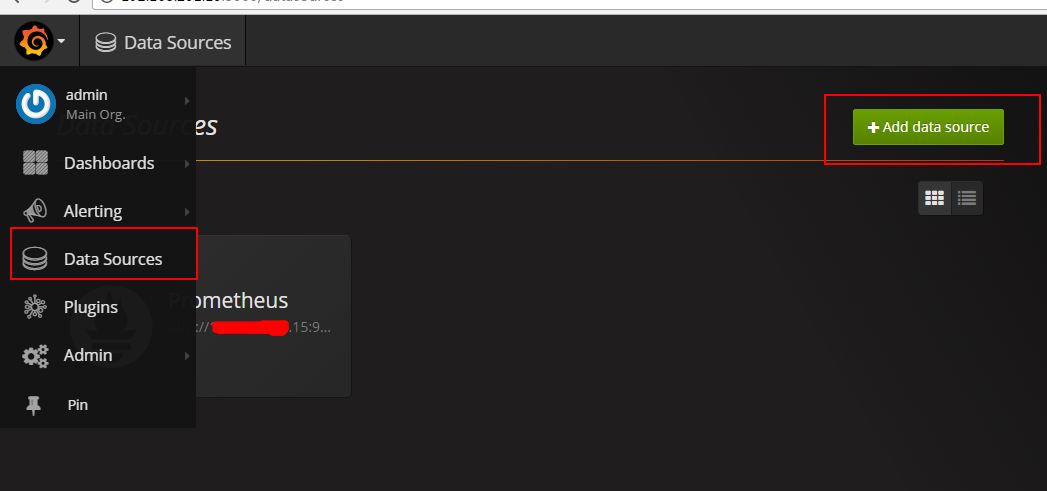
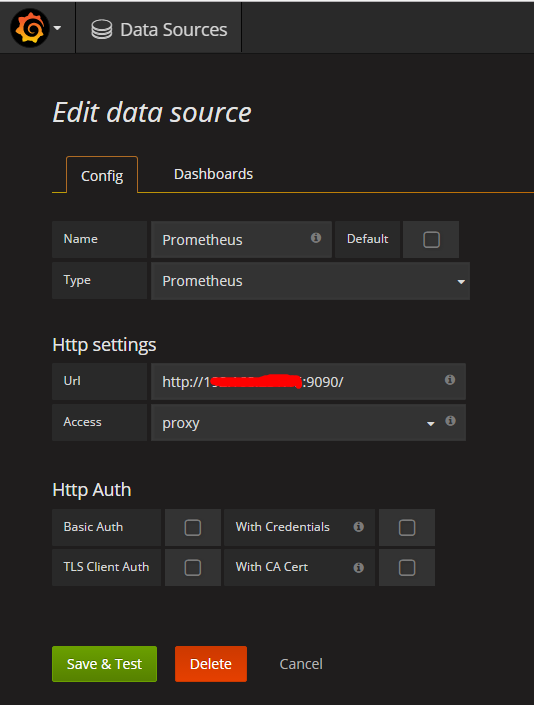
Prometheus: URL: localhost:9090/
即可完成 Prometheus 和 Grafana 的对接。
在redis服务器安装node_exporter和redis_exporter
redis_exporter安装
wget https://github.com/oliver006/redis_exporter/releases/download/v0.15.0/redis_exporter-v0.15.0.linux-amd64.tar.gz
tar -zxvf redis_exporter-v0.15.0.linux-amd64.tar.gz -C /prometheus_exporters --strip-components=
wget https://github.com/prometheus/node_exporter/releases/download/v0.15.2/node_exporter-0.15.2.linux-amd64.tar.gz
tar -zxvf redis_exporter-v0.15.2.linux-amd64.tar.gz -C /prometheus_exporters --strip-components=
启动
cd /prometheus_exporters
./node_exporter &
./redis_exporter redis//localhost:6379 & -web.listenaddress 0.0.0.0:9122
配置prometheus.yml 加入
- job_name: redis_exporter

  static_configs:

  - targets: ['192.168.0.17:9122']
注意prometheus.yml中缩进不能有tab。
导入json模板
下载grafana的redis的prometheus-redis_rev1.json模板
wget https://grafana.com/api/dashboards/763/revisions/1/download
在grafana中导入json模板
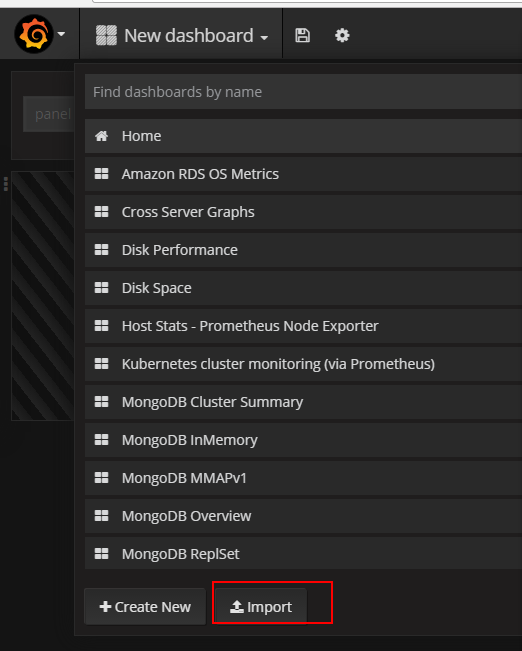
启动redis
在redis安装路径执行
src/redis-server

Prometheus + Grafana 监控 Redis的更多相关文章
- prometheus+grafana监控redis
prometheus+grafana监控redis redis安装配置 https://www.cnblogs.com/autohome7390/p/6433956.html redis_export ...
- [转帖]安装prometheus+grafana监控mysql redis kubernetes等
安装prometheus+grafana监控mysql redis kubernetes等 https://www.cnblogs.com/sfnz/p/6566951.html plug 的模式进行 ...
- Grafana Prometheus系统监控Redis服务
Grafana Prometheus系统监控Redis服务 一.Grafana Prometheus系统监控Redis服务 1.1流程 1.2安装redis_exporter 1.3配置prometh ...
- Prometheus + Grafana 监控系统搭
本文主要介绍基于Prometheus + Grafana 监控Linux服务器. 一.Prometheus 概述(略) 与其他监控系统对比 1 Prometheus vs. Zabbix Zabbix ...
- Prometheus+Grafana监控SpringBoot
Prometheus+Grafana监控SpringBoot 一.Prometheus监控SpringBoot 1.1 pom.xml添加依赖 1.2 修改application.yml配置文件 1. ...
- cAdvisor+Prometheus+Grafana监控docker
cAdvisor+Prometheus+Grafana监控docker 一.cAdvisor(需要监控的主机都要安装) 官方地址:https://github.com/google/cadvisor ...
- [转帖]Prometheus+Grafana监控Kubernetes
原博客的位置: https://blog.csdn.net/shenhonglei1234/article/details/80503353 感谢原作者 这里记录一下自己试验过程中遇到的问题: . 自 ...
- prometheus+grafana监控mysql
prometheus+grafana监控mysql 1.安装配置MySQL官方的 Yum Repository(有mysql只需设置监控账号即可) [root@localhost ~]# wget - ...
- 【Springboot】用Prometheus+Grafana监控Springboot应用
1 简介 项目越做越发觉得,任何一个系统上线,运维监控都太重要了.关于Springboot微服务的监控,之前写过[Springboot]用Springboot Admin监控你的微服务应用,这个方案可 ...
随机推荐
- 小米oj 帮小学生排队(排序+插入)
帮小学生排队 序号:#18难度:有挑战时间限制:1000ms内存限制:10M 描述 用一个数组表示一群正在排队的小学生,每个小学生用一对整数 H, K 来表示:H 表示这个小学生的身高,K 表示这个 ...
- 【线性代数】2-4:矩阵操作(Matrix Operations)
title: [线性代数]2-4:矩阵操作(Matrix Operations) toc: true categories: Mathematic Linear Algebra date: 2017- ...
- 用Python爬虫爬取“女神吧”上的照片。
爬取的网页链接为https://tieba.baidu.com/p/5177270774 是一个美女警花哦! 所用Python环境为:python 3.3.2 用到的库为:urllib.reque ...
- mysql 日期字符串互转
字符串转日期select str_to_date('2008-4-2 15:3:28','%Y-%m-%d %H:%i:%s');select str_to_date('2008-08-09 08:9 ...
- Linux设备驱动程序 之 并发及其管理
竞态产生 Linux系统找那个存在大量的并发联系,因此会导致可能的竞态: 1. 正在运行的用户空间进程可以以多种组合方式访问我们的代码: 2. SMP系统甚至可以再不同的处理器上同时执行我们的代码: ...
- jquery+ajax 实现搜索框提示
<!DOCTYPE html> <html lang="en"> <head> <meta charset="UTF-8&quo ...
- 尚硅谷周阳老师-redis脑图课件
因为脑图原件是.mmap格式,使用wps和xmind打开都会有格式不兼容的问题,这里我们可以使用mindmanager存为html5交互式格式, 提供在线阅读.因为阿里云学生服务器带宽有限,这里打开加 ...
- Docker-----关于dockerfile
docker build参数说明 --no-cache :创建镜像的过程不使用缓存: --force-rm :设置镜像过程中删除中间容器: --network=host:容器会使用宿主机的网络,容器与 ...
- Highcharts的常用属性及导出SVG
做了好几个项目都用到了Highcharts,好用自然不用多说,这里总结一下每次作图经常用的一些配置,方便以后查看. 引入Highcharts非常简单,只需引入对应的js,页面中写入存放表格的div,j ...
- js图片预览带进度条
<!DOCTYPE html> <html lang="en"> <head> <meta charset="UTF-8&quo ...