
从Excel中读取数据并批量写入MySQL数据库(基于pymysql)
一、Excel内容时这样的:
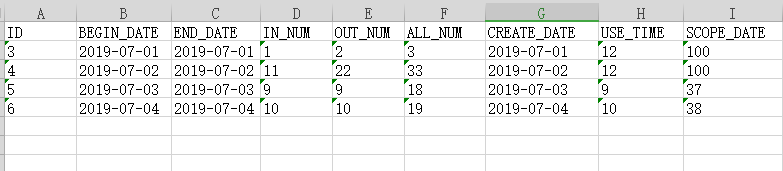
二、最初的代码是这样的:
# -*- coding:utf-8 -*-
import pymysql
from xlrd import open_workbook

class DB:
    global host,username,password,port,database,config
    host = "xx.xx.xx.xxx"
    username = "root"
    password = "xxxx"
    port = 3306
    database = "pythondb"
    config = {
        'host': str(host),
        'user': username,
        'passwd': password,
        'port': int(port),
        'db': database
    }
    def __init__(self):
        self.db = None
        self.cursor = None

    def connectDB(self):
        try:
            self.db = pymysql.connect(**config)
            self.cursor = self.db.cursor()
            print "Connect DB successfully!"
        except:
            print "Connect DB failed!"

    def executeSQL(self,sql):
        self.connectDB()
        self.cursor.execute(sql)
        self.db.commit()
        return self.cursor

    def getAll(self,cursor):
        value = cursor.fetchall()
        return value

    def getOne(self,cursor):
        value = cursor.fetchone()
        return value

    def closeDB(self):
        self.db.close()
        print "Database closed!"

    def get_xls(self,xls_name, sheet_name):
        """
        get interface data from xls file
        :return:
        """
        cls = []
        # open xls file
        file = open_workbook(xls_name)
        # get sheet by name
        sheet = file.sheet_by_name(sheet_name)
        # get one sheet's rows
        nrows = sheet.nrows
        for i in range(1,nrows):
            cls.append(sheet.row_values(i))
        return tuple(cls)

if __name__ == "__main__":
    mysqlInfo = DB()
    content = mysqlInfo.get_xls("DataSource.xls","Sheet1")
    for i in range(0,len(content)):
        id = content[i][0]
        begin_date = str(content[i][1])
        end_date = content[i][2]
        in_num = content[i][3]
        out_num = content[i][4]
        all_num = content[i][5]
        create_time = content[i][6]
        use_time = content[i][7]
        scope_date = content[i][8]
        sql = "INSERT INTO `day`( ID, BEGIN_DATE, END_DATE, IN_NUM, OUT_NUM, ALL_NUM, CREATE_TIME, USE_TIME, SCOPE_DATE ) VALUES(%s,'%s','%s',%s,%s,%s,'%s',%s,%s)" %(id, begin_date, end_date, in_num, out_num, all_num, create_time, use_time, scope_date)
        mysqlInfo.executeSQL(sql)
        mysqlInfo.closeDB()
从Excel中读取数据并批量写入MySQL数据库(基于pymysql)的更多相关文章
- 从Excel中读取数据并批量写入MySQL数据库(基于MySQLdb)
一.Excel内容如下,现在需要将Excel中的数据全部写入的MySQL数据库中: 二.连接MySQL的第三方库使用的是“MySQLdb”,代码如下: # -*- coding:utf-8 -*-im ...
- php从memcache读取数据再批量写入mysql的方法
这篇文章主要介绍了php从memcache读取数据再批量写入mysql的方法,可利用memcache缓解服务器读写压力,并实现数据库数据的写入操作,非常具有实用价值,需要的朋友可以参考下. 用 Mem ...
- 用python在excel中读取与生成随机数写入excel中
今天是我第一次发博客,就关于python在excel中的应用作为我的第一篇吧. 具体要求是:在一份已知的excel表格中读取学生的学号与姓名,再将这些数据放到新的excel表中的第一列与第二列,最后再 ...
- 从Excel中读取数据(python-xlrd)
从Excel中读取数据(python-xlrd) 1.导入模块 import xlrd 2.打开Excel文件读取数据 data = xlrd.open_workbook('excelFile.xls ...
- 在实现从excel中读取数据作为接口参数遇到的问题
这个算我自己第一次使用python语言实现 一个功能 一.首先我们先要代码实现如何从excel上读取数据python实现还是比较简单的 1.我使用的是xlrd模块,我们先要安装这个包,这样我们才可以使 ...
- PHP批量替换MySql数据库中的数据内容(替换MySql数据库内容源码)
PHP批量替换MySql数据库内容 UTF-8 1.0版 <?php //声明 //1.本源码开发意图:作者在使用一些CMS建站的时候发现很多CMS把网址写入到数据库了,如果换网址,那么就需要更 ...
- Python读取Excel中的数据并导入到MySQL
""" 功能:将Excel数据导入到MySQL数据库 """ import xlrd import MySQLdb # Open the w ...
- Badboy - 从excel中读取数据
参考: http://leafwf.blog.51cto.com/872759/1119161 http://www.51testing.com/html/00/130600-1367743.html ...
- C#从Excel中读取数据为空
将HDR设置为YES,IMEX设置为1即可. OleDbConnection objConn = new OleDbConnection("Provider=Microsoft.ACE.OL ...
随机推荐
- 【Qt开发】Qt5 中对 C++11 一些新特性的封装
C++11 是现在的 C++ 标准的名称,C++11 为 C++ 语言带来很多新特性. 而 Qt 4.8 是 Qt 首个在其 API 中开始使用一些新的 C++11 特性的版本,我之前写过一篇博文:C ...
- Java文章翻译
一.基础 1.String 使用" "还是构造函数创建字符串? 画图说明字符串的不变性 在Java中字符串为什么是不可变的 Java中的字符串是按引用传递? 排名前十的Java字符 ...
- 在VMware上安装centos
Windows,VMware和Centos三者的关系 VMware安装.centos安装 在 VMware 上安装 CentOS 第 1 步:打开 VMware,点击创建新的虚拟机 第 2 步:选择典 ...
- Docker pull php:7.1-fpm的php.ini配置修改
今天,换了 Deepin 操作系统,开发环境是通过 Docker 搭建的,具体结构如下: CONTAINER ID IMAGE COMMAND CREATED STATUS PORTS NAMES e ...
- [转帖CCIX]
业界七巨头联手,数据中心通过PCIe实现25Gbps数据通信! 2017-06-07 17:31 CCIX(Cache Coherent Interconnect for Accelerators,针 ...
- redis主从同步错误处理
背景: 之前resis只有一台服务器(redis master),现需要为其增加一台slave服务器(slave),做成一主一从 要求,不影响 master的正常情况下完成 . 1.配置slave: ...
- 【AtCoder】diverta 2019 Programming Contest
diverta 2019 Programming Contest 因为评测机的缘故--它unrated了.. A - Consecutive Integers #include <bits/st ...
- ACM-ICPC 2018 徐州赛区网络预赛 I. query 树状数组
I. query 题目链接: Problem Description Given a permutation \(p\) of length \(n\), you are asked to answe ...
- .NET Core 3.0 发布单文件可执行程序
Windows dotnet publish -r win10-x64 /p:PublishSingleFile=true maxOS dotnet publish -r osx-x64 /p:Pub ...
- luogu2858奶牛零食题解--区间DP
题目链接 https://www.luogu.org/problemnew/show/P2858 一句话题意: https://cn.vjudge.net/problem/POJ-3186#autho ...