
Python统计字符出现次数(Counter包)以及txt文件写入
# -*- coding: utf-8 -*-

#spyder (python 3.7)
1. 统计字符(可以在jieba分词之后使用)
from collections import Counter

from operator import itemgetter

# txt_list可以写成函数参数进行导入

txt_list = ['千古','人间','人间','龙','龙','龙','哈哈哈','人才','千古','千古']

c = Counter()

for x in txt_list:

    if len(x) >= 1:

        if x == '\r\n' or x == '\n' or x == ' ':

            continue

        else:

            c[x] += 1

print('常用词频统计结果: \n')

for (k, v) in c.most_common(4): #打印排名前四位

    print('%s%s %s  %d' % ('  ' * (3 ), k, '*' * 3, v))

# 按照词频数从大到小打印

d = sorted(c.items(),key=itemgetter(1),reverse = True)

for ss,tt in d:

    out_words=ss + '\t' + str(tt)

    print(out_words)
2. 多次覆盖,循环写入文件
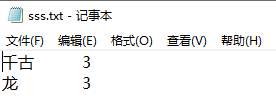
#写入文件,多次写入,后一次覆盖前一次,但是out_words本身是在叠加的

#即:第一次写入的是:千古\t3\n;第二次写入的是:千古\t3\n龙\t3\n,覆盖上一次的数据;

#第三次是:千古\t3\n龙\t3\n人间\t2\n,继续覆盖上一次的数据

out_words = ''

for ss,tt in d:

    out_words=out_words + ss + '\t' + str(tt) + '\n'

    with open(r".\sss.txt", "w",encoding='utf-8') as f:

        f.write(out_words+'\n')
比如,循环两次的结果是:
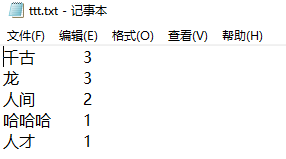
3. 一次性写入文件,中间不会覆盖和多次写入;但是如果重复运行代码,则会覆盖之前的全部内容,一次性重新写入所有新内容
out_words = ''

for ss,tt in d:

    out_words=out_words + ss + '\t' + str(tt) + '\n'

with open(r".\ttt.txt", "w",encoding='utf-8') as f:

        f.write(out_words+'\n')
Python统计字符出现次数(Counter包)以及txt文件写入的更多相关文章
- python统计元素重复次数
python统计元素重复次数 # !/usr/bin/python3.4 # -*- coding: utf-8 -*- from collections import Counter arr = [ ...
- python 统计单词出现次数
#use python3.6 import re from collections import Counter FILESOURCE = './abc.txt' def getMostCommonW ...
- Python 网络爬虫 010 (高级功能) 解析 robots.txt 文件
解析 robots.txt 文件 使用的系统:Windows 10 64位 Python 语言版本:Python 2.7.10 V 使用的编程 Python 的集成开发环境:PyCharm 2016 ...
- ----关于统计字符出现次数的JS循环以及indesxOf函数----
以下将会通过JS循环判断字符“banana”出现次数 以及调用indexOf中的函数来实现统计 <!DOCTYPE html> <html> <body> &l ...
- JS-使用indexof来统计字符出现次数
<!DOCTYPE html> <html lang="en"> <head> <meta charset="UTF-8&quo ...
- js统计字符出现次数
var s = "The rain in Spain falls rain mainly in the rain plain"; var reg = new RegExp(&quo ...
- 【python基础语法】模块和包管理,文件的操作(第8天课堂笔记)
''' 模块和包管理 模块和包的定义: 模块:模块是一个Python文件,以.py结尾,包含了Python对象定义和Python语句 包:Python中的包就是一个包含__init__.py文件的目录 ...
- 转载:python生成以及打开json、csv和txt文件
原文地址:https://blog.csdn.net/weixin_42555131/article/details/82012642 生成txt文件: mesg = "hello worl ...
- python当前工作文件夹中创建空的.txt文件
import os def new_txt(): a1='实线' b = os.getcwd() + '\\fazhandadao_test_txt\\' if not os.path.exists( ...
随机推荐
- docker常用管理命令
本文只记录docker命令在大部分情境下的使用,如果想了解每一个选项的细节,请参考官方文档,这里只作为自己以后的备忘记录下来. 根据自己的理解,总的来说分为以下几种: 容器生命周期管理 — docke ...
- 【转】mysql 存储过程的示例
原文地址:https://blog.csdn.net/lishaojun0115/article/details/50183661 begin #定义变量 declare local_sender v ...
- 【转】JS中处理Number浮点数精度问题
https://github.com/dt-fe/number-precision ~(function(root, factory) { if (typeof define === "fu ...
- Ubuntu18.04 安装MySQL
安装 #命令1 sudo apt-get update #命令2 sudo apt-get install mysql-server 初始化 sudo mysql_secure_installatio ...
- mysql函数concat与group_concat使用说明
mysql函数concat与group_concat使用说明concat()函数<pre>mysql> select concat(',',name,',') from `user` ...
- Mybatis笔记2
使用Mybatis完成的CRUD操作 个人总结的一些小规律 学习过程中碰到的错误: org.apache.ibatis.exceptions.PersistenceException: ### Err ...
- Ubuntu bashrc profile environment 区别
在 Ubuntu 中有如下几个文件可以设置环境变量: /etc/profile:在登录时,操作系统定制用户环境时使用的第一个文件,此文件为系统的每个用户设置环境信息,当用户第一次登录时,该文件被执行. ...
- QT加载自带字体
#include <QCoreApplication> #include <QStringList> #include <QFontDatabase> #inclu ...
- SQL——UPDATE(改)
一.UPDATE语句基本用法 UPADTE语句用于修改表中已存在的记录. UPDATE语句语法: UPDATE 表名 SET 列名1 = 值1,列名2 = 值2... WHERE 条件语句; 演示st ...
- WUSTOJ 1315: 杜学霸和谭女神(Java)
题目链接: