
Unity3D热更新之LuaFramework篇[05]--Lua脚本调用c#以及如何在Lua中使用Dotween
在上一篇文章 Unity3D热更新之LuaFramework篇[04]--自定义UI监听方法 中,我对LuaBehaviour脚本进行了扩展,添加了两个新的UI监听方法,也提到最好能单写一个脚本处理此事。本篇文章就来继续这个工作。
从Lua中调用C#代码
1、创建UI监听脚本
打开之前的工程,在Assets/LuaFrameworks/Scripts/Common下,创建一个UIEventEx.cs脚本,将LuaBehaviour.cs中的AddButtonClick以及AddInputFieldEndEditHandler方法迁移过来,并扩展了一些其它方法,代码如下:
 using LuaInterface;

 using System.Collections;

 using System.Collections.Generic;

 using UnityEngine;

 using UnityEngine.EventSystems;

 using UnityEngine.UI;

 /// <summary>

 /// 自定义的添加UI监听的方法,可以用lua中调用以做事件绑定

 /// </summary>

 public class UIEventEx {

     //添加监听

     public static void AddButtonClick(GameObject go, LuaFunction luafunc)

     {

         if (go == null || luafunc == null)

             return;

         Button btn = go.GetComponent<Button>();

         if (btn == null)

             return;

         btn.onClick.AddListener

         (

             delegate ()

             {

                 luafunc.Call(go);

             }

         );

     }

     //添加监听(外带数据中转功能)

     public static void AddButtonClick(GameObject go, LuaFunction luafunc, LuaTable luatable)

     {

         if (go == null || luafunc == null)

             return;

         Button btn = go.GetComponent<Button>();

         if (btn == null)

             return;

         btn.onClick.AddListener

         (

             delegate ()

             {

                 luafunc.Call(go, luatable);

             }

         );

     }

     /// <summary>

     /// 给Toggle组件添加监听

     /// </summary>

     public static void AddToggle(GameObject go, LuaFunction luafunc, LuaTable luatable)

     {

         if (go == null || luafunc == null) return;

         Toggle toggle = go.GetComponent<Toggle>();

         if (toggle == null) return;

         go.GetComponent<Toggle>().onValueChanged.AddListener(

             delegate (bool select) {

                 luafunc.Call(luatable, select);

             }

         );

     }

     /// <summary>

     /// 给Toggle组件添加监听

     /// </summary>

     public static void AddToggle(GameObject go, LuaFunction luafunc)

     {

         if (go == null || luafunc == null) return;

         Toggle toggle = go.GetComponent<Toggle>();

         if (toggle == null) return;

         go.GetComponent<Toggle>().onValueChanged.AddListener(

             delegate (bool select) {

                 luafunc.Call(select);

             }

         );

     }

     //给输入组件(InputField)添加结束编辑(OnEndEdit)监听

     public static void AddInputFieldEndEditHandler(GameObject go, LuaFunction luafunc)

     {

         if (go == null || luafunc == null) return;

         InputField input = go.GetComponent<InputField>();

         if (input == null)

         {

             Debug.LogError(go.name + "找不到InputField组件");

             return;

         }

         go.GetComponent<InputField>().onEndEdit.AddListener(

             delegate (string text) {

                 luafunc.Call(text);

             }

         );

     }

     /// <summary>

     /// 添加对光标按下|抬起事件的支持

     /// </summary>

     /// <param name="go">目标对象</param>

     /// <param name="luafunc">按下事件</param>

     /// <param name="luafunc2">抬起事件</param>

     public static void AddPointerDownUpSupport(GameObject go, LuaFunction luafunc, LuaFunction luafunc2)

     {

         if (go == null) return;

         EventsSupport es = go.AddComponent<EventsSupport>();

         es.InitDownUpHandler((PointerEventData pointerEventData) => {

             if (luafunc != null)

             {

                 luafunc.Call(go, pointerEventData);

             }

         }, (PointerEventData pointerEventData) => {

             if (luafunc2 != null)

             {

                 luafunc2.Call(go, pointerEventData);

             }

         });

     }

     /// <summary>

     /// 给Slider组件添加onValueChanged事件

     /// </summary>

     /// <param name="go"></param>

     /// <param name="luafunc"></param>

     public static void AddSliderOnChangeEvent(GameObject go, LuaFunction luafunc)

     {

         if (go == null || luafunc == null) return;

         Slider component = go.GetComponent<Slider>();

         if (component == null)

         {

             Debug.LogError(go.name + "找不到Slider组件");

             return;

         }

         go.GetComponent<Slider>().onValueChanged.AddListener(

             delegate (float val) {

                 luafunc.Call(val);

             }

         );

     }

     //清除监听

     public static void ClearButtonClick(GameObject go)

     {

         if (go == null)

             return;

         Button btn = go.GetComponent<Button>();

         if (btn == null)

             return;

         btn.onClick.RemoveAllListeners();

     }

 }
UIEventEx.cs
在Assets/LuaFrameworks/Scripts/Common下,创建一个EventsSupport.cs脚本,该脚本是一个实现了IPointerDownHandler, IPointerUpHandler等接口的类,用于在Lua中检测鼠标输入(鼠标点击,抬起、按下等功能),配合UIEventEx.cs中的AddPointerDownUpSupport方法使用。其代码如下:
 using System;

 using System.Collections;

 using System.Collections.Generic;

 using UnityEngine;

 using UnityEngine.EventSystems;

 /*  其它事件可根据需要在此类中实现

     IPointerEnterHandler - OnPointerEnter - Called when a pointer enters the object

     IPointerExitHandler - OnPointerExit - Called when a pointer exits the object

     IPointerDownHandler - OnPointerDown - Called when a pointer is pressed on the object

     IPointerUpHandler - OnPointerUp - Called when a pointer is released (called on the original the pressed object)

     IPointerClickHandler - OnPointerClick - Called when a pointer is pressed and released on the same object

     IInitializePotentialDragHandler - OnInitializePotentialDrag - Called when a drag target is found, can be used to initialise values

     IBeginDragHandler - OnBeginDrag - Called on the drag object when dragging is about to begin

     IDragHandler - OnDrag - Called on the drag object when a drag is happening

     IEndDragHandler - OnEndDrag - Called on the drag object when a drag finishes

     IDropHandler - OnDrop - Called on the object where a drag finishes

     IScrollHandler - OnScroll - Called when a mouse wheel scrolls

     IUpdateSelectedHandler - OnUpdateSelected - Called on the selected object each tick

     ISelectHandler - OnSelect - Called when the object becomes the selected object

     IDeselectHandler - OnDeselect - Called on the selected object becomes deselected

     IMoveHandler - OnMove - Called when a move event occurs (left, right, up, down, ect)

     ISubmitHandler - OnSubmit - Called when the submit button is pressed

     ICancelHandler - OnCancel - Called when the cancel button is pressed

  */

 /// <summary>

 /// unity事件支持(本类用于实现Unity中的各种事件,借给Lua调用)

 /// </summary>

 public class EventsSupport : MonoBehaviour, IPointerDownHandler, IPointerUpHandler

 {

     Action<PointerEventData> onPointerDownHandler = null;

     Action<PointerEventData> onPointerUpHandler = null;

     public void InitDownUpHandler (Action<PointerEventData> downHandler, Action<PointerEventData> upHandler)

     {

         onPointerDownHandler = downHandler;

         onPointerUpHandler = upHandler;

     }

     public void OnPointerDown(PointerEventData pointerEventData)

     {

         //Output the name of the GameObject that is being clicked

         //Debug.Log("[" + name + "] Game Object Click in Progress");

         if (onPointerDownHandler != null) {

             onPointerDownHandler(pointerEventData);

         }

     }

     //Detect if clicks are no longer registering

     public void OnPointerUp(PointerEventData pointerEventData)

     {

         //Debug.Log("[" + name + "] No longer being clicked");

         if (onPointerUpHandler != null)

         {

             onPointerUpHandler(pointerEventData);

         }

     }

 }
EventsSupport.cs
EventsSupport.cs脚本需要挂在待检测输入的Game Object上。
2、使用脚本
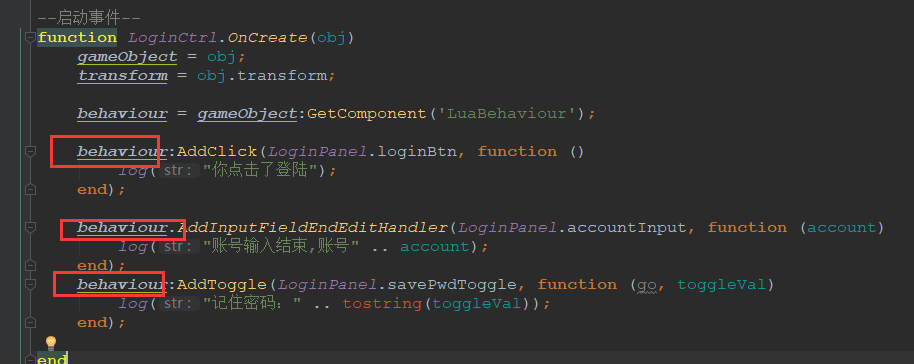
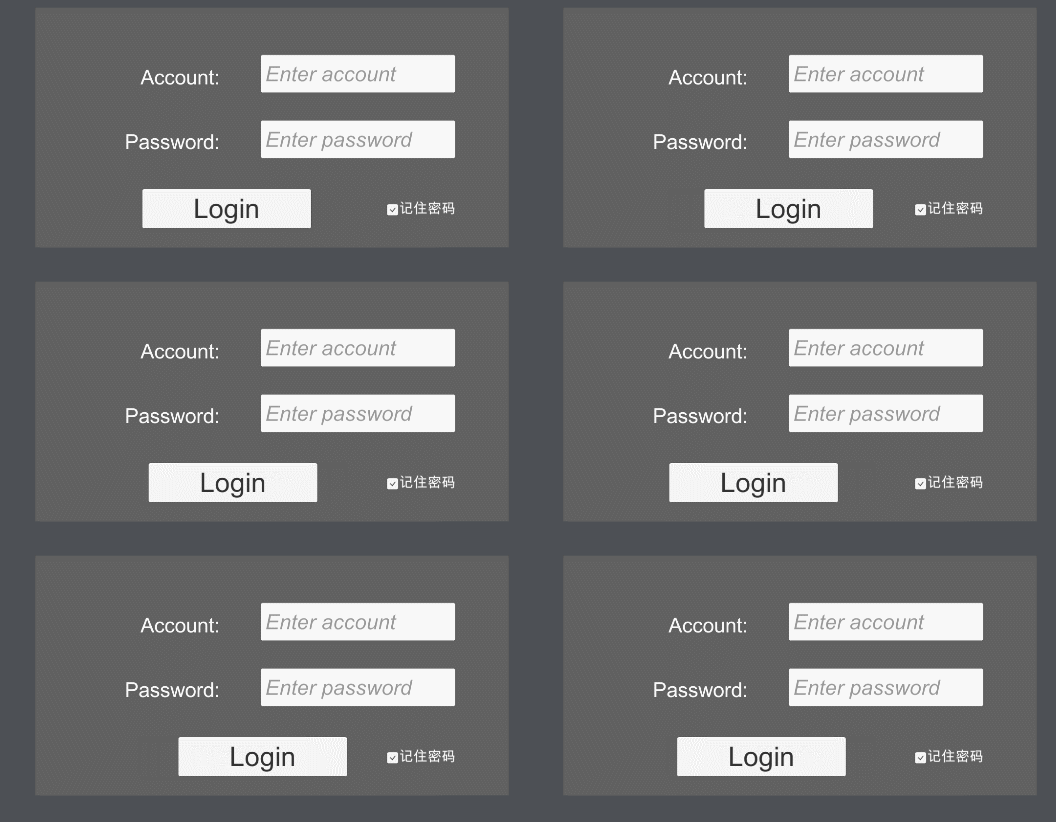
这里还是以上一篇文章写的登陆界面为例,之前我们是通过LuaBehaviour给Button、Toggle以及InputField添加的监听函数,现在将相应的用法直接替换掉。
替换前:
替换后:
然后运行,看是否生效。
......
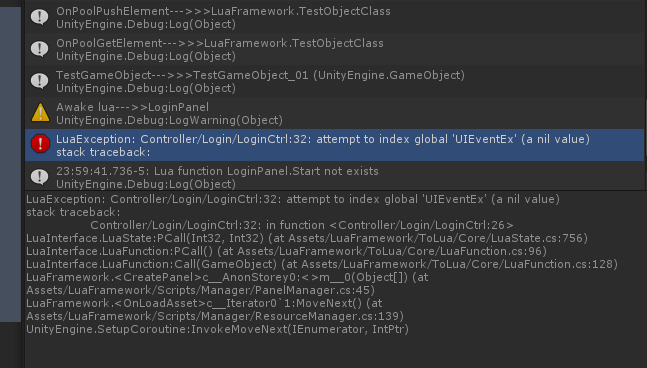
运行结果,报错了,提示全局变量 UIEventEx为nil(就是这个变量不存在的意思)
看来这样想当然的方法是行不通了,我们不能创建一个C#脚本,然后在Lua中直接使用它。
3、C#类导出
在上一步中,我们发现无法直接在Lua中使用创建的C#脚本。通过查阅资料了解到,对自定义的c#类,如果想在Lua中使用的话,需要做一个导出操作才行。
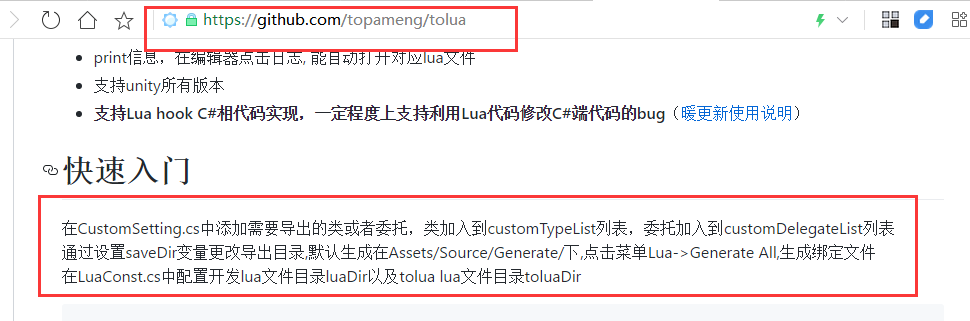
ToLua的官方git上也有相关的说明:
跟着说明操作:
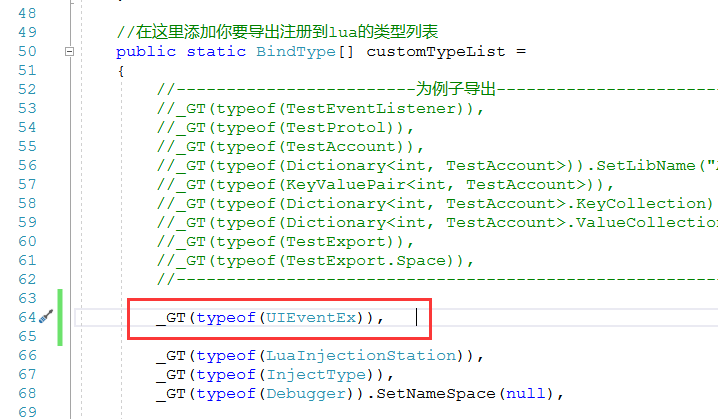
1)找到Assets\LuaFramework\Editor\下的CustomSettings.cs脚本;
2)在CustomSettings的60 行左右照例添加一个导出语句"_GT(typeof(UIEventEx)),";
3)点击Lua/Generate All菜单,等到日志打印 Generate LuaBinder over !字样时,表明Generate操作已经完成了。
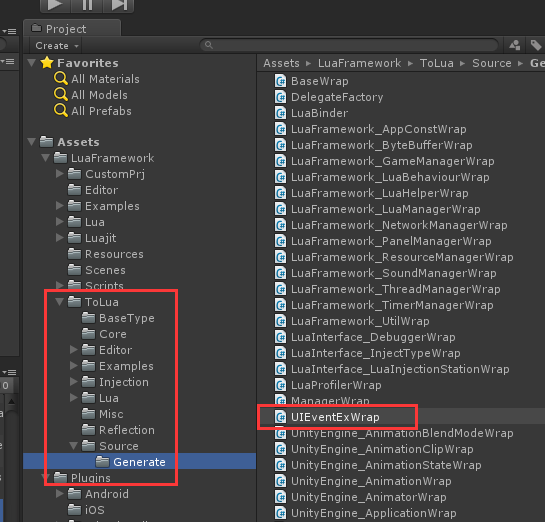
此时查看Assets\LuaFramework\ToLua\Source\Generate,能找到一个叫UIEventExWrap的cs文件,这个就是UIEventEx的导出类。
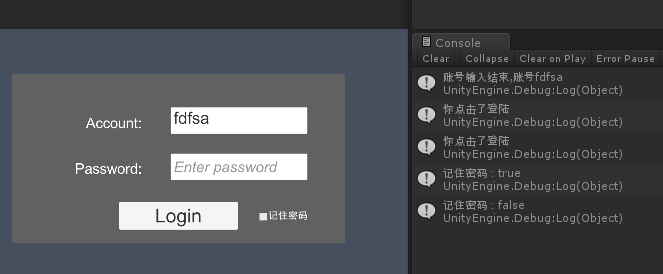
4)重新运行Unity,已经不再报错了,点击Button、Toggle、在InputField中输入字符,功能都和之前使用LuaBehaviour时一致。

总结
如果想在Lua中使用自定义的c#类,需要4个步骤:
1)创建c#脚本;
2)在CustomSetting.cs中添加导出语句;
3)点击Lua/Generate All菜单;
4)在Lua中以全局变量的形式直接使用;
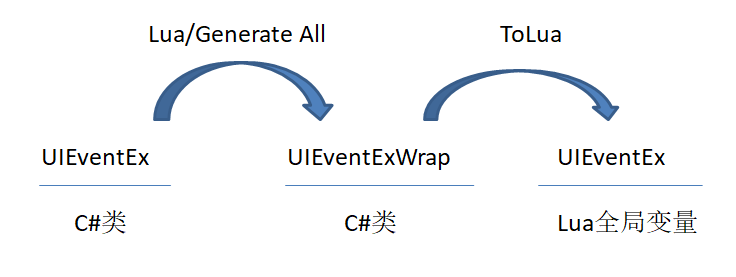
这里涉及的转化过程是这样的:
1)UIEventEx脚本通过Lua/Generate All菜单生成UIEventWrap脚本;
2)UIEventWrap脚本经过ToLua的作用,最终成为Lua中的一个全局变量UIEventEx;
在之前的文章中我们曾直接使用Lua/Generate All菜单而未做解释,那么现在你应该明白它的做用是什么了。
至于ToLua怎么把一个XxxWrap转换为Lua中的全局变量,就不是本文能讲得清的了(你可以自己做弄清楚);
怎么在Lua中使用Dotween
Dotween作为一款非常优秀的缓动动画插件,基本上快成为Unity的标配了。而如果想把所有的UI逻辑全部Lua化,那么在Lua中使用Dotween就是必须的了。
根据前边的经验,Dotween相关的类对于ToLua来说,就是自定义类,想要在Lua中使用,就必须做导出操作。
那么就有以下步骤:
1)给项目导入一个Dotween插件;
2)导出Dotween相关类;
第二步就是要整理Dotween相关的类,然后一个个写导出语句,这不是一个简单的活儿。
不过不必担心,ToLua已经帮我们做好了。
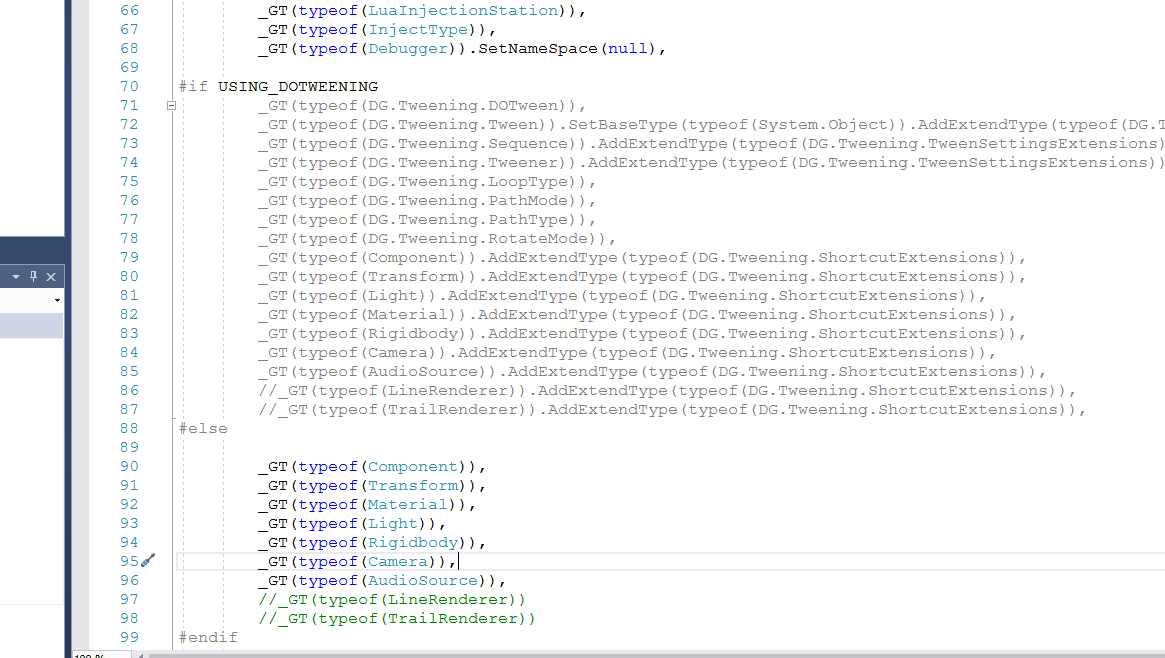
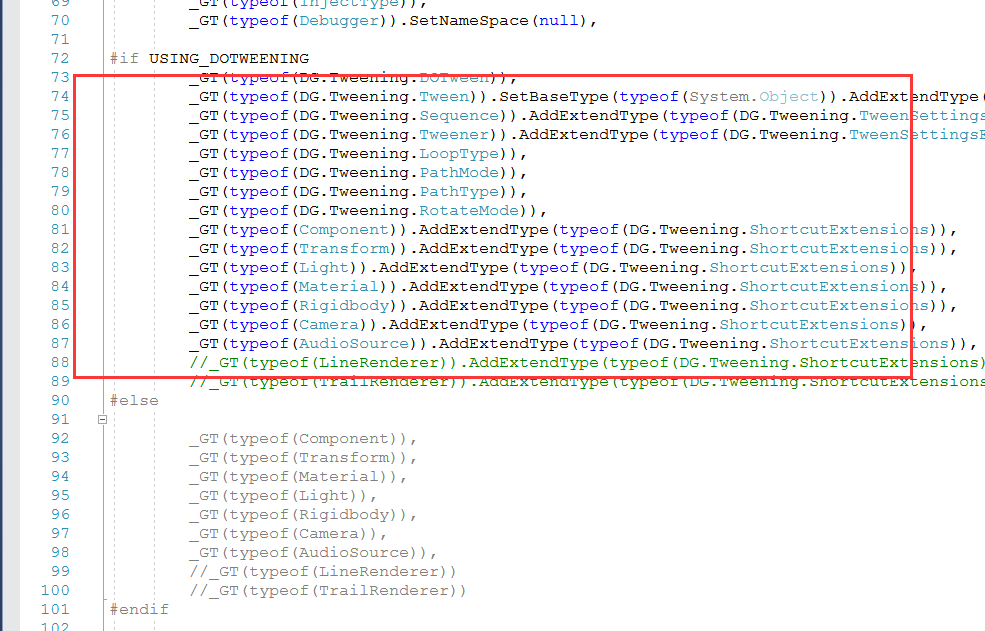
打开Assets\LuaFramework\Editor\下的CustomSettings.cs脚本,在70~100行左右,能看到Dotween相关类的导出语句,不过由于未检测到USING_DOTWEENING宏定义的原因,这一段代码并未生效。
3)使用宏定义USING_DOTWEENING
一个简单的定义宏的办法是在脚本头部加入 #define USING_DOTWEENING语句,如下图
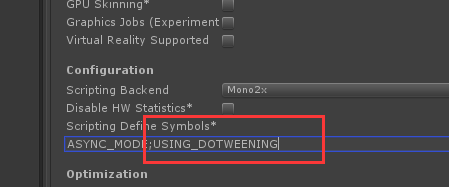
另外一个办法是在PlayerSettings的Scripting Define Symbols*下添加相应的宏,如下图:
其中ASYNC_MOD是之前有的,两个宏之间用分号隔开,输入USING_DOTWEENING 要回车一次,让脚本重新编译。
这里使用第一种办法。
定义了宏之后,Dotween相关类的导出语句就生效了,然后要执行一次Lua/Generate All。
4)在Lua中作用Dotween
以登陆界面的登陆按钮为例,在LoginPanel.lua脚本中添加如下的Dotween使用方法。
然后运行,能看到动画已经生效了(移动及循环都没问题),不过最后的回调没执行。
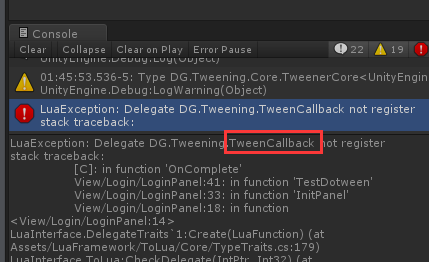
看日志有一个报错,说的是TweenCallback未注册。这个就是OnComplete回调未执行的原因。
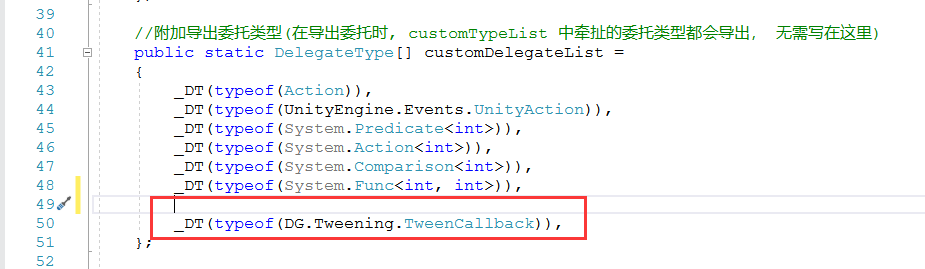
TweenCallback是一个委托类型,根据此前了知识,委托类型也需要在CustomSetting中指定位置注册。
打开CustomSettings脚本,在40~50行左右的位置,添加TweenCallback的导出语句"_DT(typeof(DG.Tweening.TweenCallback)),",如下图所示:
之后重新执行Lua/Generate All菜单(如果有报错,可先执行一次Clear再执行Generate All)。
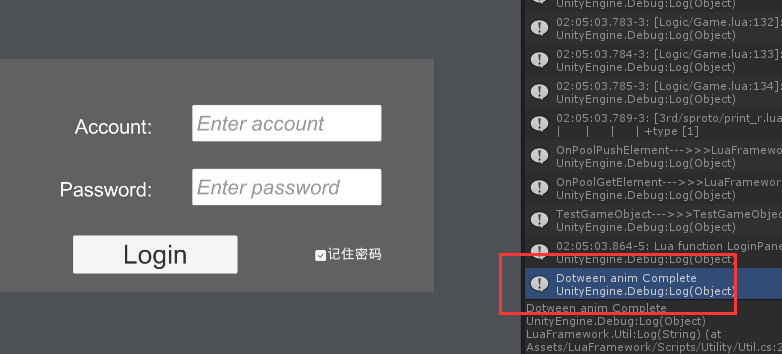
现在将循环次数改为1,重新运行。
能看到动画停止后,指定的日志已经输出。
在Lua中使用用Dotween,就是这样一个步骤。
有一点要注意的是,在Lua中的代码提示是很不健全的,特别是在调用用C#脚本的时候。
这里写Dotween动画的代码就是全靠经验,如果不熟的话,也可以先用C#写一遍,再搬到Lua中改造。


怎么从C#中调用Lua脚本
文章的前半部分介绍了Lua中调用c#的方法,那么相应的如何从c#中调用Lua也有必要了解一下。
c#调用Lua是比较少的一个操作,基本上就在框架(LuaFramework)初始化的时候有用到。这里不做详细案例,只讲一下了解方式。
方式1:
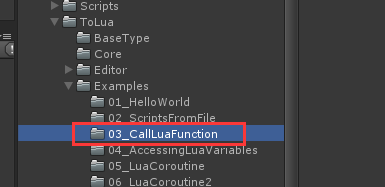
ToLua的Examples, 03_CallLuaFunction,这个脚本详细讲述了c#调用Lua的过程。
方式2:
LuaFramework的LuaManager类,这个脚本里有详细的调用Main.Lua的过程。

后记
一个疑问:
在写Lua的Dotween代码的时候,使用DOLocalMove、SetLoops和OnComplete都是用冒号:的方式,实际上这三个都是static方法,这有违于上一篇文章中总结的静态方法用点号,成员方法用冒号的规则。
暂不知道原因,如果你知道,还请留言指教。
------------------------------------
疑问已解决,答案在1楼,感谢 @ 马三小伙儿 大佬的解答

Unity3D热更新之LuaFramework篇[05]--Lua脚本调用c#以及如何在Lua中使用Dotween的更多相关文章
- Unity3D热更新之LuaFramework篇[10]--总结篇
背景 19年年初的时候,进到一家新单位,公司正准备将现有的游戏做成支持热更的版本.于是寻找热更方案的任务就落在了我头上. 经过搜索了解,能做Unity热更的方案是有好几种,但是要么不够成熟,要么不支持 ...
- Unity3D热更新之LuaFramework篇[02]--用Lua创建自己的面板
在上篇文章 Unity3D热更新之LuaFramework篇[01]--从零开始 中,我们了解了怎么获得一个可用的LuaFramework框架. 本篇将我会先介绍一下如何配置Lua开发环境,然后分析在 ...
- Unity3D热更新之LuaFramework篇[07]--怎么让unity对象绑定Lua脚本
前言 在上一篇文章 Unity3D热更新之LuaFramework篇[06]--Lua中是怎么实现脚本生命周期的 中,我分析了由LuaBehaviour来实现lua脚本生命周期的方法. 但在实际使用中 ...
- Unity3D热更新之LuaFramework篇[03]--prefab加载和Button事件
在上一篇文章 Unity3D热更新之LuaFramework篇[02]--用Lua创建自己的面板 中,我介绍了LuaFramework加载面板的方法,但这个方法并不适用于其它Prefab资源,在这套框 ...
- Unity3D热更新之LuaFramework篇[09]--资源热更新与代码热更新的具体实现
前言 在上一篇文章 Unity3D热更新之LuaFramework篇[08]--热更新原理及热更服务器搭建 中,我介绍了热更新的基本原理,并且着手搭建一台服务器. 本篇就做一个实战练习,真正的来实现热 ...
- Unity3D热更新之LuaFramework篇[04]--自定义UI监听方法
时隔一个多月我又回来啦! 坚持真的是很难的一件事,其它事情稍忙,就很容易说服自己把写博客的计划给推迟了. 好在终于克服了自己的惰性,今天又开始了. 本篇继续我的Luaframework学习之路. 一. ...
- Unity3D热更新之LuaFramework篇[08]--热更新原理及热更服务器搭建
前言 前面铺垫了这么久,终于要开始写热更新了. Unity游戏热更新包含两个方面,一个是资源的更新,一个是脚本的更新. 资源更新是Unity本来就支持的,在各大平台也都能用.而脚本的热更新在iOS平台 ...
- Unity3D热更新之LuaFramework篇[06]--Lua中是怎么实现脚本生命周期的
前言 用c#开发的时候,新建的脚本都默认继承自Monobehaviour, 因此脚本才有了自己的生命周期函数,如Awake,Start, Update, OnDestroy等. 在相应的方法中实现游戏 ...
- Unity3D热更新之LuaFramework篇[01]--从零开始
前言 因工作关系,需要对手头的项目进行热更新支持.了解后发现,Lua的几个变种:XLua.ToLua(原uLua)和Slua都可以做Unity热更,而ToLua更是提供了一个简易的热更框架--LuaF ...
随机推荐
- solr 分面搜索(转载)
原文地址:http://blog.csdn.net/bingduanlbd/article/details/52199347 分面搜索(Faceting)基于索引词项对搜索结果进行分类,同时返回每个分 ...
- 浅析servlet
目录 Servlet简介 Servlet定义 Servlet的特点 Servlet底层原理 Servlet GenericServlet HttpServlet Servlet的生命周期 Servle ...
- CF1157F Maximum Balanced Circle
思路 观察到答案一定是连续的一段下凸函数或者上凸函数 直接模拟找出即可 时间复杂度为\(O(n)\) 代码 #include <cstdio> #include <cstring&g ...
- 使用Ajax中get请求发送Token时踩的那些坑
在使用惯了各种牛X的插件以后,在使用原生组件写一些小东西的时候总是有踩不完的坑! 今天就来说一说我使用原生ajax请求时踩得坑: 下面是我的代码: var xmlhttp; if (window.XM ...
- Visual Studio 查看宏展开
使用Visual Studio 开发c++项目,中遇到项目中宏定义套宏定义,难以阅读源代码的时候. 可在 项目-->右键-->配置属性-->c/c++ -->预处理器 --&g ...
- Git 提交代码和更新代码
首先,操作之前一定要看清分支!! 其次,提交代码之前一定要先更新代码!! git branch -----查看当前分支 git pull -----更新代码到本地 ...
- javascript原型继承
在传统的基于Class的语言如Java.C++中,继承的本质是扩展一个已有的Class,并生成新的Subclass. 由于这类语言严格区分类和实例,继承实际上是类型的扩展.但是,JavaScript由 ...
- BDD行为驱动简介及Pytest-bdd基础使用
目录 BDD介绍 需求描述/用户场景 场景解析/实现 场景测试 Pytest-bdd的参数化 运行环境: pip insall pytest pytest-bdd pytest-selenium BD ...
- 利用简单的有限状态机(FSM)来实现一个简单的LED流水灯
有限状态机,(英语:Finite-state machine, FSM),又称有限状态自动机,简称状态机,是表示有限个状态以及在这些状态之间的转移和动作等行为的数学模型. 有限状态机是指输出取决于过去 ...
- csp-s模拟84
T1: 考虑如何能按顺序生成光滑数.对每个质数用队列维护包含此质数的候选集合,每次从所有队首取出最小的作为一个光滑数,用每个质数乘上这个光滑数并加入相应候选集合.这样不会漏掉一个光滑数,但会有重复.比 ...