
iOS:UIAlertController和UIAlertAction的详解
提示框控制器:UIAlertController
typedef NS_ENUM(NSInteger, UIAlertControllerStyle) {
UIAlertControllerStyleActionSheet = 0, //在视图底部弹出的提示框,它不能添加文本框,而且在ipad中必须使用popover形式展示
UIAlertControllerStyleAlert //在视图中间弹出的提示框
} NS_ENUM_AVAILABLE_IOS(8_0);
typedef NS_ENUM(NSInteger, UIAlertActionStyle) {
UIAlertActionStyleDefault = 0, //默认的确认按钮
UIAlertActionStyleCancel, //默认的取消按钮
UIAlertActionStyleDestructive //默认的红色按钮
}NS_ENUM_AVAILABLE_IOS(8_0);
3、UIAlertController:提示框控制器类
@interface UIAlertController : UIViewController
方法:
//创建提示框控制器的类方法
+ (instancetype)alertControllerWithTitle:(NSString *)title message:(NSString *)message preferredStyle:(UIAlertControllerStyle)preferredStyle;
//在提示框上添加文本框的实例方法(只能在UIAlertView风格的提示框添加)
- (void)addTextFieldWithConfigurationHandler:(void (^)(UITextField *textField))configurationHandler;
//在提示框上添加按钮
- (void)addAction:(UIAlertAction *)action;
属性:
//提示框上存放所有按钮的数组
@property (nonatomic, readonly) NSArray *actions;
//提示框上存放所有文本框的数组
@property (nonatomic, readonly) NSArray *textFields;
//提示框的标题
@property (nonatomic, copy) NSString *title;
//提示信息
@property (nonatomic, copy) NSString *message;
//提示框控制器的风格
@property (nonatomic, readonly) UIAlertControllerStyle preferredStyle;
@end
4、UIAlertAction:提示框按钮
@interface UIAlertAction : NSObject <NSCopying>
方法:
//创建提示框按钮的类方法
+ (instancetype)actionWithTitle:(NSString *)title style:(UIAlertActionStyle)style handler:(void (^)(UIAlertAction *action))handler;
属性:
//按钮标题
@property (nonatomic, readonly) NSString *title;
//按钮的风格
@property (nonatomic, readonly) UIAlertActionStyle style;
//按钮是否有效
@property (nonatomic, getter=isEnabled) BOOL enabled;
@end
具体的实例如下:
创建步骤:
1、布局故事板,在控制器的视图中拖入一个按钮,并关联IBAction事件
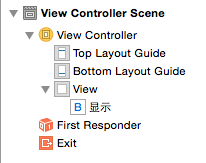


2、在按钮的关联事件中的主要代码如下:
//创建提示框控制器
    //创建提示框控制器

    UIAlertController *alertController = [UIAlertController alertControllerWithTitle:@"提示框" message:@"消息" preferredStyle:UIAlertControllerStyleAlert];

    alertController.view.backgroundColor = [UIColor purpleColor];
//创建提示框按钮
    //创建提示按钮

    UIAlertAction *action1 = [UIAlertAction actionWithTitle:@"默认Cancel" style:UIAlertActionStyleCancel handler:nil];

    UIAlertAction *action2 = [UIAlertAction actionWithTitle:@"默认Default" style:UIAlertActionStyleDefault handler:nil];

    UIAlertAction *action3 = [UIAlertAction actionWithTitle:@"默认Destructive" style:UIAlertActionStyleDestructive handler:nil];
//添加提示按钮到提示框中
    //添加提示按钮

    [alertController addAction:action1];

    [alertController addAction:action2];

    [alertController addAction:action3];
//添加文本框到提示框中(只适合提示框风格为:UIAlertControllerStyleAlert)
    //添加文本框(只适合alertview类型的提示框)

    [alertController addTextFieldWithConfigurationHandler:^(UITextField *textField) {

        textField.placeholder = @"账号";

    }];

    [alertController addTextFieldWithConfigurationHandler:^(UITextField *textField) {

        textField.placeholder = @"密码";

        textField.secureTextEntry = YES; //安全输入模式

    }];
//给文本框添加监听事件
    //给文本框添加监听事件(文本框的开始、结束、状态改变等)

    [alertController addTextFieldWithConfigurationHandler:^(UITextField *textField) {

        textField.placeholder = @"添加监听事件";

        [textField addTarget:self action:@selector(alertTextFiledDidChanged:) forControlEvents:UIControlEventEditingChanged];

    }];
//以模态窗口的形式显示提示框
[self presentViewController:alertController animated:YES completion:nil];
//实现文本框事件
#pragma mark 文本框监听事件

-(void)alertTextFiledDidChanged:(NSNotification *)notification

{

    NSLog(@"Enditing changed");

}
//点击按钮,显示演示结果
当没有添加action3按钮到提示框,即按钮个数<=2时,两种提示框的样式截图为:
UIAlertControllerStyleAlert:从屏幕中间弹出

UIAlertControllerStyleActionSheet:从屏幕底部弹出(不能添加文本框)
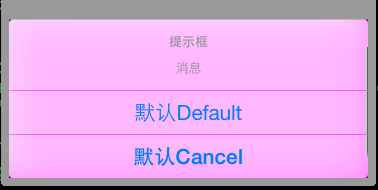
当没有添加action3按钮到提示框,即按钮个数>=3时,两种提示框的样式截图为:
UIAlertControllerStyleAlert:从屏幕中间弹出
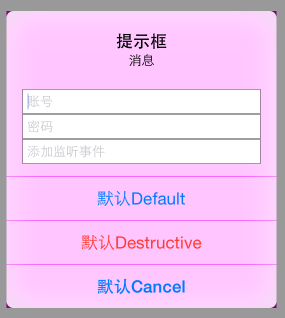
UIAlertControllerStyleActionSheet:从屏幕底部弹出(不能添加文本框)

iOS:UIAlertController和UIAlertAction的详解的更多相关文章
- iOS 视图控制器转场详解
iOS 视图控制器转场详解 前言的前言 唐巧前辈在微信公众号「iOSDevTips」以及其博客上推送了我的文章后,我的 Github 各项指标有了大幅度的增长,多谢唐巧前辈的推荐.有些人问我相关的问题 ...
- iOS 开发之照片框架详解(2)
一. 概况 本文接着 iOS 开发之照片框架详解,侧重介绍在前文中简单介绍过的 PhotoKit 及其与 ALAssetLibrary 的差异,以及如何基于 PhotoKit 与 AlAssetLib ...
- iOS中MVC等设计模式详解
iOS中MVC等设计模式详解 在iOS编程,利用设计模式可以大大提高你的开发效率,虽然在编写代码之初你需要花费较大时间把各种业务逻辑封装起来.(事实证明这是值得的!) 模型-视图-控制器(MVC)设计 ...
- iOS 证书与签名 解惑详解
iOS 证书与签名 解惑详解 分类: iPhone2012-06-06 19:57 9426人阅读 评论(1) 收藏 举报 iosxcodecryptographyappleiphone测试 目录 ...
- iOS 6分享列表——UIActivityViewController详解
iOS 6分享列表——UIActivityViewController详解 2013-06-03 01:42:33 发表评论 在iOS 6之后提供了一个分享列表视图,它通过UIActivity ...
- IOS数据库操作SQLite3使用详解(转)
iPhone中支持通过sqlite3来访问iPhone本地的数据库.具体使用方法如下1:添加开发包libsqlite3.0.dylib首先是设置项目文件,在项目中添加iPhone版的sqlite3的数 ...
- iOS 开发之照片框架详解之二 —— PhotoKit 详解(下)
本文链接:http://kayosite.com/ios-development-and-detail-of-photo-framework-part-three.html 这里接着前文<iOS ...
- iOS 开发之照片框架详解
转载自:http://kayosite.com/ios-development-and-detail-of-photo-framework.html 一. 概要 在 iOS 设备中,照片和视频是相当重 ...
- iOS 开发之照片框架详解之二 —— PhotoKit 详解(上)
转载自:http://kayosite.com/ios-development-and-detail-of-photo-framework-part-two.html 一. 概况 本文接着 iOS 开 ...
随机推荐
- PSPO表格
一.项目计划总结: 周活动总结表 日期 任务 听课 编写程序 阅读课本 准备考试 日总计 周日 周一 周二 300 100 30 430 周三 100 50 30 180 周四 200 ...
- Python科学计算(二)windows下开发环境搭建(当用pip安装出现Unable to find vcvarsall.bat)
用于科学计算Python语言真的是amazing! 方法一:直接安装集成好的软件 刚开始使用numpy.scipy这些模块的时候,图个方便直接使用了一个叫做Enthought的软件.Enthought ...
- 4、android xml中drawableTop(drawableBoottom、drawableLeft、drawableRight)在java代码中的动态配置
做安卓开发的朋友都知道,我们在xml中可以通过这样来对button设置其上部或者(下.左.右)的图片资源: 那么如果需要动态配置图片呢?我们不得不使用java代码来进行操作: Drawable dra ...
- 配置Symfony2
安装成功后打开server php app/console server:run 127.0.0.1:8000 然后在浏览器输入localhost/8000/config.php进行配置 1.date ...
- EF:Invalid column name 'Discriminator'.
错误信息: InnerException: System.Data.SqlClient.SqlExceptionHResult=-2146232060Message=Invalid column na ...
- 【BZOJ】【3522】【POI2014】Hotel
暴力/树形DP 要求在树上找出等距三点,求方案数,那么用类似Free Tour2那样的合并方法,可以写出: f[i][j]表示以 i 为根的子树中,距离 i 为 j 的点有多少个: g[i][j]表示 ...
- [工作积累] Software keyboard not shown on Activity.onCreate
protected void onCreate (Bundle savedInstanceState) { super.onCreate(savedInstanceState); this.setCo ...
- 树链剖分 - BZOJ 1036: [ZJOI2008]树的统计Count
这是树链剖分的入门题,也是我学树链剖分的第一题. 树链剖分:就是把树中和线段树联系起来,求(u,v)路径中权值的最大值和其路径的权值和. 入门blog:http://blog.sina.com.cn/ ...
- HOWTO: Create native-looking iPhone/iPad applications from HTML, CSS and JavaScript
HOWTO: Create native-looking iPhone/iPad applications from HTML, CSS and JavaScript Though it's not ...
- CountDownLatch,一个同步辅助类,在完成一组正在其他线程中执行的操作之前,它允许一个或多个线程一直等待。
CountDownLatch,一个同步辅助类,在完成一组正在其他线程中执行的操作之前,它允许一个或多个线程一直等待. 主要方法 public CountDownLatch(int count); pu ...