
shell 基本结构
就像其他的编程语言一样,shell也有三种基本的结构:顺序结构、分支结构、循环结构。顺序结构就是按照命令的出现顺序依次执行,比较简单。如下分别介绍分支结构和循环结构。
分支结构
格式1:
if command

then

    commands

fi

# 或者

if command: then

    commands

fi
说明:在其他编程语言中,if后面的command是一个等式,用来判断是true还是false;但是在bash shell中,该command是一个命令,if语句根据command执行结果的退出状态码是否为0来判断then部分是否需要执行[返回0表明命令执行成功,则执行then部分]。
如下使用grep命令在/etc/passwd文件中查找某个特定用户名是否在当前系统上使用,如果存在该用户,则显示该用户主目录的bash文件:
#! /bin/bash

# function: This script is to test structured commands

# author: benxintuzi

# date: --

user=benxintuzi

if grep $user /etc/passwd

then

  echo "The bash files for user $user are:"

  ls -a /home/$user/.b*

fi

格式2:
if command

then

  commands

else

  commands

fi
user=123456

if grep $user /etc/passwd

then

  echo "The bash files for user $user are:"

  ls -a /home/$user/.b*

else

  echo "The user $user does not exist on this system"

fi

格式3:
if command1

then

  commands

elif command2

then

  commands

elif ...

then

  ...

fi
注:if-then语句不能测试与命令退出码无关的条件,这个任务可以通过test命令来完成。
test命令的格式非常简单:test condition,用在if-then语句块中时,格式如下:
if test condition

then

    commands

fi

# 或者

# bash shell中可以使用方括号:

if [ condition ]

then

    commands

fi

说明:方括号定义了test命令,但是括号内两侧必须有空格
test命令可以用于3类条件:数值比较、字符串比较、文件比较。
1 数值比较
|
操 作 |
描 述 |
|
n1 –eq n2 |
判断n1是否等于n2 |
|
n1 –ge n2 |
判断n1是否大于或等于n2 |
|
n1 –gt n2 |
判断n1是否大于n2 |
|
n1 –le n2 |
判断n1是否小于或等于n2 |
|
n1 –lt n2 |
判断n1是否小于n2 |
|
n1 –ne n2 |
判断n1是否不等于n2 |
val=

if [ $val -gt  ]

then

  echo "The test value $val is greater than 5"

else

  echo "sorry, you are so little"

fi

2 字符串比较
|
比 较 |
描 述 |
|
str1 = str2 |
是否相同 |
|
str1 != str2 |
是否不同 |
|
str1 < str2 |
是否小于 |
|
str1 > str2 |
是否大于 |
|
-n str1 |
str1的长度是否非0 |
|
-z str1 |
str1的长度是否为0 |
2.1 【=、!=】
user=benxintuzi

if [ $USER = $user ]

then

  echo "Welcome $user"

else

  echo "The user $user is not exist"

fi

2.2 【>、<】这两个比较操作使用时必须转义,否则shell将其解释为重定向符号。
val1=Testing

val2=testing

if [ $val1 \> $val2 ]

then

  echo "The $val1 is greater than $val2"

else

  echo "The $val1 is less than $val2"

fi

2.3 【-n、-z】
val1=testing

val2=''

if [ -n val1 ]

then

  echo "The string '$val1' is not empty"

else

  echo "The string '$val1' is empty"

fi

if [ -z val2 ]

then

  echo "The string '$val2' is not empty"

else

  echo "The string '$val2' is empty"

fi

3 文件比较
|
-d file |
检查file目录是否存在 |
|
-e file |
检查file是否存在 |
|
-f file |
检查file文件是否存在 |
|
-r file |
检查file是否存在并可读 |
|
-s file |
检查file是否存在并非空 |
|
-w file |
检查file是否存在并可写 |
|
-x file |
检查file是否存在并可执行 |
|
-O file |
检查file是否存在并属于当前用户所有 |
|
-G file |
检查file是否存在并且默认组与当前用户相同 |
|
file1 –nt file2 |
检查file1是否比file2新 |
|
file1 –ot file2 |
检查file1是否比file2旧 |
复合条件的编写
if-then语句可以使用布尔逻辑来组合测试,格式如下:
[ condition1 ] && [ condition2 ]

[ condition1 ] || [ condition2 ]
if-then高级特性
(( expression ))    用于对expression进行简单比较或计算,其中的比较操作符>等不需要转义

[[ expression ]]    主要用于字符串模式匹配
val1=

if (( $val1 **  >  ))

then

  (( val2=$val1 **  ))

  echo "The square of $val1 is $val2"

fi

if [[ $USER == benxin* ]]

then

  echo "Hello, $USER"

else

  echo "Sorry, I do not know you"

fi

当分支情况比较多时,可能需要编写多条if-then-elif-then-...语句,此时,可以使用case语句,格式如下:
case variable in

pattern1 | pattern2)

  command1;;

pattern3)

  commands;;

*)

  commands;;

esac
说明:在一行中使用|来分割多个模式。
val=benxin

case $val in

benxin | tuzi)

  echo "You are alone";;

benxintuzi)

  echo "Congratulations";;

*)

  echo "go out now!";;

esac

循环结构
for命令
for var in list

do

    commands

done

# 或者

for var in list; do

    commands

done
for var in benxin tuzi benxintuzi

do

  echo "The next user is $var"

done

说明:for命令使用空格来划分列表中的不同值,如果单个数据值中也有空格,此时需要用双引号将这个值括起来,如下:
for var in benxin tuzi "benxin     tuzi"

do

  echo "The next user is $var"

done
通常的情况下,我们将一系列的值都存储在一个变量中,如:
list="benxin tuzi benxintuzi"

for var in $list

do

    echo "The next user is $var"

done

bash shell中使用IFS(Internal Field Separator)环境变量作为字段分隔符,默认情况下IFS使用如下字符:空格符,制表符,换行符。
如果要将冒号:设定为分隔符,可以如下设置:
IFS=:
IFS=:

list="benxin:tuzi:benxintuzi"

for var in $list

do

    echo "The next user is $var"

done

如果需要指定多个IFS字符,只要将它们在赋值行中串起来就行了:
(IFS=$'\n:;')表示可以使用换行符、冒号、分号作为字段之间的分隔符。
IFS=$'\n:;'

list="benxin

tuzi:benxintuzi

tuzi;"

for var in $list

do

    echo "The next user is $var"

done

注:我们修改默认IFS一般只是为了处理一段特殊的脚本,因此处理完成后必须恢复默认值,如下:
IFS.OLD=$IFS

IFS=$’\n’

# user processing...

IFS=$IFS.OLD
while命令
while test command

do

    commands

done
val=

while [ $val -gt  ]

do

    echo $val

    val=$[ $val -  ]

done

until命令
until test command

do

    commands

done
说明:until命令的执行刚好与while相反,其测试条件不成立时才执行。
循环控制命令
 break命令

终止并退出循环;

break n

默认情况下,n为1,表示跳出当前循环;如果n为2,表示跳出上一级循环

for a in

do

    echo "Outer loop: $a"

    for (( b = ; b < ; b++ ))

    do

        if [ $b -gt  ]

        then

            break

        fi

        echo "Inner loop: $b"

    done

done

 continue命令

跳过本次循环中的其余命令,继续执行下一轮循环

同理也有continue n
循环重定向
for a in

do

  echo "Outer loop: $a"

  for (( b = ; b < ; b++ ))

  do

    if [ $b -gt  ]

    then

      break

    fi

    echo "Inner loop: $b"

  done

done > output.txt
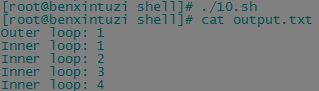
即直接在done后加上重定向符号即可,当然,也可以直接将循环输出重定向到一个命令的输入中:
for state in apple orange pear banana pineapple

do

    echo "$state is my favourite fruit"

done | sort

shell 基本结构的更多相关文章
- Shell脚本、Shell脚本结构、date命令的用法、变量
1.Shell脚本: shell是一种脚本语言 目的:可以实现自动化运维,能大大增加运维的效率.2.Shell脚本结构: #!/bin/bash 以#!/bin/bash开头,即以/bin/ba ...
- centos shell脚本编程1 正则 shell脚本结构 read命令 date命令的用法 shell中的逻辑判断 if 判断文件、目录属性 shell数组简单用法 $( ) 和${ } 和$(( )) 与 sh -n sh -x sh -v 第三十五节课
centos shell脚本编程1 正则 shell脚本结构 read命令 date命令的用法 shell中的逻辑判断 if 判断文件.目录属性 shell数组简单用法 $( ) 和$ ...
- shell脚本介绍、shell脚本结构和执行、date命令用法、shell脚本中的变量
7月11日任务 20.1 shell脚本介绍20.2 shell脚本结构和执行20.3 date命令用法20.4 shell脚本中的变量 20.1 shell脚本介绍 1.shell脚本语言是linu ...
- Linux centosVMware shell脚本介绍、shell脚本结构和执行、date命令用法、shell脚本中的变量
一. shell脚本介绍 shell是一种脚本语言 aming_linux blog.lishiming.net 可以使用逻辑判断.循环等语法 可以自定义函数 shell是系统命令的集合 shell脚 ...
- For,while,case,shell循环结构
For,while,case,shell循环结构 案例1:使用for循环结构 案 ...
- Linux编程 24 shell编程(结构化 if [ condition ] 数值比较,字符串比较)
一.概述 接着上篇讲的结构化命令,最后讲到了test命令的另一种写法 if [ condition ],它的语法格式如下: --格式如下: if [ condition ] then commands ...
- Linux编程 23 shell编程(结构化条件判断 命令if -then , if-then ... elif-then ...else,if test)
一.概述 在上一篇里讲到了shell脚本,shell按照命令在脚本中出现的顺序依次进行处理,对于顺序操作已经足够了,但许多程序要求对shell脚本中的命令加入一些逻辑流程控制,这样的命令通常叫做 结构 ...
- shell脚本结构
echo $? 代表上一次命令的状态返回值,‘0’则代表为真<执行成功>,‘非零’则代表为假<执行失败>. shell脚本: <判断老男孩的年纪> [root@bo ...
- shell脚本结构化语句
本文中记录一下shell中的两种循环语句:for和while for循环 for循环是linux shell中最常用的结构,for循环有三种结构:1.列表for循环.2.不带列表for循环.3.C风格 ...
随机推荐
- Android学习笔记之AndroidManifest.xml文件解析
一.关于AndroidManifest.xml AndroidManifest.xml 是每个android程序中必须的文件.它位于整个项目的根目录,描述了package中暴露的组件(activiti ...
- vc不用IDE编译方法
一个EXE是如何形成的 比如一个源程序有以下两个文件. 1.c 1.rc 首先cl.exe 会把源代码编译为1.obj rc.exe会把1.rc编译为1.res link.exe会把1.obj 1.r ...
- oracle:触发器,自治事务 trigger
create or replace trigger TRI_FC83_INSERT before insert ON FC83 FOR EACH ROW declare PRAGMA AUTONOMO ...
- kickstart bonding安装
bonding用的是最简单的负载均衡模式,交换机不需要做配置. https://access.redhat.com/documentation/en-US/Red_Hat_Enterprise_Lin ...
- js 函数function的几种形式
//有的时候我们一直都在使用函数,但是却不知道函数使用的正真含义 //其中一个重要的目的是为了提高代码的复用率 //其二函数可以传递参数并有返回值 //函数声明 //不带参数,不带返回值 functi ...
- Android IOS WebRTC 音视频开发总结(四七)-- 深度解读国内首届WebRTC大会背后的真相
本文主要解读国内首届WebRTC大会背后的真相,文章来自博客园RTC.Blacker,支持原创,转载必须说明出处,更多详见www.rtc.help -------------------------- ...
- Python之路【第二篇】:Python基础(一)
一.作用域 对于变量的作用域,执行声明并在内存中存在,该变量就可以在下面的代码中使用. 1 2 3 if 1==1: name = 'wupeiqi' print name 下面的结论对吗? ...
- ububtu 14.04 问题集合
作者:jostree 转载请注明出处 http://www.cnblogs.com/jostree/p/4168168.html 1.Chromium 中的flash插件问题: sudo apt-ge ...
- kickstart简介 20140707
kickstart是红帽发行版中的一种安装方式,它通过以配置文件的方式来记录linux系统安装是的各项参数和想要安装的软件.只要配置正确, 整个安装过程中无需人工交互参与,达到无人值守安装的目的,因而 ...
- CSS3实现轮播图效果
CSS3实现轮播图主要是由css:background-position和css3:animation实现.且实现此轮播需要一张四个图横着相连的图片. 注(Internet Explorer 10.F ...