
2015.8.2 jdbc实现商品类的增删查改
在惠普济宁基地进行了两周sql和java的学习,学到很多东西
刚才实现了用jdbc访问数据库对数据库进行操作,是用eclipse写的,过几天移植到NetBeans上,个人还是比较习惯看图形化界面
前几天茫然无头绪的时候闫老师指点迷津了一下,讲了具体的流程,如下:
1.创建项目
2.导入相关JAR
3.组织项目结构
util:工具类,公共类
po:实体类对象
dao:数据访问
biz:业务类
view:显示
第一步不多陈述
第二步具体如何配置可以参见蔡振华的博客http://qmkkd.blog.51cto.com/9511687/1682048
我详细说下第三步组织项目结构,我的理解还不是很透彻,欢迎大家指正,先弄张图
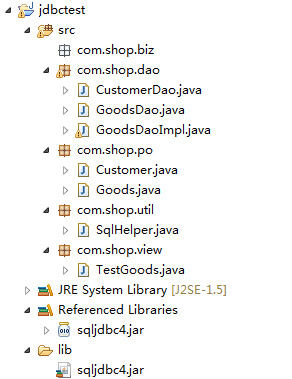
先创建com.shop.util包,包里放工具类,公共类,我是放了一个SqlHelper类,提供sql的相关帮助
之前在用C#做的时候,我在里面放了连接和增删查改的函数,但是在这里我只放了连接数据库,关闭结果集,关闭Statement,关闭连接的函数,上代码
 package com.shop.util;

 import java.sql.*;

 //SqlHelper类

 //定义了数据库连接函数,关闭查询结果集,关闭Statement对象,关闭数据库连接

 //这样的做法是执行上述4个操作时可以直接调用函数(面向对象的思想),可以好好理解一下

 public class SqlHelper {

     public static Connection getConnection() {

         Connection conn = null;

         String driver = "com.microsoft.sqlserver.jdbc.SQLServerDriver";// 驱动

         String url = "jdbc:sqlserver://127.0.0.1:1433;DatabaseName=Shopping";// SqlServer链接地址

         String username = "sa";// 用户名

         String password = "sa";// 密码

         try {

             Class.forName(driver);// 加载驱动类

             conn = DriverManager.getConnection(url, username, password);

         } catch (ClassNotFoundException e) {

             System.out.println("找不到驱动程序类 ,加载驱动失败!");

             e.printStackTrace();

         } catch (SQLException e) {

             System.out.println("数据库连接失败!");

             e.printStackTrace();

         }

         // System.out.println("连接成功");

         return conn;

     }

     //关闭连接

     public static void closeConn(Connection conn){

         if(conn!=null){

             try {

                 conn.close();

             } catch (SQLException e) {

                 // TODO Auto-generated catch block

                 e.printStackTrace();

             }

         }

     }

     //关闭执行对象

     public static void closeStatement(Statement stmt){

         if(stmt!=null){

             try {

                 stmt.close();

             } catch (SQLException e) {

                 // TODO Auto-generated catch block

                 e.printStackTrace();

             }

         }

     }

     //关闭结果集

     public static void closeResultSet(ResultSet rs){

         if(rs!=null){

             try {

                 rs.close();

             } catch (SQLException e) {

                 // TODO Auto-generated catch block

                 e.printStackTrace();

             }

         }

     }

 }
SqlHelper
然后是com.shop.po包,包里放实体类对象,这点如果不是老师指点我完全没有想到。。以前都是整条数据直接插入。
但是设置实体类对象后提高了程序的结构性和面向对象的感觉。。这样说有点怪。。下面是Goods类,很简单,这个类就对应数据库里面的一个表,这个类的对象就对应数据库里面的一条记录,这样说大家不知道能不能明白,上代码
 package com.shop.po;

 public class Goods {

     private int id;

     private String name;

     private String kind;

     private double price;

     private int stock;

     private String description;

     public int getId() {

         return id;

     }

     public void setId(int id) {

         this.id = id;

     }

     public Goods(){

     }

     public Goods(String name, String kind, double price, int stock,

             String description) {

         super();

         this.name = name;

         this.kind = kind;

         this.price = price;

         this.stock = stock;

         this.description = description;

     }

     public String getName() {

         return name;

     }

     public void setName(String name) {

         this.name = name;

     }

     public String getKind() {

         return kind;

     }

     public void setKind(String kind) {

         this.kind = kind;

     }

     public double getPrice() {

         return price;

     }

     public void setPrice(double price) {

         this.price = price;

     }

     public int getStock() {

         return stock;

     }

     public void setStock(int stock) {

         this.stock = stock;

     }

     public String getDescription() {

         return description;

     }

     public void setDescription(String description) {

         this.description = description;

     }

     public String toString() {

         return this.getName() + "," + this.getKind() + "," + this.getPrice()

                 + "," + this.getStock() + "," + this.getDescription();

     }

 }
Goods
然后是dao包,包里放数据访问的类,这部分里面的代码可能不太规范。。。毕竟是自己慢慢挤的,闫老师的方法是
写一个GoodsDao接口,里面定义对Goods表操作的函数,但不提供实现,上代码
 package com.shop.dao;

 import java.util.List;

 import com.shop.po.Goods;

 /**

  * 对商品信息操作

  * @author HP-Developer

  *

  */

 //定义接口,其中的函数是用来对数据库进行操作

 //具体实现是在GoodsDaoImpl中

 public interface GoodsDao {

     public int insertGoods(Goods goods);

     public int deleteGoods(int id);

     public int updateGoods(int id,Goods goods);//参数为修改后的新商品对象

     public List<Goods> findAll();

     public Goods findById(int id);

 }
GoodsDao
然后是接口的实现,在GoodsDaoImpl类中,上代码,这部分代码是核心,有一定的瑕疵
 package com.shop.dao;

 import java.sql.*;

 import java.util.ArrayList;

 import java.util.List;

 import com.shop.po.Goods;

 import com.shop.util.SqlHelper;

 /**

  * GoodsDao接口实现类

  *

  * @author HP-Developer

  *

  */

 public class GoodsDaoImpl implements GoodsDao {

     public int insertGoods(Goods goods) {

         Connection conn = null;

         //PreparedStatement和Statement的区别在于

         //PreparedStatement接口继承Statement,

         //PreparedStatement 实例包含已编译的 SQL 语句,所以其执行速度要快于 Statement 对象。

         //作为 Statement 的子类,PreparedStatement 继承了 Statement 的所有功能。

         //三种方法 execute、 executeQuery 和 executeUpdate 已被更改以使之不再需要参数

         //PreparedStatement性能更优,建议使用,但是比较复杂一点

         //Statement 是 Java 执行数据库操作的一个重要方法,用于在已经建立数据库连接的基础上,向数据库发送要执行的SQL语句

         //使用 Statement 对象执行语句

         Statement stmt = null;

         int result = 0;

         String name=goods.getName();

         String kind=goods.getKind();

         double price=goods.getPrice();

         int stock=goods.getStock();

         String des=goods.getDescription();

         String sql = "insert into Goods values('"+name+"','"+kind+"','"+price+"','"+stock+"','"+des+"')";

         // 访问数据库

         try {

             // 1获得连接

             conn = SqlHelper.getConnection();

             // 2执行对象

             stmt = conn.createStatement();

             // 3执行

             result = stmt.executeUpdate(sql);

         } catch (Exception e) {

             //捕捉错误

             e.printStackTrace();

         } finally {

             //关闭操作对象

             SqlHelper.closeStatement(stmt);

             //关闭连接

             SqlHelper.closeConn(conn);

         }

         //返回受影响的行数

         return result;

         //try catch finally是一种语句结构

         //就我个人的理解,在try中执行操作,catch捕捉错误,finally进行收尾

     }

     //删除和更新与插入类似 ,我就不加注释了

     public int deleteGoods(int id) {

         Connection conn = null;

         Statement stmt = null;

         int result = 0;

         String sql = "delete from Goods where gID='"+id+"'";

         try {

             conn = SqlHelper.getConnection();

             stmt = conn.createStatement();

             result = stmt.executeUpdate(sql);

         } catch (SQLException e) {

             // TODO Auto-generated catch block

             e.printStackTrace();

         } finally {

             SqlHelper.closeStatement(stmt);

             SqlHelper.closeConn(conn);

         }

         return result;

     }

     public int updateGoods(int id, Goods goods) {

         // TODO Auto-generated method stub

         Connection conn = null;

         Statement stmt = null;

         int result = 0;

         String name=goods.getName();

         String kind=goods.getKind();

         double price=goods.getPrice();

         int stock=goods.getStock();

         String des=goods.getDescription();

         String sql = "update Goods set gName='"+name+"',gKind='"+kind+"',gPrice='"+price+"',gNum='"+stock+"',gDes='"+des+"' where gID='"+id+"'";

         try {

             conn = SqlHelper.getConnection();

             stmt = conn.createStatement();

             result = stmt.executeUpdate(sql);

         } catch (SQLException e) {

             e.printStackTrace();

         } finally {

             SqlHelper.closeStatement(stmt);

             SqlHelper.closeConn(conn);

         }

         return result;

     }

     //查询全部商品

     //因为是多个对象,采用返回List的方式,返回Goods对象的集合

     public List<Goods> findAll() {

         Connection conn=null;

         Statement stmt=null;

         //创建对象集合

         List gdList = new ArrayList();

         ResultSet rs=null;

         String sql="select * from Goods";

         try{

             conn=SqlHelper.getConnection();

             stmt=conn.createStatement();

             rs=stmt.executeQuery(sql);

             while(rs.next()){

                 //创建单个对象

                 Goods gd = new Goods();

                 gd.setId(rs.getInt("gID"));

                 gd.setName(rs.getString("gName"));

                 gd.setKind(rs.getString("gKind"));

                 gd.setPrice(rs.getDouble("gPrice"));

                 gd.setStock(rs.getInt("gNum"));

                 gd.setDescription(rs.getString("gDes"));

                 //将此对象存入集合中,昨天闫老师带我们学习了ArrayList,add方法大家应该不陌生

                 gdList.add(gd);

             }

         }

         catch(SQLException e){

             e.printStackTrace();

         }

         finally{

             SqlHelper.closeResultSet(rs);//关闭结果集

             SqlHelper.closeStatement(stmt);//关闭Statement对象

             SqlHelper.closeConn(conn);//关闭连接

             //注意关闭的顺序不能

         }

         return gdList;

     }

     public Goods findById(int id) {

         Connection conn=null;

         Statement stmt=null;

         //在判断商品存在后再new对象,这样规范

         Goods gd = null;

         ResultSet rs=null;//定义数据集ResultSet 接受stmt.executeQuery(sql)的返回值

         String sql="select * from Goods where gID='"+id+"'";

         try{

             conn=SqlHelper.getConnection();

             stmt=conn.createStatement();

             //gd=(Goods)stmt.executeQuery(sql);stmt.executeQuery(sql)的返回值是一个结果集ResultSet

             //因为返回的记录是一条,之前想用强制转换的方法实现返回一个商品(Goods)对象,但是不可行,这条代码错误,下面给出正确的操作

             rs=stmt.executeQuery(sql);

             if(rs.next()){

                 gd=new Goods();

                 gd.setId(rs.getInt("gID"));

                 gd.setName(rs.getString("gName"));

                 gd.setKind(rs.getString("gKind"));

                 gd.setPrice(rs.getDouble("gPrice"));

                 gd.setStock(rs.getInt("gNum"));

                 gd.setDescription(rs.getString("gDes"));

             }

             else{

                 //这样返回一个空商品对象,节省了即使对象为空还赋值的多余操作

                 return gd;

             }

         }

         catch(SQLException e){

             e.printStackTrace();

         }

         finally{

             SqlHelper.closeResultSet(rs);//关闭结果集

             SqlHelper.closeStatement(stmt);//关闭

             SqlHelper.closeConn(conn);//关闭数据库连接

         }

         return gd;

     }

 }
GoodsDaoImpl
//我改正了里面的一些代码
然后是com.shop.biz业务类包。这个我不太熟悉。这个项目比较简单。里面是空的
最后是com.shop.view视图包,里面我放了主函数,这个可能也写的不太规范,我刚才修正了之前的一些代码,上代码
 package com.shop.view;

 import java.util.List;

 import java.util.Scanner;

 import com.shop.dao.*;

 import com.shop.po.Goods;

 public class TestGoods {

     static Scanner sc = new Scanner(System.in);

     // 非静态方法需要声明对象来调用

     static GoodsDaoImpl goodsdao = new GoodsDaoImpl();

     public static void main(String[] args) {

         while (true) {

             System.out.println("请选择你要进行的操作:");

             System.out

                     .println("1.插入商品   2.删除商品   3.更新商品   4.按id查询商品   5.查询全部商品   6.退出");

             int choose = sc.nextInt();

             switch (choose) {

             case 1:

                 insertGood();

                 break;// 插入商品

             case 2:

                 deleteGood();

                 break;// 删除商品

             case 3:

                 updateGood();

                 break;// 更新商品

             case 4:

                 printGoodById();

                 break;// 按id查询商品

             case 5:

                 printAll();

                 break;// 输出全部商品信息

             case 6:

                 System.exit(0);

             default:

                 System.out.println("输入有误");

                 break;

             }

         }

     }

     public static void insertGood() {

         // 插入数据测试,测试成功

         // Goods goodTest=new Goods("大哥大","手机",10000,5,"高级又防身");

         System.out.println("请输入商品名称:");

         String name = sc.next();

         System.out.println("请输入商品类型:");

         String kind = sc.next();

         System.out.println("请输入商品价格:");

         double price = sc.nextDouble();

         System.out.println("请输入商品库存:");

         int stock = sc.nextInt();

         System.out.println("请输入商品描述:");

         String des = sc.next();

         Goods goodInsertTest = new Goods(name, kind, price, stock, des);

         // 调用GoodsDaoImpl中实现的函数

         // 插入删除和更新的操作 ,函数返回值为受影响的行数, 一般为1 , 大家用sql执行的时候应该有发现

         int result = goodsdao.insertGoods(goodInsertTest);

         if (result == 1) {

             System.out.println("插入数据成功");

         } else {

             System.out.println("插入失败");

         }

     }

     public static void deleteGood() {

         System.out.println("请输入要删除的商品id:");

         int id = sc.nextInt();

         int result = goodsdao.deleteGoods(id);

         if (result == 1) {

             System.out.println("删除数据成功");

         } else {

             System.out.println("不存在您指定id的商品,删除数据失败");

         }

     }

     public static void updateGood() {

         System.out.println("请输入要更新的商品id:");

         int id = sc.nextInt();

         Goods isGdExist = goodsdao.findById(id);

         // 这里直接用对象是否为空判断,摒弃之前用对象的getName()方法进行判断的方式

         if (isGdExist != null) {

             System.out.println("请输入商品新名称:");

             String name = sc.next();

             System.out.println("请输入商品新类型:");

             String kind = sc.next();

             System.out.println("请输入商品新价格:");

             double price = sc.nextDouble();

             System.out.println("请输入商品新库存:");

             int stock = sc.nextInt();

             System.out.println("请输入商品新描述:");

             String des = sc.next();

             // 生成一个新的商品,此处应该可以优化,但键入全部信息比较方便实现

             Goods goodUpdateTest = new Goods(name, kind, price, stock, des);

             int result = goodsdao.updateGoods(id, goodUpdateTest);

             if (result == 1) {

                 System.out.println("更新数据成功");

             } else {

                 System.out.println("更新数据失败");

             }

         } else {

             System.out.println("不存在您指定id的商品,无法更新数据");

         }

     }

     public static void printAll() {

         // 定义一个List接受查询结果

         List<Goods> gdList = goodsdao.findAll();

         // 遍历,此处可用增强的for循环

         for (int i = 0; i < gdList.size(); i++) {

             System.out.println(gdList.get(i));

         }

     }

     public static void printGoodById() {

         System.out.println("请输入要查询的商品id:");

         int id = sc.nextInt();

         // 定义一个对象接受查询返回的结果

         Goods goodQueryByIdTest = goodsdao.findById(id);

         // 这里直接用对象是否为空判断,摒弃之前用对象的getName()方法进行判断的方式

         if (goodQueryByIdTest != null) {

             System.out.println(goodQueryByIdTest);

         } else

             System.out.println("您要查询的商品不存在");

     }

 }
TestGood
//我改正了里面的一些代码
大家有不清楚可以在群里交流。建议用NetBeans做成图形化界面。
2015.8.2 jdbc实现商品类的增删查改的更多相关文章
- jdbc的实例应用:增删查改实现
//在jdbc中进行增删查改 //查看所有 public static void findAll() { String url = "jdbc:mysql://localhost:3306/ ...
- JDBC终章- 使用 DBUtils实现增删查改- C3P0Utils数据源/QueryRunner runner连接数据源并执行sql
JDBC终章- 使用 DBUtils实现增删查改 1.数据库结构 Create Table CREATE TABLE `user` ( `id` ) NOT NULL AUTO_INCREMENT, ...
- [课本]JDBC课程6--使用JDBC的DAO模块化--完成数据库的增删查改_工具类JDBCTools四个(Preparedstatement)功能模块的敲定版
(课本P273-任务九) /**DAO: Data Access Object * 为什么用: 实现功能的模块化,更有利于代码的维护和升级 * 是什么: 访问数据信息的类,包含对数据的CRUD(cre ...
- JDBC+Servlet+jsp(增删查改)
先在mysql新增数据库和表先,把下面的几句代码复制去到mysql运行就可以创建成功了! 创建数据库 create database jdbc01 character set utf8 collat ...
- 在Eclipse上实现简单的JDBC增删查改操作
在Javaweb的学习里,学到了如何完成简单的增删查改操作,在这里撰写一篇文章以便自己整理回忆. 首先要建立一些包和导入一些文件.建一些类.具体框架如图 编写Product类 public clas ...
- JDBC课程4--使用PreparedStatement进行增删查改--封装进JDBCTools的功能中;模拟SQL注入 ; sql的date()传入参数值格式!
主要内容: /*SQL 的date()需要传入参数值: preparedStatement().setDate(new java.util.Date().getTime()); 熟悉了使用Prepar ...
- JDBC增删查改(使用配置文件)
JDBCDemo2.java package com.zhangbz.jdbc; import java.sql.Connection; import java.sql.ResultSet; impo ...
- JDBC 增删查改
public class MemberDaoImpl implements MemberDao { private Connection conn = null; public MemberDaoIm ...
- android SQLite使用SQLiteOpenHelper类对数据库进行增删查改
一个简单的例子,当点击按钮时进行相应的操作,效果图如下: 项目代码如下: DatabaseHelper类 package com.example.sqlitedatebasetest; import ...
随机推荐
- 深入学习PE文件(转)
PE文件是Win32的原生文件格式.每一个Win32可执行文件都遵循PE文件格式.对PE文件格式的了解可以加深你对Win32系统的深入理解. 一. 基本结构. 上图便是PE文件的基本结构.(注意:DO ...
- ODI KM二次开发手册
ODI KM二次开发手册 分类: ODI(16) 目录(?)[+] 1 引言 1.1 编写目的 本手册面向的读者对象为具备数据集成业务知识及对ODI操作了解的开发人员,作为其完成基于ODI基础上K ...
- JS中特殊句子-for in
for(var i=0;i<len;i++)这样的用法一般都可以用for in 来替代. 例如: var a = ["a","b","c&quo ...
- XDocument读取xml的所有元素以及XPath语法
原文 http://www.cnblogs.com/xxyishutong/p/3326375.html <?xml version="1.0" encoding=&quo ...
- 转:onkeypress、onkeydown、onkeyup 区别
在使用JavaScript做WEB键盘事件侦听捕获时,主要采用onkeypress.onkeydown.onkeyup三个事件进行出来.该三个事件的执行顺序如下:onkeydown -> onk ...
- 达内TTS6.0课件oop_day04
- IOS7 position:fixed 定位问题
在IOS7下position:fixed定位会出一些bug. 输入框 focus 状态下 fixed会随之改变.参见该页面详细描述(http://www.cnblogs.com/zhangdaipin ...
- Android入门——UI(7)——Fragment
先上fragment静态加载的代码 <?xml version="1.0" encoding="utf-8"?> <LinearLayout ...
- ORA-03113: 通信通道的文件结尾 进程 ID: 764 会话 ID: 125 序列号: 5
昨天因为导入很久数据,最后一看是因为数据文件不够,后来就关机了.现在,开启数据库,总是报“ORA-03113: 通信通道的文件结尾” SQL> conn /as sysdba; 已连接到空闲例程 ...
- spring aop简单日志实例
转载自:http://www.blogjava.net/laoding/articles/242611.html 一直就用spring的IOC,遗憾spring的另一重要组成部分AOP却没用过,所以近 ...