
Android开源代码解读のOnScrollListener实现ListView滚屏时不加载数据
使用ListView过程中,如果滚动加载数据的操作比较费时,很容易在滚屏时出现屏幕卡住的现象,一个解决的办法就是不要在滚动时加载数据,而是等到滚动停止后再进行数据的加载。这同样要实现OnScrollListener接口,关于该接口的简要描述见上一篇文章,这里直接进行代码的分析:
- package hust.iprai.asce1885;
- import android.app.ListActivity;
- import android.content.Context;
- import android.os.Bundle;
- import android.view.LayoutInflater;
- import android.view.View;
- import android.view.ViewGroup;
- import android.widget.AbsListView;
- import android.widget.AbsListView.OnScrollListener;
- import android.widget.BaseAdapter;
- import android.widget.TextView;
- public class MainActivity extends ListActivity implements OnScrollListener {
- private TextView mStatus; //显示滚屏状态
- private boolean mBusy = false; //标识是否存在滚屏操作
- /**
- * 自定义Adapter,实现ListView中view的显示
- *
- */
- private class SlowAdapter extends BaseAdapter {
- private LayoutInflater mInflater;
- public SlowAdapter(Context context) {
- mInflater = (LayoutInflater) context.getSystemService(Context.LAYOUT_INFLATER_SERVICE);
- }
- /**
- * 列表中元素个数取决于数据的个数
- */
- public int getCount() {
- return mStrings.length;
- }
- /**
- * 我们的模拟数据是从数组中获取的,因此这里直接返回索引值就可以获取相应的数据了
- */
- public Object getItem(int position) {
- return position;
- }
- /**
- * 使用数组的索引作为唯一的id
- */
- public long getItemId(int position) {
- return position;
- }
- /**
- * 获取List中每一行的view
- */
- public View getView(int position, View convertView, ViewGroup parent) {
- TextView text;
- //给text赋值
- if (null == convertView) {
- text = (TextView) mInflater.inflate(android.R.layout.simple_list_item_1, parent, false);
- } else {
- text = (TextView) convertView;
- }
- if (!mBusy) {
- //当前不处于加载数据的忙碌时期(没有滚屏),则显示数据
- text.setText(mStrings[position]);
- //这里约定将tag设置为null说明这个view已经有了正确的数据
- text.setTag(null);
- } else {
- //当前处于滚屏阶段,不加载数据,直接显示数据加载中提示
- text.setText("Loading...");
- //tag非空说明这个view仍然需要进行数据加载并显示
- text.setTag(this);
- }
- return text;
- }
- }
- @Override
- public void onCreate(Bundle savedInstanceState) {
- super.onCreate(savedInstanceState);
- setContentView(R.layout.main);
- mStatus = (TextView) findViewById(R.id.status);
- mStatus.setText("Idle");
- //使用自定义的ListAdapter将数据映射到TextView中
- setListAdapter(new SlowAdapter(this));
- //设置滚动监听器
- getListView().setOnScrollListener(this);
- }
- public void onScroll(AbsListView view, int firstVisibleItem,
- int visibleItemCount, int totalItemCount) {
- }
- public void onScrollStateChanged(AbsListView view, int scrollState) {
- switch (scrollState) {
- case OnScrollListener.SCROLL_STATE_IDLE: //Idle态,进行实际数据的加载显示
- mBusy = false;
- int first = view.getFirstVisiblePosition();
- int count = view.getChildCount();
- for (int i = 0; i < count; i++) {
- TextView tv = (TextView) view.getChildAt(i);
- if (tv.getTag() != null) { //非null说明需要加载数据
- tv.setText(mStrings[first + i]);
- tv.setTag(null);
- }
- }
- mStatus.setText("Idle");
- break;
- case OnScrollListener.SCROLL_STATE_TOUCH_SCROLL:
- mBusy = true;
- mStatus.setText("Touch Scroll");
- break;
- case OnScrollListener.SCROLL_STATE_FLING:
- mBusy = true;
- mStatus.setText("Fling");
- break;
- default:
- mStatus.setText("Are you kidding me!");
- break;
- }
- }
- private String[] mStrings = {
- "Abbaye de Belloc", "Abbaye du Mont des Cats", "Abertam",
- "Abondance", "Ackawi", "Acorn", "Adelost", "Affidelice au Chablis",
- "Afuega'l Pitu", "Airag", "Airedale", "Aisy Cendre",
- "Allgauer Emmentaler", "Alverca", "Ambert", "American Cheese",
- "Ami du Chambertin", "Anejo Enchilado", "Anneau du Vic-Bilh",
- "Anthoriro", "Appenzell", "Aragon", "Ardi Gasna", "Ardrahan",
- "Armenian String", "Aromes au Gene de Marc", "Asadero", "Asiago",
- "Aubisque Pyrenees", "Autun", "Avaxtskyr", "Baby Swiss", "Babybel",
- "Baguette Laonnaise", "Bakers", "Baladi", "Balaton", "Bandal",
- "Banon", "Barry's Bay Cheddar", "Basing", "Basket Cheese",
- "Bath Cheese", "Bavarian Bergkase", "Baylough", "Beaufort",
- "Beauvoorde", "Beenleigh Blue", "Beer Cheese", "Bel Paese",
- "Bergader", "Bergere Bleue", "Berkswell", "Beyaz Peynir",
- "Bierkase", "Bishop Kennedy", "Blarney", "Bleu d'Auvergne",
- "Bleu de Gex", "Bleu de Laqueuille", "Bleu de Septmoncel",
- "Bleu Des Causses", "Blue", "Blue Castello", "Blue Rathgore",
- "Blue Vein (Australian)", "Blue Vein Cheeses", "Bocconcini",
- "Bocconcini (Australian)", "Boeren Leidenkaas", "Bonchester",
- "Bosworth"};
- }
下面是布局文件main.xml:
- <?xml version="1.0" encoding="utf-8"?>
- <LinearLayout xmlns:android="http://schemas.android.com/apk/res/android"
- android:orientation="vertical"
- android:layout_width="match_parent"
- android:layout_height="match_parent">
- <ListView android:id="@android:id/list"
- android:layout_width="match_parent"
- android:layout_height="0dip"
- android:layout_weight="1"
- android:drawSelectorOnTop="false"/>
- <TextView android:id="@+id/status"
- android:layout_width="match_parent"
- android:layout_height="wrap_content"
- android:paddingLeft="8dip"
- android:paddingRight="8dip"/>
- </LinearLayout>
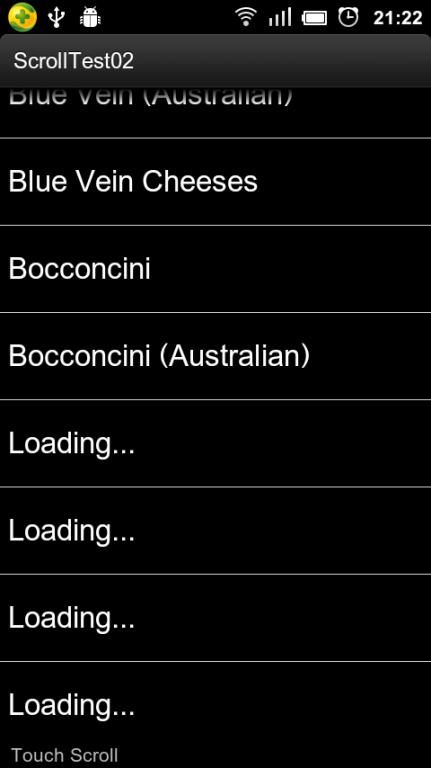
程序运行结果如下图所示:
Android开源代码解读のOnScrollListener实现ListView滚屏时不加载数据的更多相关文章
- jQuery+Ajax滚屏异步加载数据实现(附源码)
一.CSS样式 body { font:12px/1.0em Microsoft Yahei; line-height:1.6em; background:#fff; line-height:1.2e ...
- Android开源代码解读-基于SackOfViewAdapter类实现类似状态通知栏的布局
一般来说,ListView的列表项都会采用相同的布局,只是填充的内容不同而已,这种情况下,Android提供了convertView帮我们缓存列表项,达到循环利用的目的,开发者也会使用ViewHold ...
- Listview滑动时不加载数据,停下来时加载数据,让App更优
http://blog.csdn.net/yy1300326388/article/details/45153813
- material design 的android开源代码整理
material design 的android开源代码整理 1 android (material design 效果的代码库) 地址请点击:MaterialDesignLibrary 效果: 2 ...
- 22个值得收藏的Android开源代码-UI篇
本文介绍了android开发者中比较热门的开源代码,这些代码绝大多数可以直接应用到项目中. FileBrowserView 一个强大的文件选择控件.界面比较漂亮,使用也很简单.特点:可以自定义UI:支 ...
- android开源代码
Android开源项目--分类汇总 转自:https://github.com/Trinea/android-open-project Android开源项目第一篇——个性化控件(View)篇 包括L ...
- 160多个android开源代码汇总
第一部分 个性化控件(View) 主要介绍那些不错个性化的View,包括ListView.ActionBar.Menu.ViewPager.Gallery.GridView.ImageView.Pro ...
- 22个值得收藏的Android开源代码——cool
转自http://www.jcodecraeer.com/a/anzhuokaifa/androidkaifa/2014/1020/1808.html 本文介绍了android开发者中比较热门的开源代 ...
- 优秀开源代码解读之JS与iOS Native Code互调的优雅实现方案
简介 本篇为大家介绍一个优秀的开源小项目:WebViewJavascriptBridge. 它优雅地实现了在使用UIWebView时JS与ios 的ObjC nativecode之间的互调,支持消息发 ...
随机推荐
- Java基础知识强化38:StringBuffer类之StringBuffer的添加功能
1. StringBuffer的添加功能: public StringBuffer append(String str):可以把任意类型数据添加到字符串缓冲区里面,并返回字符串缓冲区本身. publ ...
- Java设计模式---(动态)代理模式
代理设计模式 定义:为其他对象提供一种代理以控制对这个对象的访问. 动态代理使用 java动态代理机制以巧妙的方式实现了代理模式的设计理念. 之前虽然会用JDK的动态代理,但是有些问题却一直没有搞明白 ...
- 部署hibernate框架项目时出现问题:The type java.lang.Object cannot be resolved. It is indirectly referenced from required .class files.
基本情况: (这些其实关系不大)我是直接impor导入HibernateDemo项目到eclipse中的,该项目的hibernate版本是3.6.7.Final版,使用了Hibernate Tools ...
- OD: Exploit Me - Inject Instruction
修改之前的代码: #include<stdio.h> #include<stdlib.h> #include<string.h> #include<windo ...
- 腾讯云(centos)上安装apache
安装 yun install httpd 随系统自启动 chkconfig httpd on 修改/etc/httpd/conf/httpd.conf文件 #修改WWW目录为自己的目录 Dcoumen ...
- javascript 冒泡和事件源 形成的事件委托
冒泡:即使通过子级元素的事件来触发父级的事件,通过阻止冒泡可以防止冒泡发生. 事件源:首先这个东西是有兼容行问题的,当然解决也很简单. 两者结合使用,形成的事件委托有两个优势: 1.减少性能消耗: 2 ...
- 转载——SqlServer之like、charindex、patindex
转载自:http://www.2cto.com/database/201305/214967.html SqlServer之like.charindex.patindex 1.环境介绍 测试环境 ...
- (转)【已解决】关于SQL2008 “不允许保存更改。您所做的更改要求删除并重新创建以下表。您对无法重新创建的标进行了更改或者启用了‘阻止保存要求重新创建表的更改’” 解决方案
近日在使用sql2008的过程中,要对已经创建完成的表结构进行修改,却一直提示弹出如下提示: “ 不允许保存更改.您所做的更改要求删除并重新创建以下表.您对无法重新创建的标进行了更改或者启用了“阻止保 ...
- ADO.NET之使用DataGridView控件显示从服务器上获取的数据
今天回顾下ADO.NET中关于使用DataGridiew控件显示数据的相关知识 理论整理: 使用 DataGridView 控件,可以显示和编辑来自多种不同类型的数据源的表格数据. SqlDataAd ...
- UIColor各种颜色转换
1.Hex值颜色转换 #import <UIKit/UIKit.h> @interface UIColor (Extension) // 根据无符号的32位整数转换为对应的RGB颜色 + ...