
Android开源代码解读のOnScrollListener实现ListView滚屏时不加载数据
使用ListView过程中,如果滚动加载数据的操作比较费时,很容易在滚屏时出现屏幕卡住的现象,一个解决的办法就是不要在滚动时加载数据,而是等到滚动停止后再进行数据的加载。这同样要实现OnScrollListener接口,关于该接口的简要描述见上一篇文章,这里直接进行代码的分析:
- package hust.iprai.asce1885;
- import android.app.ListActivity;
- import android.content.Context;
- import android.os.Bundle;
- import android.view.LayoutInflater;
- import android.view.View;
- import android.view.ViewGroup;
- import android.widget.AbsListView;
- import android.widget.AbsListView.OnScrollListener;
- import android.widget.BaseAdapter;
- import android.widget.TextView;
- public class MainActivity extends ListActivity implements OnScrollListener {
- private TextView mStatus; //显示滚屏状态
- private boolean mBusy = false; //标识是否存在滚屏操作
- /**
- * 自定义Adapter,实现ListView中view的显示
- *
- */
- private class SlowAdapter extends BaseAdapter {
- private LayoutInflater mInflater;
- public SlowAdapter(Context context) {
- mInflater = (LayoutInflater) context.getSystemService(Context.LAYOUT_INFLATER_SERVICE);
- }
- /**
- * 列表中元素个数取决于数据的个数
- */
- public int getCount() {
- return mStrings.length;
- }
- /**
- * 我们的模拟数据是从数组中获取的,因此这里直接返回索引值就可以获取相应的数据了
- */
- public Object getItem(int position) {
- return position;
- }
- /**
- * 使用数组的索引作为唯一的id
- */
- public long getItemId(int position) {
- return position;
- }
- /**
- * 获取List中每一行的view
- */
- public View getView(int position, View convertView, ViewGroup parent) {
- TextView text;
- //给text赋值
- if (null == convertView) {
- text = (TextView) mInflater.inflate(android.R.layout.simple_list_item_1, parent, false);
- } else {
- text = (TextView) convertView;
- }
- if (!mBusy) {
- //当前不处于加载数据的忙碌时期(没有滚屏),则显示数据
- text.setText(mStrings[position]);
- //这里约定将tag设置为null说明这个view已经有了正确的数据
- text.setTag(null);
- } else {
- //当前处于滚屏阶段,不加载数据,直接显示数据加载中提示
- text.setText("Loading...");
- //tag非空说明这个view仍然需要进行数据加载并显示
- text.setTag(this);
- }
- return text;
- }
- }
- @Override
- public void onCreate(Bundle savedInstanceState) {
- super.onCreate(savedInstanceState);
- setContentView(R.layout.main);
- mStatus = (TextView) findViewById(R.id.status);
- mStatus.setText("Idle");
- //使用自定义的ListAdapter将数据映射到TextView中
- setListAdapter(new SlowAdapter(this));
- //设置滚动监听器
- getListView().setOnScrollListener(this);
- }
- public void onScroll(AbsListView view, int firstVisibleItem,
- int visibleItemCount, int totalItemCount) {
- }
- public void onScrollStateChanged(AbsListView view, int scrollState) {
- switch (scrollState) {
- case OnScrollListener.SCROLL_STATE_IDLE: //Idle态,进行实际数据的加载显示
- mBusy = false;
- int first = view.getFirstVisiblePosition();
- int count = view.getChildCount();
- for (int i = 0; i < count; i++) {
- TextView tv = (TextView) view.getChildAt(i);
- if (tv.getTag() != null) { //非null说明需要加载数据
- tv.setText(mStrings[first + i]);
- tv.setTag(null);
- }
- }
- mStatus.setText("Idle");
- break;
- case OnScrollListener.SCROLL_STATE_TOUCH_SCROLL:
- mBusy = true;
- mStatus.setText("Touch Scroll");
- break;
- case OnScrollListener.SCROLL_STATE_FLING:
- mBusy = true;
- mStatus.setText("Fling");
- break;
- default:
- mStatus.setText("Are you kidding me!");
- break;
- }
- }
- private String[] mStrings = {
- "Abbaye de Belloc", "Abbaye du Mont des Cats", "Abertam",
- "Abondance", "Ackawi", "Acorn", "Adelost", "Affidelice au Chablis",
- "Afuega'l Pitu", "Airag", "Airedale", "Aisy Cendre",
- "Allgauer Emmentaler", "Alverca", "Ambert", "American Cheese",
- "Ami du Chambertin", "Anejo Enchilado", "Anneau du Vic-Bilh",
- "Anthoriro", "Appenzell", "Aragon", "Ardi Gasna", "Ardrahan",
- "Armenian String", "Aromes au Gene de Marc", "Asadero", "Asiago",
- "Aubisque Pyrenees", "Autun", "Avaxtskyr", "Baby Swiss", "Babybel",
- "Baguette Laonnaise", "Bakers", "Baladi", "Balaton", "Bandal",
- "Banon", "Barry's Bay Cheddar", "Basing", "Basket Cheese",
- "Bath Cheese", "Bavarian Bergkase", "Baylough", "Beaufort",
- "Beauvoorde", "Beenleigh Blue", "Beer Cheese", "Bel Paese",
- "Bergader", "Bergere Bleue", "Berkswell", "Beyaz Peynir",
- "Bierkase", "Bishop Kennedy", "Blarney", "Bleu d'Auvergne",
- "Bleu de Gex", "Bleu de Laqueuille", "Bleu de Septmoncel",
- "Bleu Des Causses", "Blue", "Blue Castello", "Blue Rathgore",
- "Blue Vein (Australian)", "Blue Vein Cheeses", "Bocconcini",
- "Bocconcini (Australian)", "Boeren Leidenkaas", "Bonchester",
- "Bosworth"};
- }
下面是布局文件main.xml:
- <?xml version="1.0" encoding="utf-8"?>
- <LinearLayout xmlns:android="http://schemas.android.com/apk/res/android"
- android:orientation="vertical"
- android:layout_width="match_parent"
- android:layout_height="match_parent">
- <ListView android:id="@android:id/list"
- android:layout_width="match_parent"
- android:layout_height="0dip"
- android:layout_weight="1"
- android:drawSelectorOnTop="false"/>
- <TextView android:id="@+id/status"
- android:layout_width="match_parent"
- android:layout_height="wrap_content"
- android:paddingLeft="8dip"
- android:paddingRight="8dip"/>
- </LinearLayout>
程序运行结果如下图所示:
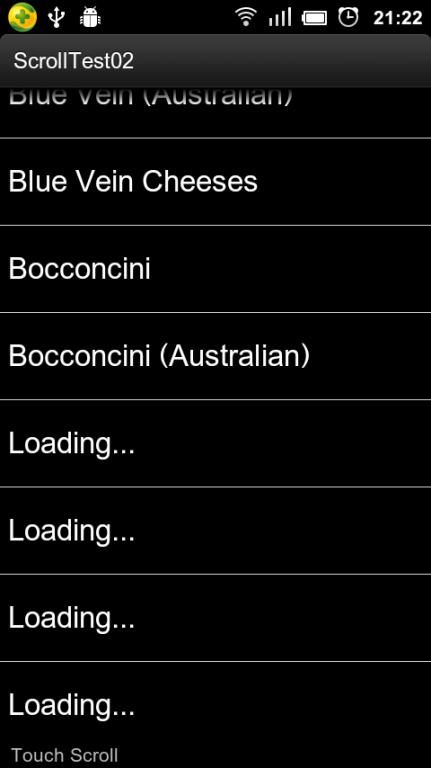
Android开源代码解读のOnScrollListener实现ListView滚屏时不加载数据的更多相关文章
- jQuery+Ajax滚屏异步加载数据实现(附源码)
一.CSS样式 body { font:12px/1.0em Microsoft Yahei; line-height:1.6em; background:#fff; line-height:1.2e ...
- Android开源代码解读-基于SackOfViewAdapter类实现类似状态通知栏的布局
一般来说,ListView的列表项都会采用相同的布局,只是填充的内容不同而已,这种情况下,Android提供了convertView帮我们缓存列表项,达到循环利用的目的,开发者也会使用ViewHold ...
- Listview滑动时不加载数据,停下来时加载数据,让App更优
http://blog.csdn.net/yy1300326388/article/details/45153813
- material design 的android开源代码整理
material design 的android开源代码整理 1 android (material design 效果的代码库) 地址请点击:MaterialDesignLibrary 效果: 2 ...
- 22个值得收藏的Android开源代码-UI篇
本文介绍了android开发者中比较热门的开源代码,这些代码绝大多数可以直接应用到项目中. FileBrowserView 一个强大的文件选择控件.界面比较漂亮,使用也很简单.特点:可以自定义UI:支 ...
- android开源代码
Android开源项目--分类汇总 转自:https://github.com/Trinea/android-open-project Android开源项目第一篇——个性化控件(View)篇 包括L ...
- 160多个android开源代码汇总
第一部分 个性化控件(View) 主要介绍那些不错个性化的View,包括ListView.ActionBar.Menu.ViewPager.Gallery.GridView.ImageView.Pro ...
- 22个值得收藏的Android开源代码——cool
转自http://www.jcodecraeer.com/a/anzhuokaifa/androidkaifa/2014/1020/1808.html 本文介绍了android开发者中比较热门的开源代 ...
- 优秀开源代码解读之JS与iOS Native Code互调的优雅实现方案
简介 本篇为大家介绍一个优秀的开源小项目:WebViewJavascriptBridge. 它优雅地实现了在使用UIWebView时JS与ios 的ObjC nativecode之间的互调,支持消息发 ...
随机推荐
- mysql数据库的高可用方法总结
高可用架构对于互联网服务基本是标配,无论是应用服务还是数据库服务都需要做到高可用.虽然互联网服务号称7*24小时不间断服务,但多多少少有一 些时候服务不可用,比如某些时候网页打不开,百度不能搜索或者无 ...
- 关于一个下载的源代码中的”*.vssscc“文件的问题
今天下载了一份程序的源代码,老是提示我要连接源代码管理服务器,这个……你的账号密码我怎么知道,有木有.于是上网搜罗了一番找来了解决方案,在这里分享给可能出现同样问题的童鞋. 首先说明一下什么是vsss ...
- django: db howto - 1
以在 Django 中使用 MySQL 为例,首先要安装 MySQL 和 MySQL-python 组件,确保 python 能执行 import MySQLdb. MySQL 中创建数据库: [ro ...
- Android -------- RelativeLayout 和 LinearLayout 的性能分析
布局的绘制角度 RelativeLayout不如LinearLayout快的根本原因是: RelativeLayout需要对其子View进行两次measure过程, 而LinearLayout则只需一 ...
- Create new Android Virtual Device时不能创建
在Create new Android Virtual Device时不能创建... 因为之前有重装过系统,ADT和java都没有更换,不知道是不是有哪里的环境(C盘中的配置)出错了... LOG在下 ...
- oracle commit之后的数据回滚
当你晕晕乎乎的执行了commit之后,突然间意思到自己点错了,那说明你和我碰到了一样的问题. 瞬间感觉大冷天头顶冒汗,那就说明你的感觉对了.废话少说,下面是我的办法: 下面的例子都是以Test表为例. ...
- 用jquery向网页添加背景图片 拉伸 模糊 遮罩层 代码
方法一:手动添加 1.在body内任意位置添加html代码 <div id="web_bg" style=" position:fixed; _position:a ...
- 命令提示符CMD远程连接Mysql学习笔记
我想要用Cmd可以像SecureCRT一样远程连接数据库,查询数据,因为用cmd的话可以用批处理,方便脚本调用 第一步:直接使用命令 mysql –h ip –u user –p,本地运行了该命令提示 ...
- QT 串口通信 数据16进制发送
在QT中进行串口通信时,很多情况要用到发送16进制的数据.从网上找来了一段代码测试能用: static QByteArray QString2Hex(QString str) { QByteArray ...
- 配置TC2.0运行环境
一. 学习过程 下载TC2.0并打开如图: 这是一个集成的C语言环境包,包括TC.dosbox和一些编译工具,很明显这样我无法判断单个程序的功能,也无法区分哪些程序是必须的. 那么为了搞清楚哪些文件是 ...