
转:Dynamic Binding Of RDLC To ReportViewer
Introduction
I was struggling to find the solution to bind rdlc dynamically to reportviewer .We had a scenario were we migrated our application from .NET 1.1 to .NET 2.0 .After migration embedding reportviewer with explicit objectdatasource was creating a major issue. Whenever we try to assign dataset reference to objectdatasource the IDE shuts down abruptly for no reason. This was one of the bug we encountered while developing. We searched a lot but this unique problem was faced by very few hence the correct solution was not available. We then planned to bind the reportviewer at runtime without taking objectdatasource. Below is the procedure to go about it.
Design Architecture
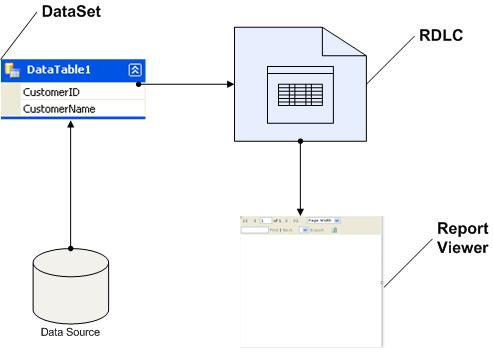
Production Deployment Issues And Its Resolution
During deployment if the source code is published and precompiled is created, one has to be extra careful to do below activity.
- Create precompiled for deployment.
- Replace the .RDLC file from the precompiled source code with the original *.rdlc file. The reason behind this is precompiled corrupt the .rdlc internal code constructs. In order to maintain its schema and design we suggest you to replace the precompiled rdlc with original one.
Prerequisite
Note: In production web server we have light weight .net framework installed so report viewer is not available. Due to which it will throw report viewer dlls not exist.
Click here to install Reportviewer.exe.
Problem Statement
There is customer table with two field customerid and customerName. We need to generate report for this datatable in reportviewer without usingobjectdatasource.
Create Dataset Schema
Follow the step given below to define dataset schema without connecting to any datasource. This is manual process. This is require each column of the table to added one by one as shown below.
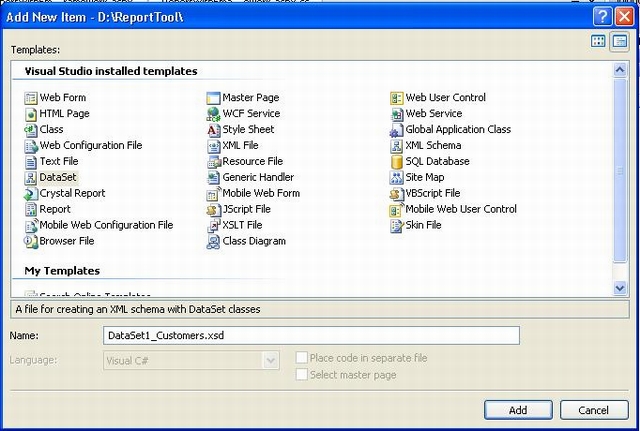
Click on the toolbox icon to proceed further.

Add column to the schema as given below.
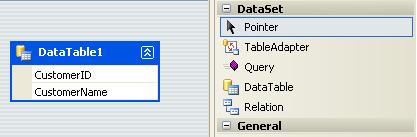
Create Report RDLC With Parameter
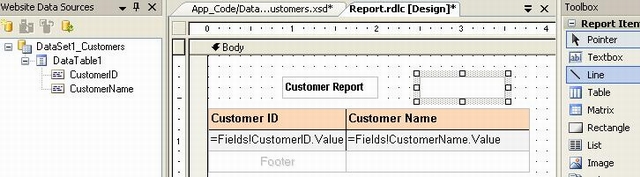
One needs to drag table from toolbox to panel to draw table section as body part of report. Once done that click on Show Data Source one will view the dataset schema section as given below. Drag columns into table row just below header section. Select Reportparameter from main menu and add one to report. This parameter value can be passed from aspx's form to Reportviewer's RDLC panel.
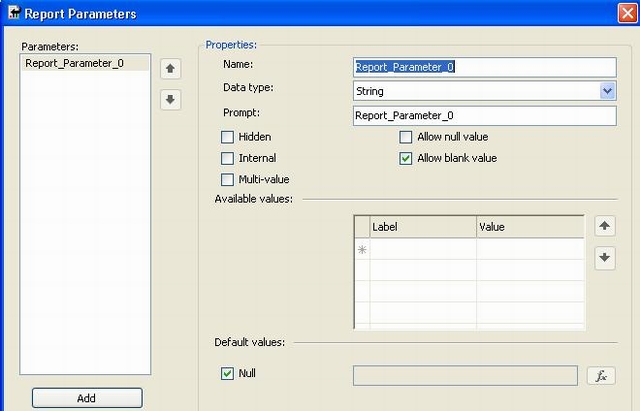
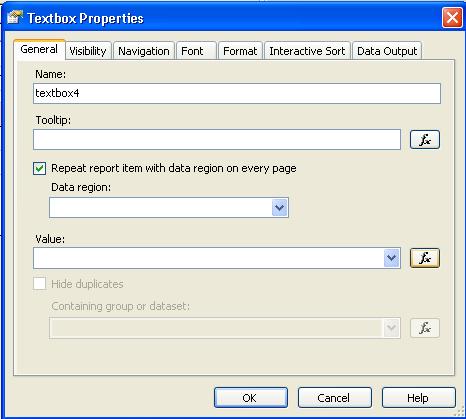
Drag textbox in report screen and right click to select property of it.
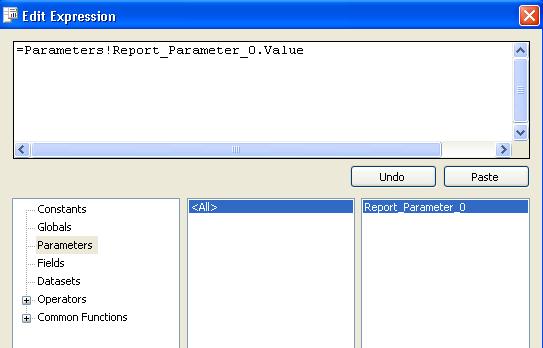
Click on Fx button of value field to associate this textbox field value to parameter set field variable.
Embed Report Viewer in Aspx
Drag Reportviewer into aspx design page and add localpath of the RDLC file. One can invoke storeprocedure and get the database resultset and can assign it to reportviewer. For running a version of this demo, I included hardcoded resultset.
 Collapse
private void BindReportViewer()
{
ReportViewer1.Visible = true; //Invoke Stored procedure With Input parameter to it.
//DataSet dsReport = objSP.GetTable(storedProcedure,txtParameter.Text));
//Hardcoded Values.
IList >Customer< customerList = new List>Customer<();
customerList.Add(new Customer(1,"Santosh Poojari"));
customerList.Add(new Customer(2, "Santosh Poojari1"));
customerList.Add(new Customer(3, "Santosh Poojari2")); ReportParameter[] param = new ReportParameter[1];
param[0] = new ReportParameter("Report_Parameter_0",txtParameter.Text);
ReportViewer1.LocalReport.SetParameters(param); ReportDataSource rds = new ReportDataSource
("DataSet1_Customers_DataTable1", customerList);
ReportViewer1.LocalReport.DataSources.Clear();
ReportViewer1.LocalReport.DataSources.Add(rds);
ReportViewer1.LocalReport.Refresh();
}
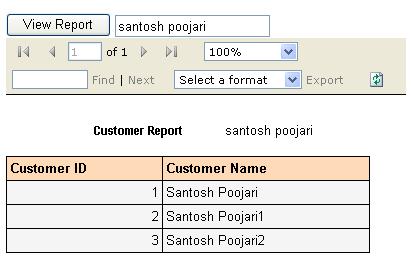
Below is the expected output.
Conclusion
Hope this article will help those who are working on similar problem statement. Any suggestion and advice will help me to improve the quality of this article.
转:Dynamic Binding Of RDLC To ReportViewer的更多相关文章
- java之多态(Polymorphic)、动态绑定(Dynamic Binding)、迟绑定(Late Binding)
今天,我们来说说java面向对象最核心的东西,多态.通过多态可以使我们的程序可复用性达到极致,这就是我们为什么要学多态的原因. “多态”(Polymorphic)也叫“动态绑定”(Dynamic Bi ...
- Dynamic Binding & Static Binding
Reference: JavaPoint BeginnerBook What is Binding Connecting a method call to the method body is kno ...
- Dynamic Binding
调用方法时,如何决定调用对象还是其父类的方法呢? 在JVM中,根据实际类型(actual type)调用.而非声明类型(declared type),如果实际类型的类中没有该方法,就会沿着inheri ...
- Java中对象方法的调用过程&动态绑定(Dynamic Binding)
Java面向对象的最重要的一个特点就是多态, 而多态当中涉及到了一个重要的机制是动态绑定(Dynamic binding). 之前只有一个大概的概念, 没有深入去了解动态绑定的机理, 直到很多公司都问 ...
- static binding/dynamic binding
static binding/dynamic binding class Person { private void who() { System.out.println("Inside p ...
- Only Link: What's the difference between dynamic dispatch and dynamic binding
http://stackoverflow.com/questions/20187587/what-is-the-difference-between-dynamic-dispatch-and-late ...
- ASP.NETserver控件使用之Reportviewer 报表
1. Reportviewer 报表 1.1. Reportviewer控件 注:本教程附2个事例: l 演练:在本地处理模式下将数据库数据源与 ReportViewer W ...
- Dynamic dispatch
Dynamic dispatch动态调度.动态分发 In computer science, dynamic dispatch is the process of selecting which im ...
- mvc 在view视图中直接输出rdlc报表文件(Excel、PDF、Word)
给一段代码做参考 public ActionResult RdlcReport(string code) { LocalReport localReport = new LocalReport(); ...
随机推荐
- structs2使用小结2
回顾之前做过类似structs2的知识点总结 Structs2历史.处理流程及与1.0版本的区别 Structs2配置文件.拦截器.校验等 EL表达式在JS中使用 ${}El表达式不能直接在单独JS文 ...
- 返回本机的mac物理路径
/// <summary> /// 返回本机的mac物理路径 /// </summary> /// <return ...
- Mysql update 错误
今天在工作的时候发现自己update 一个表的某个字段超时,想了好久,首先想到的办法是,延长操作时间: mysql> set innodb_lock_wait_timeout=100 mysql ...
- 认识什么是SEO
何为SEO? SEO是由英 文Search Engine Optimization缩写而来, 中文意译为“搜索引擎优化”,是指在了解搜索引擎自然排名机制的基础上,对网站进行内部及外部的调整优化,改进网 ...
- 3Sum Closest 解答
Question Given an array S of n integers, find three integers in S such that the sum is closest to a ...
- PHP性能优化学习笔记--语言级性能优化--来自慕课网Pangee http://www.imooc.com/learn/205
使用ab进行压力测试 ab -n行数 -c并发数 url 重点关注下面两点: 1.Request per secend : 每秒可接收的请求数 2.Time per request : 每次请求所耗费 ...
- CodeForces 158 B. Taxi(模拟)
[题目链接]click here~~ [题目大意]n组团体去包车,每组团体的人数<=4,一辆车最多容纳4人,求所求车的数目最小 [解题思路]:思路见代码~~ // C #ifndef _GLIB ...
- HashMap的使用方法及注意事项
99.Map(映射):Map 的keySet()方法会返回 key 的集合,因为 Map 的键是不能重复的,因此 keySet()方法的返回类型是 Set:而 Map 的值是可以重复的,因此 valu ...
- vim 快捷键大全
一.移动光标 1.左移h.右移l.下移j.上移k 2.向下翻页ctrl + f,向上翻页ctrl + b 3.向下翻半页ctrl + d,向上翻半页ctrl + u 4.移动到行尾$,移动到行首0(数 ...
- JSON 学习笔记
学习使用json过程随笔: json数组格式 var employees = [ { "firstName":"Bill" , "lastName&q ...