
C# WinForm判断Win7下是否是管理员身份运行
原文:C# WinForm判断Win7下是否是管理员身份运行
如果程序不是以管理员身份运行,操作本地文件会提示:System.UnauthorizedAccessException异常
Vista 和 Windows 7 操作系统为了加强安全,增加了 UAC(用户账户控制) 的机制,如果 UAC 被打开,用户即使是以管理员权限登录,其应用程序默认情况下也无法对系统目录,系统注册表等可能影响系统运行的设置进行写操作。这个机制大大增强了系统的安全性,但对应用程序开发者来说,我们不能强迫用户去关闭UAC,但有时我们开发的应用程序又需要以 Administrator 的方式运行,即 Win7 中 以 as administrator 方式运行,那么我们怎么来实现这样的功能呢?
我们在 win7 下运行一些安装程序时,会发现首先弹出一个对话框,让用户确认是否同意允许这个程序改变你的计算机配置,但我们编写的应用程序默认是不会弹出这个提示的,也无法以管理员权限运行。本文介绍了 C# 程序如何设置来提示用户以管理员权限运行。
首先在项目中增加一个 Application Manifest File
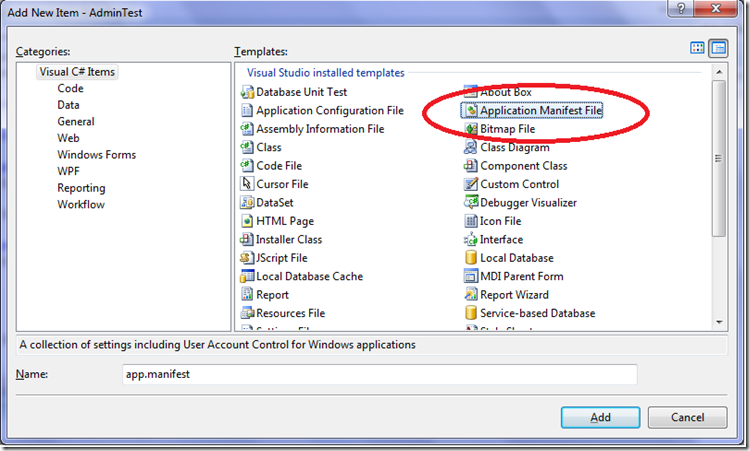
默认的配置如下:
<?xml version="1.0" encoding="utf-8"?><asmv1:assembly manifestVersion="1.0" xmlns="urn:schemas-microsoft-com:asm.v1" xmlns:asmv1="urn:schemas-microsoft-com:asm.v1" xmlns:asmv2="urn:schemas-microsoft-com:asm.v2" xmlns:xsi="http://www.w3.org/2001/XMLSchema-instance"> <assemblyIdentity version="1.0.0.0" name="MyApplication.app"/> <trustInfo xmlns="urn:schemas-microsoft-com:asm.v2"> <security> <requestedPrivileges xmlns="urn:schemas-microsoft-com:asm.v3"> <!-- UAC Manifest Options If you want to change the Windows User Account Control level replace the requestedExecutionLevel node with one of the following. <requestedExecutionLevel level="asInvoker" uiAccess="false" /> <requestedExecutionLevel level="requireAdministrator" uiAccess="false" /> <requestedExecutionLevel level="highestAvailable" uiAccess="false" /> If you want to utilize File and Registry Virtualization for backward compatibility then delete the requestedExecutionLevel node. --> <requestedExecutionLevel level="asInvoker" uiAccess="false" /> </requestedPrivileges> </security> </trustInfo></asmv1:assembly>
我们可以看到这个配置中有一个 requestedExecutionLevel 项,这个项用于配置当前应用请求的执行权限级别。这个项有3个值可供选择,如下表所示:
| Value | Description | Comment |
| asInvoker | The application runs with the same access token as the parent process. | Recommended for standard user applications. Do refractoring with internal elevation points, as per the guidance provided earlier in this document. |
| highestAvailable | The application runs with the highest privileges the current user can obtain. | Recommended for mixed-mode applications. Plan to refractor the application in a future release. |
| requireAdministrator | The application runs only for administrators and requires that the application be launched with the full access token of an administrator. | Recommended for administrator only applications. Internal elevation points are not needed. The application is already running elevated. |
asInvoker : 如果选这个,应用程序就是以当前的权限运行。
highestAvailable: 这个是以当前用户可以获得的最高权限运行。
requireAdministrator: 这个是仅以系统管理员权限运行。
默认情况下是 asInvoker。
highestAvailable 和 requireAdministrator 这两个选项都可以提示用户获取系统管理员权限。那么这两个选项的区别在哪里呢?
他们的区别在于,如果我们不是以管理员帐号登录,那么如果应用程序设置为 requireAdministrator ,那么应用程序就直接运行失败,无法启动。而如果设置为 highestAvailable,则应用程序可以运行成功,但是是以当前帐号的权限运行而不是系统管理员权限运行。如果我们希望程序在非管理员帐号登录时也可以运行(这种情况下应该某些功能受限制) ,那么建议采用 highestAvailable 来配置。
关于requestedExecutionLevel 设置的权威文档请参考下面链接:
Create and Embed an Application Manifest (UAC)
下面是修改后的配置文件:
<?xml version="1.0" encoding="utf-8"?><asmv1:assembly manifestVersion="1.0" xmlns="urn:schemas-microsoft-com:asm.v1" xmlns:asmv1="urn:schemas-microsoft-com:asm.v1" xmlns:asmv2="urn:schemas-microsoft-com:asm.v2" xmlns:xsi="http://www.w3.org/2001/XMLSchema-instance"> <assemblyIdentity version="1.0.0.0" name="MyApplication.app"/> <trustInfo xmlns="urn:schemas-microsoft-com:asm.v2"> <security> <requestedPrivileges xmlns="urn:schemas-microsoft-com:asm.v3"> <!-- UAC Manifest Options If you want to change the Windows User Account Control level replace the requestedExecutionLevel node with one of the following. <requestedExecutionLevel level="asInvoker" uiAccess="false" /> <requestedExecutionLevel level="requireAdministrator" uiAccess="false" /> <requestedExecutionLevel level="highestAvailable" uiAccess="false" /> If you want to utilize File and Registry Virtualization for backward compatibility then delete the requestedExecutionLevel node. --> <requestedExecutionLevel level="requireAdministrator" uiAccess="false" /> </requestedPrivileges> </security> </trustInfo></asmv1:assembly>
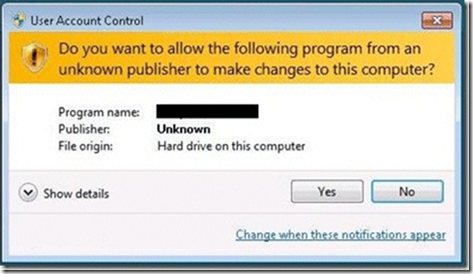
配置文件修改后,我们运行应用程序,就会首先弹出这样一个提示框,点 Yes 后,程序才可以继续运行,并且获得系统管理员的权限。
下面再来看看程序如何知道当前运行在系统管理员权限还是非系统管理员权限:
using System.Security.Principal
public static bool IsAdministrator(){ WindowsIdentity identity = WindowsIdentity.GetCurrent(); WindowsPrincipal principal = new WindowsPrincipal(identity); return principal.IsInRole(WindowsBuiltInRole.Administrator);}
这段代码可以用于判断当前程序是否运行在系统管理员权限下。如果配置为 asInvoker,在win7 下,这个函数会返回 false ,如果是 requireAdministrator 则返回 true。
参考:http://msdn.microsoft.com/zh-cn/library/system.security.principal.windowsidentity.aspx
url:http://greatverve.cnblogs.com/archive/2011/12/28/win7-admin.html
C# WinForm判断Win7下是否是管理员身份运行的更多相关文章
- Win7下判断当前进程是否以管理员身份运行
判断当前程序是否以管理员身份运行,代码如下: #include <iostream> #include <windows.h> using namespace std; // ...
- win7如何设置以管理员身份运行
一.对所有程序以管理员身份运行 1.右键单击桌面“计算机”,选择“管理” 2.在页面左侧,依此打开“计算机管理(本地)→ 系统工具→本地用户和组→用户”,在右侧找到“Administrator”,双击 ...
- win8下始终以管理员身份运行vs2012的解决办法
因为我的windows8不是专业版的,不能通过网上方法修改组策略,所以尝试了下面的方法: 1. 在vs2012快捷方式上,右键选择兼容性疑难解答: 2. 等待检测完,选择故障排除选项页面,选“疑难解答 ...
- C#判断程序是否以管理员身份运行,否则以管理员身份重新打开
/// <summary> /// 判断程序是否是以管理员身份运行. /// </summary> public static bool IsRunAsAdmin() { Wi ...
- C# 让程序自动以管理员身份运行
exe在Vista或Win7下不以管理员权限运行,会被UAC(用户帐户控制)阻止访问系统某些功能,如修改注册表操作等;如何让exe以管理员权限运行呢,方法有两种,一个是直接修改exe属性;另一个是在程 ...
- Win7 下以管理员身份运行批处理文件,切换JDK版本
Win7下 切换JDK的批处理命令 1. 批处理文件(必须以管理员身份执行)内容如下 @echo off rem --- Base Config 配置JDK的安装目录 --- :init set JA ...
- win7下让程序默认以管理员身份运行
在win7中用自己写的程序读取MBR时,突然提示无法对磁盘进行操作,而在xp下并没有这个问题:最后点右键以管理员身份运行才可以正常运行.于是想办法让程序在双击启动时默认以管理员身份运行.具体方法: 1 ...
- 【VS开发】win7下让程序默认以管理员身份运行
在win7中用自己写的程序读取MBR时,突然提示无法对磁盘进行操作,而在xp下并没有这个问题:最后点右键以管理员身份运行才可以正常运行.于是想办法让程序在双击启动时默认以管理员身份运行.具体方法: 1 ...
- win7 64位下vs不能以管理员身份运行的问题解决
开发机上安装了VS6.0/2008/2010/2013,之前一直是正常的,突然莫名其妙不能以管理员身份运行(除了VS6),报"application cannot start.", ...
随机推荐
- PHP性能如何实现全面优化?
性能是网站运行是否良好的关键因素, 网站的性能与效率影响着公司的运营成本及长远发展,编写出高质高效的代码是我们每个开发人员必备的素质,也是我们良好的职业素养. 如何优化PHP性能呢? 一.变量(重要) ...
- Phalcon 性能最高的php框架没有之一
最近有个朋友说他们现在在用Phalcon框架开发项目,明显感觉性能有很大的提升,所有着手学习下这个高性能框架,网上是这样说的“虽然以C语言编写达到较高的效能,但相对的一项缺点就是在服务器上必须拥有管理 ...
- hibernate总结四
HIbernate-查询语句 Hibernate Query Language (HQL) 是一个面向对象的查询语言,与Sql相似, 相对于sql对表和列的操作, HQL是对持久对象和他们的属性进行操 ...
- 后缀数组的一些性质----height数组
height数组:定义 height[i] = suffix[i-1] 和 suffix[i] 的最长公共前缀,也就是排名相邻的两个后缀的最长公共前缀.那么对于 j 和 k 不妨设 Rank[j] & ...
- 使用ConcurrentDictionary实现轻量缓存
项目中需要用到一个轻量缓存,存储重复使用的数据.在设计中需要考虑:1.做成通用组件,为未来其他模块方法操作结果做准备.2.缓存模块需要接口化,为未来替换使用外部缓存做准备.3.使用默认缓存过期时间,单 ...
- 非阻塞IO
设置描述符非阻塞的两种方法: 1,调用 open 时,设置,O_NONBLOCK; 2,调用 fcntl设置: 具体如下: ,open("/xxx/file1",O_RDWR|O_ ...
- 利用VHDL读写file文件
library ieee; use std.textio.all; use ieee.std_logic_textio.all; use ieee.std_logic_1164 ...
- the C programming language 阅读笔记1
读了一遍著名的<the C programming language>,果然如听说的一样,讲解基础透彻,案例简单典型,确实自己C语言还有很多细节点不是很清楚. 总结一下阅读的收获(部分原书 ...
- VMware ESXI4.1 常用命令
一. VMware ESX Command 1. # vmware –v (查看esx版本) 2. # esxcfg-info -a(查看显示ESX硬件,内核,存储,网络等信息) # esxcfg- ...
- 7816的报文结构——APDU
命令APDU 包括头和主体(这可以在上面的图中看到).头包括CLA,INS,P1 和P2 域.同T0 协议一样,CLA 和INS 说明了应用的分类和指令.P1 和P2 用来详细说明具体指令,并由每一条 ...