
Spring boot 集成 mybaits plus(代码生成器)
源码地址:https://github.com/YANGKANG01/Spring-Boot-Demo
代码生成操作
在pom.xml文件中引入以下包:
<!-- mybatisplus与springboot整合 -->

<dependency>

   <groupId>com.baomidou</groupId>

   <artifactId>mybatis-plus-boot-starter</artifactId>

   <version>3.0.5</version>

</dependency>

<!-- velocity 模板引擎, 默认 -->

<dependency>

   <groupId>org.apache.velocity</groupId>

   <artifactId>velocity-engine-core</artifactId>

   <version>2.0</version>

</dependency>

<!-- freemarker 模板引擎 -->

<dependency>

   <groupId>org.freemarker</groupId>

   <artifactId>freemarker</artifactId>

   <version>2.3.28</version>

   </dependency>

<!-- mysql数据库连接驱动 -->

<dependency>

   <groupId>mysql</groupId>

   <artifactId>mysql-connector-java</artifactId>

   <version>5.1.31</version>

</dependency>

<!--阿里druid数据库链接依赖-->

<dependency>

   <groupId>com.alibaba</groupId>

   <artifactId>druid</artifactId>

   <version>1.1.12</version>

</dependency>
在Application.java启动类目录下新建类CodeGenerator.java(代码生成器),内容如下:
package com.example.demo.mybatis;

import java.util.ArrayList;

import java.util.List;

import java.util.Scanner;

import com.baomidou.mybatisplus.core.exceptions.MybatisPlusException;

import com.baomidou.mybatisplus.core.toolkit.StringPool;

import com.baomidou.mybatisplus.core.toolkit.StringUtils;

import com.baomidou.mybatisplus.generator.AutoGenerator;

import com.baomidou.mybatisplus.generator.InjectionConfig;

import com.baomidou.mybatisplus.generator.config.DataSourceConfig;

import com.baomidou.mybatisplus.generator.config.FileOutConfig;

import com.baomidou.mybatisplus.generator.config.GlobalConfig;

import com.baomidou.mybatisplus.generator.config.PackageConfig;

import com.baomidou.mybatisplus.generator.config.StrategyConfig;

import com.baomidou.mybatisplus.generator.config.TemplateConfig;

import com.baomidou.mybatisplus.generator.config.po.TableInfo;

import com.baomidou.mybatisplus.generator.config.rules.NamingStrategy;

import com.baomidou.mybatisplus.generator.engine.FreemarkerTemplateEngine;

// 演示例子,执行 main 方法控制台输入模块表名回车自动生成对应项目目录中

public class CodeGenerator {

    /**

     * <p>

     * 读取控制台内容

     * </p>

     */

    public static String scanner(String tip) {

        Scanner scanner = new Scanner(System.in);

        StringBuilder help = new StringBuilder();

        help.append("请输入" + tip + ":");

        System.out.println(help.toString());

        if (scanner.hasNext()) {

            String ipt = scanner.next();

            if (StringUtils.isNotEmpty(ipt)) {

                return ipt;

            }

        }

        throw new MybatisPlusException("请输入正确的" + tip + "!");

    }

    public static void main(String[] args) {

        // 代码生成器

        AutoGenerator mpg = new AutoGenerator();

        // 全局配置

        GlobalConfig gc = new GlobalConfig();

        String projectPath = System.getProperty("user.dir");

        gc.setOutputDir(projectPath + "/src/main/java");//输出文件路径

        gc.setOpen(false);

        gc.setFileOverride(true);

        gc.setActiveRecord(false);// 不需要ActiveRecord特性的请改为false

        gc.setEnableCache(false);// XML 二级缓存

        gc.setBaseResultMap(true);// XML ResultMap

        gc.setBaseColumnList(false);// XML columList

        gc.setAuthor("demo");// 作者

        mpg.setGlobalConfig(gc);

        // 数据源配置

        DataSourceConfig dsc = new DataSourceConfig();

        dsc.setUrl("jdbc:mysql://localhost:3306/HaveAQuestion?useUnicode=true&useSSL=false&characterEncoding=utf8");

        // dsc.setSchemaName("public");

        dsc.setDriverName("com.mysql.jdbc.Driver");

        dsc.setUsername("root");

        dsc.setPassword("123456");

        mpg.setDataSource(dsc);

        // 包配置

        PackageConfig pc = new PackageConfig();

        pc.setModuleName(scanner("模块名"));

        //修改为自己的项目路径

        pc.setParent("com.example.demo.ant");

        mpg.setPackageInfo(pc);

        // 自定义配置

        InjectionConfig cfg = new InjectionConfig() {

            @Override

            public void initMap() {

                // to do nothing

            }

        };

        List<FileOutConfig> focList = new ArrayList<>();

        focList.add(new FileOutConfig("/templates/mapper.xml.ftl") {

            @Override

            public String outputFile(TableInfo tableInfo) {

                // 自定义输入文件名称

                return projectPath + "/src/main/resources/mapper/" + pc.getModuleName()

                        + "/" + tableInfo.getEntityName() + "Mapper" + StringPool.DOT_XML;

            }

        });

        cfg.setFileOutConfigList(focList);

        mpg.setCfg(cfg);

        mpg.setTemplate(new TemplateConfig().setXml(null));

        // 策略配置

        StrategyConfig strategy = new StrategyConfig();

        strategy.setNaming(NamingStrategy.underline_to_camel);

        strategy.setColumnNaming(NamingStrategy.underline_to_camel);

        //strategy.setSuperEntityClass("com.baomidou.mybatisplus.extension.activerecord.Model");

        //strategy.setEntityLombokModel(true);//是否系列化类

        strategy.setRestControllerStyle(true);

       // strategy.setSuperControllerClass("com.baomidou.ant.common.BaseController");

        strategy.setInclude(scanner("表名"));

        strategy.setSuperEntityColumns("id");

        strategy.setControllerMappingHyphenStyle(true);

        strategy.setTablePrefix(pc.getModuleName() + "_");

        mpg.setStrategy(strategy);

        mpg.setTemplateEngine(new FreemarkerTemplateEngine());

        mpg.execute();

    }

}
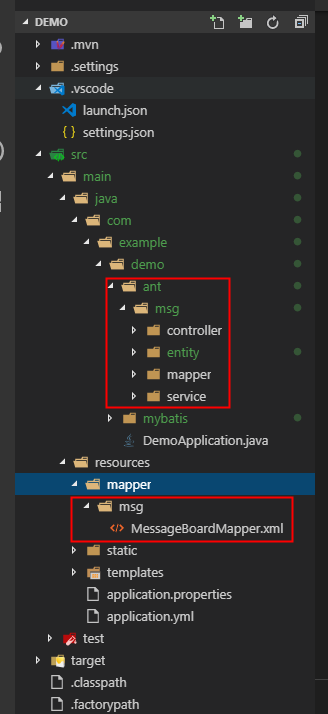
生成后的项目结构:
基础使用
在application.properties文件中添加数据库连接源等信息,内容如下:
#项目启动 端口

server.port=8080

#数据库信息

spring.datasource.type=com.alibaba.druid.pool.DruidDataSource

spring.datasource.url=jdbc:mysql://localhost:3306/test?useUnicode=true&useSSL=false&characterEncoding=utf8

spring.datasource.username=root

spring.datasource.password=123456

spring.datasource.driver-class-name=com.mysql.jdbc.Driver

spring.datasource.max-idle=10

spring.datasource.max-wait=10000

spring.datasource.min-idle=5

spring.datasource.initial-size=5
打开之前创建的msg控制器,根据id查询示例如下:
@RestController

public class MessageBoardController {

    @Autowired

    MessageBoardMapper mapper;

    @RequestMapping("/msg/message-board")

    public MessageBoard GetMsg() {

        MessageBoard data = mapper.selectById(1);

        return data;

    }

}
Ps:MessageBoardMapper在使用前需要注解@Mapper,否则启动会报错。
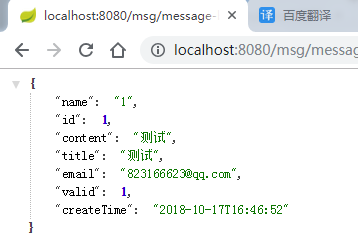
注解效果展示:

返回的数据如下:
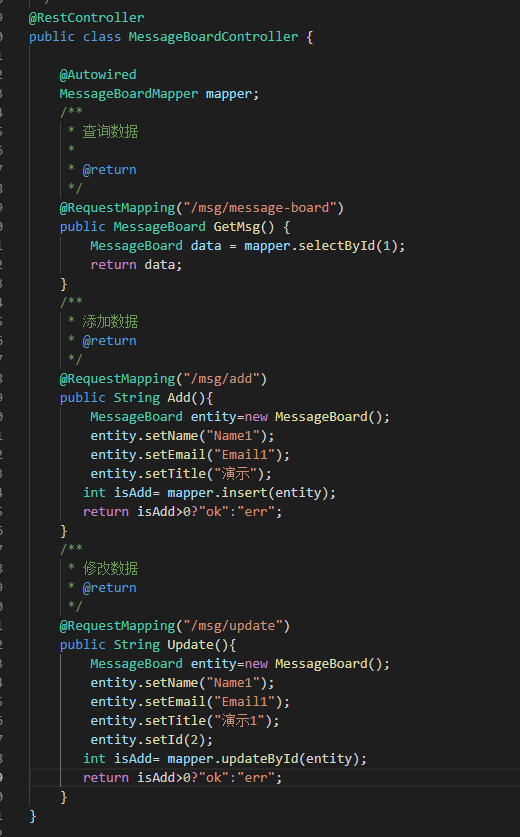
增、改、查示例代码:
Spring boot 集成 mybaits plus(代码生成器)的更多相关文章
- Spring boot入门(二):Spring boot集成MySql,Mybatis和PageHelper插件
上一篇文章,写了如何搭建一个简单的Spring boot项目,本篇是接着上一篇文章写得:Spring boot入门:快速搭建Spring boot项目(一),主要是spring boot集成mybat ...
- spring boot集成mybatis(3) - mybatis generator 配置
Spring Boot 集成教程 Spring Boot 介绍 Spring Boot 开发环境搭建(Eclipse) Spring Boot Hello World (restful接口)例子 sp ...
- Spring Boot集成Jasypt安全框架
Jasypt安全框架提供了Spring的集成,主要是实现 PlaceholderConfigurerSupport类或者其子类. 在Sring 3.1之后,则推荐使用PropertySourcesPl ...
- Spring boot集成swagger2
一.Swagger2是什么? Swagger 是一款RESTFUL接口的文档在线自动生成+功能测试功能软件. Swagger 是一个规范和完整的框架,用于生成.描述.调用和可视化 RESTful 风格 ...
- Spring Boot 集成 Swagger,生成接口文档就这么简单!
之前的文章介绍了<推荐一款接口 API 设计神器!>,今天栈长给大家介绍下如何与优秀的 Spring Boot 框架进行集成,简直不能太简单. 你所需具备的基础 告诉你,Spring Bo ...
- spring boot 集成 zookeeper 搭建微服务架构
PRC原理 RPC 远程过程调用(Remote Procedure Call) 一般用来实现部署在不同机器上的系统之间的方法调用,使得程序能够像访问本地系统资源一样,通过网络传输去访问远程系统资源,R ...
- Spring Boot 集成Swagger
Spring Boot 集成Swagger - 小单的博客专栏 - CSDN博客https://blog.csdn.net/catoop/article/details/50668896 Spring ...
- spring boot集成swagger,自定义注解,拦截器,xss过滤,异步调用,guava限流,定时任务案例, 发邮件
本文介绍spring boot集成swagger,自定义注解,拦截器,xss过滤,异步调用,定时任务案例 集成swagger--对于做前后端分离的项目,后端只需要提供接口访问,swagger提供了接口 ...
- (转)Spring Boot(十八):使用 Spring Boot 集成 FastDFS
http://www.ityouknow.com/springboot/2018/01/16/spring-boot-fastdfs.html 上篇文章介绍了如何使用 Spring Boot 上传文件 ...
随机推荐
- max值——单元测试
设计思想 在调试的时候,尽可能的将所有可能出现的情况都考虑到,输入这些情况,查看程序运行的结果 源代码 #include<iostream> using namespace std; in ...
- Android笔记-5-EditText密码和Checkbox二选一
EditText密码:明文和密文 密文: public class MainActivity extends Activity { private EditText password = null; ...
- 对于Redis的了解
Redis :高性能的key-value数据库,支持存储的value类型包括字符串.链表.集合.有序集合.哈希类型. redis使用两种文件格式:全量数据和增量请求. 全量数据格式是将内存中的数据写入 ...
- SCRUM:周日周一任务实现情况
1.设计.制作欢迎界面 2.对杰龙注册界面进行重设计和规范strings → → →
- <构建之法>前三章读后感—软件工程
本教材不同于其他教材一贯的理知识直接灌溉,而是以对话形式向我们传授知识的,以使我们更好地理解知识点,更加清晰明确. 第一章 第一章的概述中,书本以多种方式,形象生动地向我们阐述了软件工程的内容,也让我 ...
- 用友时空B/S表单外挂(接口)程序操作说明文档
用友时空B/S表单外挂(接口)程序 一.B/S表单接口需求 众所周知,用友时空KSOA支持B/S架构.且移动商务.在线门店,都是完全基于B/S架构的. B/S架构的优越性在于没有本地客户端和本地数据, ...
- mysql中字符串类型char(n)和varchar(n)的区别
n的含义 根据网络上找到的结果(不能保证准确),在5.0.3以后版本中,n均代表字符数,而不是字节数:我用来测试的版本是5.7.20,该版本中,n表示字符数. 验证过程如下 建表 CREATE TAB ...
- Spring Cloud与微服务构建:微服务简介
Spring Cloud与微服务构建:微服务简介 单体架构及其不足 1.单体架构简介 在软件设计中,经常提及和使用经典的3曾模型,即表示层.业务逻辑层和数据访问层. 表示层:用于直接和用户交互,也成为 ...
- rabbitmq 集群安装
1.安装模式分为三种:单主机模式.普通集群模式.镜像集群模式. 单主机模式:rabbitmq运行在一台主机上,生产环境不建议使用该模式,性能有限.如果该台主机down机,整个服务将不可用. 普通集群模 ...
- Shell脚本创建Nginx的upstream及location配置文件
#!/bin/sh ##################################################### # Name: create_nginx_conf.sh # Versi ...