
Spring boot 集成 mybaits plus(代码生成器)
源码地址:https://github.com/YANGKANG01/Spring-Boot-Demo
代码生成操作
在pom.xml文件中引入以下包:
<!-- mybatisplus与springboot整合 -->

<dependency>

   <groupId>com.baomidou</groupId>

   <artifactId>mybatis-plus-boot-starter</artifactId>

   <version>3.0.5</version>

</dependency>

<!-- velocity 模板引擎, 默认 -->

<dependency>

   <groupId>org.apache.velocity</groupId>

   <artifactId>velocity-engine-core</artifactId>

   <version>2.0</version>

</dependency>

<!-- freemarker 模板引擎 -->

<dependency>

   <groupId>org.freemarker</groupId>

   <artifactId>freemarker</artifactId>

   <version>2.3.28</version>

   </dependency>

<!-- mysql数据库连接驱动 -->

<dependency>

   <groupId>mysql</groupId>

   <artifactId>mysql-connector-java</artifactId>

   <version>5.1.31</version>

</dependency>

<!--阿里druid数据库链接依赖-->

<dependency>

   <groupId>com.alibaba</groupId>

   <artifactId>druid</artifactId>

   <version>1.1.12</version>

</dependency>
在Application.java启动类目录下新建类CodeGenerator.java(代码生成器),内容如下:
package com.example.demo.mybatis;

import java.util.ArrayList;

import java.util.List;

import java.util.Scanner;

import com.baomidou.mybatisplus.core.exceptions.MybatisPlusException;

import com.baomidou.mybatisplus.core.toolkit.StringPool;

import com.baomidou.mybatisplus.core.toolkit.StringUtils;

import com.baomidou.mybatisplus.generator.AutoGenerator;

import com.baomidou.mybatisplus.generator.InjectionConfig;

import com.baomidou.mybatisplus.generator.config.DataSourceConfig;

import com.baomidou.mybatisplus.generator.config.FileOutConfig;

import com.baomidou.mybatisplus.generator.config.GlobalConfig;

import com.baomidou.mybatisplus.generator.config.PackageConfig;

import com.baomidou.mybatisplus.generator.config.StrategyConfig;

import com.baomidou.mybatisplus.generator.config.TemplateConfig;

import com.baomidou.mybatisplus.generator.config.po.TableInfo;

import com.baomidou.mybatisplus.generator.config.rules.NamingStrategy;

import com.baomidou.mybatisplus.generator.engine.FreemarkerTemplateEngine;

// 演示例子,执行 main 方法控制台输入模块表名回车自动生成对应项目目录中

public class CodeGenerator {

    /**

     * <p>

     * 读取控制台内容

     * </p>

     */

    public static String scanner(String tip) {

        Scanner scanner = new Scanner(System.in);

        StringBuilder help = new StringBuilder();

        help.append("请输入" + tip + ":");

        System.out.println(help.toString());

        if (scanner.hasNext()) {

            String ipt = scanner.next();

            if (StringUtils.isNotEmpty(ipt)) {

                return ipt;

            }

        }

        throw new MybatisPlusException("请输入正确的" + tip + "!");

    }

    public static void main(String[] args) {

        // 代码生成器

        AutoGenerator mpg = new AutoGenerator();

        // 全局配置

        GlobalConfig gc = new GlobalConfig();

        String projectPath = System.getProperty("user.dir");

        gc.setOutputDir(projectPath + "/src/main/java");//输出文件路径

        gc.setOpen(false);

        gc.setFileOverride(true);

        gc.setActiveRecord(false);// 不需要ActiveRecord特性的请改为false

        gc.setEnableCache(false);// XML 二级缓存

        gc.setBaseResultMap(true);// XML ResultMap

        gc.setBaseColumnList(false);// XML columList

        gc.setAuthor("demo");// 作者

        mpg.setGlobalConfig(gc);

        // 数据源配置

        DataSourceConfig dsc = new DataSourceConfig();

        dsc.setUrl("jdbc:mysql://localhost:3306/HaveAQuestion?useUnicode=true&useSSL=false&characterEncoding=utf8");

        // dsc.setSchemaName("public");

        dsc.setDriverName("com.mysql.jdbc.Driver");

        dsc.setUsername("root");

        dsc.setPassword("123456");

        mpg.setDataSource(dsc);

        // 包配置

        PackageConfig pc = new PackageConfig();

        pc.setModuleName(scanner("模块名"));

        //修改为自己的项目路径

        pc.setParent("com.example.demo.ant");

        mpg.setPackageInfo(pc);

        // 自定义配置

        InjectionConfig cfg = new InjectionConfig() {

            @Override

            public void initMap() {

                // to do nothing

            }

        };

        List<FileOutConfig> focList = new ArrayList<>();

        focList.add(new FileOutConfig("/templates/mapper.xml.ftl") {

            @Override

            public String outputFile(TableInfo tableInfo) {

                // 自定义输入文件名称

                return projectPath + "/src/main/resources/mapper/" + pc.getModuleName()

                        + "/" + tableInfo.getEntityName() + "Mapper" + StringPool.DOT_XML;

            }

        });

        cfg.setFileOutConfigList(focList);

        mpg.setCfg(cfg);

        mpg.setTemplate(new TemplateConfig().setXml(null));

        // 策略配置

        StrategyConfig strategy = new StrategyConfig();

        strategy.setNaming(NamingStrategy.underline_to_camel);

        strategy.setColumnNaming(NamingStrategy.underline_to_camel);

        //strategy.setSuperEntityClass("com.baomidou.mybatisplus.extension.activerecord.Model");

        //strategy.setEntityLombokModel(true);//是否系列化类

        strategy.setRestControllerStyle(true);

       // strategy.setSuperControllerClass("com.baomidou.ant.common.BaseController");

        strategy.setInclude(scanner("表名"));

        strategy.setSuperEntityColumns("id");

        strategy.setControllerMappingHyphenStyle(true);

        strategy.setTablePrefix(pc.getModuleName() + "_");

        mpg.setStrategy(strategy);

        mpg.setTemplateEngine(new FreemarkerTemplateEngine());

        mpg.execute();

    }

}
生成后的项目结构:
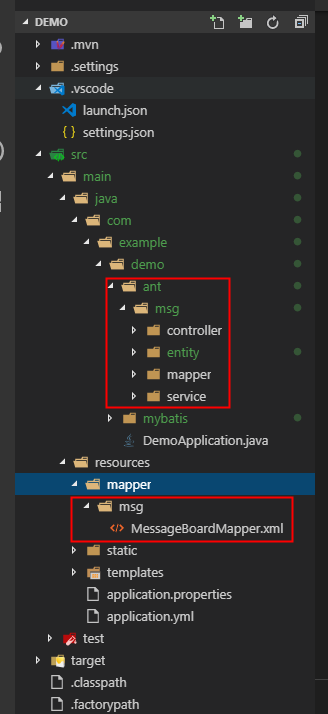
基础使用
在application.properties文件中添加数据库连接源等信息,内容如下:
#项目启动 端口

server.port=8080

#数据库信息

spring.datasource.type=com.alibaba.druid.pool.DruidDataSource

spring.datasource.url=jdbc:mysql://localhost:3306/test?useUnicode=true&useSSL=false&characterEncoding=utf8

spring.datasource.username=root

spring.datasource.password=123456

spring.datasource.driver-class-name=com.mysql.jdbc.Driver

spring.datasource.max-idle=10

spring.datasource.max-wait=10000

spring.datasource.min-idle=5

spring.datasource.initial-size=5
打开之前创建的msg控制器,根据id查询示例如下:
@RestController

public class MessageBoardController {

    @Autowired

    MessageBoardMapper mapper;

    @RequestMapping("/msg/message-board")

    public MessageBoard GetMsg() {

        MessageBoard data = mapper.selectById(1);

        return data;

    }

}
Ps:MessageBoardMapper在使用前需要注解@Mapper,否则启动会报错。
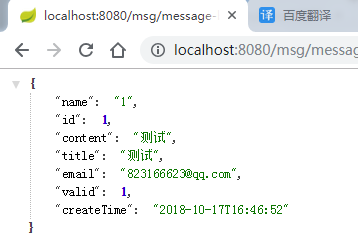
注解效果展示:

返回的数据如下:
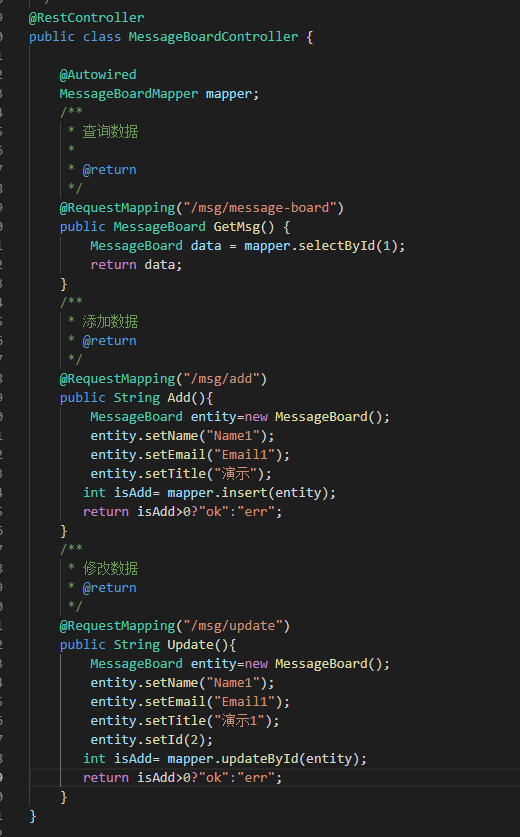
增、改、查示例代码:
Spring boot 集成 mybaits plus(代码生成器)的更多相关文章
- Spring boot入门(二):Spring boot集成MySql,Mybatis和PageHelper插件
上一篇文章,写了如何搭建一个简单的Spring boot项目,本篇是接着上一篇文章写得:Spring boot入门:快速搭建Spring boot项目(一),主要是spring boot集成mybat ...
- spring boot集成mybatis(3) - mybatis generator 配置
Spring Boot 集成教程 Spring Boot 介绍 Spring Boot 开发环境搭建(Eclipse) Spring Boot Hello World (restful接口)例子 sp ...
- Spring Boot集成Jasypt安全框架
Jasypt安全框架提供了Spring的集成,主要是实现 PlaceholderConfigurerSupport类或者其子类. 在Sring 3.1之后,则推荐使用PropertySourcesPl ...
- Spring boot集成swagger2
一.Swagger2是什么? Swagger 是一款RESTFUL接口的文档在线自动生成+功能测试功能软件. Swagger 是一个规范和完整的框架,用于生成.描述.调用和可视化 RESTful 风格 ...
- Spring Boot 集成 Swagger,生成接口文档就这么简单!
之前的文章介绍了<推荐一款接口 API 设计神器!>,今天栈长给大家介绍下如何与优秀的 Spring Boot 框架进行集成,简直不能太简单. 你所需具备的基础 告诉你,Spring Bo ...
- spring boot 集成 zookeeper 搭建微服务架构
PRC原理 RPC 远程过程调用(Remote Procedure Call) 一般用来实现部署在不同机器上的系统之间的方法调用,使得程序能够像访问本地系统资源一样,通过网络传输去访问远程系统资源,R ...
- Spring Boot 集成Swagger
Spring Boot 集成Swagger - 小单的博客专栏 - CSDN博客https://blog.csdn.net/catoop/article/details/50668896 Spring ...
- spring boot集成swagger,自定义注解,拦截器,xss过滤,异步调用,guava限流,定时任务案例, 发邮件
本文介绍spring boot集成swagger,自定义注解,拦截器,xss过滤,异步调用,定时任务案例 集成swagger--对于做前后端分离的项目,后端只需要提供接口访问,swagger提供了接口 ...
- (转)Spring Boot(十八):使用 Spring Boot 集成 FastDFS
http://www.ityouknow.com/springboot/2018/01/16/spring-boot-fastdfs.html 上篇文章介绍了如何使用 Spring Boot 上传文件 ...
随机推荐
- 软工 · 第十二次作业 - Beta答辩总结
福大软工 · 第十二次作业 - Beta答辩总结 写第十二次的时候操作失误直接在Beta版本的博客里改了...第七次冲刺的作业链接补在这里 Beta(7/7) 组长本次博客作业链接 项目宣传视频链接 ...
- Firefox插件开发学习总结
2018.06.14 我们小组最初只准备开发运行在google上的知乎插件,但我们经过调研发现还有一大部分用户是使用的火狐浏览器,所以我们也准备制作火狐插件.以下是我学习了部分火狐插件制作知识后的总结 ...
- jquery easyui datagrid getSelected getChecked获取选择行数据(勾选)数据
要想获得上图所选取的元素只能用getChecked getSelected不能进行多个选择,只能单选 /* getSelected取得选中的数据,否则为null */ var user=$(" ...
- Delphi控件-复合控件【转】
复合控件复合控件是Delphi控件中非常重要的一种控件,复合控件就是将两个或两个以上的控件重新组合成一个新的控件.例如TspinEdit.TlabeledEdit.TDBNavigator等就是复合控 ...
- selenium获取新页面标签页(只弹出一个新页面的切换)
selenium获取新页面标签页(只弹出一个新页面的切换) windows = driver.current_window_handle #定位当前页面句柄 all_handles = driver. ...
- js 函数讲解
函数 来自<JavaScript 标准参考教程(alpha)>,by 阮一峰 目录 概述 函数的声明 函数的重复声明 圆括号运算符,return 语句和递归 第一等公民 函数名的提升 不能 ...
- C语言以字符形式读写文件
一.字符读取函数 fgetc (一).函数介绍 fgetc 是 file get char 的缩写,意思是从指定的文件中读取一个字符.函数原型为: int fgetc(FILE* fp) fp 为文件 ...
- [转帖]升级 Ubuntu,解决登录时提示有软件包可以更新的问题
升级 Ubuntu,解决登录时提示有软件包可以更新的问题 2017年12月05日 11:58:17 阅读数:2953更多 个人分类: ubuntu Connecting to ... Connecti ...
- QObject 源代码阅读
我们进入 qt/src 文件夹.你可能对这里的目录名时曾相识,因为几乎这里的所有文件夹名都对应着 Qt 的模块的名字:gui,network,multimedia等等.我们从最核心的 QtCore 开 ...
- MySQL数据库中varchar与char类型的区别
在数据库中建表时,需要给数据定义一个数据库中的数据库类型,当需要给String类型定义一个数据库中的类型时,可以看见有两个选择,一个是varchar,另一个是char,有很多人不清楚两者的区别,包括自 ...