
C# xml通过xslt转换为html输出
html效果截图:
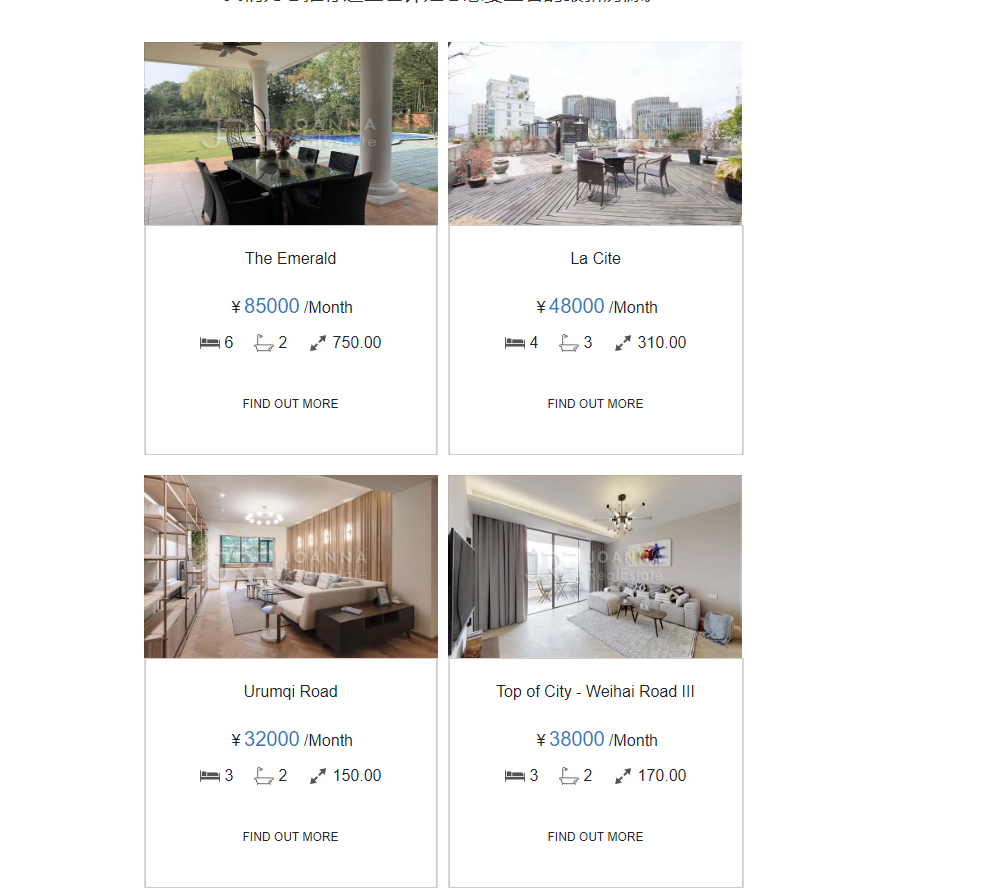
1、首先分析html代码结构:
结果如图:

2、调用接口返回的数据格式:

3、由第一步可看出每2个数据为一行并排显示,后台返回的数据总数可能为奇数个或偶数个,对应该生成的xml结构:
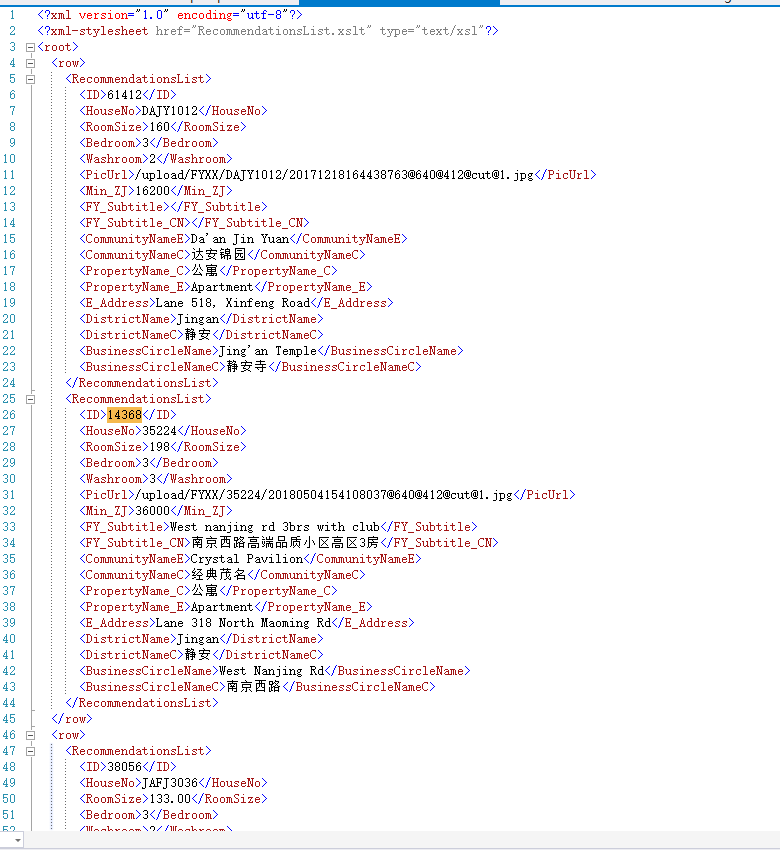
4、对应的xslt文件代码
<?xml version="1.0" encoding="utf-8"?>
<xsl:stylesheet version="1.0" xmlns:xsl="http://www.w3.org/1999/XSL/Transform"
xmlns:msxsl="urn:schemas-microsoft-com:xslt" exclude-result-prefixes="msxsl"
>
<xsl:output method="html" indent="yes"/>
<xsl:template match="/root"> <html lang="en"> <head>
<title>REAL ESTATE</title>
<meta charset="utf-8"></meta>
<meta name="viewport" content="width=device-width, initial-scale=1.0" />
<link rel="shortcut icon" href="http://joannarealestate.com.cn/images/jre_logo.png" type="image/png"></link>
</head>
<style>
th.c20 {
font-size: 0pt;
line-height: 0pt;
padding: 0;
margin: 0;
font-weight: normal;
vertical-align: top;
} table.c19 {
border-bottom: 1px solid rgb(219, 219, 219);
} td.c18 {
background-color: #FFFFFF;
/*border: 1px solid #232129;*/
} td.c17 {
color: #232129;
font-family: Arial, sans-serif;
font-size: 12px;
width: 148px;
height: 40px;
line-height: 16px;
text-align: center;
} a.c16 {
color: #232129;
text-decoration: none;
} img.c15 {
margin: 0;
padding: 0;
max-width: 25px;
} img.c14 {
margin: 0;
padding: 0;
max-width: 23px;
} td.c13 {
color: #232129;
font-family: Arial, sans-serif;
font-size: 16px;
line-height: 22px;
text-align: left;
} td.c12 {
font-size: 0pt;
line-height: 0pt;
text-align: left;
} img.c11 {
margin: 0;
padding: 0;
max-width: 20px;
} div.c10 {
color: #232129;
font-family: Arial, sans-serif;
font-size: 16px;
line-height: 18px;
text-align: center;
} span.c9 {
color: #1d78be;
font-size: 20px;
} table.c8 {
font-size: 0pt;
line-height: 0pt;
text-align: center;
width: 100%;
min-width: 100%;
} td.c7 {
font-size: 0pt;
line-height: 0pt;
text-align: center;
width: 100%;
min-width: 100%;
} div.c6 {
color: #ff6f51;
font-family: Arial, sans-serif;
font-size: 20px;
line-height: 26px;
text-align: center;
margin: 10px 0px 5px 0px;
} a.c5 {
color: #232129;
text-decoration: none;
} td.c4 {
background-color: #DBDBDB;
font-size: 0pt;
line-height: 0pt;
text-align: left;
} div.c3 {
font-size: 0pt;
line-height: 0pt;
text-align: left;
} a.c2 {
color: #232129;
text-decoration: none;
display: block;
} img.c1 {
margin: 0;
padding: 0;
width: 294px;
height: 183px;
}
</style> <body>
<table bgcolor="#ffffff" border="0" cellpadding="0" cellspacing="0" width="100%">
<tbody>
<tr>
<td align="center" valign="top">
<table border="0" cellpadding="0" cellspacing="0" width="600">
<tbody>
<tr>
<td class="td" style="font-size: 0pt; line-height: 0pt; padding: 0; margin: 0; font-weight: normal; width: 600px; min-width: 600px;" width="600">
<table border="0" cellpadding="0" cellspacing="0" width="100%">
<tbody>
<tr>
<td id="target"> <div repeatindex="3">
<table border="0" cellpadding="0" cellspacing="0" width="100%">
<tbody>
<tr>
<td class="content-spacing" style="font-size: 0pt; line-height: 0pt; text-align: left;" width="20"></td>
<td align="center">
<table border="0" cellpadding="0" cellspacing="0" class="center">
<tbody>
<tr>
<td>
<table border="0" cellpadding="0" cellspacing="0" width="100%">
<tbody>
<tr>
<td class="content-spacing" style="font-size: 0pt; line-height: 0pt; text-align: left;" width="25"></td>
<td>
<div class="h6-center" style="color: #232129;font-size: 26px;line-height: 20px;text-align: center;padding-bottom: 10px;">
<div>最新推荐房源</div>
</div>
<table border="0" cellpadding="0" cellspacing="0" class="spacer" style="font-size: 0pt; line-height: 0pt; text-align: center; width: 100%; min-width: 100%;" width="100%">
<tbody>
<tr>
<td class="spacer" height="5" style="font-size: 0pt; line-height: 0pt; text-align: center; width: 100%; min-width: 100%;"> </td>
</tr>
</tbody>
</table>
</td>
<td class="content-spacing" style="font-size: 0pt; line-height: 0pt; text-align: left;" width="25"></td>
</tr>
</tbody>
</table>
<table bgcolor="#232129" border="0" cellpadding="0" cellspacing="0" class="border" style="font-size: 0pt; line-height: 0pt; text-align: center; width: 100%; min-width: 100%;" width="100%">
<tbody>
<tr>
<td bgcolor="#232129" class="border" height="1" style="font-size: 0pt; line-height: 0pt; text-align: center; width: 100%; min-width: 100%;"> </td>
</tr>
</tbody>
</table>
</td>
</tr>
</tbody>
</table>
<table border="0" cellpadding="0" cellspacing="0" class="spacer" style="font-size: 0pt; line-height: 0pt; text-align: center; width: 100%; min-width: 100%;" width="100%">
<tbody>
<tr>
<td class="spacer" height="10" style="font-size: 0pt; line-height: 0pt; text-align: center; width: 100%; min-width: 100%;"> </td>
</tr>
</tbody>
</table>
</td>
<td class="content-spacing" style="font-size: 0pt; line-height: 0pt; text-align: left;" width="20"></td>
</tr>
</tbody>
</table>
</div>
<div repeatindex="4">
<table border="0" cellpadding="0" cellspacing="0" width="100%">
<tbody>
<tr>
<td class="content-spacing" style="font-size: 0pt; line-height: 0pt; text-align: left;" width="75"></td>
<td align="center">
<div class="text-center" style="font-size: 20px;font-weight: normal;line-height: 30px;color: #333333;text-align: center;">
<div>
<br/>
我们为您推荐这些也许是您想要查看的最新房源。
</div>
</div>
<table border="0" cellpadding="0" cellspacing="0" class="spacer" style="font-size: 0pt; line-height: 0pt; text-align: center; width: 100%; min-width: 100%;" width="100%">
<tbody>
<tr>
<td class="spacer" height="35" style="font-size: 0pt; line-height: 0pt; text-align: center; width: 100%; min-width: 100%;"> </td>
</tr>
</tbody>
</table>
</td>
<td class="content-spacing" style="font-size: 0pt; line-height: 0pt; text-align: left;" width="75"></td>
</tr>
</tbody>
</table>
</div>
<!-- 房子 -->
<xsl:for-each select="./row">
<div repeatindex="6">
<table border="0" cellpadding="0" cellspacing="0" class="mobile-full" width="600">
<tbody>
<tr>
<td colspan="3">
<table border="0" cellpadding="0" cellspacing="0" style="margin-bottom:20px;" width="100%">
<tbody>
<tr> <!--奇数行-->
<th class="column-top c20" valign="top" width="294">
<xsl:for-each select="./RecommendationsList[position() mod 2=1]">
<xsl:call-template name="data2"></xsl:call-template>
</xsl:for-each>
</th> <!--间隔-->
<th class="column-top" style="font-size:0pt;line-height:0pt;padding:0;margin:0;font-weight:normal;vertical-align:top;" valign="top" width="10">
<table border="0" cellpadding="0" cellspacing="0" class="spacer c2" width="100%">
<tbody>
<tr>
<td class="spacer c1" height="30"></td>
</tr>
</tbody>
</table>
</th> <!--偶数行-->
<th class="column-top c20" valign="top" width="294">
<xsl:for-each select="./RecommendationsList[position() mod 2=0]">
<xsl:call-template name="data2"></xsl:call-template>
</xsl:for-each>
</th>
</tr>
</tbody>
</table>
</td>
</tr>
</tbody>
</table>
</div>
</xsl:for-each>
<!-- /房子 -->
</td>
</tr>
</tbody>
</table>
</td>
</tr>
</tbody>
</table>
</td>
</tr>
</tbody>
</table>
</body> </html>
</xsl:template> <xsl:template name="data2" match="child::*">
<table border="0" cellpadding="0" cellspacing="0" width="100%">
<tbody>
<tr>
<td>
<div class="fluid-img c3">
<xsl:element name="a">
<xsl:attribute name="href">
<xsl:text>http://joannarealestate.com.cn/property.html?houseID=</xsl:text>
<xsl:value-of select="./ID"/>
</xsl:attribute>
<xsl:attribute name="class">c2</xsl:attribute>
<xsl:attribute name="target">_blank</xsl:attribute>
<xsl:element name="img">
<xsl:attribute name="border">0</xsl:attribute>
<xsl:attribute name="width">294</xsl:attribute>
<xsl:attribute name="height">183</xsl:attribute>
<xsl:attribute name="class">c1</xsl:attribute>
<xsl:attribute name="href">
<xsl:text>http://img.jrechina.com</xsl:text>
<xsl:value-of select="./PicUrl"/>
</xsl:attribute>
</xsl:element>
</xsl:element>
</div>
<table border="0" cellpadding="0" cellspacing="0" width="100%">
<tbody>
<tr>
<td class="img c4" width="1"></td>
<td>
<table style="border:1px #CCC solid;" border="0" cellpadding="0" cellspacing="0" class="c19" width="100%">
<tbody>
<tr>
<td align="center" colspan="3">
<div class="h4-1-orange-center c6" style="margin-top: 20px">
<xsl:element name="a">
<xsl:attribute name="href">
<xsl:text>http://joannarealestate.com.cn/property.html?houseID=</xsl:text>
<xsl:value-of select="./ID"/>
</xsl:attribute>
<xsl:attribute name="class">c5</xsl:attribute>
<xsl:attribute name="target">_blank</xsl:attribute>
<xsl:attribute name="style">display: block;margin-bottom: 20px; font-size:16px</xsl:attribute>
<xsl:value-of select="./CommunityNameE"/>
</xsl:element>
</div>
<table border="0" cellpadding="0" cellspacing="0" class="spacer c8" width="100%">
<tbody>
<tr>
<td class="spacer c7" height="5"></td>
</tr>
</tbody>
</table>
<div class="text-2-center c10" style="font-size:16px">
¥<span class="c9">
<xsl:value-of select="./Min_ZJ"/>
</span> /Month
</div>
<table border="0" cellpadding="0" cellspacing="0" class="spacer c8" width="100%">
<tbody>
<tr>
<td class="spacer c7" height="15"></td>
</tr>
</tbody>
</table>
<div>
<table border="0" cellpadding="0" cellspacing="0" class="center">
<tbody>
<tr>
<td class="img c12" width="20">
<img border="0" src="http://crm.joannarealestate.com.cn/HD/ZhongQiu_en/images/bed.jpg" class="c11"/>
</td>
<td class="img c12" width="5"></td>
<td class="text c13" style="font-size:16px">
<div>
<xsl:value-of select="./Bedroom"/>
</div>
</td>
<td class="img c12" width="20"></td>
<td class="img c12" width="20">
<img border="0" src="http://crm.joannarealestate.com.cn/HD/ZhongQiu_en/images/wash.jpg" class="c14"/>
</td>
<td class="img c12" width="5"></td>
<td class="text c13" style="font-size:16px">
<div>
<xsl:value-of select="./Washroom"/>
</div>
</td>
<td class="img c12" width="20"></td>
<td class="img c12" width="20">
<img border="0" src="http://crm.joannarealestate.com.cn/HD/ZhongQiu_en/images/sqm.jpg" class="c15"/>
</td>
<td class="img c12" width="5"></td>
<td class="text c13">
<div style="font-size:16px">
<xsl:value-of select="./RoomSize"/>
</div>
</td>
</tr>
</tbody>
</table>
<table border="0" cellpadding="0" cellspacing="0" class="spacer c8" width="100%">
<tbody>
<tr>
<td class="spacer c7" height="15"></td>
</tr>
</tbody>
</table>
</div>
<table border="0" cellpadding="0" cellspacing="0" class="spacer c8" width="100%">
<tbody>
<tr>
<td class="spacer c7" height="15"></td>
</tr>
</tbody>
</table>
<table border="0" cellpadding="0" cellspacing="0" class="center">
<tbody>
<tr>
<td class="c18">
<table border="0" cellpadding="0" cellspacing="0" width="100%">
<tbody>
<tr>
<td class="text-btn-black c17" colspan="3" style="color:#232129;font-family:Arial, sans-serif;font-size:12px;width: 148px;height: 40px;line-height:16px;text-align:center;">
<div>
<xsl:element name="a">
<xsl:attribute name="href">
<xsl:text>http://joannarealestate.com.cn/property.html?houseID=</xsl:text>
<xsl:value-of select="./RecommendationsList/ID"/>
</xsl:attribute>
<xsl:attribute name="class">link-black c16</xsl:attribute>
<xsl:attribute name="target">_blank</xsl:attribute>
<xsl:attribute name="style">color:#232129;text-decoration:none;</xsl:attribute>
<xsl:text>FIND OUT MORE</xsl:text>
</xsl:element>
</div>
</td>
</tr>
</tbody>
</table>
</td>
</tr>
</tbody>
</table>
<table border="0" cellpadding="0" cellspacing="0" class="spacer c8" width="100%">
<tbody>
<tr>
<td class="spacer c7" height="30"></td>
</tr>
</tbody>
</table>
</td>
</tr>
</tbody>
</table>
</td>
<td class="img c4" width="1"></td>
</tr>
</tbody>
</table>
</td>
</tr>
</tbody>
</table>
</xsl:template>
</xsl:stylesheet>
xslt代码
5、调用接口生成xml的代码:
string Owner_ID = EncryptHelper.DESEncrypt("18745_9479", "test");

string url = string.Format("http://netapi.jrechina.com/Handler/FYGL.ashx?Action=GetRecommendationsList&lan={0}&Owner_ID={1}&page=1&rows=4", , Owner_ID);

XDocument doc = new XDocument(

   new XProcessingInstruction("xml-stylesheet", "href=\"RecommendationsList.xslt\" type=\"text/xsl\""));

XElement eleRoot = new XElement("root");//根节点

doc.Add(eleRoot);

//根据用户ID拼接请求获取该用户的推荐列表(取前4条)

string res = HttpHelper.GetData(url);

dynamic result = Utility.Helper.FromJson<dynamic>(res);

if (result.DataList != null && (int)result.DataList.Count > )

{

    int totalCount = (int)result.DataList.Count;

    int rows = totalCount %  >  ? totalCount /  +  : totalCount / ;//2个数据为一行

    XElement eleRow = new XElement("row");

    //eleRoot.Add(eleRow);

    XElement eleRecommendationsList;

    int index = ;//循环到第几个

    foreach (dynamic item in result.DataList)

    {

        index++;

        if (index %  == )

        {//奇数个表示新起一行

            eleRow = new XElement("row");

        }

        eleRecommendationsList = new XElement("RecommendationsList",

            new XElement("ID", (item.ID??"").ToString()),

            new XElement("HouseNo", (item.HouseNo??"").ToString()),

            new XElement("RoomSize", (item.RoomSize??"").ToString()),

            new XElement("Bedroom", (item.Bedroom??"").ToString()),

            new XElement("Washroom", (item.Washroom??"").ToString()),

            new XElement("PicUrl", string.IsNullOrEmpty((string)item.PicUrl) ? "" : ((string)item.PicUrl).Replace("sm_", "").Replace("sf_", "").Replace(".", "@640@412@cut@1.")),

            new XElement("Min_ZJ", (item.Min_ZJ??"").ToString()),

            new XElement("FY_Subtitle", (item.FY_Subtitle??"").ToString()),

            new XElement("FY_Subtitle_CN", (item.FY_Subtitle_CN ?? "").ToString()),

            new XElement("CommunityNameE", (item.CommunityNameE ?? "").ToString()),

            new XElement("CommunityNameC", (item.CommunityNameC ?? "").ToString()),

            new XElement("PropertyName_C", (item.PropertyName_C ?? "").ToString()),

            new XElement("PropertyName_E", (item.PropertyName_E ?? "").ToString()),

            new XElement("E_Address", (item.E_Address ?? "").ToString()),

            new XElement("DistrictName", (item.DistrictName ?? "").ToString()),

            new XElement("DistrictNameC", (item.DistrictNameC ?? "").ToString()),

            new XElement("BusinessCircleName", (item.BusinessCircleName ?? "").ToString()),

            new XElement("BusinessCircleNameC", (item.BusinessCircleNameC ?? "").ToString())

            );

        eleRow.Add(eleRecommendationsList);

        if (index %  == || index %  > && index >= totalCount)

        {//是偶数个或最后一个且是奇数个

            eleRoot.Add(eleRow);

        }

    }

}

string savePath = @"G:\zhyue\backup\projects\Test\ConsoleApplication1\测试\XSLT和XML结合使用\RecommendationsList.xml";

if (File.Exists(savePath)) File.Delete(savePath);

doc.Save(savePath);
调用接口生成xml代码
6、浏览器中查看xml:
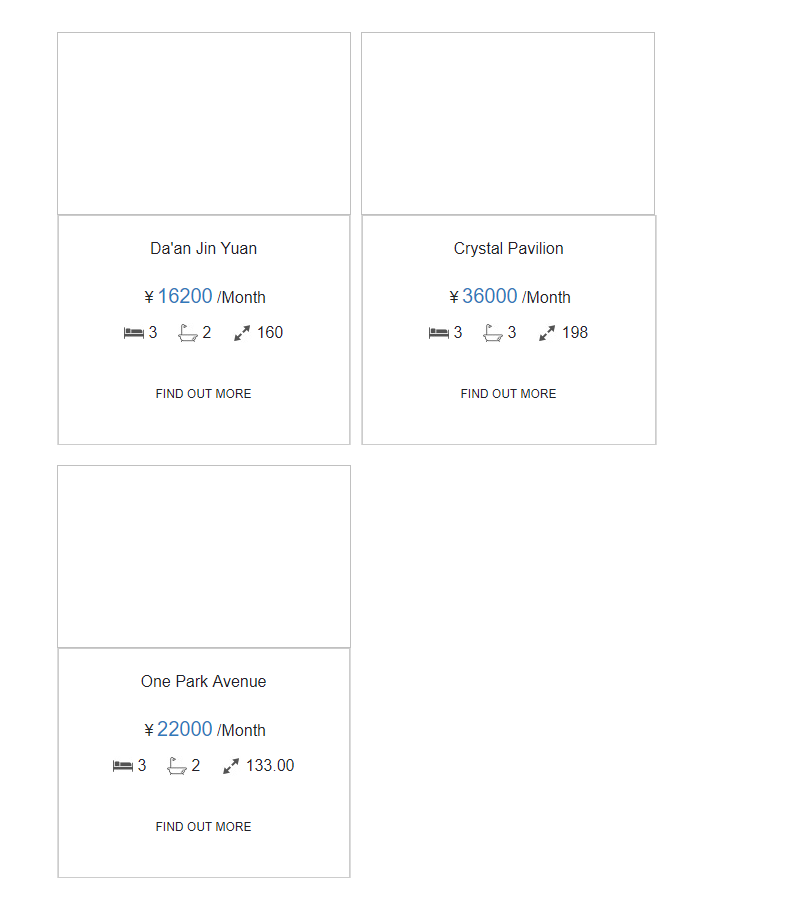
成功,不过xml无法直接访问图片,没找到解决法案,html是可以的
C# xml通过xslt转换为html输出的更多相关文章
- xml之XSLT
1.XSLT是什么 XSLT是XSL的子集,XSL是样式表.XSLT的作用:将XML文档转化成HTML,做的是中间转换者. 而主要需要学习的是XSLT(XSLTransformation). 2 ...
- Winform: use the WebBrowser to display XML with xslt, xml, xslt 转 html 字符串
原文:Winform: use the WebBrowser to display XML with xslt, xml, xslt 转 html 字符串 声明xml字符串: string xml = ...
- 【转】php中XML、XSLT的结合运用
原文:http://blog.csdn.net/bjbs_270/article/details/140253 下面我要讲的是一个简单的从数据库中抽取数据,生成XML文档,使用XSLT转换成HTM ...
- ASP.NET 动态查找数据 并且生成xml文档 同时使用xslt转换为xhtml
前言 xsl是一门标签解析语言,很适合做动态网页的前台标签 www.bamn.cn 1 首先是aspx页面 添加一个输入框 按钮 还有一个用来显示解析后的xhtml代码的控件 <form id= ...
- c#使用XSLT将xml文档转换为html文档
需要引用下面的命名空间: using System.Xml; using System.Xml.Xsl; 方法实现: public static string ConvertXML(XmlDocume ...
- 使用Python把Gtest XML测试结果转换为HTML格式
在最近的测试中,使用gtest测试框架对c语言代码进行测试,结果以XML文件来保存,但是测试结果的查阅和分析非常不方便.便想着把xml的结果直接转为HTML文件,方便和Jenkins系统对接显示.因现 ...
- C#操作Xml:XSLT语法 在.net中使用XSLT转换xml文档示例
XSL即可扩展的样式表文件. 可以格式化xml的显示,也可以将xml转换成需要的另一种格式. 学习XSL必须熟悉XPath.XSL和XPath一样简单强大,容易学习. 1. XSL既然可以格式化xml ...
- C++读入二进制数并转换为十进制输出
题目描述 已知一个只包含0和1的二进制数,长度不大于10,将其转换为十进制并输出. 输入描述 输入一个二进制整数n,其长度不大于10 输出描述 输出转换后的十进制数,占一行 样例输入 样例输出 sol ...
- XML, XPath, Xslt及解析/Parse
XML及解析/Parse "Programming with libxml2 is like the thrilling embrace of an exotic stranger.&quo ...
随机推荐
- 《JAVA与模式》之装饰模式
在阎宏博士的<JAVA与模式>一书中开头是这样描述装饰(Decorator)模式的: 装饰模式又名包装(Wrapper)模式.装饰模式以对客户端透明的方式扩展对象的功能,是继承关系的一个替 ...
- python相见恨晚的库
1)基本工具: virtualenv(虚拟环境)pip.setuptools (e.g. easy_install,这些东西肯定要呢)ipython(用了以后,就不再想用普通的python shell ...
- 【NOIP2016提高组】 Day2 T3 愤怒的小鸟
题目传送门:https://www.luogu.org/problemnew/show/P2831 说个题外话:NOIP2014也有一道题叫做愤怒的小鸟. 这题自测时算错了eps,导致被卡了精度,从1 ...
- (转)python学习笔记4--数字类型与操作符
原文:https://blog.csdn.net/lemonwyc/article/details/37558269 1. 同时赋值(Simultaneous Assignments) python支 ...
- android IPC 机制 (开发艺术探索)
一.IPC 机制介绍 IPC是Inter-Process Communication的缩写,含义就是进程间通信或者跨进程通信,是指两个进程之间进行数据交换的过程.那么什么是进程,什么是线程,进程和线程 ...
- android开发分辨率适配总结
重要概念 什么是屏幕尺寸.屏幕分辨率.屏幕像素密度? 什么是dp.dip.dpi.sp.px?他们之间的关系是什么? 什么是mdpi.hdpi.xdpi.xxdpi?如何计算和区分? 在下面的内容中我 ...
- java文件上传-使用apache-fileupload组件
目前文件上传的(框架)组件:Apache----fileupload .Orialiy – COS – 2008() .Jsp-smart-upload – 200M. 用fileupload上传文件 ...
- 针对石家庄铁道大学官网首页的UI分析
身为一名光荣的铁大铮铮学子,我对铁大的网站首页非常的情有独钟,下面我就石家庄铁道大学的官网首页进行UI分析: 1.在首页最醒目的地方赫然写着石家庄铁道大学七个大字,让人一眼就豁然开朗. 2.网站有EN ...
- LDAP落地实战(一):OpenLDAP部署及管理维护
公司内部会有许多第三方系统或服务,例如Svn,Git,VPN,Jira,Jenkins等等,每个系统都需要维护一份账号密码以支持用户认证,当然公司也会有许多的主机或服务器,需要开放登录权限给用户登录使 ...
- spark报错处理
Spark报错处理 1.问题:org.apache.spark.SparkException: Exception thrown in awaitResult 分析:出现这个情况的原因是spark启动 ...