
C# xml通过xslt转换为html输出
html效果截图:
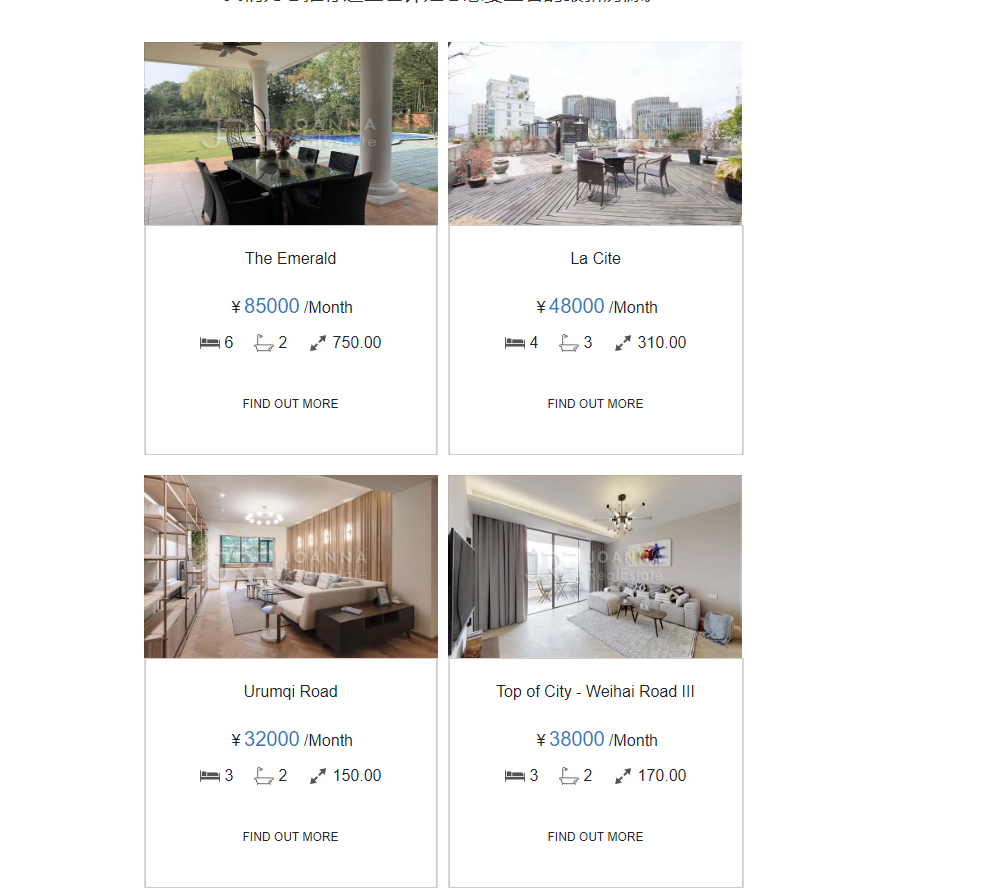
1、首先分析html代码结构:
结果如图:

2、调用接口返回的数据格式:

3、由第一步可看出每2个数据为一行并排显示,后台返回的数据总数可能为奇数个或偶数个,对应该生成的xml结构:
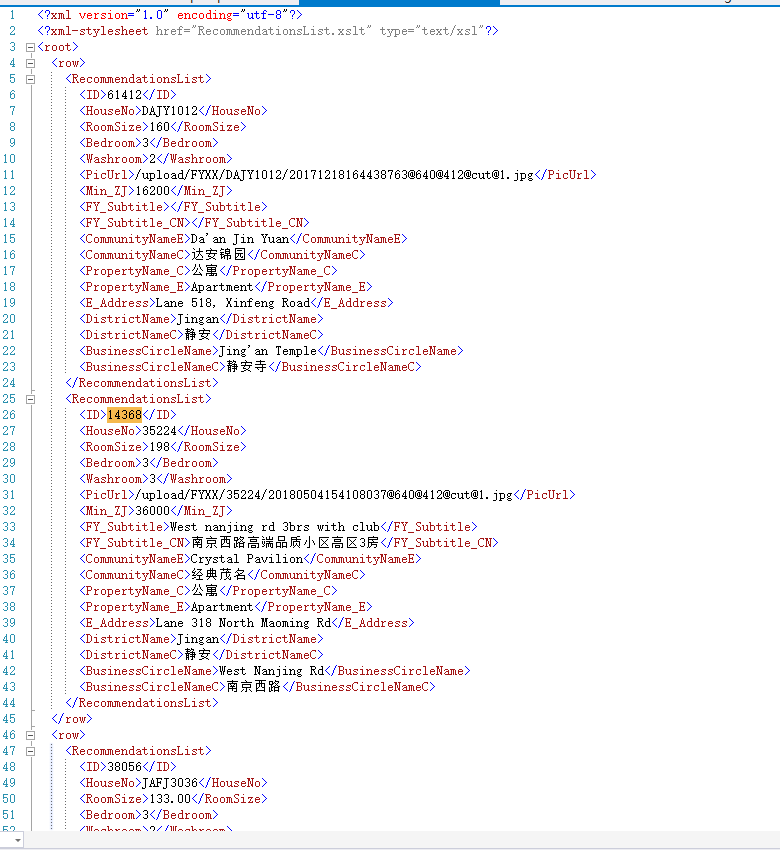
4、对应的xslt文件代码
<?xml version="1.0" encoding="utf-8"?>
<xsl:stylesheet version="1.0" xmlns:xsl="http://www.w3.org/1999/XSL/Transform"
xmlns:msxsl="urn:schemas-microsoft-com:xslt" exclude-result-prefixes="msxsl"
>
<xsl:output method="html" indent="yes"/>
<xsl:template match="/root"> <html lang="en"> <head>
<title>REAL ESTATE</title>
<meta charset="utf-8"></meta>
<meta name="viewport" content="width=device-width, initial-scale=1.0" />
<link rel="shortcut icon" href="http://joannarealestate.com.cn/images/jre_logo.png" type="image/png"></link>
</head>
<style>
th.c20 {
font-size: 0pt;
line-height: 0pt;
padding: 0;
margin: 0;
font-weight: normal;
vertical-align: top;
} table.c19 {
border-bottom: 1px solid rgb(219, 219, 219);
} td.c18 {
background-color: #FFFFFF;
/*border: 1px solid #232129;*/
} td.c17 {
color: #232129;
font-family: Arial, sans-serif;
font-size: 12px;
width: 148px;
height: 40px;
line-height: 16px;
text-align: center;
} a.c16 {
color: #232129;
text-decoration: none;
} img.c15 {
margin: 0;
padding: 0;
max-width: 25px;
} img.c14 {
margin: 0;
padding: 0;
max-width: 23px;
} td.c13 {
color: #232129;
font-family: Arial, sans-serif;
font-size: 16px;
line-height: 22px;
text-align: left;
} td.c12 {
font-size: 0pt;
line-height: 0pt;
text-align: left;
} img.c11 {
margin: 0;
padding: 0;
max-width: 20px;
} div.c10 {
color: #232129;
font-family: Arial, sans-serif;
font-size: 16px;
line-height: 18px;
text-align: center;
} span.c9 {
color: #1d78be;
font-size: 20px;
} table.c8 {
font-size: 0pt;
line-height: 0pt;
text-align: center;
width: 100%;
min-width: 100%;
} td.c7 {
font-size: 0pt;
line-height: 0pt;
text-align: center;
width: 100%;
min-width: 100%;
} div.c6 {
color: #ff6f51;
font-family: Arial, sans-serif;
font-size: 20px;
line-height: 26px;
text-align: center;
margin: 10px 0px 5px 0px;
} a.c5 {
color: #232129;
text-decoration: none;
} td.c4 {
background-color: #DBDBDB;
font-size: 0pt;
line-height: 0pt;
text-align: left;
} div.c3 {
font-size: 0pt;
line-height: 0pt;
text-align: left;
} a.c2 {
color: #232129;
text-decoration: none;
display: block;
} img.c1 {
margin: 0;
padding: 0;
width: 294px;
height: 183px;
}
</style> <body>
<table bgcolor="#ffffff" border="0" cellpadding="0" cellspacing="0" width="100%">
<tbody>
<tr>
<td align="center" valign="top">
<table border="0" cellpadding="0" cellspacing="0" width="600">
<tbody>
<tr>
<td class="td" style="font-size: 0pt; line-height: 0pt; padding: 0; margin: 0; font-weight: normal; width: 600px; min-width: 600px;" width="600">
<table border="0" cellpadding="0" cellspacing="0" width="100%">
<tbody>
<tr>
<td id="target"> <div repeatindex="3">
<table border="0" cellpadding="0" cellspacing="0" width="100%">
<tbody>
<tr>
<td class="content-spacing" style="font-size: 0pt; line-height: 0pt; text-align: left;" width="20"></td>
<td align="center">
<table border="0" cellpadding="0" cellspacing="0" class="center">
<tbody>
<tr>
<td>
<table border="0" cellpadding="0" cellspacing="0" width="100%">
<tbody>
<tr>
<td class="content-spacing" style="font-size: 0pt; line-height: 0pt; text-align: left;" width="25"></td>
<td>
<div class="h6-center" style="color: #232129;font-size: 26px;line-height: 20px;text-align: center;padding-bottom: 10px;">
<div>最新推荐房源</div>
</div>
<table border="0" cellpadding="0" cellspacing="0" class="spacer" style="font-size: 0pt; line-height: 0pt; text-align: center; width: 100%; min-width: 100%;" width="100%">
<tbody>
<tr>
<td class="spacer" height="5" style="font-size: 0pt; line-height: 0pt; text-align: center; width: 100%; min-width: 100%;"> </td>
</tr>
</tbody>
</table>
</td>
<td class="content-spacing" style="font-size: 0pt; line-height: 0pt; text-align: left;" width="25"></td>
</tr>
</tbody>
</table>
<table bgcolor="#232129" border="0" cellpadding="0" cellspacing="0" class="border" style="font-size: 0pt; line-height: 0pt; text-align: center; width: 100%; min-width: 100%;" width="100%">
<tbody>
<tr>
<td bgcolor="#232129" class="border" height="1" style="font-size: 0pt; line-height: 0pt; text-align: center; width: 100%; min-width: 100%;"> </td>
</tr>
</tbody>
</table>
</td>
</tr>
</tbody>
</table>
<table border="0" cellpadding="0" cellspacing="0" class="spacer" style="font-size: 0pt; line-height: 0pt; text-align: center; width: 100%; min-width: 100%;" width="100%">
<tbody>
<tr>
<td class="spacer" height="10" style="font-size: 0pt; line-height: 0pt; text-align: center; width: 100%; min-width: 100%;"> </td>
</tr>
</tbody>
</table>
</td>
<td class="content-spacing" style="font-size: 0pt; line-height: 0pt; text-align: left;" width="20"></td>
</tr>
</tbody>
</table>
</div>
<div repeatindex="4">
<table border="0" cellpadding="0" cellspacing="0" width="100%">
<tbody>
<tr>
<td class="content-spacing" style="font-size: 0pt; line-height: 0pt; text-align: left;" width="75"></td>
<td align="center">
<div class="text-center" style="font-size: 20px;font-weight: normal;line-height: 30px;color: #333333;text-align: center;">
<div>
<br/>
我们为您推荐这些也许是您想要查看的最新房源。
</div>
</div>
<table border="0" cellpadding="0" cellspacing="0" class="spacer" style="font-size: 0pt; line-height: 0pt; text-align: center; width: 100%; min-width: 100%;" width="100%">
<tbody>
<tr>
<td class="spacer" height="35" style="font-size: 0pt; line-height: 0pt; text-align: center; width: 100%; min-width: 100%;"> </td>
</tr>
</tbody>
</table>
</td>
<td class="content-spacing" style="font-size: 0pt; line-height: 0pt; text-align: left;" width="75"></td>
</tr>
</tbody>
</table>
</div>
<!-- 房子 -->
<xsl:for-each select="./row">
<div repeatindex="6">
<table border="0" cellpadding="0" cellspacing="0" class="mobile-full" width="600">
<tbody>
<tr>
<td colspan="3">
<table border="0" cellpadding="0" cellspacing="0" style="margin-bottom:20px;" width="100%">
<tbody>
<tr> <!--奇数行-->
<th class="column-top c20" valign="top" width="294">
<xsl:for-each select="./RecommendationsList[position() mod 2=1]">
<xsl:call-template name="data2"></xsl:call-template>
</xsl:for-each>
</th> <!--间隔-->
<th class="column-top" style="font-size:0pt;line-height:0pt;padding:0;margin:0;font-weight:normal;vertical-align:top;" valign="top" width="10">
<table border="0" cellpadding="0" cellspacing="0" class="spacer c2" width="100%">
<tbody>
<tr>
<td class="spacer c1" height="30"></td>
</tr>
</tbody>
</table>
</th> <!--偶数行-->
<th class="column-top c20" valign="top" width="294">
<xsl:for-each select="./RecommendationsList[position() mod 2=0]">
<xsl:call-template name="data2"></xsl:call-template>
</xsl:for-each>
</th>
</tr>
</tbody>
</table>
</td>
</tr>
</tbody>
</table>
</div>
</xsl:for-each>
<!-- /房子 -->
</td>
</tr>
</tbody>
</table>
</td>
</tr>
</tbody>
</table>
</td>
</tr>
</tbody>
</table>
</body> </html>
</xsl:template> <xsl:template name="data2" match="child::*">
<table border="0" cellpadding="0" cellspacing="0" width="100%">
<tbody>
<tr>
<td>
<div class="fluid-img c3">
<xsl:element name="a">
<xsl:attribute name="href">
<xsl:text>http://joannarealestate.com.cn/property.html?houseID=</xsl:text>
<xsl:value-of select="./ID"/>
</xsl:attribute>
<xsl:attribute name="class">c2</xsl:attribute>
<xsl:attribute name="target">_blank</xsl:attribute>
<xsl:element name="img">
<xsl:attribute name="border">0</xsl:attribute>
<xsl:attribute name="width">294</xsl:attribute>
<xsl:attribute name="height">183</xsl:attribute>
<xsl:attribute name="class">c1</xsl:attribute>
<xsl:attribute name="href">
<xsl:text>http://img.jrechina.com</xsl:text>
<xsl:value-of select="./PicUrl"/>
</xsl:attribute>
</xsl:element>
</xsl:element>
</div>
<table border="0" cellpadding="0" cellspacing="0" width="100%">
<tbody>
<tr>
<td class="img c4" width="1"></td>
<td>
<table style="border:1px #CCC solid;" border="0" cellpadding="0" cellspacing="0" class="c19" width="100%">
<tbody>
<tr>
<td align="center" colspan="3">
<div class="h4-1-orange-center c6" style="margin-top: 20px">
<xsl:element name="a">
<xsl:attribute name="href">
<xsl:text>http://joannarealestate.com.cn/property.html?houseID=</xsl:text>
<xsl:value-of select="./ID"/>
</xsl:attribute>
<xsl:attribute name="class">c5</xsl:attribute>
<xsl:attribute name="target">_blank</xsl:attribute>
<xsl:attribute name="style">display: block;margin-bottom: 20px; font-size:16px</xsl:attribute>
<xsl:value-of select="./CommunityNameE"/>
</xsl:element>
</div>
<table border="0" cellpadding="0" cellspacing="0" class="spacer c8" width="100%">
<tbody>
<tr>
<td class="spacer c7" height="5"></td>
</tr>
</tbody>
</table>
<div class="text-2-center c10" style="font-size:16px">
¥<span class="c9">
<xsl:value-of select="./Min_ZJ"/>
</span> /Month
</div>
<table border="0" cellpadding="0" cellspacing="0" class="spacer c8" width="100%">
<tbody>
<tr>
<td class="spacer c7" height="15"></td>
</tr>
</tbody>
</table>
<div>
<table border="0" cellpadding="0" cellspacing="0" class="center">
<tbody>
<tr>
<td class="img c12" width="20">
<img border="0" src="http://crm.joannarealestate.com.cn/HD/ZhongQiu_en/images/bed.jpg" class="c11"/>
</td>
<td class="img c12" width="5"></td>
<td class="text c13" style="font-size:16px">
<div>
<xsl:value-of select="./Bedroom"/>
</div>
</td>
<td class="img c12" width="20"></td>
<td class="img c12" width="20">
<img border="0" src="http://crm.joannarealestate.com.cn/HD/ZhongQiu_en/images/wash.jpg" class="c14"/>
</td>
<td class="img c12" width="5"></td>
<td class="text c13" style="font-size:16px">
<div>
<xsl:value-of select="./Washroom"/>
</div>
</td>
<td class="img c12" width="20"></td>
<td class="img c12" width="20">
<img border="0" src="http://crm.joannarealestate.com.cn/HD/ZhongQiu_en/images/sqm.jpg" class="c15"/>
</td>
<td class="img c12" width="5"></td>
<td class="text c13">
<div style="font-size:16px">
<xsl:value-of select="./RoomSize"/>
</div>
</td>
</tr>
</tbody>
</table>
<table border="0" cellpadding="0" cellspacing="0" class="spacer c8" width="100%">
<tbody>
<tr>
<td class="spacer c7" height="15"></td>
</tr>
</tbody>
</table>
</div>
<table border="0" cellpadding="0" cellspacing="0" class="spacer c8" width="100%">
<tbody>
<tr>
<td class="spacer c7" height="15"></td>
</tr>
</tbody>
</table>
<table border="0" cellpadding="0" cellspacing="0" class="center">
<tbody>
<tr>
<td class="c18">
<table border="0" cellpadding="0" cellspacing="0" width="100%">
<tbody>
<tr>
<td class="text-btn-black c17" colspan="3" style="color:#232129;font-family:Arial, sans-serif;font-size:12px;width: 148px;height: 40px;line-height:16px;text-align:center;">
<div>
<xsl:element name="a">
<xsl:attribute name="href">
<xsl:text>http://joannarealestate.com.cn/property.html?houseID=</xsl:text>
<xsl:value-of select="./RecommendationsList/ID"/>
</xsl:attribute>
<xsl:attribute name="class">link-black c16</xsl:attribute>
<xsl:attribute name="target">_blank</xsl:attribute>
<xsl:attribute name="style">color:#232129;text-decoration:none;</xsl:attribute>
<xsl:text>FIND OUT MORE</xsl:text>
</xsl:element>
</div>
</td>
</tr>
</tbody>
</table>
</td>
</tr>
</tbody>
</table>
<table border="0" cellpadding="0" cellspacing="0" class="spacer c8" width="100%">
<tbody>
<tr>
<td class="spacer c7" height="30"></td>
</tr>
</tbody>
</table>
</td>
</tr>
</tbody>
</table>
</td>
<td class="img c4" width="1"></td>
</tr>
</tbody>
</table>
</td>
</tr>
</tbody>
</table>
</xsl:template>
</xsl:stylesheet>
xslt代码
5、调用接口生成xml的代码:
string Owner_ID = EncryptHelper.DESEncrypt("18745_9479", "test");

string url = string.Format("http://netapi.jrechina.com/Handler/FYGL.ashx?Action=GetRecommendationsList&lan={0}&Owner_ID={1}&page=1&rows=4", , Owner_ID);

XDocument doc = new XDocument(

   new XProcessingInstruction("xml-stylesheet", "href=\"RecommendationsList.xslt\" type=\"text/xsl\""));

XElement eleRoot = new XElement("root");//根节点

doc.Add(eleRoot);

//根据用户ID拼接请求获取该用户的推荐列表(取前4条)

string res = HttpHelper.GetData(url);

dynamic result = Utility.Helper.FromJson<dynamic>(res);

if (result.DataList != null && (int)result.DataList.Count > )

{

    int totalCount = (int)result.DataList.Count;

    int rows = totalCount %  >  ? totalCount /  +  : totalCount / ;//2个数据为一行

    XElement eleRow = new XElement("row");

    //eleRoot.Add(eleRow);

    XElement eleRecommendationsList;

    int index = ;//循环到第几个

    foreach (dynamic item in result.DataList)

    {

        index++;

        if (index %  == )

        {//奇数个表示新起一行

            eleRow = new XElement("row");

        }

        eleRecommendationsList = new XElement("RecommendationsList",

            new XElement("ID", (item.ID??"").ToString()),

            new XElement("HouseNo", (item.HouseNo??"").ToString()),

            new XElement("RoomSize", (item.RoomSize??"").ToString()),

            new XElement("Bedroom", (item.Bedroom??"").ToString()),

            new XElement("Washroom", (item.Washroom??"").ToString()),

            new XElement("PicUrl", string.IsNullOrEmpty((string)item.PicUrl) ? "" : ((string)item.PicUrl).Replace("sm_", "").Replace("sf_", "").Replace(".", "@640@412@cut@1.")),

            new XElement("Min_ZJ", (item.Min_ZJ??"").ToString()),

            new XElement("FY_Subtitle", (item.FY_Subtitle??"").ToString()),

            new XElement("FY_Subtitle_CN", (item.FY_Subtitle_CN ?? "").ToString()),

            new XElement("CommunityNameE", (item.CommunityNameE ?? "").ToString()),

            new XElement("CommunityNameC", (item.CommunityNameC ?? "").ToString()),

            new XElement("PropertyName_C", (item.PropertyName_C ?? "").ToString()),

            new XElement("PropertyName_E", (item.PropertyName_E ?? "").ToString()),

            new XElement("E_Address", (item.E_Address ?? "").ToString()),

            new XElement("DistrictName", (item.DistrictName ?? "").ToString()),

            new XElement("DistrictNameC", (item.DistrictNameC ?? "").ToString()),

            new XElement("BusinessCircleName", (item.BusinessCircleName ?? "").ToString()),

            new XElement("BusinessCircleNameC", (item.BusinessCircleNameC ?? "").ToString())

            );

        eleRow.Add(eleRecommendationsList);

        if (index %  == || index %  > && index >= totalCount)

        {//是偶数个或最后一个且是奇数个

            eleRoot.Add(eleRow);

        }

    }

}

string savePath = @"G:\zhyue\backup\projects\Test\ConsoleApplication1\测试\XSLT和XML结合使用\RecommendationsList.xml";

if (File.Exists(savePath)) File.Delete(savePath);

doc.Save(savePath);
调用接口生成xml代码
6、浏览器中查看xml:
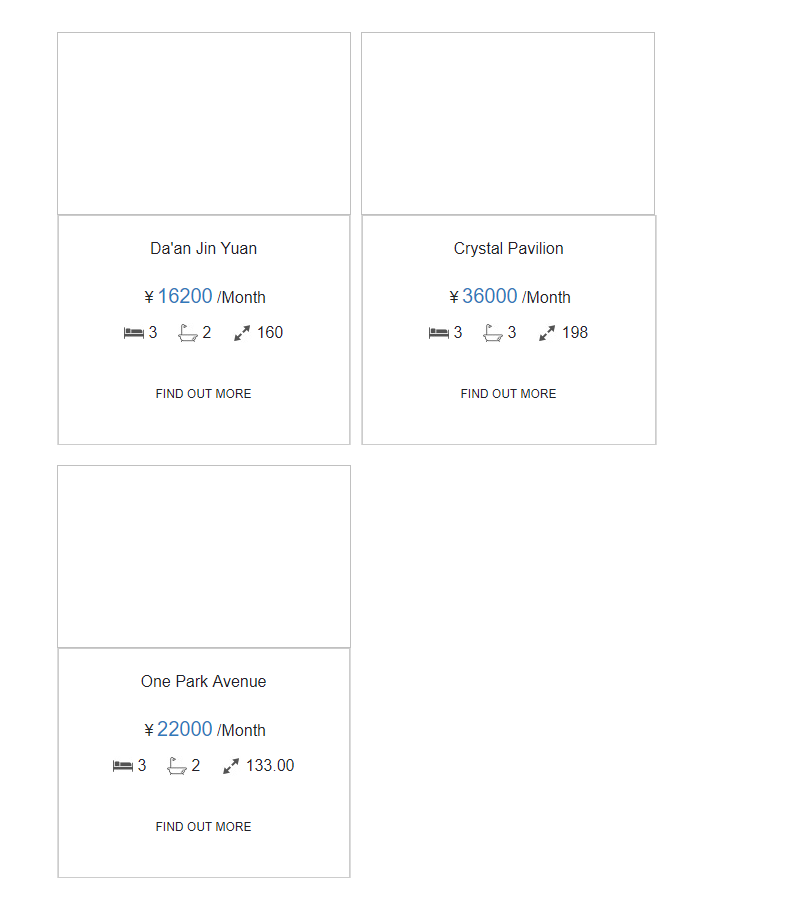
成功,不过xml无法直接访问图片,没找到解决法案,html是可以的
C# xml通过xslt转换为html输出的更多相关文章
- xml之XSLT
1.XSLT是什么 XSLT是XSL的子集,XSL是样式表.XSLT的作用:将XML文档转化成HTML,做的是中间转换者. 而主要需要学习的是XSLT(XSLTransformation). 2 ...
- Winform: use the WebBrowser to display XML with xslt, xml, xslt 转 html 字符串
原文:Winform: use the WebBrowser to display XML with xslt, xml, xslt 转 html 字符串 声明xml字符串: string xml = ...
- 【转】php中XML、XSLT的结合运用
原文:http://blog.csdn.net/bjbs_270/article/details/140253 下面我要讲的是一个简单的从数据库中抽取数据,生成XML文档,使用XSLT转换成HTM ...
- ASP.NET 动态查找数据 并且生成xml文档 同时使用xslt转换为xhtml
前言 xsl是一门标签解析语言,很适合做动态网页的前台标签 www.bamn.cn 1 首先是aspx页面 添加一个输入框 按钮 还有一个用来显示解析后的xhtml代码的控件 <form id= ...
- c#使用XSLT将xml文档转换为html文档
需要引用下面的命名空间: using System.Xml; using System.Xml.Xsl; 方法实现: public static string ConvertXML(XmlDocume ...
- 使用Python把Gtest XML测试结果转换为HTML格式
在最近的测试中,使用gtest测试框架对c语言代码进行测试,结果以XML文件来保存,但是测试结果的查阅和分析非常不方便.便想着把xml的结果直接转为HTML文件,方便和Jenkins系统对接显示.因现 ...
- C#操作Xml:XSLT语法 在.net中使用XSLT转换xml文档示例
XSL即可扩展的样式表文件. 可以格式化xml的显示,也可以将xml转换成需要的另一种格式. 学习XSL必须熟悉XPath.XSL和XPath一样简单强大,容易学习. 1. XSL既然可以格式化xml ...
- C++读入二进制数并转换为十进制输出
题目描述 已知一个只包含0和1的二进制数,长度不大于10,将其转换为十进制并输出. 输入描述 输入一个二进制整数n,其长度不大于10 输出描述 输出转换后的十进制数,占一行 样例输入 样例输出 sol ...
- XML, XPath, Xslt及解析/Parse
XML及解析/Parse "Programming with libxml2 is like the thrilling embrace of an exotic stranger.&quo ...
随机推荐
- linux文件系统底层原理
Linux文件系统中的文件是数据的集合,文件系统不仅包含着文件中的数据而且还有文件系统的结构,所有Linux 用户和程序看到的文件.目录.软连接及文件保护信息等都存储在其中. 底层原理图: 在讲解各个 ...
- JavaScript里的Date 对象属性及对象方法--实现简单的日历
上网搜索"js 日历插件"就会出来各种效果的功能丰富的日历插件,很多都可以下载源码,然后根据各自的需求对源码进行修改就可以直接用了. 但今天讲的不是如何使用这些插件,而是讲如何实现 ...
- 【OpenCV3】threshold()函数详解
threshold()函数源码 double cv::threshold( InputArray _src, OutputArray _dst, double thresh, double maxva ...
- c#调用R
R.NET使用文档 介绍 本页面涉及R.NET1.5.13. 1.5.13版本在功能上等同于1.5.12,但可作为一个包在NuGet.org上获得. R.NET使.NET框架与R统计语言在同一进程进行 ...
- Python生成gexf文件并导入gephi做网络图分析
Gephi是一款优秀的复杂网络分析软件,支持导入多种格式的文件.gexf格式是Gephi 推荐的格式,基于 XML.本文是一个用python写的简单Demo,示例如何生成一个典型的gexf格式文件.代 ...
- 【数组】Minimum Size Subarray Sum
题目: Given an array of n positive integers and a positive integer s, find the minimal length of a sub ...
- Android 开发工具类 31_WebService 获取手机号码归属地
AndroidInteractWithWebService.xml <?xml version="1.0" encoding="utf-8"?> & ...
- Chapter 3 Phenomenon——11
"I'm completely fine, Char — Dad," I sighed. "There's nothing wrong with me." “我 ...
- 二叉查找树 Java实现
定义: 一棵二叉查找树是一棵二叉树,每个节点都含有一个Comparable的键(以及对应的值). 每个节点的键都大于左子树中任意节点的键而小于右子树中任意节点的键. 树的术语: Name Functi ...
- Go pprof和火焰图
Profiling 在计算机性能调试领域里,profiling 就是对应用的画像,这里画像就是应用使用 CPU 和内存的情况.也就是说应用使用了多少 CPU 资源?都是哪些部分在使用?每个函数使用的比 ...