
DRM/KMS 基本组件介绍
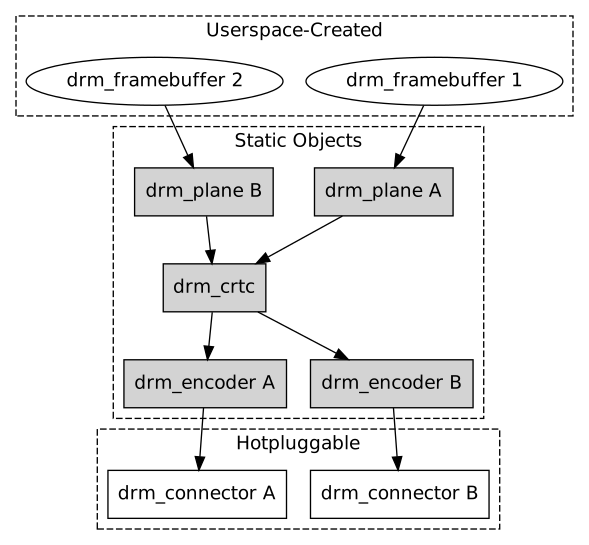
Each DRM device provides access to manage which monitors and displays are currently used and what frames to be displayed. This task is calledKernel Mode-Setting (KMS). Historically, this was done in user-space and called User-space Mode-Setting (UMS). Almost all open-source drivers now provide the KMS kernel API to do this in the kernel, however, many non-open-source binary drivers from different vendors still do not support this. You can use drmModeSettingSupported(3) to check whether your driver supports this. To understand how KMS works, we need to introduce 5 objects: CRTCs, Planes, Encoders, Connectors and Framebuffers.
CRTCs
- A CRTC short for CRT Controller is an abstraction representing a part of the chip that contains a pointer to a scanout buffer. Therefore, the number of CRTCs available determines how many independent scanout buffers can be active at any given time. The CRTC structure contains several fields to support this: a pointer to some video memory (abstracted as a frame-buffer object), a list of driven connectors, a display mode and an (x, y) offset into the video memory to support panning or configurations where one piece of video memory spans multiple CRTCs. A CRTC is the central point where configuration of displays happens. You select which objects to use, which modes and which parameters and then configure each CRTC via drmModeCrtcSet(3) to drive the display devices.
Planes
- A plane respresents an image source that can be blended with or overlayed on top of a CRTC during the scanout process. Planes are associated with a frame-buffer to crop a portion of the image memory (source) and optionally scale it to a destination size. The result is then blended with or overlayed on top of a CRTC. Planes are not provided by all hardware and the number of available planes is limited. If planes are not available or if not enough planes are available, the user should fall back to normal software blending (via GPU or CPU).
Encoders
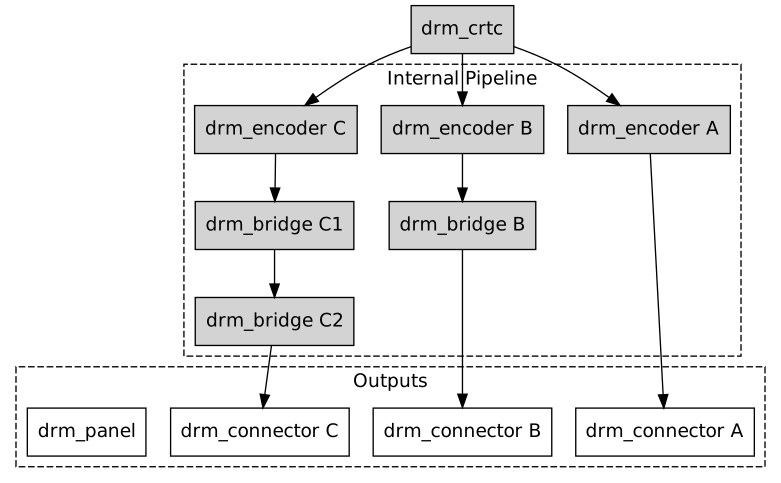
- An encoder takes pixel data from a CRTC and converts it to a format suitable for any attached connectors. On some devices, it may be possible to have a CRTC send data to more than one encoder. In that case, both encoders would receive data from the same scanout buffer, resulting in a cloned display configuration across the connectors attached to each encoder.
Connectors
- A connector is the final destination of pixel-data on a device, and usually connects directly to an external display device like a monitor or laptop panel. A connector can only be attached to one encoder at a time. The connector is also the structure where information about the attached display is kept, so it contains fields for display data, EDID data, DPMS and connection status, and information about modes supported on the attached displays.
Framebuffers
- Framebuffers are abstract memory objects that provide a source of pixel data to scanout to a CRTC. Applications explicitely request the creation of framebuffers and can control their behavior. Framebuffers rely on the underneath memory manager for low-level memory operations. When creating a framebuffer, applications pass a memory handle through the API which is used as backing storage. The framebuffer itself is only an abstract object with no data. It just refers to memory buffers that must be created with the drm-memory(7) API.
- KMS Display Pipeline Overview
- KMS Output Pipeline
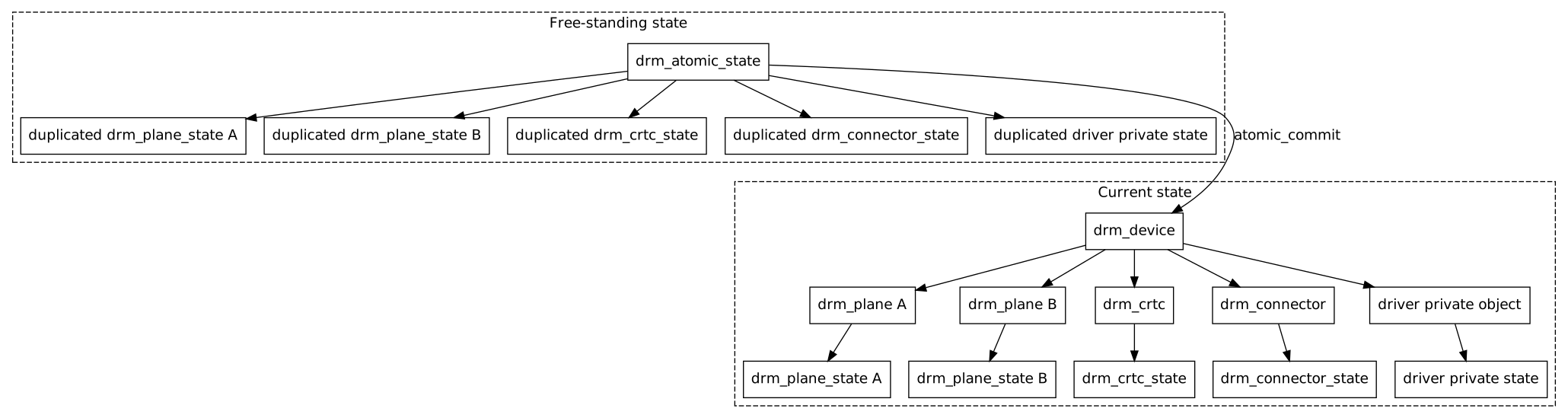
- Atomic Mode Setting
DRM/KMS 基本组件介绍的更多相关文章
- linux DRM/KMS 测试工具 modetest、kmscude、igt-gpu-tools (一)
这里整理几个在学习Linux DRM/KMS中用到的几个工具,modetest.kmscude.igt-gpu-tools. 简介: modetest 是由libdrm提供的测试程序,可以查询显示设备 ...
- linux DRM/KMS 测试工具 modetest、kmscude、igt-gpu-tools (二)
kmscube kmscube is a little demonstration program for how to drive bare metal graphics without a c ...
- Linux DRM KMS 驱动简介【转】
转自:https://blog.csdn.net/yangkuanqaz85988/article/details/48689521 Whoops,上次写完<Linux DRM Graphic ...
- 开源免费且稳定实用的.NET PDF打印组件itextSharp(.NET组件介绍之八)
在这个.NET组件的介绍系列中,受到了很多园友的支持,一些园友(如:数据之巅. [秦时明月]等等这些大神 )也给我提出了对应的建议,我正在努力去改正,有不足之处还望大家多多包涵.在传播一些简单的知识的 ...
- 免费开源的.NET多类型文件解压缩组件SharpZipLib(.NET组件介绍之七)
前面介绍了六种.NET组件,其中有一种组件是写文件的压缩和解压,现在介绍另一种文件的解压缩组件SharpZipLib.在这个组件介绍系列中,只为简单的介绍组件的背景和简单的应用,读者在阅读时可以结合官 ...
- 免费高效实用的.NET操作Excel组件NPOI(.NET组件介绍之六)
很多的软件项目几乎都包含着对文档的操作,前面已经介绍过两款操作文档的组件,现在介绍一款文档操作的组件NPOI. NPOI可以生成没有安装在您的服务器上的Microsoft Office套件的Excel ...
- 免费开源的DotNet任务调度组件Quartz.NET(.NET组件介绍之五)
很多的软件项目中都会使用到定时任务.定时轮询数据库同步,定时邮件通知等功能..NET Framework具有“内置”定时器功能,通过System.Timers.Timer类.在使用Timer类需要面对 ...
- 免费开源的DotNet二维码操作组件ThoughtWorks.QRCode(.NET组件介绍之四)
在生活中有一种东西几乎已经快要成为我们的另一个电子”身份证“,那就是二维码.无论是在软件开发的过程中,还是在普通用户的日常中,几乎都离不开二维码.二维码 (dimensional barcode) , ...
- 最好的.NET开源免费ZIP库DotNetZip(.NET组件介绍之三)
在项目开发中,除了对数据的展示更多的就是对文件的相关操作,例如文件的创建和删除,以及文件的压缩和解压.文件压缩的好处有很多,主要就是在文件传输的方面,文件压缩的好处就不需要赘述,因为无论是开发者,还是 ...
随机推荐
- 手写简单的promise
function Promise(fn) { var that = this; this.status = "pedding"; this.value = undefined; / ...
- Prime k-tuple UVA - 1404
就是大区间求素数 参考 LightOJ - 1197 https://www.cnblogs.com/WTSRUVF/p/9190660.html 直接套那个代码就好了 #include <i ...
- 纯css实现长宽等比例的div
现代网站页面基本都需要响应式,一个div的长宽往往我们都设置为百分之多少,这个百分之是相对于父容器动态计算的 这样在浏览器宽度变化之后,我们的元素也能自动更新长宽.例如:我们在页面上摆了一个div,这 ...
- 【HBuilder】手机App推送至Apple App Store过程
一.前言 最近由于公司同事离职,顶替这位同事从事手机App的研发工作,BIM数据平台部门采用的是HBuilder作为手机App的制作环境.本篇介绍我是如何将HBuilder的Releas ...
- 【BZOJ1052】覆盖问题(贪心)
[BZOJ1052]覆盖问题(贪心) 题面 BZOJ 洛谷 题解 这题好神仙啊. 很明显可以看出来要二分一个边长. 那么如何\(check\)呢? 我们把所有点用一个最小矩形覆盖, 那么必定每个边界上 ...
- 【BZOJ4059】Non-boring sequences
Solution 记序列为\(a\),计算出与\(a_i\)相等的前一个元素的位置\(pre_i\),以及后一个元素的位置\(nex_i\),显然,对于那些左端点处于\((pre_i,i]\)以及右端 ...
- 【bzoj1194】 HNOI2006—潘多拉的盒子
http://www.lydsy.com/JudgeOnline/problem.php?id=1194 (题目链接) 题意 给出S个自动机,如果一个自动机u的所有状态是另一个自动机v的状态的子集,那 ...
- UOJ #126 【NOI2013】 快餐店
题目链接:快餐店 震惊!某ZZ选手此题调了一天竟是因为……>>点击查看 一般碰到这种基环树的题都要先想想树上怎么做.这道题如果是在树上的话……好像求一遍直径就做完了?答案就是直径长度的一半 ...
- 【THUSC2017】杜老师
题目描述 杜老师可是要打+∞年World Final的男人,虽然规则不允许,但是可以改啊! 但是今年WF跟THUSC的时间这么近,所以他造了一个idea就扔下不管了…… 给定L,R,求从L到R的这R− ...
- BZOJ1053:反素数(数学)
题目链接 对于任意的正整数\(x\),记其约数的个数为\(g(x)\).现在定义反素数:对于\(0<i<x\),都有\(g(x)>g(i)\),那么就称x为反素数. 现在给定一个数N ...