
ListView实现数据列表显示
要将数据库中的数据列表显示在屏幕上,我们要使用ListView这个控件,当用户从数据库中取出数据时,要将数据绑定到显示控件上,如何绑定呢,我们需要创建适配器进行绑定,创建适配器有两种方式:
第一种是用SimpleAdapter创建(要求绑定的数据是List<HashMap<String, Object>>数据类型)
第二种是用SimpleCursorAdapter创建(要求绑定的数据是Cursor数据类型)
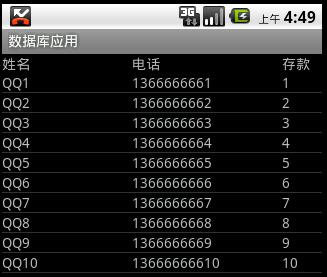
显示效果如图所示:
界面布局:
item.xml
- <?xml version="1.0" encoding="utf-8"?>
- <!--item -->
- <LinearLayout
- xmlns:android="http://schemas.android.com/apk/res/android"
- android:orientation="horizontal"
- android:layout_width="fill_parent"
- android:layout_height="fill_parent">
- <!-- 名称 -->
- <TextView
- android:layout_width="130dp"
- android:layout_height="wrap_content"
- android:id="@+id/name"
- />
- <!-- 电话 -->
- <TextView
- android:layout_width="150dp"
- android:layout_height="wrap_content"
- android:id="@+id/phone"
- />
- <!-- 存款 -->
- <TextView
- android:layout_width="fill_parent"
- android:layout_height="wrap_content"
- android:id="@+id/amount"
- />
- </LinearLayout>
main.xml
- <?xml version="1.0" encoding="utf-8"?>
- <LinearLayout xmlns:android="http://schemas.android.com/apk/res/android"
- android:orientation="vertical"
- android:layout_width="fill_parent"
- android:layout_height="fill_parent"
- >
- <!-- 标题 -->
- <LinearLayout
- android:orientation="horizontal"
- android:layout_width="fill_parent"
- android:layout_height="wrap_content">
- <TextView
- android:layout_width="130dp"
- android:layout_height="wrap_content"
- android:text="姓名"
- />
- <TextView
- android:layout_width="150dp"
- android:layout_height="wrap_content"
- android:text="电话"
- />
- <TextView
- android:layout_width="fill_parent"
- android:layout_height="wrap_content"
- android:text="存款"
- />
- </LinearLayout>
- <!-- ListView控件 -->
- <ListView
- android:layout_width="fill_parent"
- android:layout_height="fill_parent"
- android:id="@+id/listView"
- />
- </LinearLayout>
使用SimpleAdapter进行数据绑定
- public class MainActivity extends Activity {
- private PersonService service;
- @Override
- public void onCreate(Bundle savedInstanceState) {
- super.onCreate(savedInstanceState);
- setContentView(R.layout.main);
- service = new PersonService(this);
- ListView listView = (ListView) this.findViewById(R.id.listView);
- //获取到集合数据
- List<Person> persons = service.getScrollData(0, 10);
- List<HashMap<String, Object>> data = new ArrayList<HashMap<String,Object>>();
- for(Person person : persons){
- HashMap<String, Object> item = new HashMap<String, Object>();
- item.put("id", person.getId());
- item.put("name", person.getName());
- item.put("phone", person.getPhone());
- item.put("amount", person.getAmount());
- data.add(item);
- }
- //创建SimpleAdapter适配器将数据绑定到item显示控件上
- SimpleAdapter adapter = new SimpleAdapter(this, data, R.layout.item,
- new String[]{"name", "phone", "amount"}, new int[]{R.id.name, R.id.phone, R.id.amount});
- //实现列表的显示
- listView.setAdapter(adapter);
- //条目点击事件
- listView.setOnItemClickListener(new ItemClickListener());
- }
- //获取点击事件
- private final class ItemClickListener implements OnItemClickListener{
- public void onItemClick(AdapterView<?> parent, View view, int position, long id) {
- ListView listView = (ListView) parent;
- HashMap<String, Object> data = (HashMap<String, Object>) listView.getItemAtPosition(position);
- String personid = data.get("id").toString();
- Toast.makeText(getApplicationContext(), personid, 1).show();
- }
- }
- }
使用SimpleCursorAdapter进行数据绑定
- public class MainActivity extends Activity {
- private PersonService service;
- @Override
- public void onCreate(Bundle savedInstanceState) {
- super.onCreate(savedInstanceState);
- setContentView(R.layout.main);
- service = new PersonService(this);
- ListView listView = (ListView) this.findViewById(R.id.listView);
- //获取游标
- Cursor cursor = service.getCursorScrollData(0, 10);
- //创建SimpleCursorAdapter适配器将数据绑定到item显示控件上
- SimpleCursorAdapter adapter = new SimpleCursorAdapter(this, R.layout.item, cursor,
- new String[]{"name", "phone", "amount"}, new int[]{R.id.name, R.id.phone, R.id.amount});
- listView.setAdapter(adapter);
- //条目点击事件
- listView.setOnItemClickListener(new ItemClickListener());
- }
- private final class ItemClickListener implements OnItemClickListener{
- public void onItemClick(AdapterView<?> parent, View view, int position, long id) {
- ListView listView = (ListView) parent;
- Cursor cursor = (Cursor) listView.getItemAtPosition(position);
- String personid = String.valueOf(cursor.getInt(cursor.getColumnIndex("_id")));
- Toast.makeText(getApplicationContext(), personid, 1).show();
- }
- }
- }
注意:使用第二种方式在获取数据集合时必须指定主键"_id"
ListView实现数据列表显示的更多相关文章
- 黎活明8天快速掌握android视频教程--19_采用ListView实现数据列表显示
1.首先整个程序也是采用mvc的框架 DbOpenHelper 类 package dB; import android.content.Context; import android.databas ...
- C#使用ListView更新数据出现闪烁解决办法
C#使用ListView更新数据出现闪烁解决办法 在使用vs自动控件ListView控件时候,更新里面的部分代码时候出现闪烁的情况 如图: 解决以后: 解决办法使用双缓冲:添加新类继承ListView ...
- 使用自定的Adapter绑定ListView/GridView数据
使用自定的Adapter绑定ListView/GridView数据(地址) 对于ListView/Gridview的数据绑定, google提供了一些Adapter的模板, 自己也可以自定义一些个性化 ...
- Android 根据EditText搜索框ListView动态显示数据
根据EditText搜索框ListView动态显示数据是根据需求来的,觉得这之中涉及的东西可能比较的有意思,所以动手来写一写,希望对大家有点帮助. 首先,我们来分析下整个过程: 1.建立一个layou ...
- Android之listview添加数据篇
一.ListView: 1. ListView通常有两个职责: 1.向布局填充数据 2.处理选择点击等操作 2.ListView的创建需要3个元素: 1. ListView中的每一列的View. 2. ...
- Android开发之对ListView的数据进行排序
这里涉及到对ListView的数据进行排序,以及ListView的数据如何清空处理.排序的方法相同,但是里面的数据集合有些区别:一种是利用pojo类取得数据:另一种是利用map来取得数据. 第一种:利 ...
- Android ListView绑定数据
ListView绑定数据的三层: ListView绑定数据源从逻辑上可以分为三层:UI层,逻辑层,数据层. UI层:UI层即是ListView控件. 数据层:要展示到ListView控件上面的数据. ...
- Android 依据EditText搜索框ListView动态显示数据
依据EditText搜索框ListView动态显示数据是依据需求来的,认为这之中涉及的东西可能比較的有意思,所以动手来写一写.希望对大家有点帮助. 首先.我们来分析下整个过程: 1.建立一个layou ...
- WPF - 多列ListView添加数据的多种方式
多列ListView: <ListView x:Name="listView"> <ListView.View> <GridView> < ...
随机推荐
- JBOSS集群和安装
JBOSS集群和安装 http://jijian91.com/blog20071010/jboss-cluster-part5.html http://wing123.iteye.com/blog/3 ...
- SLF4J versions 1.4.0 and later requires log4j 1.2.12 or later 终极解决
http://blog.sina.com.cn/s/blog_54eb26870100uynj.html 到SLF4J官方网站:http://www.slf4j.org/codes.html#log4 ...
- mutiplemap 总结
之前只是在C++ Primer里面看过关联容器,可能因为没有实际用过,只是看看,所以导致用的时候并不熟悉: 在这之前,map和set的特性应该要了解,map是关联数组,也就是由键值对组成的,而set只 ...
- [转载] 使用Kettle进行数据迁移(ETL)
由于开发新的系统,需要将之前一个老的C/S应用的数据按照新的数据设计导入到新库中.此过程可能涉及到表结构不一致.大数据量(千万级,甚至上亿)等情况,包括异构数据的抽取.清洗等等工作.部分复杂的工作需要 ...
- 简单的文件上传html+ashx
前台页面:<form action="upload.ashx" method="post" enctype="multipart/form-da ...
- 一种基于ES5的JavaScript继承
关于JavaScript继承,方式非常多,包含compile-to-javascript的语言TypeScript, CoffeeScript以及站点MDN, GitHub, Modernizr各种p ...
- pytest文档16-用例a失败,跳过测试用例b和c并标记失败xfail
前言 当用例a失败的时候,如果用例b和用例c都是依赖于第一个用例的结果,那可以直接跳过用例b和c的测试,直接给他标记失败xfail 用到的场景,登录是第一个用例,登录之后的操作b是第二个用例,登录之后 ...
- Eclipse——浏览功能
一,打开变量声明 或选择opendeclaration就能够查看变量的定义 二.打开类型层次结构(open type hierarchy) 或者点击F4 watermark/2/text/aHR0cD ...
- Hadoop-2.2.0中文文档——Common-Hadoop HTTP web控制台认证
简单介绍 此文档描写叙述了怎样配置Hadoop HTTP web控制台,去要求用户认证. 默认地,Hadoop HTTP web控制台(JobTracker, NameNode, TaskTracke ...
- StringUtils类常用方法介绍
StringUtils方法包的位置:org.apache.commons.lang.StringUtils StringUtils 方法的操作对象是 java.lang.String 类型的对象,是 ...