
使用.Net Core MVC创建Web API
创建.Net Core MVC
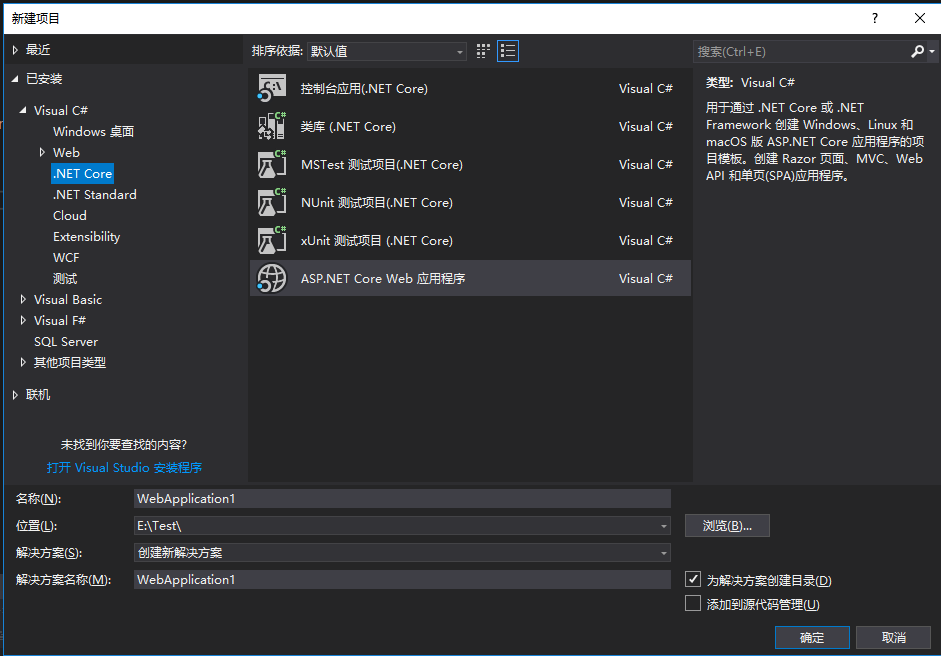
打开appsettings.json文件,添加数据库连接
{

  "Logging": {

    "LogLevel": {

      "Default": "Warning"

    }

  },

  //添加数据库连接

  "ConnectionStrings": {

    "BookContext": "Server=.;Database=Test;Trusted_Connection=True;MultipleActiveResultSets=true"

  },

  "AllowedHosts": "*"

}
数据库的准备工作,创建表贴出SQL:
CREATE TABLE [dbo].[Book](

    [ID] [int] IDENTITY(1,1) NOT NULL,

    [Author] [nvarchar](max) NULL,

    [Name] [nvarchar](50) NOT NULL,

    [Price] [decimal](18, 2) NOT NULL,

    [ReleaseDate] [datetime2](7) NOT NULL,

    [Publishing] [nvarchar](max) NOT NULL,

    [RowVersion] [timestamp] NULL,

 CONSTRAINT [PK_Book] PRIMARY KEY CLUSTERED

(

    [ID] ASC

)WITH (PAD_INDEX = OFF, STATISTICS_NORECOMPUTE = OFF, IGNORE_DUP_KEY = OFF, ALLOW_ROW_LOCKS = ON, ALLOW_PAGE_LOCKS = ON) ON [PRIMARY]

) ON [PRIMARY] TEXTIMAGE_ON [PRIMARY]
创建数据上下文BookContext
using Microsoft.EntityFrameworkCore;

using System;

using System.Collections.Generic;

using System.Linq;

using System.Threading.Tasks;

namespace BookApi.Models

{

    public class BookContext : DbContext

    {

        public BookContext(DbContextOptions<BookContext> options) : base(options)

        {

        }

        public DbSet<Book> Book { get; set; }

    }

}
注册数据库上下文,打开Startup.cs
using System;

using System.Collections.Generic;

using System.Linq;

using System.Threading.Tasks;

using BookApi.Models;

using Microsoft.AspNetCore.Builder;

using Microsoft.AspNetCore.Hosting;

using Microsoft.AspNetCore.Mvc;

using Microsoft.EntityFrameworkCore;

using Microsoft.Extensions.Configuration;

using Microsoft.Extensions.DependencyInjection;

using Microsoft.Extensions.Logging;

using Microsoft.Extensions.Options;

namespace BookApi

{

    public class Startup

    {

        public Startup(IConfiguration configuration)

        {

            Configuration = configuration;

        }

        public IConfiguration Configuration { get; }

        // This method gets called by the runtime. Use this method to add services to the container.

        public void ConfigureServices(IServiceCollection services)

        {

            services.AddDbContext<BookContext>(options => options.UseSqlServer(Configuration.GetConnectionString("BookContext")));

            services.AddMvc().SetCompatibilityVersion(CompatibilityVersion.Version_2_1);

        }

        // This method gets called by the runtime. Use this method to configure the HTTP request pipeline.

        public void Configure(IApplicationBuilder app, IHostingEnvironment env)

        {

            if (env.IsDevelopment())

            {

                app.UseDeveloperExceptionPage();

            }

            app.UseMvc();

        }

    }

}
创建实体类Book.cs
using System;

using System.Collections.Generic;

using System.ComponentModel.DataAnnotations;

using System.Linq;

using System.Threading.Tasks;

namespace BookApi.Models

{

    public class Book

    {

        public int ID { get; set; }

        [Required]

        [StringLength(50, MinimumLength = 2)]

        public string Name { get; set; }

        [Display(Name = "出版日期")]

        [DataType(DataType.Date)]

        public DateTime ReleaseDate { get; set; }

        [Range(1, 200)]

        [DataType(DataType.Currency)]

        public decimal Price { get; set; }

        public string Author { get; set; }

        [Required]

        public string Publishing { get; set; }

        [Timestamp]

        public byte[] RowVersion { get; set; }

    }

}
创建控制器类,BookController.cs
using System;

using System.Collections.Generic;

using System.Linq;

using System.Threading.Tasks;

using BookApi.Models;

using Microsoft.AspNetCore.Mvc;

using Microsoft.EntityFrameworkCore;

// For more information on enabling Web API for empty projects, visit https://go.microsoft.com/fwlink/?LinkID=397860

namespace BookApi.Controllers

{

    [Route("api/[controller]")]

    [ApiController]

    public class BookController : Controller

    {

        private readonly BookContext _context;

        public BookController(BookContext context)

        {

            _context = context;

            if (_context.Book.Count() == 0)

            {

                context.Book.AddRange(

                    new Book

                    {

                        Name = "Python编程 从入门到实践",

                        ReleaseDate = DateTime.Parse("2018-1-12"),

                        Author = "埃里克·马瑟斯",

                        Price = 75.99M,

                        Publishing = "机械出版社"

                    },

                    new Book

                    {

                        Name = "Java编程的逻辑",

                        ReleaseDate = DateTime.Parse("2018-1-13"),

                        Author = "马俊昌",

                        Price = 48.50M,

                        Publishing = "机械出版社"

                    },

                    new Book

                    {

                        Name = "统计思维:大数据时代瞬间洞察因果的关键技能",

                        ReleaseDate = DateTime.Parse("2017-12-23"),

                        Author = "西内启",

                        Price = 39.00M,

                        Publishing = "清华出版社"

                    },

                    new Book

                    {

                        Name = "微信营销",

                        ReleaseDate = DateTime.Parse("2018-01-05"),

                        Author = "徐林海",

                        Price = 36.90M,

                        Publishing = "清华出版社"

                    },

                    new Book

                    {

                        Name = "Java 8实战",

                        ReleaseDate = DateTime.Parse("2016-04-05"),

                        Author = "厄马",

                        Price = 65.60M,

                        Publishing = "科技出版社"

                    }

                );

                _context.SaveChanges();

            }

        }

        // GET: api/Book

        [HttpGet]

        public async Task<ActionResult<IEnumerable<Book>>> GetBookItems()

        {

            return await _context.Book.ToListAsync();

        }

        // GET: api/Book/5

        [HttpGet("{id}")]

        public async Task<ActionResult<Book>> GetBookItem(int id)

        {

            var bookItem = await _context.Book.FindAsync(id);

            if (bookItem == null)

            {

                return NotFound();

            }

            return bookItem;

        }

        // POST: api/Book

        [HttpPost]

        public async Task<ActionResult<Book>> PostBookItem(Book item)

        {

            _context.Book.Add(item);

            await _context.SaveChangesAsync();

            return CreatedAtAction(nameof(GetBookItem), new { id = item.ID }, item);

        }

    }

}
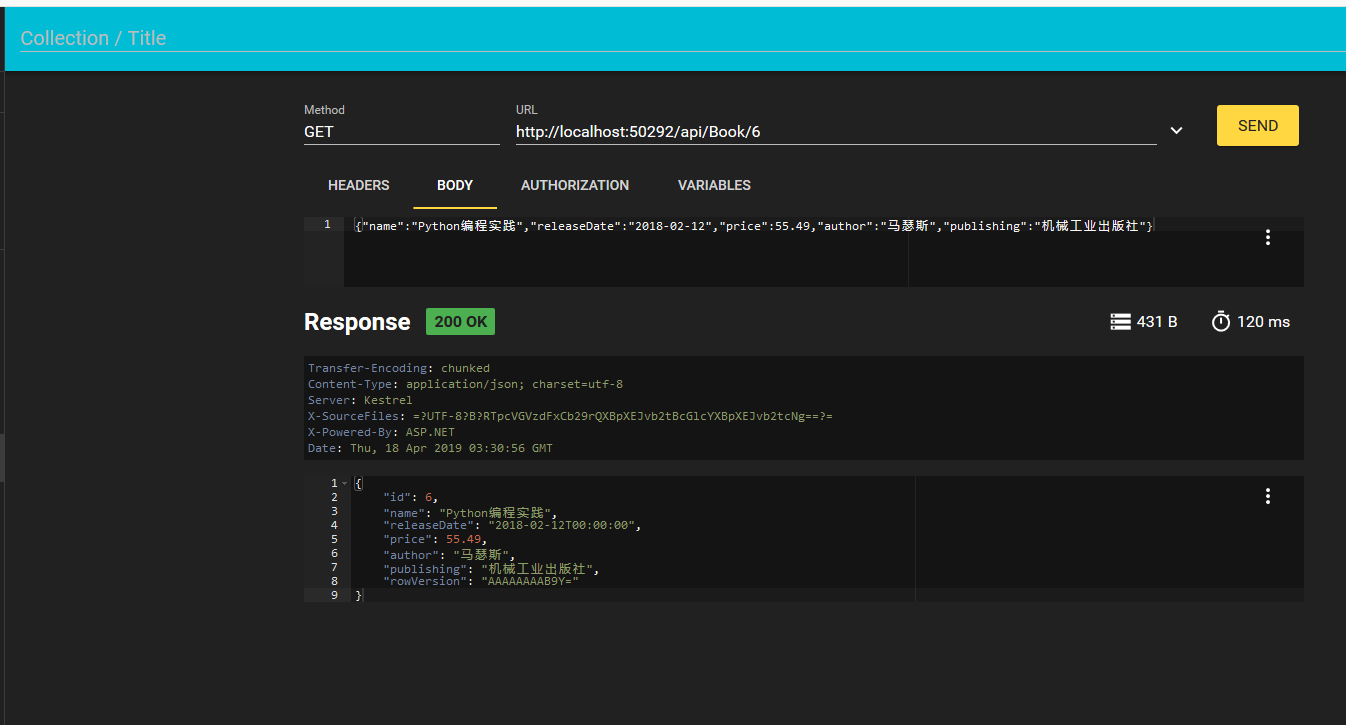
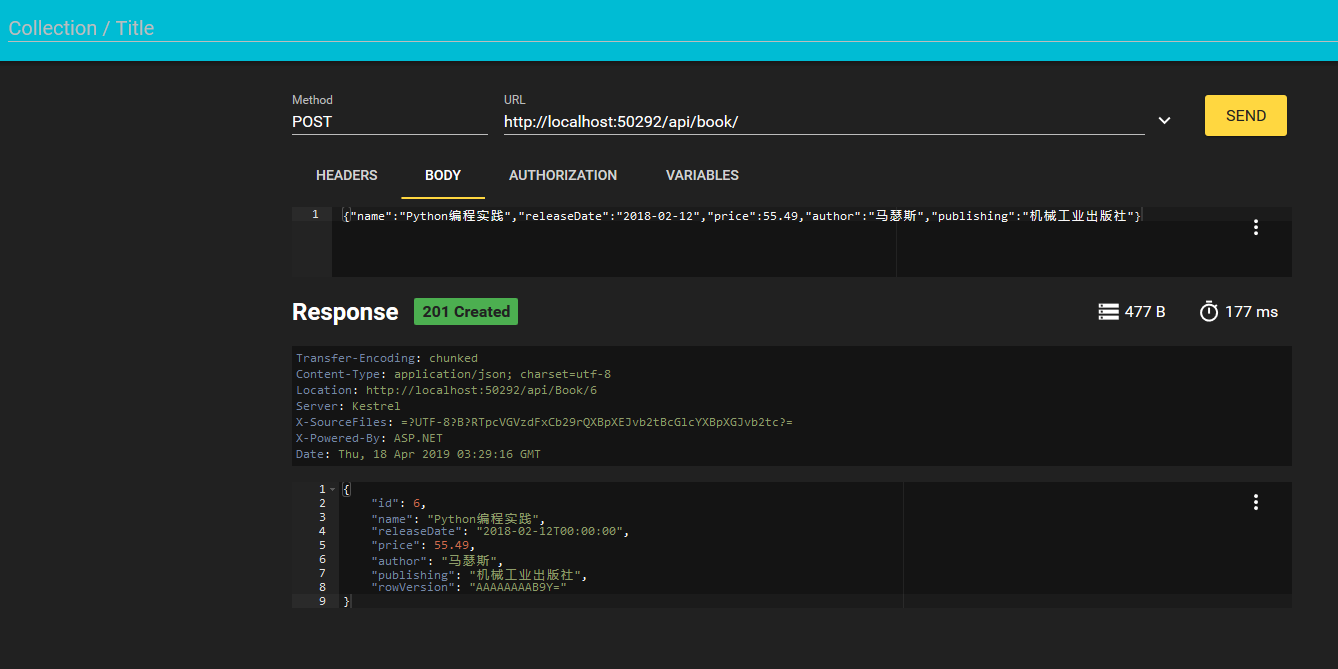
运行项目,使用firefox RESTer调用接口请求数据
使用.Net Core MVC创建Web API的更多相关文章
- 使用 ASP.NET Core MVC 创建 Web API(五)
使用 ASP.NET Core MVC 创建 Web API 使用 ASP.NET Core MVC 创建 Web API(一) 使用 ASP.NET Core MVC 创建 Web API(二) 使 ...
- 使用 ASP.NET Core MVC 创建 Web API(二)
使用 ASP.NET Core MVC 创建 Web API 使用 ASP.NET Core MVC 创建 Web API(一) 六.添加数据库上下文 数据库上下文是使用Entity Framewor ...
- 使用 ASP.NET Core MVC 创建 Web API(三)
使用 ASP.NET Core MVC 创建 Web API 使用 ASP.NET Core MVC 创建 Web API(一) 使用 ASP.NET Core MVC 创建 Web API(二) 十 ...
- 使用 ASP.NET Core MVC 创建 Web API(四)
使用 ASP.NET Core MVC 创建 Web API 使用 ASP.NET Core MVC 创建 Web API(一) 使用 ASP.NET Core MVC 创建 Web API(二) 使 ...
- 使用 ASP.NET Core MVC 创建 Web API——响应数据的内容协商(七)
使用 ASP.NET Core MVC 创建 Web API 使用 ASP.NET Core MVC 创建 Web API(一) 使用 ASP.NET Core MVC 创建 Web API(二) 使 ...
- 使用 ASP.NET Core MVC 创建 Web API(六)
使用 ASP.NET Core MVC 创建 Web API 使用 ASP.NET Core MVC 创建 Web API(一) 使用 ASP.NET Core MVC 创建 Web API(二) 使 ...
- 使用 ASP.NET Core MVC 创建 Web API(一)
从今天开始来学习如何在 ASP.NET Core 中构建 Web API 以及每项功能的最佳适用场景.关于此次示例的数据库创建请参考<学习ASP.NET Core Razor 编程系列一> ...
- 温故知新,使用ASP.NET Core创建Web API,永远第一次
ASP.NET Core简介 ASP.NET Core是一个跨平台的高性能开源框架,用于生成启用云且连接Internet的新式应用. 使用ASP.NET Core,您可以: 生成Web应用和服务.物联 ...
- 【翻译】在Visual Studio中使用Asp.Net Core MVC创建你的第一个Web API应用(一)
HTTP is not just for serving up web pages. It's also a powerful platform for building APIs that expo ...
随机推荐
- hexo的next主题个性化教程:打造炫酷网站
看到有些next主题的网站很炫酷,那么是怎么配置的呢?接下来我会讲一讲如何实现一些炫酷的效果 主要有以下32种: 在右上角或者左上角实现fork me on github 添加RSS 添加动态背景 实 ...
- PHP网站(Drupal7)响应过慢之“Wating(TTFB)时间过长”
直接上图: 这是Chrome浏览器自带的工具分析的.整个url请求的时间为2.59秒,最大的耗时在Wating(TTFB, Time To First Byte),消耗了2.59秒(应该是其他时间太短 ...
- js匹配日期和时间的正则表达式
自己写比较头疼,copy下来留着以后用 //日期的正则表达式 -]\d{}-([-]|[-])-([-]|[-][-]|[-])$/; var regExp = new RegExp(reg); if ...
- 润乾报表在proxool应用下的数据源配置
大多数应用会使用proxool数据连接池,proxool.xml的配置文件如下: <?xml version="1.0″ encoding="UTF-8″?> & ...
- maven 编译插件指定jdk版本的两种方式
第一种方式: <plugin> <artifactId>maven-compiler-plugin</artifactId> <configuration&g ...
- HBase Scan流程分析
HBase Scan流程分析 HBase的读流程目前看来比较复杂,主要由于: HBase的表数据分为多个层次,HRegion->HStore->[HFile,HFile,...,MemSt ...
- swift版的枚举变量
swift版的枚举变量 swift的枚举类型跟普通的类是极为类似的,使用的时候,请不要以为他是一个常量,以下是测试用源码 // // ViewController.swift // SwiftEnum ...
- Maven构建时跳过部分测试
当遇到以下场景: 其他人写的单元测试影响统计结果 一些需要调用外部接口的测试暂不运行 需要在非本机环境上运行一些不回滚的单元测试 则有必要选择以下方法跳过部分测试. 在测试用例前加上注解 @Ignor ...
- [BZOJ 4031][LOJ 2122][HEOI 2015] 小Z的房间
[BZOJ 4031][LOJ 2122][HEOI 2015] 小Z的房间 题意 给定一个 \(n\times m\) 的矩阵, 一些格子是障碍, 相邻的格子(四联通)之间可以连边, 求把非障碍的格 ...
- 第二次作业——App案例分析
第一部分 调研, 评测 下载软件并使用起来,描述最简单直观的个人第一次上手体验. 我选择的应用是chrome浏览器.之所以选择分析它,是因为我用的时间较长,对功能比较熟悉. chrome浏览器提供了应 ...