
Gitlab服务器维护
一. 内容
- Gitlab服务器的更新
- Gitlab服务器备份与恢复
- 导入Git仓库
二. Gitlab服务器的更新
1. 使用SSH登陆Gitlab服务器
2. 停止后端的unicorn服务器
[root@c720141 ~]# gitlab-ctl stop unicorn
ok: down: unicorn: 0s, normally up
3. 停止后端的job 服务器。
[root@c720141 ~]# gitlab-ctl stop sidekiq
ok: down: sidekiq: 0s, normally up
4. 升级前先做好备份,防止升级失败好回滚。
[root@c720141 ~]# gitlab-rake gitlab:backup:create
Dumping database ...
Dumping PostgreSQL database gitlabhq_production ... [DONE]
done
Dumping repositories ...
* root/super-git ... [DONE]
* root/super-git.wiki ... [DONE]
done
Dumping uploads ...
done
Dumping builds ...
done
Dumping artifacts ...
done
Dumping pages ...
done
Dumping lfs objects ...
done
Dumping container registry images ...
[DISABLED]
Creating backup archive: 1529996730_2018_06_26_11.0.1_gitlab_backup.tar ... done
Uploading backup archive to remote storage ... skipped
Deleting tmp directories ... done
done
done
done
done
done
done
done
Deleting old backups ... skipping
5. 从该地址下载最新包。
6. 按介绍过的安装步骤正常安装就可以了。
三. Gitlab服务器备份与恢复
1. 备份
(1). 在/etc/gitlab/gitlab.rb中描述了备份位置。详细信息见如下 :
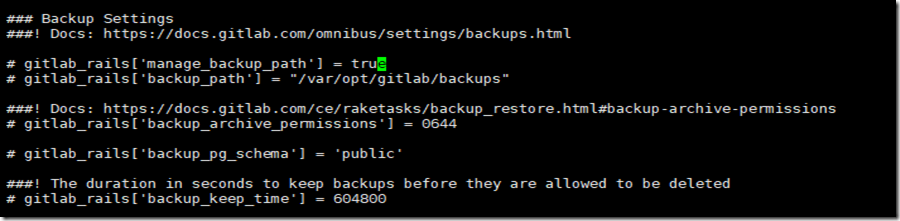
把上面的备份相关配置注释给去掉,去根据情况更改适合自己的位置。
(2). 修改完成后,执行以下命令让服务器生效。
gitlab-ctl reconfigure
(3). 执行备份命令:
gitlab-rake gitlab:backup:create
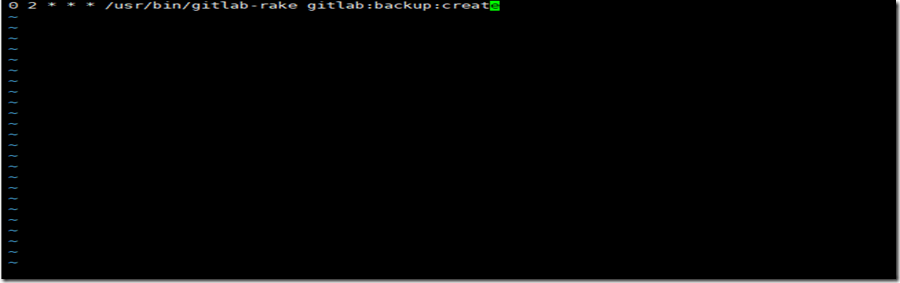
(4)自动备份(通过linux自带的crontab进行自动备份)
crontabe -e
2. 还原
(1)停止相关的服务
[root@c720141 ~]# gitlab-ctl stop unicorn
ok: down: unicorn: 0s, normally up
[root@c720141 ~]# gitlab-ctl stop sidekiq
ok: down: sidekiq: 0s, normally up
(2)执行还原
[root@c720141 backups]# gitlab-rake gitlab:backup:restore BACKUP=/var/opt/gitlab/backups/1530000374_2018_06_26_11.0.1
(3)启动gitlab服务器
[root@c720141 backups]#gitlab-ctl start
三. 导入已经存在的库
1. 登陆GitLab服务器
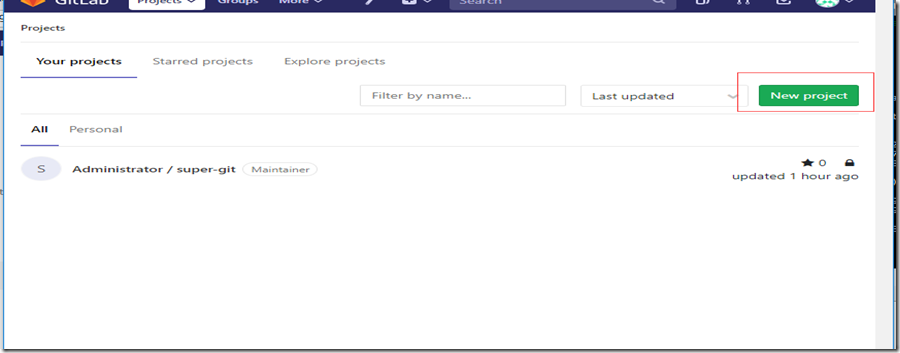
2. 点击【New Project】
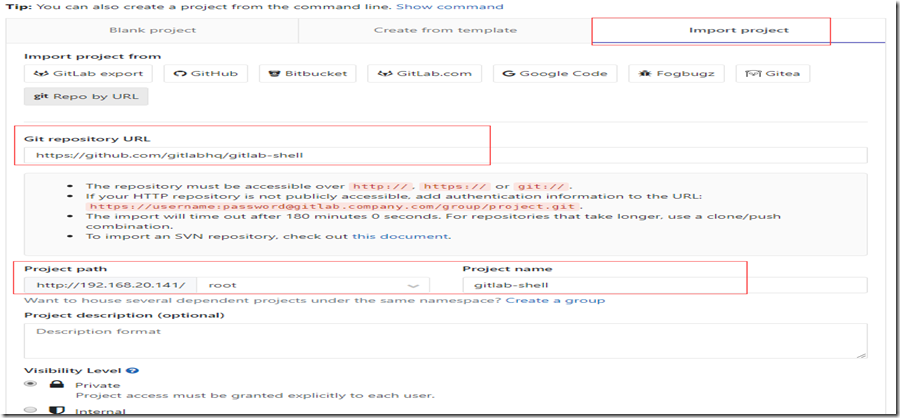
3. 根据需要,在下面红色框中填入适当信息。
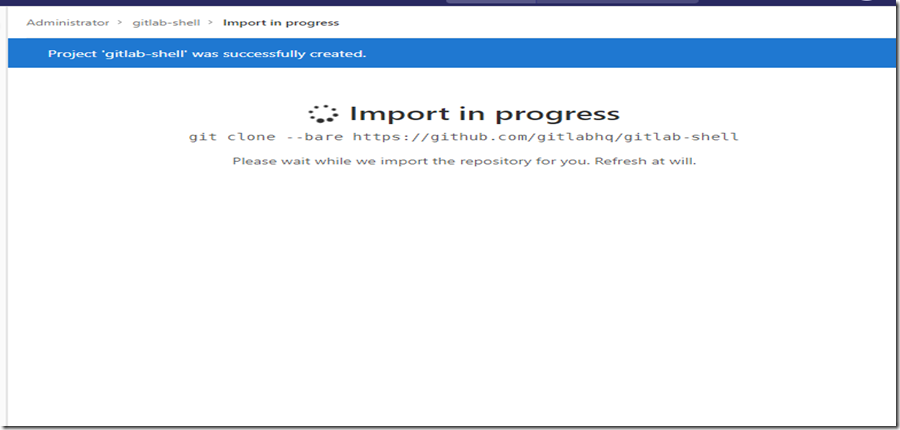
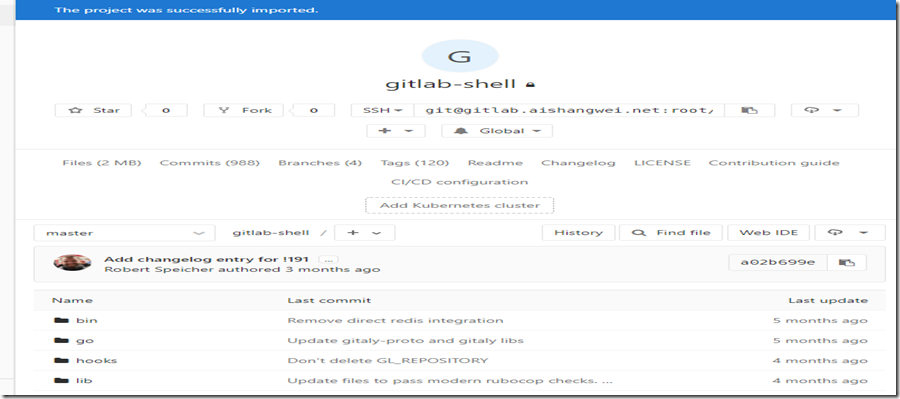
4. 导入情况如下所示
Gitlab服务器维护的更多相关文章
- 英雄联盟网络测速 v1.3 全服全区取延时+取服务器维护状态+机房地理位置
全服全区取延时+取服务器维护状态+机房地理位置 v1.2修复了服务器状态获取不准确的bug 下载链接: https://pan.baidu.com/s/1c1LHIY8
- 搭建 Linux 下 GitLab 服务器
转自:http://blog.csdn.net/passion_wu128/article/details/8216086 目录: 平台需求 硬件需求 本安装指南已于 DebianUbuntu 测试通 ...
- 搭建 Linux 下 GitLab 服务器(转)
这两天因为项目需求需要搭建一个GitLab服务器,遇到了很多问题,参考了很多网络资料,终于搭建成功,在此把这个过程记录一下,利人利己. 一.最终目的 1,在Linux下创建GitLab服务器,客户端能 ...
- gitlab服务器搭建教程
gitlab服务器搭建教程 ----2016年终总结 三 参考https://bbs.gitlab.cc/topic/35/gitlab-ce-8-7-%E6%BA%90%E7%A0%81%E5%AE ...
- Ubuntu搭建Gitlab服务器
想到Gitlab就必定会想到SVN,因为两者都是代码管理系统,作为开发人员来说,用习惯了SVN的图形化界面和SVN代码更新和提交的方式, 可能就会觉得使用git会比较麻烦,其实不然git使用起来非常方 ...
- 基于docer搭建私有gitlab服务器
今天闲着无聊,于是乎想用最近很流行的docker容器搭建一个自己的gitlab的服务器,关于docker和gitlab就不多介绍了,网上查了很多资料,貌似没有一个统一的方法,很乱很杂,而且很容易误导人 ...
- 在Windows下搭建Gitlab服务器
一.GitLab简介 GitLab 是一个用于仓库管理系统的开源项目.使用Git作为代码管理工具,并在此基础上搭建起来的web服务. 可通过Web界面进行访问公开的或者私人项目.它拥有与Github类 ...
- [转]Centos 7搭建Gitlab服务器超详细
本文转自:https://blog.csdn.net/duyusean/article/details/80011540 可参考:https://about.gitlab.com/install/#c ...
- [转]Centos 7 安装部署 GitLab 服务器
Centos 7 安装部署 GitLab 服务器 转自:https://www.jianshu.com/p/79bfded68899 文前说明 作为码农中的一员,需要不断的学习,我工作之余将一些分析总 ...
随机推荐
- 2015/11/6用Python写游戏,pygame入门(6):控制大量的对象
昨天我们已经实现了这个游戏的三个基本类. 但是现在它还是没办法做成一个适合玩的游戏,毕竟只有一架敌机的游戏是很乏味的.所以,我们需要好多子弹,也需要好多敌机. 所以,我们要创建list,这个list存 ...
- spark-shell启动spark报错
前言 离线安装好CDH.Coudera Manager之后,通过Coudera Manager安装所有自带的应用,包括hdfs.hive.yarn.spark.hbase等应用,过程很是波折,此处就不 ...
- 20155209 2016-2017-2 《Java程序设计》第五周学习总结
20155209 2016-2017-2 <Java程序设计>第五周学习总结 教材学习内容总结 try语句用大括号{}指定了一段代码,该段代码可能会抛弃一个或多个例外. catch语句的参 ...
- No known class method for selector 'setImage:andName:'错误分析.//删除.h与.m文件时的注意事项
CHENYILONG Blog No known class method for selector 'setImage:andName:'错误分析.//删除.h与.m文件时的注意事项 ...
- 【leetcode 简单】 第六十七题 回文链表
请判断一个链表是否为回文链表. 示例 1: 输入: 1->2 输出: false 示例 2: 输入: 1->2->2->1 输出: true 进阶: 你能否用 O(n) 时间复 ...
- HDU 3535 AreYouBusy (混合背包之分组背包)
题目链接 Problem Description Happy New Term! As having become a junior, xiaoA recognizes that there is n ...
- NYOJ 116 士兵杀敌(二) (树状数组)
题目链接 描述 南将军手下有N个士兵,分别编号1到N,这些士兵的杀敌数都是已知的.小工是南将军手下的军师,南将军经常想知道第m号到第n号士兵的总杀敌数,请你帮助小工来回答南将军吧.南将军的某次询问之后 ...
- MeasureSpec介绍及使用详解
一个MeasureSpec封装了父布局传递给子布局的布局要求,每个MeasureSpec代表了一组宽度和高度的要求.一个MeasureSpec有大小和模式组成.他有三种模式: UNSPECIFIED ...
- 终端多窗口分屏Terminator
1.安装 Terminator最大的特点就是可以在一个窗口中打开多个终端 sudo apt-get install terminator 2.快捷键 Ctrl+Shift+E 垂直分割窗口 Ctrl+ ...
- nand flash 的oob 及坏块管理
0.NAND的操作管理方式 NAND FLASH的管理方式:以三星FLASH为例,一片Nand flash为一个设备(device),1 (Device) = xxxx (Blocks),1 ...