
二维码之qrencode生成(带logo)
从github下载的qrencode没有QRCodeGenerator文件,需要引入
//
// QR Code Generator - generates UIImage from NSString
//
// Copyright (C) 2012 http://moqod.com Andrew Kopanev <andrew@moqod.com>
//
// Permission is hereby granted, free of charge, to any person obtaining a copy
// of this software and associated documentation files (the "Software"), to deal
// in the Software without restriction, including without limitation the rights
// to use, copy, modify, merge, publish, distribute, sublicense, and/or sell copies
// of the Software, and to permit persons to whom the Software is furnished to do so,
// subject to the following conditions:
//
// The above copyright notice and this permission notice shall be included in all
// copies or substantial portions of the Software.
//
// THE SOFTWARE IS PROVIDED "AS IS", WITHOUT WARRANTY OF ANY KIND, EXPRESS OR IMPLIED,
// INCLUDING BUT NOT LIMITED TO THE WARRANTIES OF MERCHANTABILITY, FITNESS FOR A PARTICULAR
// PURPOSE AND NONINFRINGEMENT. IN NO EVENT SHALL THE AUTHORS OR COPYRIGHT HOLDERS BE LIABLE
// FOR ANY CLAIM, DAMAGES OR OTHER LIABILITY, WHETHER IN AN ACTION OF CONTRACT, TORT OR
// OTHERWISE, ARISING FROM, OUT OF OR IN CONNECTION WITH THE SOFTWARE OR THE USE OR OTHER
// DEALINGS IN THE SOFTWARE.
//

#import <Foundation/Foundation.h>
#import <UIKit/UIKit.h>

@interface QRCodeGenerator : NSObject

+ (UIImage *)qrImageForString:(NSString *)string imageSize:(CGFloat)size;

@end
//
// QR Code Generator - generates UIImage from NSString
//
// Copyright (C) 2012 http://moqod.com Andrew Kopanev <andrew@moqod.com>
//
// Permission is hereby granted, free of charge, to any person obtaining a copy
// of this software and associated documentation files (the "Software"), to deal
// in the Software without restriction, including without limitation the rights
// to use, copy, modify, merge, publish, distribute, sublicense, and/or sell copies
// of the Software, and to permit persons to whom the Software is furnished to do so,
// subject to the following conditions:
//
// The above copyright notice and this permission notice shall be included in all
// copies or substantial portions of the Software.
//
// THE SOFTWARE IS PROVIDED "AS IS", WITHOUT WARRANTY OF ANY KIND, EXPRESS OR IMPLIED,
// INCLUDING BUT NOT LIMITED TO THE WARRANTIES OF MERCHANTABILITY, FITNESS FOR A PARTICULAR
// PURPOSE AND NONINFRINGEMENT. IN NO EVENT SHALL THE AUTHORS OR COPYRIGHT HOLDERS BE LIABLE
// FOR ANY CLAIM, DAMAGES OR OTHER LIABILITY, WHETHER IN AN ACTION OF CONTRACT, TORT OR
// OTHERWISE, ARISING FROM, OUT OF OR IN CONNECTION WITH THE SOFTWARE OR THE USE OR OTHER
// DEALINGS IN THE SOFTWARE.
//

#import "QRCodeGenerator.h"
#import "qrencode.h"

enum {
    qr_margin =
};

@implementation QRCodeGenerator

+ (void)drawQRCode:(QRcode *)code context:(CGContextRef)ctx size:(CGFloat)size {
    unsigned ;
    int width;
    data = code->data;
    width = code->width;
    float zoom = (double)size / (code->width + 2.0 * qr_margin);
    CGRect rectDraw = CGRectMake(, , zoom, zoom);

    // draw
    CGContextSetFillColor(ctx, CGColorGetComponents([UIColor blackColor].CGColor));
    ; i < width; ++i) {
        ; j < width; ++j) {
            ) {
                rectDraw.origin = CGPointMake((j + qr_margin) * zoom,(i + qr_margin) * zoom);
                CGContextAddRect(ctx, rectDraw);
            }
            ++data;
        }
    }
    CGContextFillPath(ctx);
}

+ (UIImage *)qrImageForString:(NSString *)string imageSize:(CGFloat)size {
    if (![string length]) {
        return nil;
    }

    QRcode *code = QRcode_encodeString([, QR_ECLEVEL_L, QR_MODE_8, );
    if (!code) {
        return nil;
    }

    // create context
    CGColorSpaceRef colorSpace = CGColorSpaceCreateDeviceRGB();
    CGContextRef ctx = CGBitmapContextCreate(, size, size, , size * , colorSpace, kCGImageAlphaPremultipliedLast);

    CGAffineTransform translateTransform = CGAffineTransformMakeTranslation(, -size);
    CGAffineTransform scaleTransform = CGAffineTransformMakeScale(, -);
    CGContextConcatCTM(ctx, CGAffineTransformConcat(translateTransform, scaleTransform));

    // draw QR on this context
    [QRCodeGenerator drawQRCode:code context:ctx size:size];

    // get image
    CGImageRef qrCGImage = CGBitmapContextCreateImage(ctx);
    UIImage * qrImage = [UIImage imageWithCGImage:qrCGImage];

    // some releases
    CGContextRelease(ctx);
    CGImageRelease(qrCGImage);
    CGColorSpaceRelease(colorSpace);
    QRcode_free(code);

    return qrImage;
}

@end
在需要的文件中加入#import "QRCodeGenerator.h"即可
//
//  ViewController.m
//  qRenCode
//
//  Created by City--Online on 15/6/9.
//  Copyright (c) 2015年 CYW. All rights reserved.
//

#import "ViewController.h"
#import "QRCodeGenerator.h"
@interface ViewController ()
@property(nonatomic,strong) UITextField *textField;
@property(nonatomic,strong) UIButton *btn;
@property(nonatomic,strong) UIImageView *imgView;
@end

@implementation ViewController

- (void)viewDidLoad {
    [super viewDidLoad];
    _textField=[[UITextField alloc]initWithFrame:CGRectMake(, , , )];
    _textField.borderStyle=UITextBorderStyleLine;
    [self.view addSubview:_textField];

    _btn=[UIButton buttonWithType:UIButtonTypeSystem];
    [_btn setTitle:@"生成" forState:UIControlStateNormal];
    [_btn setTitleColor:[UIColor redColor] forState:UIControlStateNormal];
    _btn.frame=CGRectMake(, , , );
    [_btn addTarget:self action:@selector(btnClick:) forControlEvents:UIControlEventTouchUpInside];
    [self.view addSubview:_btn];

    _imgView=[[UIImageView alloc]initWithFrame:CGRectMake(, , , )];
//    _imgView.backgroundColor=[UIColor blackColor];
    [self.view addSubview:_imgView];
}
-(void)btnClick:(id)sender
{
    _imgView.image = [QRCodeGenerator qrImageForString:_textField.text imageSize:_imgView.bounds.size.width];

}
-(void)touchesBegan:(NSSet *)touches withEvent:(UIEvent *)event
{
    [_textField resignFirstResponder];
}
- (void)didReceiveMemoryWarning {
    [super didReceiveMemoryWarning];
    // Dispose of any resources that can be recreated.
}

@end
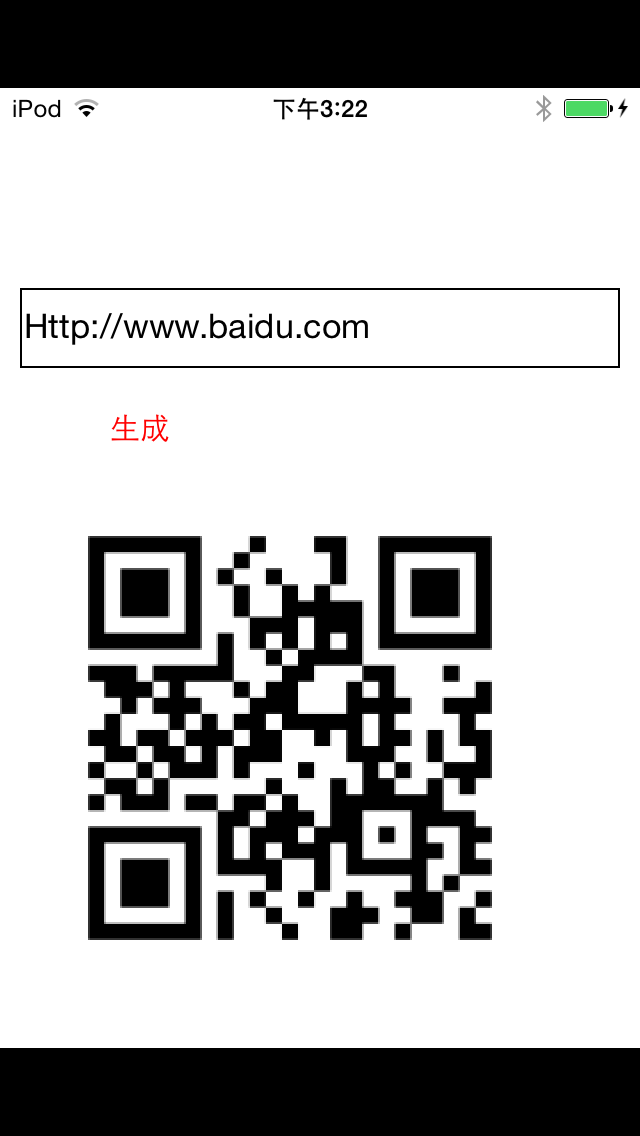
有时候想在二维码中间带个Logo,犹豫二维码有容错率,所以可以直接将图片添加上去
-(void)btnClick:(id)sender
{
    _imgView.image = [QRCodeGenerator qrImageForString:_textField.text imageSize:_imgView.bounds.size.width];
    UIImageView *img=[[UIImageView alloc]initWithImage:[UIImage imageNamed:@"1.jpg"]];
    img.frame=CGRectMake(_imgView.bounds.size.width*/, _imgView.bounds.size.height*/, _imgView.bounds.size.width/, _imgView.bounds.size.height/);
    img.backgroundColor=[UIColor redColor];
    [_imgView addSubview:img];

}

二维码之qrencode生成(带logo)的更多相关文章
- 生成二维码、条形码、带logo的二维码
Nuget安装ZXing.Net,帮助类: using System; using System.Collections.Generic; using System.Drawing; using Sy ...
- C# 生成二维码并且在中间加Logo
今天做项目的时候有个在生成二维码并且在中间加入Logo的需求,动手试了几把,总感觉效果没有之前写的好,就翻出旧代码,果然还是熟悉的味道,生成一张效果图如下 左边是微信里面的,右边是我自己生成的 原理比 ...
- QRCode生成二维码,jq QRCode生成二维码,QRCode生成电子名片
[QRCode官网]http://phpqrcode.sourceforge.net/ PHP QRCode生成二维码 官网下载QRCode源码包,引入源码包中的 qrlib.php . <?p ...
- iOS开发技术 - 二维码扫描、生成
QRecLevel:QR_ECLEVEL_H // 二维码容错率,最高为30%(即QR_ECLEVEL_H),即LOGO有大 ...
- 二维码(QR Code)生成与解析
二维码(QR Code)生成与解析 写在前面 经常在大街上听到扫码送什么什么,如果真闲着没事,从头扫到位,估计书包都装满了各种东西.各种扫各种送,太泛滥了.项目中从没接触过二维码的东东,最近要使用,就 ...
- Android二维码扫描、生成
Android二维码扫描.生成 现在使用二维码作为信息的载体已经越来越普及,那么二维码的生成以及扫描是如何实现的呢 google为我们提供了zxing开源库供我们使用 zxing GitHub源码地址 ...
- iOS 原生二维码扫描和生成
代码地址如下:http://www.demodashi.com/demo/12551.html 一.效果预览: 功能描述:WSLNativeScanTool是在利用原生API的条件下封装的二维码扫描工 ...
- 二维码相关---java生成二维码名片,而且自己主动保存到手机通讯录中...
版权声明:本文为博主原创文章,未经博主credreamer 同意不得转载 违者追究法律责任. https://blog.csdn.net/lidew521/article/details/244418 ...
- java生成带logo的二维码,自定义大小,logo路径取服务器端
package com.qishunet.eaehweb.util; import java.awt.BasicStroke; import java.awt.Graphics; import jav ...
随机推荐
- c# readkey readline read 区别
Console.read().Console.readline().Console.readkey()和Console.Write.Console.Writeline()的区别 Console.rea ...
- NetCore偶尔有用篇:NetCore项目发布为Nuget包
一.简介 1.nuget大家已经不陌生. 2.netcore默认引用便是nuget,并处理了嵌套关系. 3.netcore已经支持直接编译生成nuget包. 4.本文介绍如何把自己建立的项目发布为nu ...
- WPF点滴(1) Main 函数
应用程序的入口函数是main函数,在Console程序和Winform程序main函数都有清晰的定义,可以很容易找到,但是WPF的工程文件中却找不到main函数的定义,是WPF不需要main函数吗?N ...
- JavaScript获取某年某月有多少天以及第一天是星期几
function getDaysWeekady(year,month) { var date = new Date(year, month-1, 1);//月份是0-11 var date2 = ne ...
- c# 字符串去掉两端空格,并且将字符串中多个空格替换成一个空格
字符串去掉两端空格,并且将字符串中多个空格替换成一个空格: 主要还是考察使用字符串的方法: trim(); 去掉字符串两端空格 split(); 切割 string.join(); 连接 class ...
- python+pcap+dpkt 抓包小实例
#!/usr/bin/env python # -*- coding: utf-8 -*- """ 网络数据包捕获与分析程序 """ imp ...
- CodeChef TWOROADS(计算几何+拉格朗日乘数法)
题面 传送门 简要题意:给出\(n\)个点,请求出两条直线,并最小化每个点到离它最近的那条直线的距离的平方和,\(n\leq 100\) orz Shinbokuow 前置芝士 给出\(n\)个点,请 ...
- Python的hasattr() getattr() setattr() 函数使用方法
hasattr(object, name)判断一个对象里面是否有name属性或者name方法,返回BOOL值,有name特性返回True, 否则返回False.需要注意的是name要用括号括起来 &g ...
- Python面向对象(类的成员之属性)
day24 类的成员之属性 class Foo(): def bar(self): print("bar") @property def per(self): ') return ...
- 使用putty连接本地VirtualBox上的centos7 linux主机
1. 查看linux主机默认ssh端口 因为是使用ssh连接虚拟机上的linux主机的,所以需要查看centos ssh默认端口,一般是22 打开终端 输入cd /etc/ssh/ 查看ssh_con ...